Page 199 of 487

Interior features3
197
RX400h_U
3-1. Using the air conditioning system and defogger ... 198
Automatic air conditioning system............. 198
Rear window and outside rear view mirror defoggers,
and windshield wiper
de-icer ................................... 204
3-2. Using the front audio system ........................... 205
Audio system type................. 205
Using the radio........................ 207
Using the CD player .............. 214
Playing back MP3 and
WMA discs........................... 220
Optimal use of the audio system .................................... 228
Using the steering wheel audio switches ....................... 231
3-3. Using the rear audio system ........................... 233
Rear seat entertainment system features ................... 233
Using the DVD player
(DVD video) .......................... 239
Using the DVD player (video CD) ............................. 246
Using the DVD player (audio CD/ CD text) .......... 248
Using the DVD player
(MP3 discs) ........................... 249
Using the video mode ............ 251 Changing the initial
setting ..................................... 253
3-4. Using the interior lights ............................. 260
Interior lights list .................... 260
• Interior lights ........................ 263
• Personal lights ..................... 264
3-5. Using the storage features ........................ 265
List of storage features......... 265
• Glove box .............................. 265
• Console boxes ..................... 266
• Coin holder........................... 268
• Overhead console.............. 269
• Cup holders .......................... 269
• Door pockets ........................ 271
3-6. Other interior features ........................ 272
Sun visors ................................. 272
Vanity mirror ........................... 273
Clock .......................................... 274
Outside temperature display...................................... 275
Multi-display light control .... 276
Power outlets ........................... 277
Seat heaters ............................ 280
Armrest .................................... 282
Floor mat .................................. 283
Luggage compartment features .................................. 284
Garage door opener ............ 287
Compass .................................. 292
Page 207 of 487
205
3
Interior features
RX400h_U
3-2. Using the front audio system
Audio system type
With navigation system
Owners of models equipped with a navigation system should refer to
the “Navigation System Owner's Manual”.
Without navigation system
CD player with changer and AM/FM radio
Ti t l ePa g e
Using the radioP. 2 0 7
Using the CD playerP. 2 1 4
Playing back MP3 and WMA discsP. 220
Optimal use of the audio systemP. 2 2 8
Using the steering wheel audio switchesP. 2 3 1
Page 233 of 487
231
3-2. Using the front audio system
3
Interior features
RX400h_U
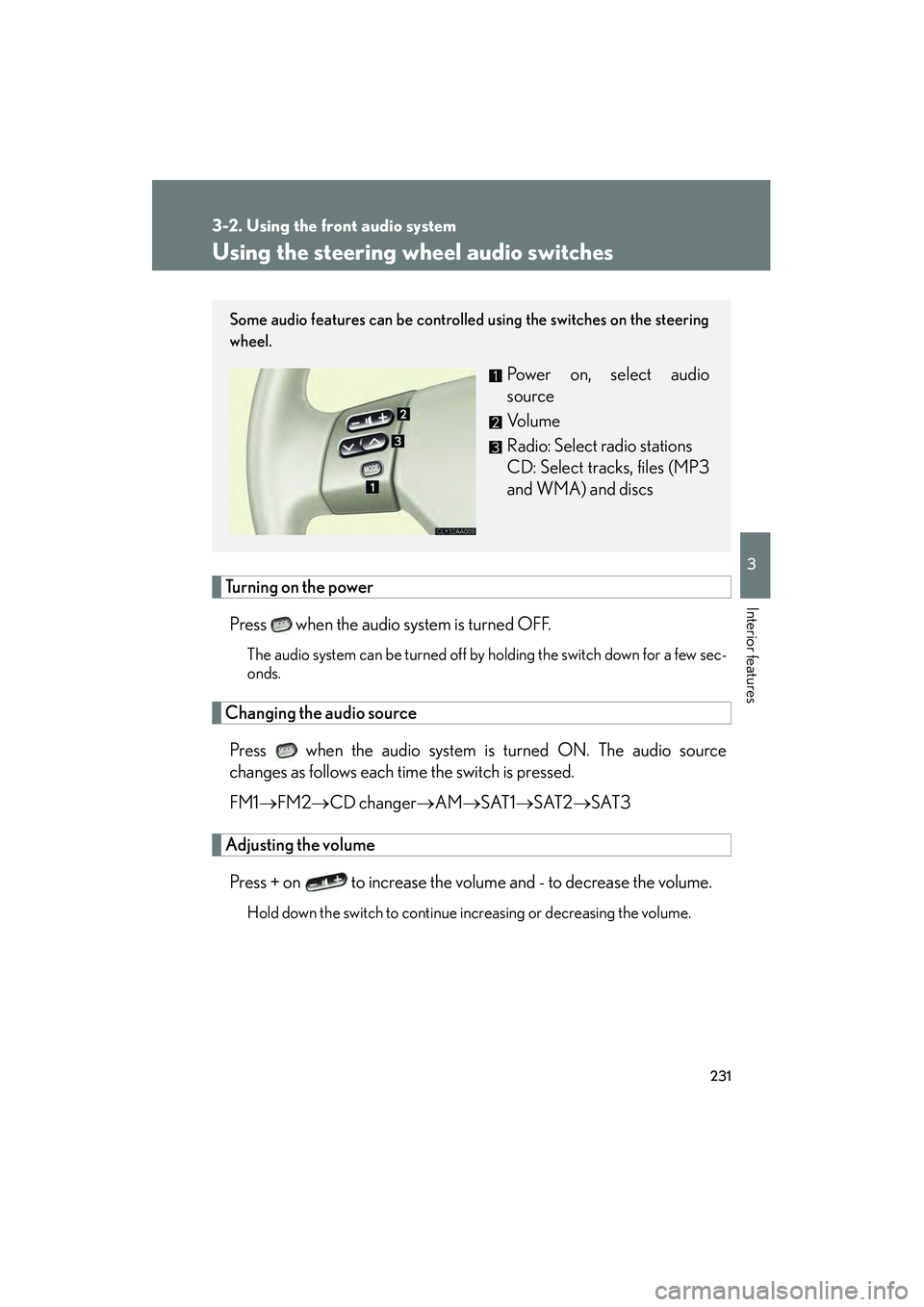
Using the steering wheel audio switches
Turning on the powerPress when the audio system is turned OFF.
The audio system can be turned off by holding the switch down for a few sec-
onds.
Changing the audio sourcePress when the audio system is turned ON. The audio source
changes as follows each time the switch is pressed.
FM1 →FM2 →CD changer →AM→ SAT1→SAT2 →SAT3
Adjusting the volume
Press + on to increase the volume and - to decrease the volume.
Hold down the switch to continue increasing or decreasing the volume.
Some audio features can be controlled using the switches on the steering
wheel.
Power on, select audio
source
Vo l u m e
Radio: Select radio stations
CD: Select tracks, files (MP3
and WMA) and discs
Page 234 of 487
232
3-2. Using the front audio system
RX400h_U
Selecting a radio stationPress to select the radio mode.
Press ∧ or ∨ on the to select a radio station.
To scan for receivable stations, press and hold the switch until you hear
a beep.
Selecting a track/file
Press to select the CD mode.
Press ∧ or ∨ on to select the desired track/file.
Selecting a disc in the CD player
Press to select the CD mode.
Press and hold ∧ or ∨ on until a beep is heard.
CAUTION
■To reduce the risk of an accident
Exercise care when operating the audio switches on the steering wheel.
STEP1
STEP2
STEP1
STEP2
STEP1
STEP2
Page 310 of 487
308
4-2. Maintenance
RX400h_U
Vehicle exterior
ItemsCheck points
Steering wheel
• Moves smoothly?
• Has correct free play?
• No strange noises?
ItemsCheck points
Door• Operate smoothly?
Engine hood• The lock system works properly?
Fluid leaks• Is there any leakage after parking?
Ti r e
• Inflation pressure is correct?
• Tire surfaces not worn or dam-aged?
• Tires rotated according to the maintenance schedule?
• Wheel nuts are not loose?
CAUTION
■If the hybrid system is running
Turn the hybrid system off and ensure that there is adequate ventilation before per-
forming maintenance checks.
Page 359 of 487
357
4-3. Do-it-yourself maintenance
4
Maintenance and care
RX400h_U
24RDI FAN NO.240Electric cooling fan
25HAZ15Turn signal lights, emergency flashers
26MPX-B17. 5Electric power steering system
27AM2 NO.130“GAUGE NO.2”, “IGN”, “INJ” and
“ST” fuses
28HORN10Horns
29MAIN40
“H-LP L LWR”, “H-LP L UPR”, “H-LP
R LWR”, “H-LP R UPR” and “DRL”
fuses
30IGCT NO.150
“INV W/P”, “IGCT NO.2”, “IGCT
NO.3”, “IGCT NO.4” and “IGCT
NO.5” fuses
31RADIO NO.115Audio system
32ECU-B NO.17. 5
Theft deterrent system, air condition-
ing system, gauges and meters, moon
roof, multiplex communication system
33DOME7. 5
Personal lights, interior lights, vanity
lights, engine switch light, gauges and
meters, navigation system
34ECU-B NO.27. 5Wireless remote control
35AMP30Audio system
36DOOR NO.1 25Power door lock system
37A/F25Air/fuel control system
38CRT7. 5Navigation system screen, rear seat
entertainment system
39H-LP R LWR15Right-hand headlight (low beam)
40INV W/P15Hybrid system
FuseAmpereCircuit
Page 361 of 487
359
4-3. Do-it-yourself maintenance
4
Maintenance and care
RX400h_U■
Driver’s side instrument panel
FuseAmpereCircuit
47RR DOOR RH20Rear right side power window
48RR DOOR LH20Rear left side power window
49FUEL OPN7. 5Fuel filler door opener
50FR FOG15Front fog lights
51OBD7. 5On-board diagnosis system
52FR DEF25Windshield wiper de-icer and all com-
ponents in “MIR HTR” fuses
53STOP10
Tail lights, high mounted stoplight,
vehicle dynamics integrated manage-
ment, shift lock control system,
multiport fuel injection system/
sequential multiport fuel injection sys-
tem
54TI&TE30Tilt and telescopic steering
55MPX-B7. 5Engine immobilizer system
56AM1 7. 5Starter system
Page 362 of 487

360
4-3. Do-it-yourself maintenance
RX400h_U
57RR FOG 7. 5No circuit
58AIR SUS7. 5No circuit
59DOOR NO.225Multiplex communication system
60S/ROOF 30Moon roof
61TA I L10
Front fog lights, instrument cluster
lights, instrument panel lights, front
side marker lights, tail lights, license
plate lights, towing converter
62PA N E L7. 5
Glove box light, instrument cluster
lights, instrument panel lights, console
box light, audio system, power outlet,
garage door opener switch, transmis-
sion system, headlight cleaner, seat
heaters, steering switches, power
back door
63ECU-IG NO.17. 5
Power rear view mirror control, moon
roof, multiplex communication system,
shift lock control system, multiplex
communication system (power door
lock system, wireless remote control
system), driving position memory sys-
tem, vehicle dynamics integrated
management, windshield wipers,
transmission, seat heaters, power
seats, tilt and telescopic steering,
power back door
64ECU-IG NO.210
Automatic headlight leveling system,
vehicle dynamics integrated manage-
ment, dynamic laser cruise control,
headlight cleaner, adaptive front-light-
ing system
FuseAmpereCircuit