Page 95 of 326

Knowing your vehicle
86 3
Cigarette lighter
To use the cigarette lighter, press the
front face then release it to allow the
cigarette lighter and ashtray to slowly
extend from center panel.
To operate the cigarette lighter, press it in
and release it. When it is heated, it auto-
matically pops out ready for use.
If the engine is not running, the ignition
switch must be in the ACC position for
the lighter to operate.
Ashtrays
Front
To use the ashtray, press the front face
and release it to allow the cigarette
lighter and ashtray to slowly extend from
center panel.
To remove the ashtray, grasp the ashtray
bucket and carefully pull it out.
INTERIOR FEATURES
OBL026017N
CAUTION
• Do not hold the lighter in after it is
already heated because it will
overheat.
• Only a genuine Kia lighter should
be used in the cigarette lighter
socket. The use of plug-in acces-
sories (shavers, hand-held vacu-
ums, and coffee pots, for exam-
ple) may damage the socket or
cause electrical failure.
• If the lighter does not pop out
within 30 seconds, remove it to
prevent overheating.
OBL026018N
Page 98 of 326

389
Knowing your vehicle
Power socket (if equipped)
The power outlets are designed to pro-
vide power for mobile telephones or
other devices designed to operate with
vehicle electrical systems. The devices
should draw less than 10 amps with the
engine running.
E2BLC303
OBL026023L
OBL026022N
(if equipped)
(if equipped)
CAUTION
•Use when the engine is running,
and remove a plug from the
power outlet after using the elec-
tric appliance. Using when the
engine stops or remaining the
electric appliance with plugged in
for many hours may cause the
battery to be discharged.
• Only use 12V electric appliances
which are less than 10A in elec-
tric capacity.
• Adjust the air-conditioner or
heater to the lowest operating
level when you have to use the
power socket.
•Close the cover when not in use.
• Some electronic devices can
cause electronic interference
when plugged into a vehicle’s
power outlet. These devices may
cause excessive audio static and
malfunctions in other electronic
systems or devices used in your
vehicle.
(if equipped)
Page 112 of 326

3 103
Knowing your vehicle
✽
NOTICE
Your audio system's factory-installed
amplifier is pre-configured for optimum
performance. You will not be able to
make any adjustments. If there is a
problem with the audio system's ampli-
fier, please consult a professional audio
engineer or the dealer where you pur-
chased your vehicle.
1. Operational Controls:
These controls are used to operate the
entire audio system. (e.g. Power ON-OFF
control knob)
2. Sound Controls:
Use these controls independently or in
combination to control how the audio
system sounds. (e.g. Volume control,
Bass and Treble controls).
The sound settings you make are appli-
cable to all audio reproduction sources
(radio or CD devices).
3. Radio controls:
Use these controls to operate, navigate
the menu options and change settings
when you are using the AM/FM digital
tuner.
4. CD controls:
Use these controls to operate the CD
player/changer, navigate the discs menu
options and change playback settings
when you are using the CD player.
✽
NOTICE
A button or control may have different
functions depending on whether you are
using the Radio or CD player. For exam-
ple, the RPT (Repeat) button can only
be used in the CD mode.
Page 129 of 326

Knowing your vehicle
120 3
Solution:
Use your audio system's Scan function to
automatically search for and select
another radio station with good signal
strength.
Problem:
Interference caused by cellular
phones and 2-way radios
Operating cellular phones and 2-way
radios inside or within close proximity of
your car may interfere with your radio
reception. You may hear static, clicks,
sounds or other types of white noise from
your speakers.
Solution:
Cease operation of cellular phone or 2-
way radios. Alternatively, move away
from your car. The interference to your
radio reception should be reduced.Caring for your Audio System
Your audio system contains sophisticat-
ed electronics and precision-engineered
parts and components that are not user-
serviceable. To ensure trouble-free oper-
ation, please observe the following pre-
cautions:
1. General Use and Operation
Your audio system contains precision
electronic components that are tempera-
ture-, moisture-, and static-sensitive. You
should take care not to subject your
audio system to extremes in tempera-
tures or moisture. For example, if you
have parked your car in the sun, the inte-
rior of the car could be very hot. Ventilate
the car to reduce the interior temperature
before trying to operate the audio sys-
tem.
Never try to insert anything other than
properly formatted CDs into the CD play-
er. Foreign objects can cause the deli-
cate mechanism to jam and render your
CD player unusable. You must also follow
the instructions displayed on your audio
system's LCD screen.
For example, if your audio system is dis-
playing "Wait", you should never try to
force-load a CD into the CD player.
WARNING
• Your car's electrical systems con-
tain sensitive electronics compo-
nents. Interference from cellular
phones, 2-way radios and other
transmitting devices could
adversely affect the safe opera-
tion of your vehicle. This could
compromise the safety of both
the driver and other passengers
in the vehicle.
• When using cellular phones,2-
way radios and other transmitting
devices in your vehicle, always
use a separate external antenna.
For restrictions on the use of
communications and transmitting
devices, please consult the rele-
vant product documentation.
• Local laws may prohibit the use
of cellular phones while driving. If
you need to make or answer a call
while driving, please s
top the
vehicle in a safe place before pro-
ceeding.
Page 131 of 326
4
Ignition switch / 4-2
Starting the engine / 4-4
Automatic transmission / 4-5
Four wheel drive (4WD) / 4-10
Limited slip differential / 4-19
Brake system / 4-20
Steering wheel / 4-25
Cruise control system / 4-27
Electronic stability control / 4-30
Rear parking assist system / 4-33
Instrument cluster / 4-36
Gauges / 4-37
Warnings and indicators / 4-39
Multi-meter / 4-45
Lighting / 4-51
Wipers and washers / 4-54
Defroster / 4-57
Hazard warning flasher / 4-58
Manual climate control system / 4-59
Automatic climate control system / 4-66
Windshield defrosting and defogging / 4-75
Driving your vehicle
Page 132 of 326
Driving your vehicle
2 4
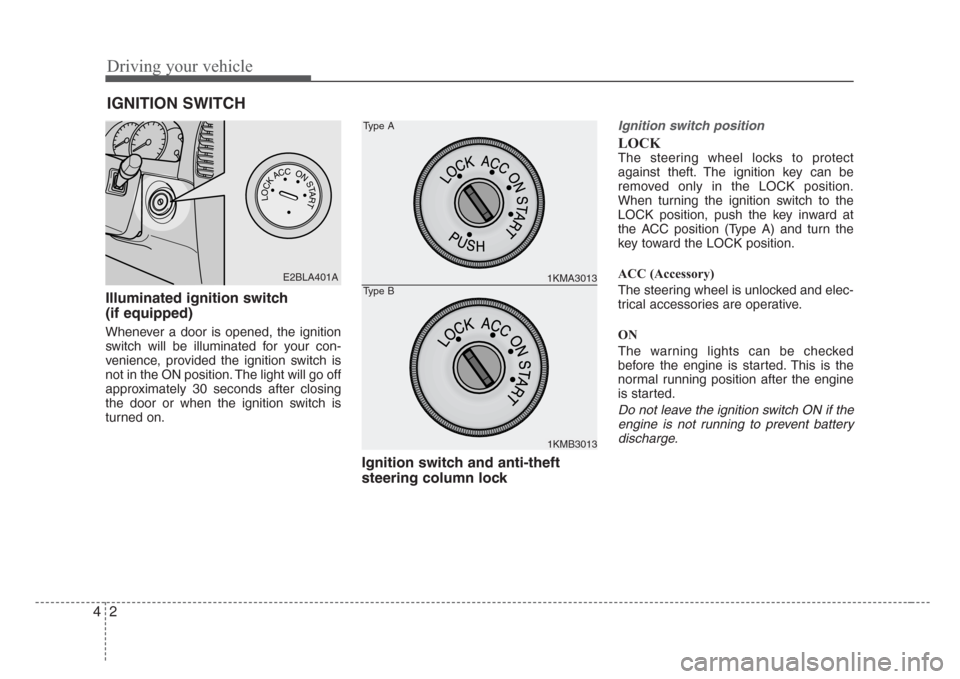
Illuminated ignition switch
(if equipped)
Whenever a door is opened, the ignition
switch will be illuminated for your con-
venience, provided the ignition switch is
not in the ON position. The light will go off
approximately 30 seconds after closing
the door or when the ignition switch is
turned on.
Ignition switch and anti-theft
steering column lock
Ignition switch position
LOCK
The steering wheel locks to protect
against theft. The ignition key can be
removed only in the LOCK position.
When turning the ignition switch to the
LOCK position, push the key inward at
the ACC position (Type A) and turn the
key toward the LOCK position.
ACC (Accessory)
The steering wheel is unlocked and elec-
trical accessories are operative.
ON
The warning lights can be checked
before the engine is started. This is the
normal running position after the engine
is started.
Do not leave the ignition switch ON if the
engine is not running to prevent battery
discharge.
IGNITION SWITCH
PUSH
LOCKACCONSTART
E2BLA401A1KMA3013
1KMB3013
Type A
Type B
Page 133 of 326

43
Driving your vehicle
START
Turn the ignition key to the START posi-
tion to start the engine. The engine will
crank until you release the key; then it
returns to the ON position. The brake
warning lamp can be checked in this
position.
✽
NOTICE
If difficulty is experienced in turning the
ignition key, turn the steering wheel
right and left to release the tension and
then turn the key.
Automatic transmission
When turning the ignition switch to the
LOCK position, the shift lever must be in
the P (Park) position.
WARNING-Ignition key
• Never turn the ignition switch to
LOCK or ACC while the vehicle is
moving. This would result in loss
of directional control and braking
function, which could cause an
immediate accident.
• Before leaving the driver’s seat,
always make sure the shift lever
is engaged in 1
stgear for manual
transmission or P (Park) for auto-
matic transmission,set the park-
ing brake fully and shut the
engine off. Unexpected and sud-
den vehicle movement may occur
if these precautions are not
taken.
(Continued)
(Continued)
• Never reach for the ignition
switch, or any other controls
through the steering wheel while
the vehicle is in motion. The pres-
ence of your hand or arm in this
area could cause a loss of vehicle
control, an accident and serious
bodily injury or death.
• Do not place any movable objects
around the driver’s seat as they
may move while driving, interfere
with the driver and lead to an
accident.
Page 134 of 326

Driving your vehicle
4 4
1. Make sure the parking brake is
applied.
2.Automatic Transmission -Place the
transmission shift lever in P (Park).
Depress the brake pedal fully.
You can also start the engine when
the shift lever is in the N (Neutral)
position.
3. Turn the ignition switch to START and
hold it there until the engine starts (a
maximum of 10 seconds), then
release the key.
4. In extremely cold weather (below
0°F / -18°C) or after the vehicle has
not been operated for several days, let
the engine warm up without depress-
ing the accelerator.
Whether the engine is cold or warm, it
should be started without depressing
the accelerator.The starter will not operate if:
Automatic Transmission -the shift lever
is NOT in the P (Park) or N (Neutral)
position.
STARTING THE ENGINE
CAUTION-Stall
If the engine stalls while you are in
motion, do not attempt to move the
shift lever to the P (Park) position. If
traffic and road conditions permit,
you may put the shift lever in the N
(Neutral) position while the vehicle
is still moving and turn the ignition
switch to the START position in an
attempt to restart the engine.
CAUTION
Do not engage the starter for more
than 10 seconds. If the engine stalls
or fails to start, wait 5 to 10 seconds
before re-engaging the starter.
Excessive or improper use of the
starter may damage it.
WARNING
Always wear appropriate shoes
when operating your vehicle.
Unsuitable shoes (high heels,ski
boots,etc.) may interfere with your
ability to use the brake and acceler-
ator pedal, and the clutch pedal (if
equipped).
