Page 137 of 339
Features of your vehicle
128 3
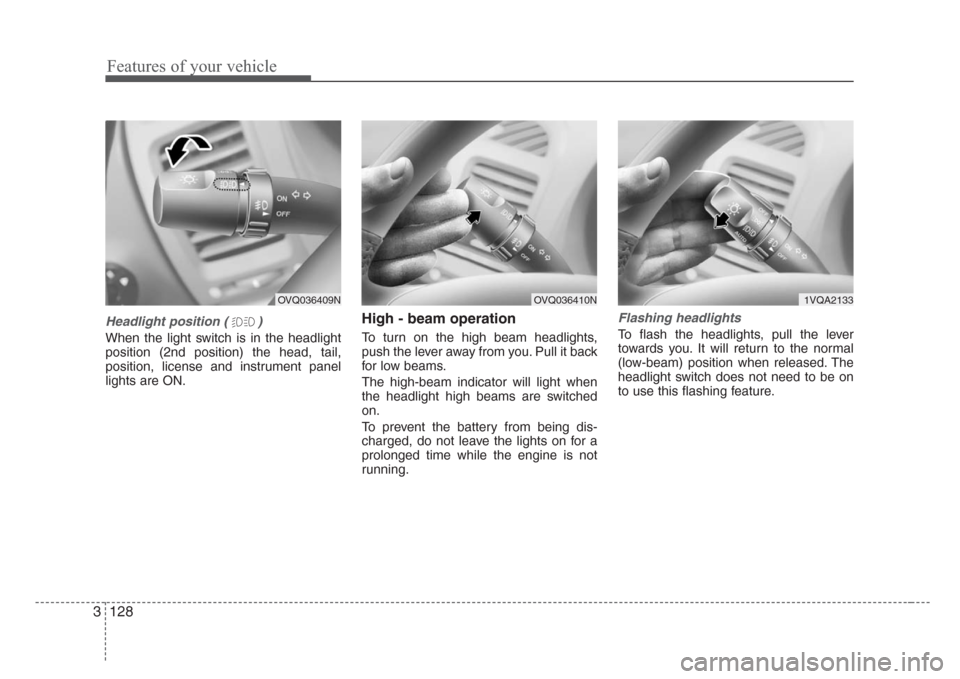
Headlight position ( )
When the light switch is in the headlight
position (2nd position) the head, tail,
position, license and instrument panel
lights are ON.
High - beam operation
To turn on the high beam headlights,
push the lever away from you. Pull it back
for low beams.
The high-beam indicator will light when
the headlight high beams are switched
on.
To prevent the battery from being dis-
charged, do not leave the lights on for a
prolonged time while the engine is not
running.
Flashing headlights
To flash the headlights, pull the lever
towards you. It will return to the normal
(low-beam) position when released. The
headlight switch does not need to be on
to use this flashing feature.
OVQ036409NOVQ036410N1VQA2133
Page 138 of 339
3 129
Features of your vehicle
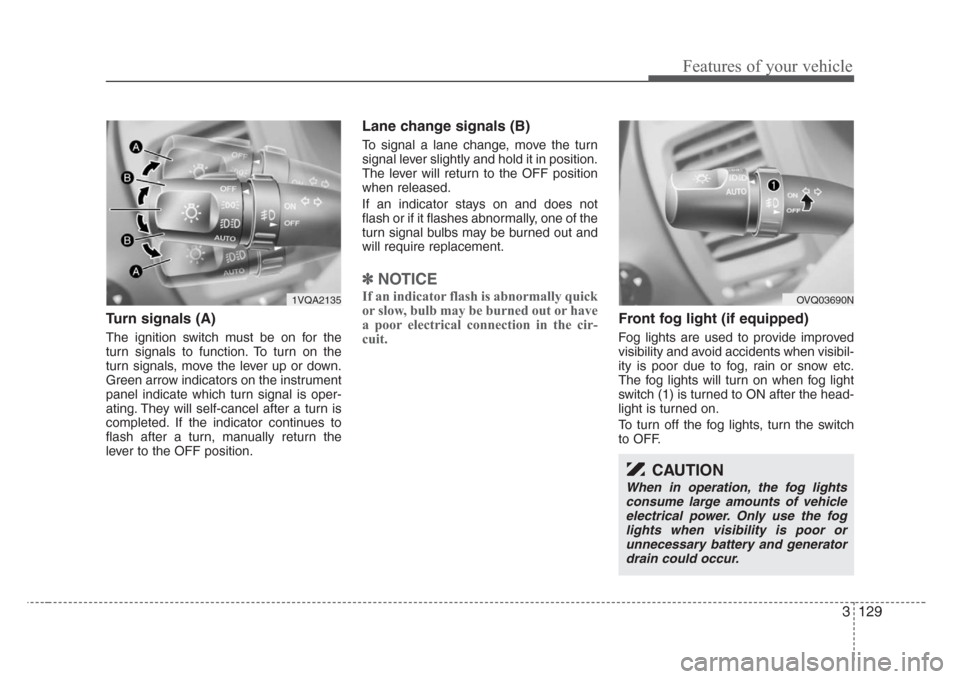
Turn signals (A)
The ignition switch must be on for the
turn signals to function. To turn on the
turn signals, move the lever up or down.
Green arrow indicators on the instrument
panel indicate which turn signal is oper-
ating. They will self-cancel after a turn is
completed. If the indicator continues to
flash after a turn, manually return the
lever to the OFF position.
Lane change signals (B)
To signal a lane change, move the turn
signal lever slightly and hold it in position.
The lever will return to the OFF position
when released.
If an indicator stays on and does not
flash or if it flashes abnormally, one of the
turn signal bulbs may be burned out and
will require replacement.
✽
NOTICE
If an indicator flash is abnormally quick
or slow, bulb may be burned out or have
a poor electrical connection in the cir-
cuit.
Front fog light (if equipped)
Fog lights are used to provide improved
visibility and avoid accidents when visibil-
ity is poor due to fog, rain or snow etc.
The fog lights will turn on when fog light
switch (1) is turned to ON after the head-
light is turned on.
To turn off the fog lights, turn the switch
to OFF.
1VQA2135
CAUTION
When in operation, the fog lights
consume large amounts of vehicle
electrical power. Only use the fog
lights when visibility is poor or
unnecessary battery and generator
drain could occur.
OVQ03690N
Page 139 of 339
Features of your vehicle
130 3
Daytime running light
(if equipped)
Daytime Running Lights (DRL) can make
it easier for others to see the front of your
vehicle during the day. DRL can be help-
ful in many different driving conditions,
and it is especially helpful after dawn and
before sunset.
The DRL system will make your high-
beam headlights turn OFF when:
1. The head light switch is ON.
2. The parking brake engaged.
3. Engine stops.
WIPERS AND WASHERS
Type A
Type BType B
Type A
OVQ038051N/OVQ038900N/OVQ038053N/OVQ038901N
Windshield wiper/washer Rear window wiper/washer
(if equipped)
Page 140 of 339

3 131
Features of your vehicle
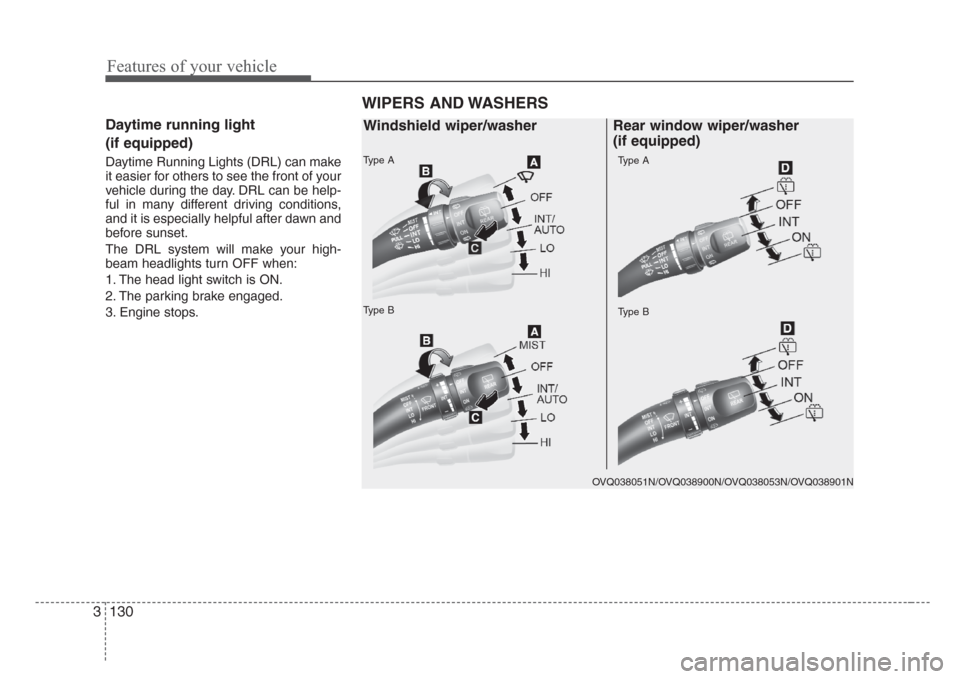
A : Wiper speed control
· MIST – Single wipe
· OFF – Off
· INT/AUTO – Intermittent wipe or
AUTO control wipe
· LO – Low wiper speed
· HI – High wiper speed
B : Intermittent or Auto control wipe
time adjustment
C : Wash with brief wipes
D : Rear wiper/washer control
· – Spraying washer fluid
· OFF – Off
· INT – Intermittent wipe (if equipped)
· ON – Continuous wipe
· – Wash with brief wipes
Windshield wipers
Operates as follows when the ignition
switch is turned ON.MIST: For a single wiping cycle, push the
lever upward and release it with
the lever in the OFF position. The
wipers will operate continuously if
the lever is pushed upward and
held.
OFF : Wiper is not in operation
INT : Wiper operates intermittently at
the same wiping intervals. Use
this mode in a light rain or mist. To
vary the speed setting, turn the
speed control knob (1).
LO : Normal wiper speed
HI : Fast wiper speed
✽
NOTICE
If there is heavy accumulation of snow
or ice on the windshield, defrost the
windshield for about 10 minutes, or
until the snow and/or ice is removed
before using the windshield wipers to
ensure proper operation.
OVQ037051N-1
OVQ038051N-1
Type A
Type B
F F
a a
s s
t t
F F
a a
s s
t tS S
l l
o o
w w
S S
l l
o o
w w
Page 145 of 339
Features of your vehicle
136 3
Front windshield deicer
(if equipped)
The engine must be running to enable
this feature. To activate the front wind-
shield deicer, press the front windshield
deicer button. The indicator on the button
illuminates when the deicer is ON. The
front windshield deicer automatically
turns off after 20 minutes or when the
ignition switch is turned off. To turn off the
deicer, press the front windshield deicer
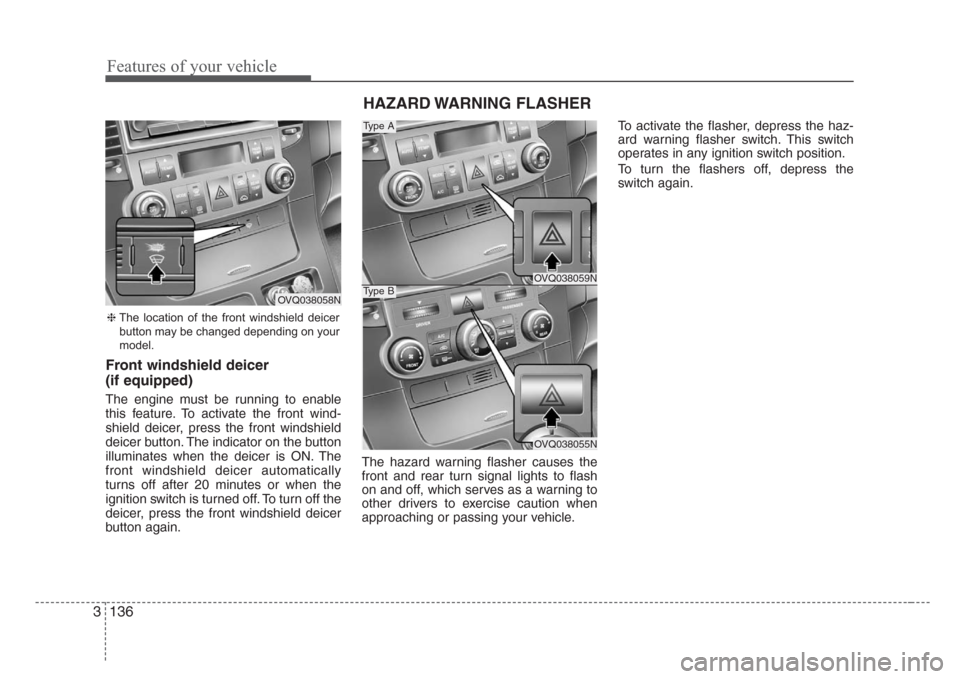
button again.The hazard warning flasher causes the
front and rear turn signal lights to flash
on and off, which serves as a warning to
other drivers to exercise caution when
approaching or passing your vehicle.To activate the flasher, depress the haz-
ard warning flasher switch. This switch
operates in any ignition switch position.
To turn the flashers off, depress the
switch again.
HAZARD WARNING FLASHER
OVQ038059N
OVQ038055N
Type A
Type B
❈The location of the front windshield deicer
button may be changed depending on your
model.
OVQ038058N
Page 147 of 339
Features of your vehicle
138 3
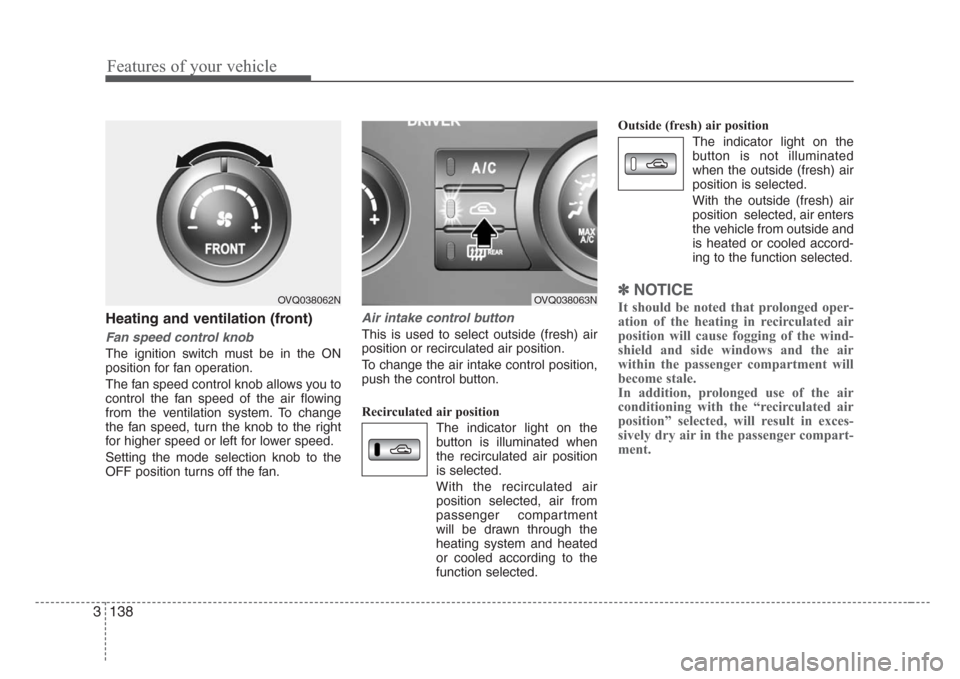
Heating and ventilation (front)
Fan speed control knob
The ignition switch must be in the ON
position for fan operation.
The fan speed control knob allows you to
control the fan speed of the air flowing
from the ventilation system. To change
the fan speed, turn the knob to the right
for higher speed or left for lower speed.
Setting the mode selection knob to the
OFF position turns off the fan.
Air intake control button
This is used to select outside (fresh) air
position or recirculated air position.
To change the air intake control position,
push the control button.
Recirculated air position
The indicator light on the
button is illuminated when
the recirculated air position
is selected.
With the recirculated air
position selected, air from
passenger compartment
will be drawn through the
heating system and heated
or cooled according to the
function selected.Outside (fresh) air position
The indicator light on the
button is not illuminated
when the outside (fresh) air
position is selected.
With the outside (fresh) air
position selected, air enters
the vehicle from outside and
is heated or cooled accord-
ing to the function selected.
✽
NOTICE
It should be noted that prolonged oper-
ation of the heating in recirculated air
position will cause fogging of the wind-
shield and side windows and the air
within the passenger compartment will
become stale.
In addition, prolonged use of the air
conditioning with the “recirculated air
position” selected, will result in exces-
sively dry air in the passenger compart-
ment.OVQ038062NOVQ038063N
Page 150 of 339

3 141
Features of your vehicle
Face - floor position
Air flow is directed towards
the face and the floor.
(outlet port: B, C, E, F)
OFF position
The fan is turned off.
Floor position
Most of the air flow is direct-
ed to the floor, with a small
amount of the air being
directed to the windshield
and side window defroster.
(outlet port: A, C, D, E, F)
Floor - defrost position
Most of the air flow is direct-
ed to the floor and the wind-
shield with a small amount
directed to the side window
defrosters.
(outlet port: A, C, D, E, F)
Defrost position
Most of the air flow is direct-
ed to the windshield with a
small amount of air directed
to the side window
defrosters.
(outlet port: A, D, E)
Instrument panel vents
If air flow control is not satisfactory, check
the instrument panel vents. The outlet
port (B, E) can be opened or closed sep-
arately using the horizontal thumbwheel.
To close the vent, rotate it left to the max-
imum position. To open the vent, rotate it
right to the desired position.
Also, you can adjust the direction of air
delivery from these vents using the vent
control lever as shown.
Air conditioning button
(if equipped)
Push the A/C button to turn the air condi-
tioning system on (indicator light will illu-
minate). Push the button again to turn the
air conditioning system off.
OFF
1VQA2148OVQ038065N
Page 152 of 339
3 143
Features of your vehicle
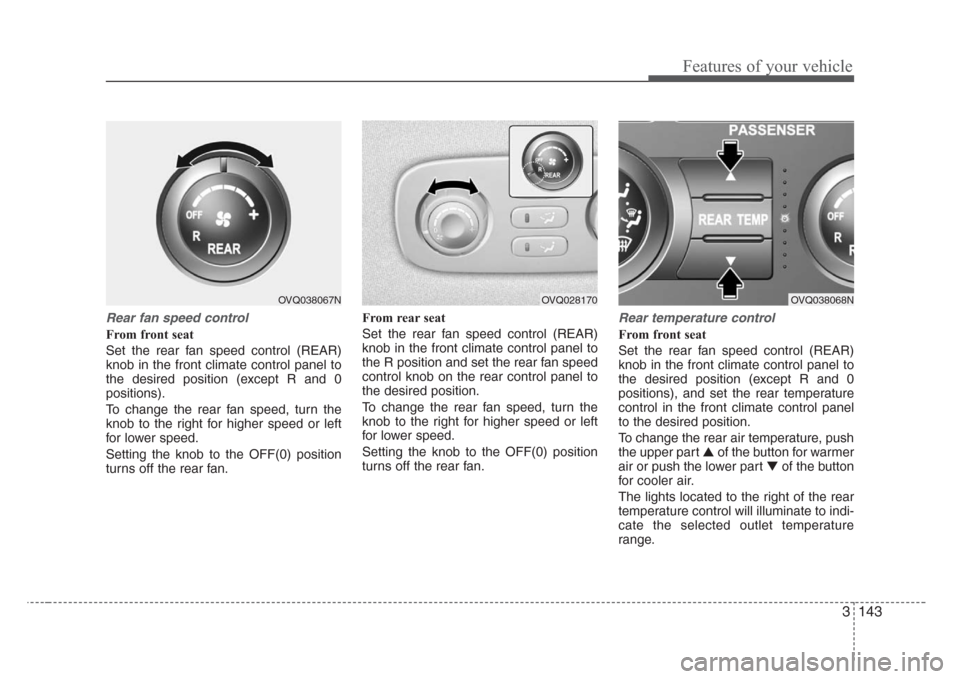
Rear fan speed control
From front seat
Set the rear fan speed control (REAR)
knob in the front climate control panel to
the desired position (except R and 0
positions).
To change the rear fan speed, turn the
knob to the right for higher speed or left
for lower speed.
Setting the knob to the OFF(0) position
turns off the rear fan.From rear seat
Set the rear fan speed control (REAR)
knob in the front climate control panel to
the R position and set the rear fan speed
control knob on the rear control panel to
the desired position.
To change the rear fan speed, turn the
knob to the right for higher speed or left
for lower speed.
Setting the knob to the OFF(0) position
turns off the rear fan.
Rear temperature control
From front seat
Set the rear fan speed control (REAR)
knob in the front climate control panel to
the desired position (except R and 0
positions), and set the rear temperature
control in the front climate control panel
to the desired position.
To change the rear air temperature, push
the upper part ▲ of the button for warmer
air or push the lower part ▼of the button
for cooler air.
The lights located to the right of the rear
temperature control will illuminate to indi-
cate the selected outlet temperature
range.
OVQ028170OVQ038067NOVQ038068N