Page 114 of 335

443
Features of your vehicle
D190600AUN
Turn signals and lane change sig- nals
The ignition switch must be on for the
turn signals to function. To turn on the
turn signals, move the lever up or down
(A). Green arrow indicators on the instru-
ment panel indicate which turn signal is
operating. They will self-cancel after a
turn is completed. If the indicator contin-
ues to flash after a turn, manually return
the lever to the OFF position.To signal a lane change, move the turn
signal lever slightly and hold it in position
(B). The lever will return to the OFF posi-tion when released.
If an indicator stays on and does not
flash or if it flashes abnormally, one of the
turn signal bulbs may be burned out andwill require replacement.
✽✽
NOTICE
If an indicator flash is abnormally quick
or slow, a bulb may be burned out or
have a poor electrical connection in the
circuit.
D190700ASA
Front fog light (if equipped)
Fog lights are used to provide improved
visibility when visibility is poor due to fog,
rain or snow, etc. The fog lights will turn
on when the fog light button is pressed
after the ignition switch is in the ON posi-
tion and the parklight is turned on.
To turn off the fog lights, press the button again.
OSA047080
CAUTION
When in operation, the fog lights consume large amounts of vehicleelectrical power. Only use the fog lights when visibility is poor.
OSA047095
Page 115 of 335

Features of your vehicle
44
4
D190800ASA
Rear fog light (if equipped)
To turn the rear fog lights on, turn the
headlight switch to the headlight on posi-
tion and press the rear fog light button(the light will illuminate).
Also, the rear fog lights turn on when the
rear fog button is pressed after the front
fog button is turned ON and the headlight
switch to the parklight position. (ifequipped)
To turn the rear fog lights off, press the
rear fog light button again or turn the
headlight switch to the OFF position.
✽✽
NOTICE
When you turn off the rear fog light by turning the headlight switch to the off
position, be sure to turn the rear fog
light button off too by pressing the but-
ton again. The chime may sound when
you open the door if the rear fog light
button is on, even though the rear foglight is off.D190900AUN
Daytime running light (if equipped)
Daytime Running Lights (DRL) can make
it easier for others to see the front of your
vehicle during the day. DRL can be help-
ful in many different driving conditions,
and it is especially helpful after dawn and
before sunset.
The DRL system will make the head-
lights turn OFF when:
1. The parklight switch is ON.
2. Engine stops.
OSA047081
Page 116 of 335
445
Features of your vehicle
D191001ASA
Headlight leveling device (if equipped)
To adjust the headlight beam level
according to the number of the passen-
gers and the loading weight in the lug-
gage area, turn the beam leveling switch.
The higher the number of the switch
position, the lower the headlight beam
level. Always keep the headlight beam at
the proper leveling position, or headlights
may dazzle other road users.Listed below are the examples of proper
switch settings. For loading conditions
other than those listed below, adjust the
switch position so that the beam level
may be the nearest as the conditionobtained according to the list. Switch setting:
OSA047082
Loading on
Position Front seats Rear seats Rear luggage
room
0 1 driver - -
2 persons - -
1 2 persons 3 persons -
2 2 persons 3 persons 55 kg
3 1 driver - 320 kg
Page 117 of 335
Features of your vehicle
46
4
D200100ASA
Windshield wipers
Operates as follows when the ignition
switch is turned ON.
: For a single wiping cycle, push thelever upward and release it with
the lever in the OFF position. The
wipers will operate continuously if
the lever is pushed upward andheld.
OFF : Wiper is not in operation INT : Wiper operates intermittently at
the same wiping intervals. Use this
mode in light rain or mist. To vary
the speed setting, turn the speedcontrol knob(1).
LO : Normal wiper speed
HI : Fast wiper speed
✽✽ NOTICE
If there is heavy accumulation of snow
or ice on the windshield, defrost the
windshield for about 10 minutes, or
until the snow and/or ice is removed
before using the windshield wipers to
ensure proper operation.
D200102ASA
Variable intermittent wipers
Set the lever to the INT position and
choose the desired wiper interval by turn-
ing the ring(1).
WIPERS AND WASHERS
OSA047084OSA047083
Page 120 of 335
449
Features of your vehicle
INTERIOR LIGHT
D210000AEN
D210200ASA Room lamp
(1) OFF - The light stays off even when adoor is open.
(2) DOOR - The light turns on or off
when a door is opened or closed.
(3) ON - The light turns on and stays on even when the doors are allclosed. D210300APA
Luggage lamp The light comes on when the tailgate is opened.
CAUTION
Do not use the interior lights for
extended periods when the engine is not running.
It may cause battery discharge.
OSA047088OSA047096
Page 127 of 335

Features of your vehicle
56
4
D230104ASA
Fan speed control
The ignition switch must be in the ON
position for fan operation.
The fan speed control knob allows you to
control the fan speed of the air flow from
the ventilation system. To change the fan
speed, turn the knob to the right for high-
er speed or left for lower speed.
0 - Fan off
1 - Low speed2 - Medium speed3 - High speed
4 - Maximum speed D230105AUN
Air conditioning (if equipped)
Push the A/C button to turn the air condi- tioning system on (indicator light will illu-
minate). Push the button again to turn the
air conditioning system off.
OSA047107
WARNING
Continued climate control system operation in the recirculated air
position may allow humidity to
increase inside the vehicle which
may fog the glass and obscure
visibility.
Do not sleep in a vehicle with the air conditioning or heating sys-
tem on. It may cause serious
harm or death due to a drop in the
oxygen level and/or body temper-
ature.
Continued climate control system operation in the recirculated air
position can cause drowsiness or
sleepiness, and loss of vehicle
control. Set the air intake controlto the outside (fresh) air position
as much as possible while driv-ing.
OSA047101
Page 136 of 335
465
Features of your vehicle
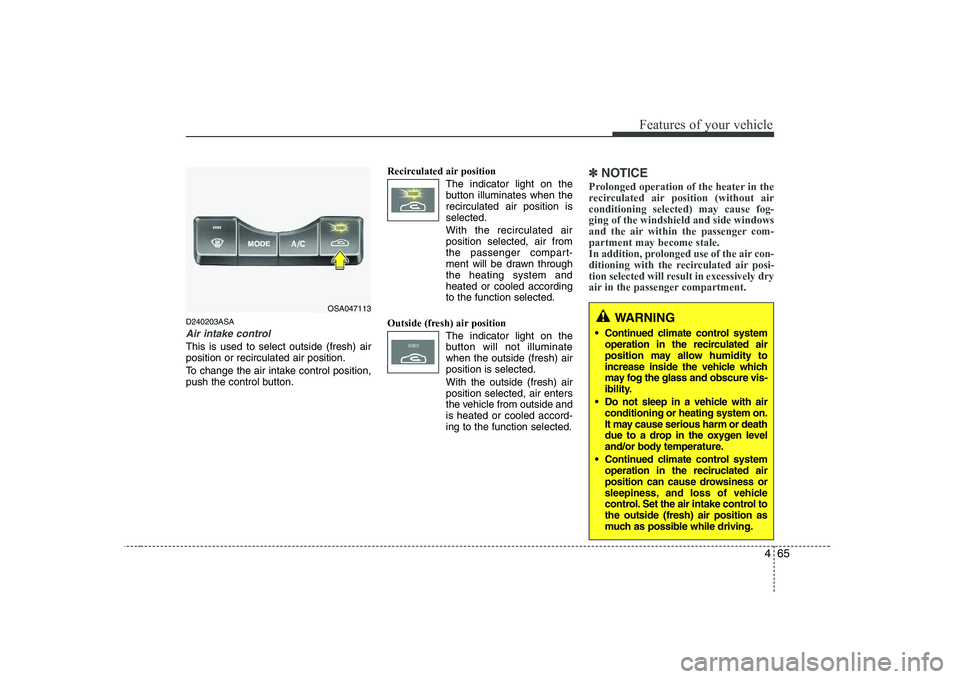
D240203ASA
Air intake control
This is used to select outside (fresh) air position or recirculated air position.
To change the air intake control position,
push the control button.Recirculated air position
The indicator light on the
button illuminates when therecirculated air position isselected.
With the recirculated air position selected, air from
the passenger compart-
ment will be drawn throughthe heating system andheated or cooled accordingto the function selected.
Outside (fresh) air position The indicator light on the
button will not illuminatewhen the outside (fresh) airposition is selected. With the outside (fresh) air position selected, air enters
the vehicle from outside andis heated or cooled accord-ing to the function selected.
✽✽NOTICE
Prolonged operation of the heater in the
recirculated air position (without airconditioning selected) may cause fog-ging of the windshield and side windows
and the air within the passenger com-partment may become stale.
In addition, prolonged use of the air con-
ditioning with the recirculated air posi-
tion selected will result in excessively dry
air in the passenger compartment.
WARNING
Continued climate control system operation in the recirculated air
position may allow humidity to
increase inside the vehicle which
may fog the glass and obscure vis-
ibility.
Do not sleep in a vehicle with air conditioning or heating system on.
It may cause serious harm or death
due to a drop in the oxygen level
and/or body temperature.
Continued climate control system operation in the reciruclated air
position can cause drowsiness or
sleepiness, and loss of vehicle
control. Set the air intake control tothe outside (fresh) air position as
much as possible while driving.OSA047113
Page 137 of 335
Features of your vehicle
66
4
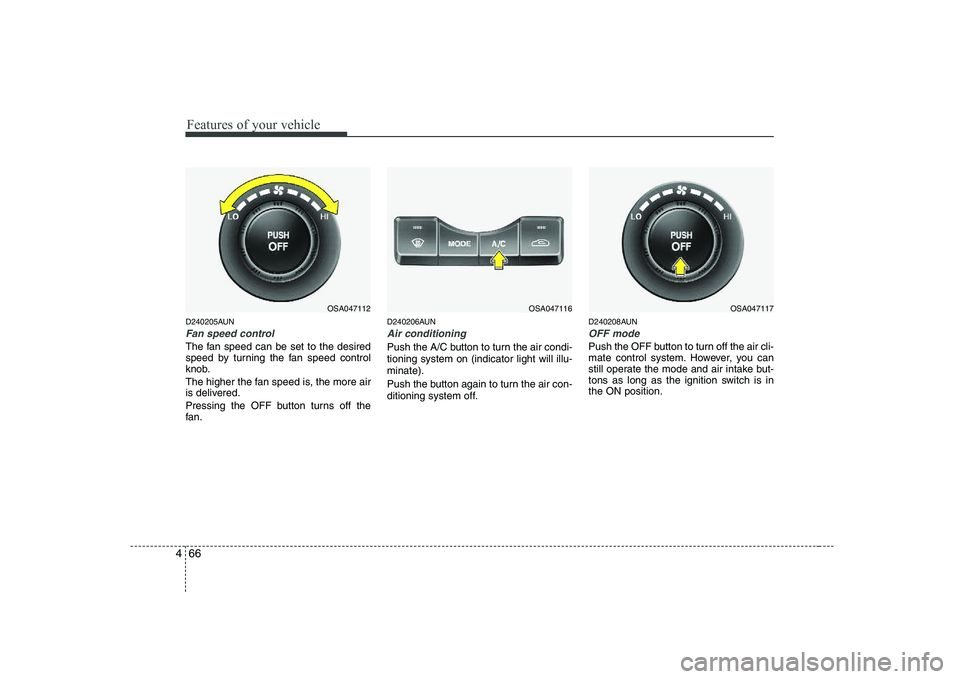
D240205AUN
Fan speed control
The fan speed can be set to the desired
speed by turning the fan speed control
knob.
The higher the fan speed is, the more air
is delivered.
Pressing the OFF button turns off the
fan. D240206AUN
Air conditioning
Push the A/C button to turn the air condi- tioning system on (indicator light will illu-minate).
Push the button again to turn the air con-
ditioning system off.
D240208AUN
OFF mode
Push the OFF button to turn off the air cli-
mate control system. However, you can
still operate the mode and air intake but-
tons as long as the ignition switch is inthe ON position.
OSA047116OSA047117OSA047112