Page 113 of 335
Features of your vehicle
42
4
D190402AEN
Headlight position ( )
When the light switch is in the headlight position (2nd position) the head, tail,
license and instrument panel lights areON.
✽✽
NOTICE
The ignition switch must be in the ON position to turn on the headlights.
D190500AUN High beam operation
To turn on the high beam headlights,
push the lever away from you. Pull it back
for low beams. The high beam indicator will light when
the headlight high beams are switchedon.
To prevent the battery from being dis-
charged, do not leave the lights on for aprolonged time while the engine is not
running. To flash the headlights, pull the lever
towards you. It will return to the normal
(low beam) position when released. The
headlight switch does not need to be on
to use this flashing feature.
OSA047092OSA047093OSA047094
Page 120 of 335
449
Features of your vehicle
INTERIOR LIGHT
D210000AEN
D210200ASA Room lamp
(1) OFF - The light stays off even when adoor is open.
(2) DOOR - The light turns on or off
when a door is opened or closed.
(3) ON - The light turns on and stays on even when the doors are allclosed. D210300APA
Luggage lamp The light comes on when the tailgate is opened.
CAUTION
Do not use the interior lights for
extended periods when the engine is not running.
It may cause battery discharge.
OSA047088OSA047096
Page 135 of 335

Features of your vehicle
64
4
D240202AUN
Temperature control
The temperature will increase to the
maximum (HI) by turning the knob to the
right extremely.
The temperature will decrease to the
minimum (Lo) by turning the knob to the
left extremely.
When turning the knob, the temperature
will increase or decrease by 0.5°C/1°F.
When set to the lowest temperature set-
ting, the air conditioning will operate con-
tinuously. Temperature conversion
If the battery has been discharged or dis-
connected, the temperature mode dis-
play will reset to Centigrade.
This is a normal condition. You can switch
the temperature mode between
Centigrade to Fahrenheit as follows;
While depressing the AUTO button,
depress the OFF button for 3 seconds or
more. The display will change from
Centigrade to Fahrenheit, or from
Fahrenheit to Centigrade.
D240207AUN
Outside tempmeter
The current outside temperature is dis-
played in 1°C (1°F) increments. The tem-
perature range is between -40°C ~ 60°C(-40°F~140°F).
OSA047111OSA047125
Page 140 of 335
469
Features of your vehicle
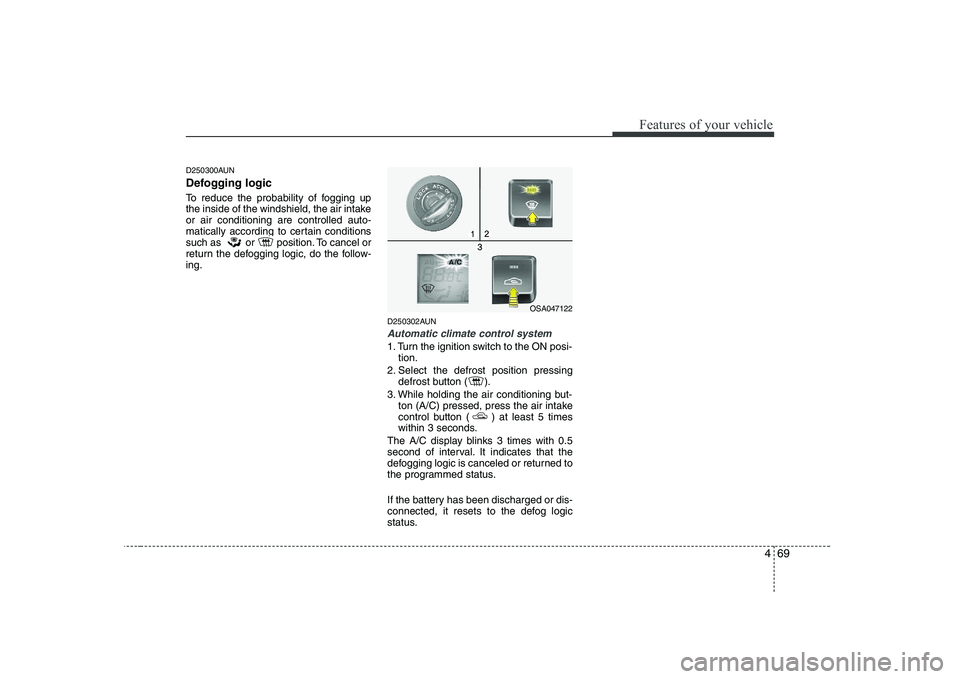
D250300AUN
Defogging logic
To reduce the probability of fogging up
the inside of the windshield, the air intakeor air conditioning are controlled auto-
matically according to certain conditions
such as or position. To cancel or
return the defogging logic, do the follow-ing.D250302AUN
Automatic climate control system
1. Turn the ignition switch to the ON posi-tion.
2. Select the defrost position pressing defrost button ( ).
3. While holding the air conditioning but- ton (A/C) pressed, press the air intake
control button ( ) at least 5 times
within 3 seconds.
The A/C display blinks 3 times with 0.5
second of interval. It indicates that the
defogging logic is canceled or returned to
the programmed status.
If the battery has been discharged or dis-
connected, it resets to the defog logic
status.
OSA047122
Page 145 of 335

Features of your vehicle
74
4
D281400AFD
Aux, USB and iPod port (if equipped)
If your vehicle has an aux and/or
USB(universal serial bus) port or iPod
port, you can use an aux port to connect
audio devices and an USB port to plug in
an USB and also an iPod port to plug in
an iPod.
✽✽
NOTICE
When using a portable audio device
connected to the power outlet, noise may
occur during playback. If this happens,
use the power source of the portableaudio device.
D280600ASA
Digital clock (if equipped)
Whenever the battery terminals or relat-
ed fuses are disconnected, you must
reset the time.
When the ignition switch is in the ACC or
ON position, the clock buttons operate as
follows: D280601ASA
Hour:
Turn the knob to the left (H), will advance
the time displayed by one hour. D280602ASA
Minute:
Turn the knob to the right (M), will
advance the time displayed by one
minute. D280603ASA
Reset
To clear away the minutes, press the
knob for more than 1 second.
Then the clock will be set precisely to the
hour.
For example, if the knob is pressed while
the time is between 9:01 and 9:29, the
display will reset to 9:00.
9:01 ~ 9:29 display changed to 9:00
9:30 ~ 9:59 display changed to 10:00
OSA047140OSA047132
WARNING
Do not adjust the clock while driv-
ing. You may lose your steering
control and cause severe personal
injury or accidents.
Page 146 of 335

475
Features of your vehicle
D280500AUN
Power outlet (if equipped)
The power outlet is designed to provide
power for mobile telephones or other
devices designed to operate with vehicle
electrical systems. The devices should
draw less than 10 amps with the engine
running.D280800AEN
Clothes hanger (if equipped) ❈
The actual feature may differ from the
illustration.
OSA047144
CAUTION
Use the power outlet only when
the engine is running and removethe accessory plug after use.Using the accessory plug for pro- longed periods of time with the
engine off could cause batterydischarge.
Only use 12V electric accessories which are less than 10A in elec-
tric capacity.
Adjust the air-conditioner or heater to the lowest operatinglevel when using the power out- let.
Close the cover when not in use. Some electronic devices can cause electronic interferencewhen plugged into a vehicle’s power outlet. These devices may
cause excessive audio static and malfunctions in other electronicsystems or devices used in your vehicle.
CAUTION
Do not hang heavy clothes, since
those may damage the hook.
OSA047133
Page 183 of 335

Driving your vehicle
4
5
Ignition switch position
E030201AUN
LOCK
The steering wheel locks to protect
against theft. The ignition key can be
removed only in the LOCK position.
When turning the ignition switch to the
LOCK position, push the key inward at
the ACC position and turn the key towardthe LOCK position. E030202AUN
ACC (Accessory)
The steering wheel is unlocked and elec-
trical accessories are operative.
✽✽
NOTICE
If difficulty is experienced in turning the
ignition switch to the ACC position, turnthe steering wheel right and left to
release the tension and then turn the
key.
E030203AUN
ON
The warning lights can be checked
before the engine is started. This is the
normal running position after the engine
is started.
Do not leave the ignition switch ON if the engine is not running to prevent batterydischarge.
E030204AUN
START
Turn the ignition switch to the START
position to start the engine. The engine
will crank until you release the key; then
it returns to the ON position. The brake
warning lamp can be checked in thisposition. E030205ASA
KEY POSITIONS
OSA057001WARNING
- Ignition
switch
Never turn the ignition switch to LOCK or ACC while the vehicle is
moving. This would result in loss
of directional control and braking
function, which could cause anaccident.
The anti-theft steering column lock is not a substitute for the parking
brake. Before leaving the driver’s
seat, always make sure the shift
lever is engaged in the 1st gear for
manual transaxle or P (Park) for
the automatic transaxle, set the
parking brake fully and shut the
engine off. Unexpected and sud-
den vehicle movement may occurif these precautions are not taken.
(Continued)
Page 189 of 335
Driving your vehicle
10
5
E060000APA E060100APA
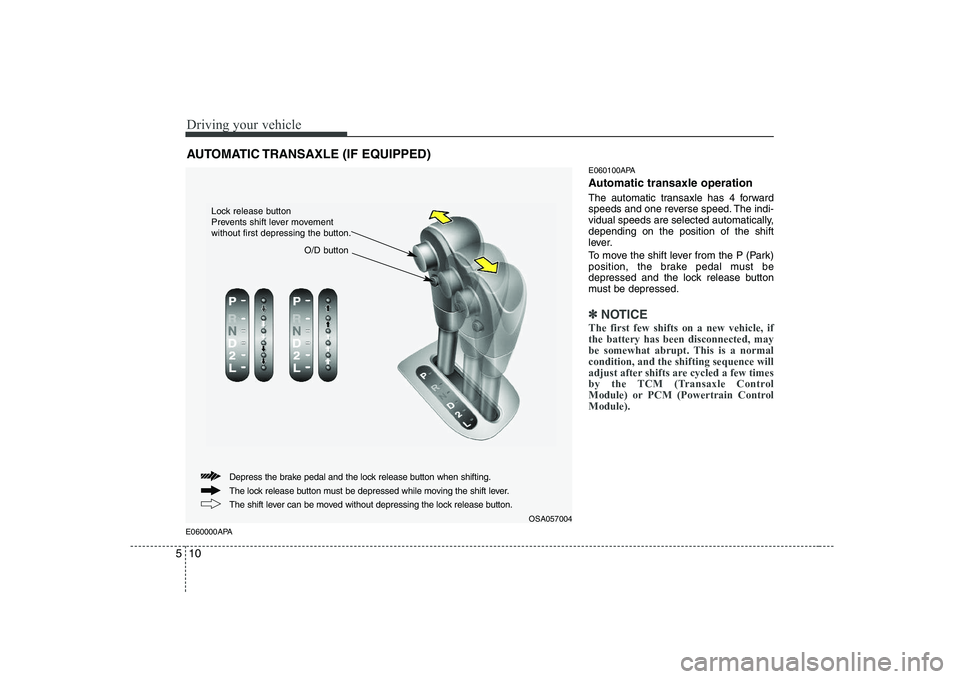
Automatic transaxle operation
The automatic transaxle has 4 forward
speeds and one reverse speed. The indi-
vidual speeds are selected automatically,depending on the position of the shift
lever.
To move the shift lever from the P (Park)
position, the brake pedal must be
depressed and the lock release button
must be depressed.
✽✽
NOTICE
The first few shifts on a new vehicle, if the battery has been disconnected, may
be somewhat abrupt. This is a normalcondition, and the shifting sequence will
adjust after shifts are cycled a few times
by the TCM (Transaxle Control
Module) or PCM (Powertrain ControlModule).
AUTOMATIC TRANSAXLE (IF EQUIPPED)
OSA057004
The lock release button must be depressed while moving the shift lever.
The shift lever can be moved without depressing the lock release button.
Depress the brake pedal and the lock release button when shifting.
O/D button
Lock release button
Prevents shift lever movement
without first depressing the button.