2008 JEEP GRAND CHEROKEE audio
[x] Cancel search: audioPage 214 of 490

Power Switch/Volume Control (Rotary)
Press the ON/VOL control to turn the radio ON. Press
the ON/VOL a second time to turn OFF the radio.
Electronic Volume Control
The electronic volume control turns continuously (360
degrees) in either direction without stopping. Turning the
volume control to the right increases the volume and to
the left decreases it.
When the audio system is turned on, the sound will be
set at the same volume level as last played.
SEEK Buttons (Radio Mode)
Press and release the SEEK buttons to search for the next
listenable station in AM/FM mode. Press the right switch
to seek up and the left switch to seek down. The radio
will remain tuned to the new station until you make
another selection. Holding either button will bypass
stations without stopping until you release it.
SCAN Button (Radio Mode)
Pressing the SCAN button causes the tuner to search for
the next listenable station, in AM, FM or Satellite (if
equipped) frequencies, pausing for 5 seconds at each
listenable station before continuing to the next. To stop
the search, press the SCAN button a second time.
Voice Recognition Button (UConnectŸ Hands Free
Phone) Ð If Equipped
Press this button to operate the Hand Free Phone (UCon-
nectŸ) feature (if equipped). Refer to ªHands-Free Com-
munication (UConnectŸ)º in Section 3 for more informa-
tion.
If your vehicle is not equipped with or this feature is not
available on your vehicle, a ªUConnectŸ System Not
Availableº message will display on the radio screen.
214 UNDERSTANDING YOUR INSTRUMENT PANEL
Page 218 of 490

station with the same selected Music Type name. The
Music Type function only operates when in the FM
mode.
If a preset button is activated while in the Music Type
(Program Type) mode, the Music Type mode will be
exited and the radio will tune to the preset station.
SETUP Button
Pressing the SETUP button allows you to select between
the following items:
NOTE:Use the Tune Control Knob to scroll through the
entries. Push the Audio/Select button to select an entry
and make changes.
²DVD Enter -When the disc is in DVD Menu mode,
selecting DVD Enter will allow you to play the current
highlighted selection. Use the remote control to scroll
up and down the menu (If Equipped).
²DISC Play/Pause -You can toggle between
playing the DVD and pausing the DVD by
pushing the SELECT button (If Equipped).
²DVD Play Options -Selecting the DVD Play Options
will display the following:
²Subtitle ± Repeatedly Pressing SELECT will switch
subtitles to different subtitle languages that are
available on the disc (If Equipped).
²Audio Stream ± Repeatedly Pressing SELECT will
switch to different audio languages (if supported on
the disc) (If Equipped).
²Angle ± Repeatedly Pressing SELECT will change
the viewing angle if supported by the DVD disc (If
Equipped).
NOTE:The available selections for each of the above
entries varies depending upon the disc.
218 UNDERSTANDING YOUR INSTRUMENT PANEL
Page 219 of 490

NOTE:These selections can only be made while playing
a DVD.
²VES Power -Allows you to turn VES ON and OFF (If
Equipped).
²VES Lock -Locks out rear VES remote controls (If
Equipped).
²VES CH1/CH2 -Allows the user to change mode of
either the IR1 or IR2, wireless headphones, by pressing
the Audio/Select button (If Equipped).
²Set Home Clock -Pressing the SELECT button will
allow user to set the clock. Turn the TUNE control
knob to adjust the hours and then press and turn the
TUNE control knob to adjust the minutes. Press the
TUNE control knob again to save changes.
²Player Defaults -Selecting this item will allow the
user to scroll through the following items, and set
defaults according to customer preference.Menu Language Ð If Equipped
Selecting this item will allow the user to choose the
default startup DVD menu language (effective only if
language supported by disc). If customer wishes to select
a language not listed, then scroll down and select9other.9
Enter the 4-digit country code using the TUNE control
knob to scroll up and down to select the # and then push
to select.
Audio Language Ð If Equipped
Selecting this item will allow the user to choose a default
audio language (effective only if language supported by
disc). If customer wishes to select a language not listed,
then scroll down and select9other.9Enter the country
code using the TUNE control knob to scroll up and down
to select the # and then push to select.
UNDERSTANDING YOUR INSTRUMENT PANEL 219
4
Page 220 of 490

Subtitle Language Ð If Equipped
Selecting this item will allow the user to choose a default
subtitle language (effective only if language supported
by disc). If customer wishes to select a language not
listed, then scroll down and select9other.9Enter the
country code using the TUNE control knob to scroll up
and down to select the # and then push to select.
Subtitles Ð If Equipped
Selecting this item will allow the user to choose between
subtitle OFF or ON.
Audio DRC Ð If Equipped
Selecting this item will allow the user to limit maximum
audio dynamic range - The default is set to9High,9and
under this setting, dialogues will play at 11 db higher
than if the setting is9Normal.9Aspect Ratio Ð If Equipped
Selecting this item will allow the user to choose between
wide screen, pan scan, and letter box.
AutoPlay Ð If Equipped
When this is set to ON and a DVD video is inserted, it
will bypass the DVD menu screen and automatically play
the movie. In some rare cases, the DVD player may not
auto play the main title. In such cases, use the menu
button on the remote control to select desired title to play.
NOTE:The user will have to set these defaults before
loading a disc. If changes are made to these settings after
a disc is loaded, changes will not be effective. Also, the
defaults are effective only if the disc supports the
customer-preferred settings.
AM and FM Buttons (Radio Mode)
Press the buttons to select AM or FM Modes.
220 UNDERSTANDING YOUR INSTRUMENT PANEL
Page 221 of 490

SET Button (Radio Mode) Ð To Set the
Push-Button Memory
When you are receiving a station that you wish to
commit to push-button memory, press the SET button.
The symbol SET 1 will now show in the display window.
Select the button (1-6) you wish to lock onto this station
and press and release that button. If a button is not
selected within 5 seconds after pressing the SET button,
the station will continue to play but will not be stored
into push-button memory.
You may add a second station to each push-button by
repeating the above procedure with this exception: Press
the SET button twice and SET 2 will show in the display
window. Each button can be set for SET 1 and SET 2 in
both AM and FM. This allows a total of 12 AM, 12 FM,
and 12 Satellite (if equipped) stations to be stored into
push-button memory. The stations stored in SET 2
memory can be selected by pressing the push-button
twice.Every time a preset button is used, a corresponding
button number will display.Buttons1-6(Radio Mode)
These buttons tune the Radio to the stations that you
commit to push-button memory {12 AM, 12 FM, and 12
Satellite (if equipped) stations}.
DISC Button
Pressing the DISC button will allow you to switch from
AM/FM modes to Disc modes.
Operation Instructions - (DISC MODE for CD and
MP3/WMA Audio Play, DVD-VIDEO)
The radio DVD player and many DVD discs are coded by
geographic region. These region codes must match in
order for the disc to play. If the region code for the DVD
disc does not match the region code for the radio DVD
player, it will not play the disc. Customers may take their
vehicle to an authorized dealer to change the region code
of the player a maximum of 5 times.
UNDERSTANDING YOUR INSTRUMENT PANEL 221
4
Page 224 of 490

Supported Medium Formats (File Systems)
The medium formats supported by the radio are ISO 9660
Level 1 and Level 2 and includes the Joliet extension.
When reading discs recorded using formats other than
ISO 9660 Level 1 and Level 2, the radio may fail to read
files properly and may be unable to play the file nor-
mally. UDF and Apple HFS formats are not supported.
The radio uses the following limits for file systems:
²Maximum number of directory levels: 8
²Maximum number of files: 255
²Maximum number of folders: 100
²Maximum number of characters in file/folder names:
²Level 1: 12 (including a separator9.9and a
3-character extension)
²Level 2: 31 (including a separator9.9and a
3-character extension)Multisession disc formats are supported by the radio.
Multisession discs may contain combinations of normal
CD audio tracks and computer files (including MP3/
WMA files). Discs created with an option such as9keep
disc open after writing9are most likely multisession
discs. The use of multisession for CD audio or MP3/
WMA playback may result in longer disc loading times.
If a disc contains multi formats, such as CD audio and
mp3/wma tracks, the radio will only play the mp3/wma
tracks on that disc.
Supported MP3/WMA File Formats
The radio will recognize only files with the *.MP3/WMA
extension as MP3/WMA files. Non-MP3/WMA files
named with the *.MP3/WMA extension may cause play-
back problems. The radio is designed to recognize the file
as an invalid MP3/WMA and will not play the file.
When using the MP3/WMA encoder to compress audio
data to an MP3/WMA file, the bit rate and sampling
224 UNDERSTANDING YOUR INSTRUMENT PANEL
Page 225 of 490
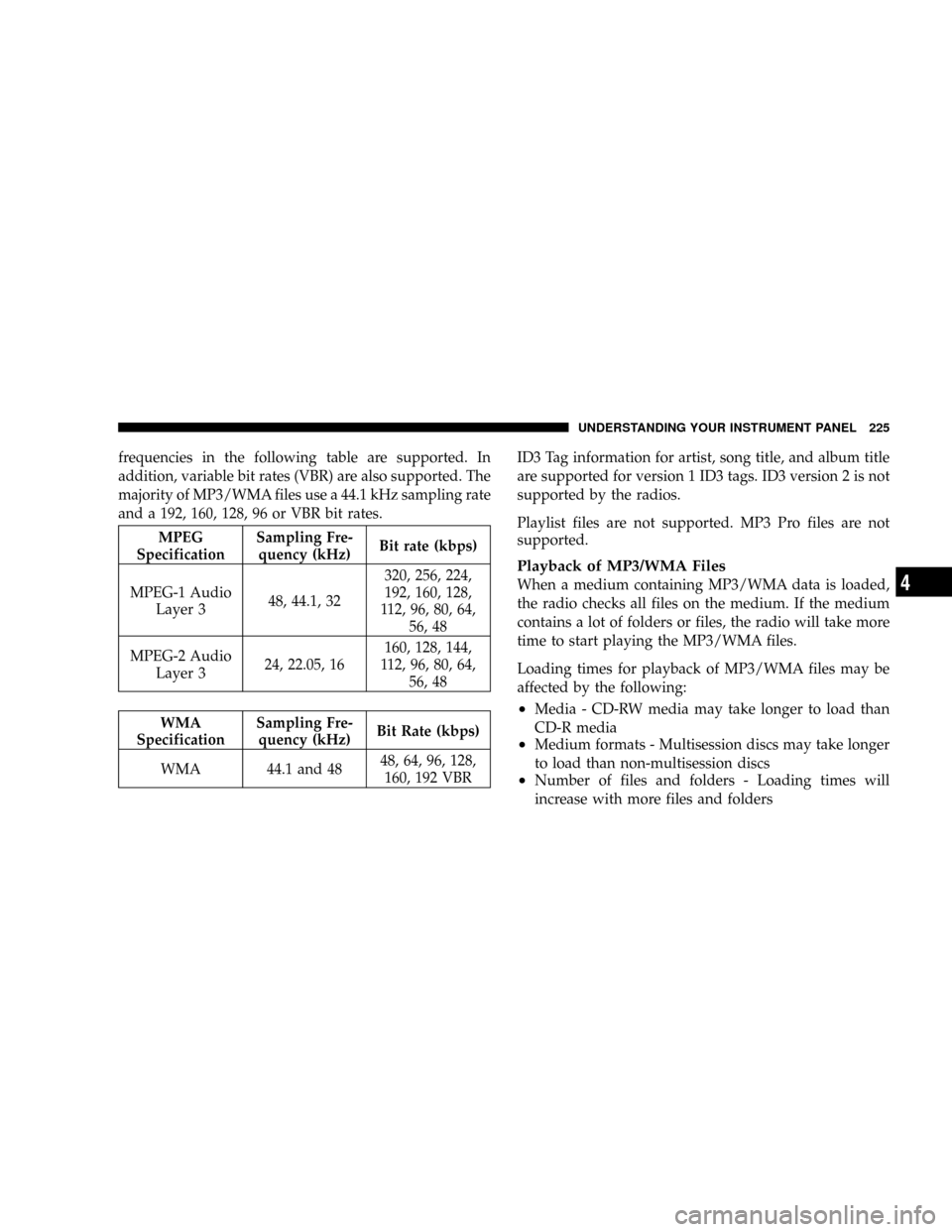
frequencies in the following table are supported. In
addition, variable bit rates (VBR) are also supported. The
majority of MP3/WMA files use a 44.1 kHz sampling rate
and a 192, 160, 128, 96 or VBR bit rates.
MPEG
SpecificationSampling Fre-
quency (kHz)Bit rate (kbps)
MPEG-1 Audio
Layer 348, 44.1, 32320, 256, 224,
192, 160, 128,
112, 96, 80, 64,
56, 48
MPEG-2 Audio
Layer 324, 22.05, 16160, 128, 144,
112, 96, 80, 64,
56, 48
WMA
SpecificationSampling Fre-
quency (kHz)Bit Rate (kbps)
WMA 44.1 and 4848, 64, 96, 128,
160, 192 VBRID3 Tag information for artist, song title, and album title
are supported for version 1 ID3 tags. ID3 version 2 is not
supported by the radios.
Playlist files are not supported. MP3 Pro files are not
supported.
Playback of MP3/WMA Files
When a medium containing MP3/WMA data is loaded,
the radio checks all files on the medium. If the medium
contains a lot of folders or files, the radio will take more
time to start playing the MP3/WMA files.
Loading times for playback of MP3/WMA files may be
affected by the following:
²Media - CD-RW media may take longer to load than
CD-R media
²Medium formats - Multisession discs may take longer
to load than non-multisession discs
²Number of files and folders - Loading times will
increase with more files and folders
UNDERSTANDING YOUR INSTRUMENT PANEL 225
4
Page 226 of 490

To increase the speed of disc loading, it is recommended
to use CD-R media and single-session discs. To create a
single-session disc, enable the Disc at Once option before
writing to the disc.
LIST Button (DISC Mode for MP3/WMA Play)
Pressing the LIST button will bring up a list of all folders
on the disc. Scrolling up or down the list is done by
turning the TUNE control knob. Selecting a folder by
pressing the TUNE control knob will begin playing the
files contained in that folder (or the next folder in
sequence if the selection does not contain playable files).
The folder list will time out after 5 seconds.
INFO Button (DISC Mode for MP3/WMA Play)
Pressing the INFO button repeatedly will scroll through
the following TAG information: Song Title, Artist, File
Name, and Folder Name (if available).Press the INFO button once more to return to9elapsed
time9priority mode.
Press and hold the INFO button for 3 seconds or more
and radio will display song titles for each file.
Press and hold the INFO button again for 3 seconds to
return to9elapsed time9display.
Operation Instructions - Auxiliary Mode
The auxiliary (AUX) jack is an audio input jack, which
allows the user to plug in a portable device such as an
MP3/WMA player, cassette player, or microphone and
utilize the vehicle's audio system to amplify the source
and play through the vehicle speakers.
Pushing the AUX button will change the mode to auxil-
iary device if the AUX jack is connected.
NOTE:The AUX device must be turned on and the
device's volume set to proper level. If the AUX audio is
226 UNDERSTANDING YOUR INSTRUMENT PANEL