Page 106 of 490
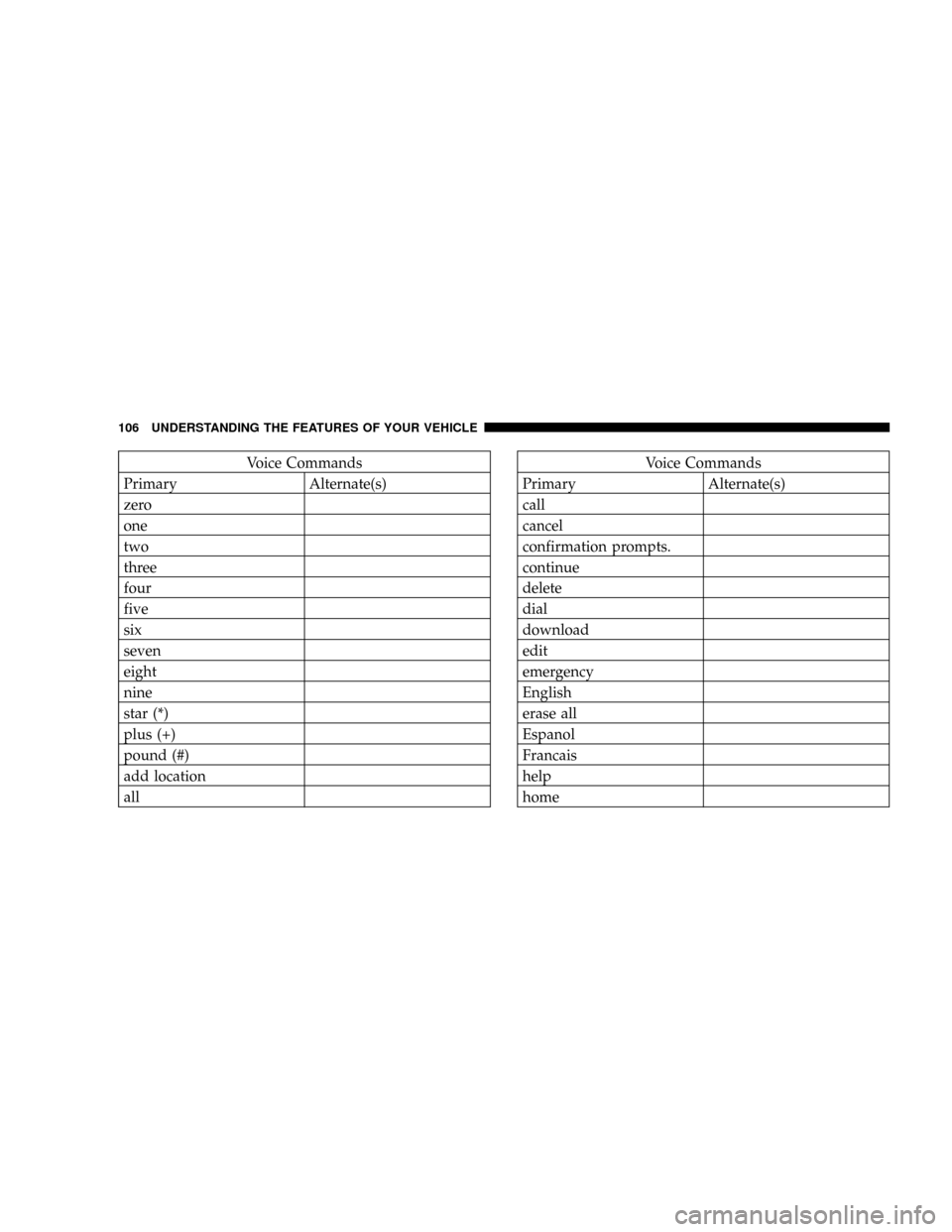
Voice Commands
Primary Alternate(s)
zero
one
two
three
four
five
six
seven
eight
nine
star (*)
plus (+)
pound (#)
add location
allVoice Commands
Primary Alternate(s)
call
cancel
confirmation prompts.
continue
delete
dial
download
edit
emergency
English
erase all
Espanol
Francais
help
home
106 UNDERSTANDING THE FEATURES OF YOUR VEHICLE
Page 113 of 490
WARNING!
Persons who are unable to feel pain to the skin
because of advanced age, chronic illness, diabetes,
spinal cord injury, medication, alcohol use, exhaus-
tion or other physical condition must exercise care
when using the seat heater. It may cause burns even
at low temperatures, especially if used for long
periods of time.
Do not place anything on the seat that insulates
against heat, such as a blanket or cushion. This may
cause the seat heater to overheat.
Rear Heated Seats Ð If Equipped
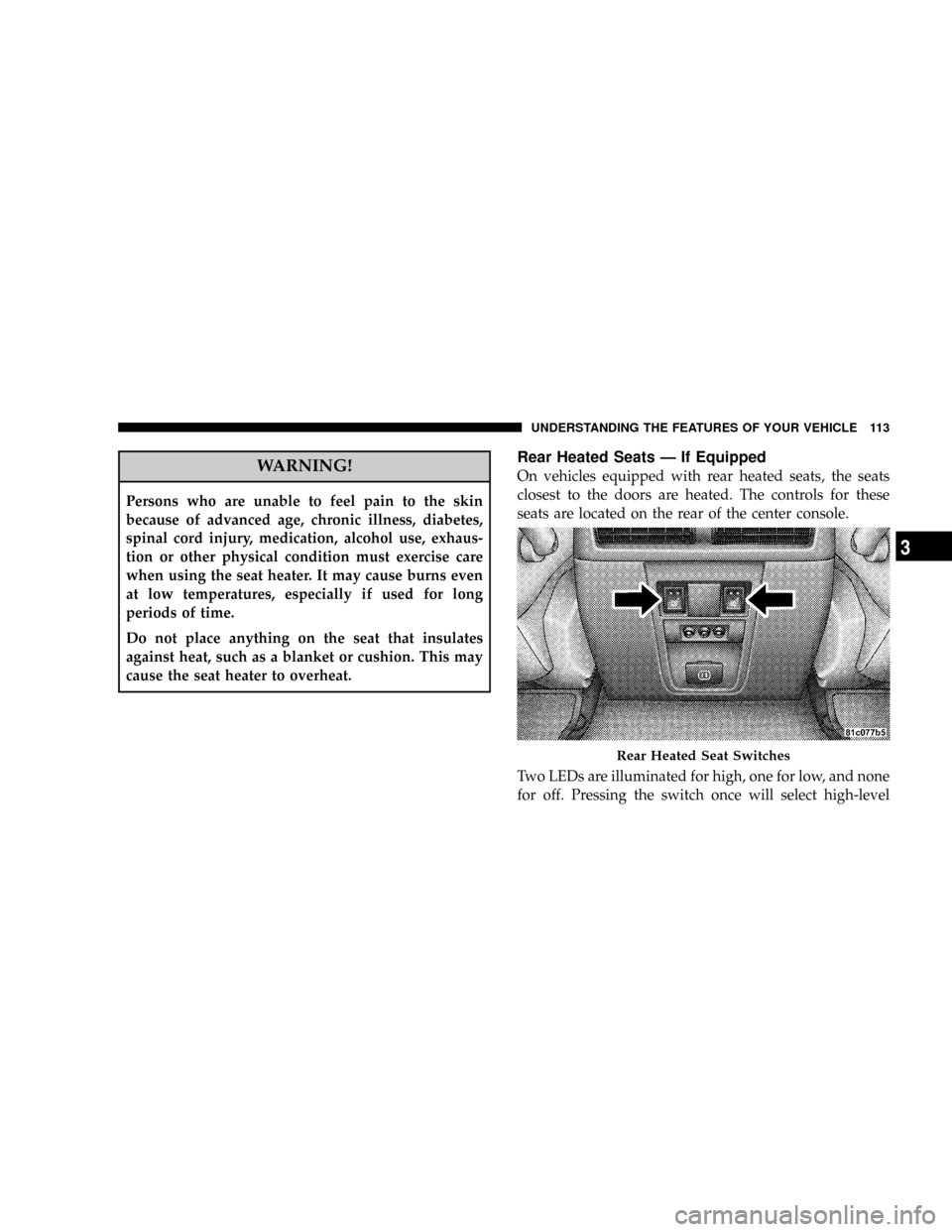
On vehicles equipped with rear heated seats, the seats
closest to the doors are heated. The controls for these
seats are located on the rear of the center console.
Two LEDs are illuminated for high, one for low, and none
for off. Pressing the switch once will select high-level
Rear Heated Seat Switches
UNDERSTANDING THE FEATURES OF YOUR VEHICLE 113
3
Page 114 of 490

heating. Pressing the switch a second time will select
low-level heating. Pressing the switch a third time will
shut the heating elements off.
When high-temperature heating is selected, the heaters
provide a boosted heat level during the first four minutes
of operation after heating is activated. The heat output
then drops to the normal high-temperature level. If
high-level heating is selected, the system will automati-
cally switch to the low level after 30 minutes of continu-
ous operation. At that time, the number of illuminated
LEDs changes from two to one, indicating the change.
Operation on the low setting also turns off automatically
after 30 minutes.
NOTE:Once a heat setting is selected, heat will be felt
within two to five minutes.WARNING!
Persons who are unable to feel pain to the skin
because of advanced age, chronic illness, diabetes,
spinal cord injury, medication, alcohol use, exhaus-
tion or other physical condition must exercise care
when using the seat heater. It may cause burns even
at low temperatures, especially if used for long
periods of time.
Do not place anything on the seat that insulates
against heat, such as a blanket or cushion. This may
cause the seat heater to overheat.
114 UNDERSTANDING THE FEATURES OF YOUR VEHICLE
Page 131 of 490

Mist
Use this feature when weather conditions make occa-
sional usage of the wipers necessary. Pull down and
release the control lever for a single wiping cycle.
Speed Sensitive Intermittent Wiper System
Use one of the five intermittent wiper speeds when
weather conditions make a single wiping cycle, with a
variable pause between cycles, desirable. Turn the end of
the lever to one of the five delay positions for the desired
delay interval. The delay can be regulated from a maxi-
mum of approximately 18 seconds between cycles, to a
cycle every 1/2 second.
NOTE:The wiper delay times depend on vehicle speed.
If the vehicle is moving less than 10 mph (16 km/h),
delay times will be doubled.
Rain Sensing WipersÐIf Equipped
This feature senses moisture on the windshield and
automatically activates the wipers for the driver. The
feature is especially useful for road splash or overspray
from the windshield washers of the vehicle ahead. Rotate
the end of the multi-function lever to one of five settings
to activate this feature.
The sensitivity of the system can be adjusted with the
multi-function lever. Wiper delay position 1 is the least
sensitive, and wiper delay position 5 is the most sensi-
tive. Setting 3 should be used for normal rain conditions.
Settings 1 and 2 can be used if the driver desires less
wiper sensitivity. Settings 4 and 5 can be used if the
driver desires more sensitivity. Place the wiper switch in
the OFF position when not using the system.
UNDERSTANDING THE FEATURES OF YOUR VEHICLE 131
3
Page 138 of 490

Using Speed Control On Hills
The automatic transmission may downshift on hills to
maintain the vehicle set speed.
NOTE:The speed control system maintains speed up
and down hills. A slight speed change on moderate hills
is normal.
On steep hills a greater speed loss or gain may occur so
it may be preferable to drive without speed control.
ELECTRONIC BRAKE CONTROL SYSTEM
Your vehicle is equipped with an advanced electronic
brake control system that includes ABS (Anti-Lock Brake
System), TCS (Traction Control System), BAS (Brake
Assist System), ERM (Electronic Roll Mitigation), and
ESP (Electronic Stability Program). All five of these
systems work together to enhance vehicle stability and
control in various driving conditions.Also, your vehicle is equipped with TSC (Trailer Sway
Control) and, if it has 4WD with the NV245 two-speed
transfer case, HSA (Hill Start Assist) and HDC (Hill
Descent Control).
ABS (Anti-Lock Brake System)
This system aids the driver in maintaining vehicle control
under adverse braking conditions. The system controls
hydraulic brake pressure to prevent wheel lock-up and
help avoid skidding on slippery surfaces during braking.
Refer to ªAnti-Lock Brake Systemº in Section 5 of this
manual for more information about ABS.
138 UNDERSTANDING THE FEATURES OF YOUR VEHICLE
Page 139 of 490
WARNING!
ABS (Anti-Lock Brake System) cannot prevent the
natural laws of physics from acting on the vehicle,
nor can it increase the traction afforded by prevailing
road conditions. ABS cannot prevent accidents, in-
cluding those resulting from excessive speed in
turns, driving on very slippery surfaces, or hydro-
planing. Only a safe, attentive, and skillful driver can
prevent accidents. The capabilities of an ABS-
equipped vehicle must never be exploited in a reck-
less or dangerous manner which could jeopardize the
user's safety or the safety of others.
TCS (Traction Control System)
This system monitors the amount of wheel spin of each of
the driven wheels. If wheel spin is detected, brake
pressure is applied to the slipping wheel(s) and engine
power is reduced to provide enhanced acceleration and
stability. A feature of the TCS system functions similar to
a limited slip differential and controls the wheel spin
across a driven axle. If one wheel on a driven axle is
spinning faster than the other, the system will apply the
brake of the spinning wheel. This will allow more engine
torque to be applied to the wheel that is not spinning.
This feature remains active even if TCS and ESP are in
either the ªPartial Offº or ªFull Offº modes. Refer to ªESP
(Electronic Stability Program)º in this section for more
information.
UNDERSTANDING THE FEATURES OF YOUR VEHICLE 139
3
Page 141 of 490

ERM (Electronic Roll Mitigation)
This system anticipates the potential for wheel lift by
monitoring the driver 's steering wheel input and the
speed of the vehicle. When ERM determines that the rate
of change of the steering wheel angle and vehicles speed
are sufficient to potentially cause wheel lift, it then
applies the brake of the appropriate wheel and may also
reduce engine power to lessen the chance that wheel lift
will occur. ERM will only intervene during very severe or
evasive driving maneuvers.
ERM can only reduce the chance of wheel lift occurring
during severe or evasive driving maneuvers. It cannot
prevent wheel lift due to other factors such as road
conditions, leaving the roadway or striking objects or
other vehicles.NOTE:Anytime the ESP system is in the ªFull Offº
mode, ERM is disabled. Refer to ESP (Electronic Stability
Program) for a complete explanation of the available ESP
modes.
WARNING!
Many factors, such as vehicle loading, road condi-
tions and driving conditions, influence the chance
that wheel lift or rollover may occur. ERM cannot
prevent all wheel lift or rollovers, especially those
that involve leaving the roadway or striking objects
or other vehicles. Only a safe, attentive, and skillful
driver can prevent accidents. The capabilities of an
ERM-equipped vehicle must never be exploited in a
reckless or dangerous manner which could jeopar-
dize the user's safety or the safety of others.
UNDERSTANDING THE FEATURES OF YOUR VEHICLE 141
3
Page 142 of 490

ESP (Electronic Stability Program)
This system enhances directional control and stability of
the vehicle under various driving conditions. ESP cor-
rects for oversteering or understeering of the vehicle by
applying the brake of the appropriate wheel to assist in
counteracting the oversteer or understeer condition. En-
gine power may also be reduced to help the vehicle
maintain the desired path.
ESP uses sensors in the vehicle to determine the vehicle
path intended by the driver and compares it to the actual
path of the vehicle. When the actual path does not match
the intended path, ESP applies the brake of the appropri-
ate wheel to assist in counteracting the oversteer or
understeer condition.
²Oversteer - when the vehicle is turning more than
appropriate for the steering wheel position.
²Understeer - when the vehicle is turning less than
appropriate for the steering wheel position.
The9ESP/TCS Indicator Light9located in the instrument
cluster, starts to flash as soon as the tires lose traction and
the ESP system becomes active. The9ESP/TCS Indicator
Light9also flashes when TCS is active. If the9ESP/TCS
Indicator Light9begins to flash during acceleration, ease
up on the accelerator and apply as little throttle as
possible. Be sure to adapt your speed and driving to the
prevailing road conditions.
142 UNDERSTANDING THE FEATURES OF YOUR VEHICLE