2008 Hyundai Santa Fe Automatic
[x] Cancel search: AutomaticPage 102 of 355
1FEATURES OF YOUR HYUNDAI90
!
Auto ReverseIf an object is detected while the sunroof is
closing automatically, it will reverse direc-
tion, and then stop.
Auto reverse function does not work if a
small obstacle is blocked between the
sliding glass and the sunroof sash. You
should always check that all passengers
and objects are away from the sunroof
before closing it.
WARNING:
Be careful that someone’s head, hands
and body are not trapped by a closing
sunroof.Manual slide closePress the CLOSE button on the overhead
console for less than 0.5 second.
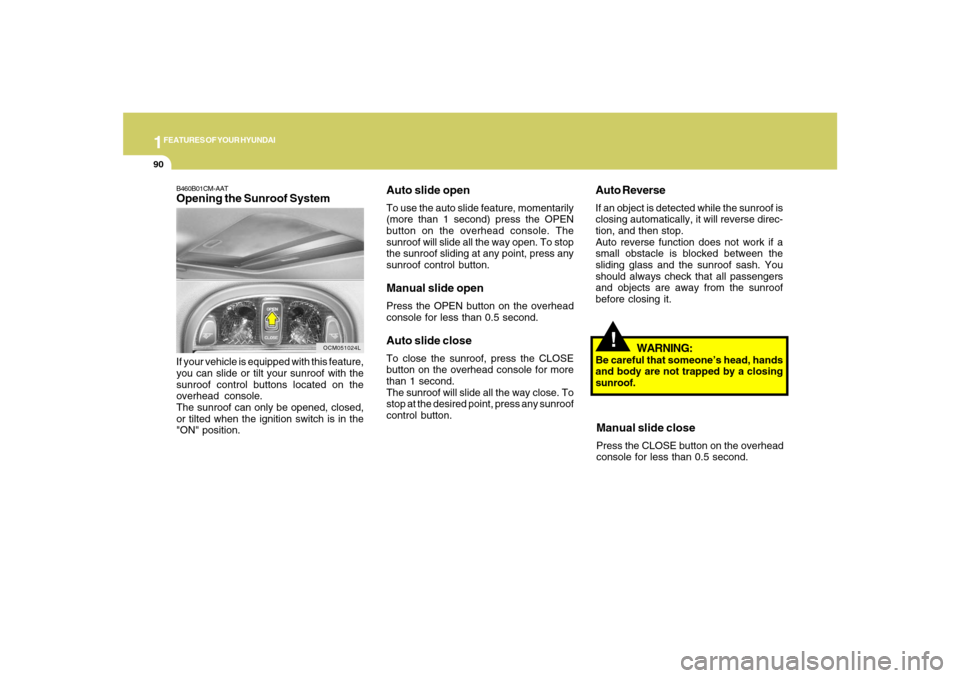
Auto slide openTo use the auto slide feature, momentarily
(more than 1 second) press the OPEN
button on the overhead console. The
sunroof will slide all the way open. To stop
the sunroof sliding at any point, press any
sunroof control button.Manual slide openPress the OPEN button on the overhead
console for less than 0.5 second.Auto slide closeTo close the sunroof, press the CLOSE
button on the overhead console for more
than 1 second.
The sunroof will slide all the way close. To
stop at the desired point, press any sunroof
control button.
B460B01CM-AATOpening the Sunroof SystemIf your vehicle is equipped with this feature,
you can slide or tilt your sunroof with the
sunroof control buttons located on the
overhead console.
The sunroof can only be opened, closed,
or tilted when the ignition switch is in the
"ON" position.
OCM051024L
Page 107 of 355
1
FEATURES OF YOUR HYUNDAI
95
!
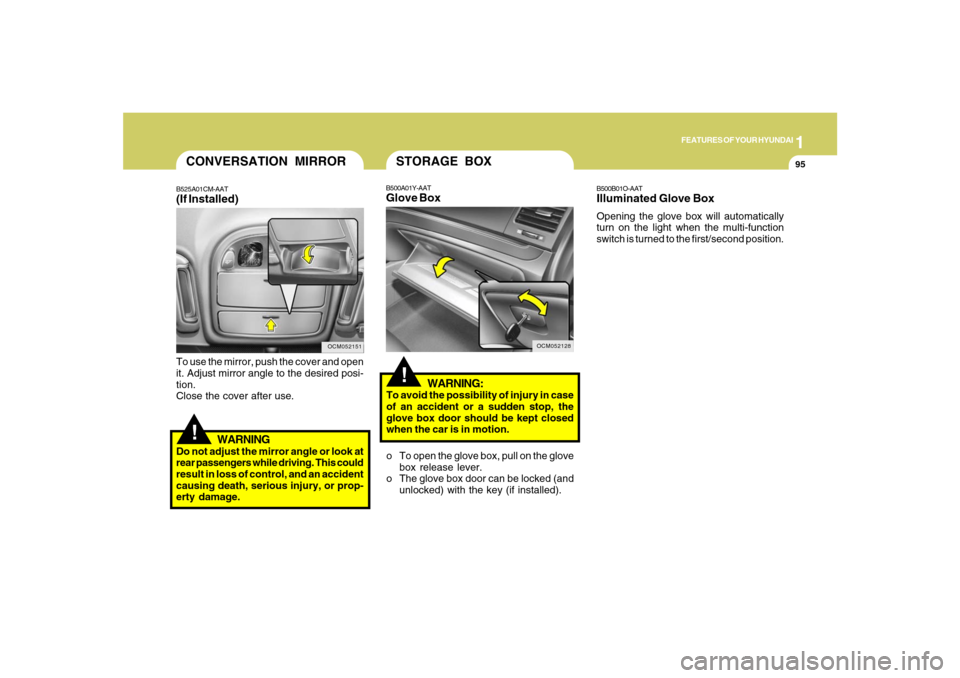
To use the mirror, push the cover and open
it. Adjust mirror angle to the desired posi-
tion.
Close the cover after use.
WARNING
Do not adjust the mirror angle or look at
rear passengers while driving. This could
result in loss of control, and an accident
causing death, serious injury, or prop-
erty damage.CONVERSATION MIRRORB525A01CM-AAT(If Installed)
OCM052151
OCM052128
!
WARNING:
To avoid the possibility of injury in case
of an accident or a sudden stop, the
glove box door should be kept closed
when the car is in motion.
B500B01O-AATIlluminated Glove BoxOpening the glove box will automatically
turn on the light when the multi-function
switch is turned to the first/second position.
B500A01Y-AATGlove BoxSTORAGE BOXo To open the glove box, pull on the glove
box release lever.
o The glove box door can be locked (and
unlocked) with the key (if installed).
Page 111 of 355
1
FEATURES OF YOUR HYUNDAI
99
!
WARNING:
Do not adjust or fold the outside rearview
mirrors while the vehicle is moving. This
could result in loss of control, and an
accident causing death, serious injury
or property damage.
CAUTION:
If the mirror is jammed with ice, do not
adjust the mirror by force. Use an ap-
proved spray de-icer (not radiator anti-
freeze) to release the frozen mecha-
nism or move the vehicle to a warm
place and allow the ice to melt.
!
DAY/NIGHT INSIDE REAR-
VIEW MIRRORB520A01A-AATManual TypeYour Hyundai is equipped with a day/night
inside rearview mirror. The "night" position
is selected by flipping the tab at the bottom
of the mirror toward you. In the "night"
position, the glare of headlights of cars
behind you is reduced.
B520A01CM
B520C01CM-AATAutomatic Dimming Rearview
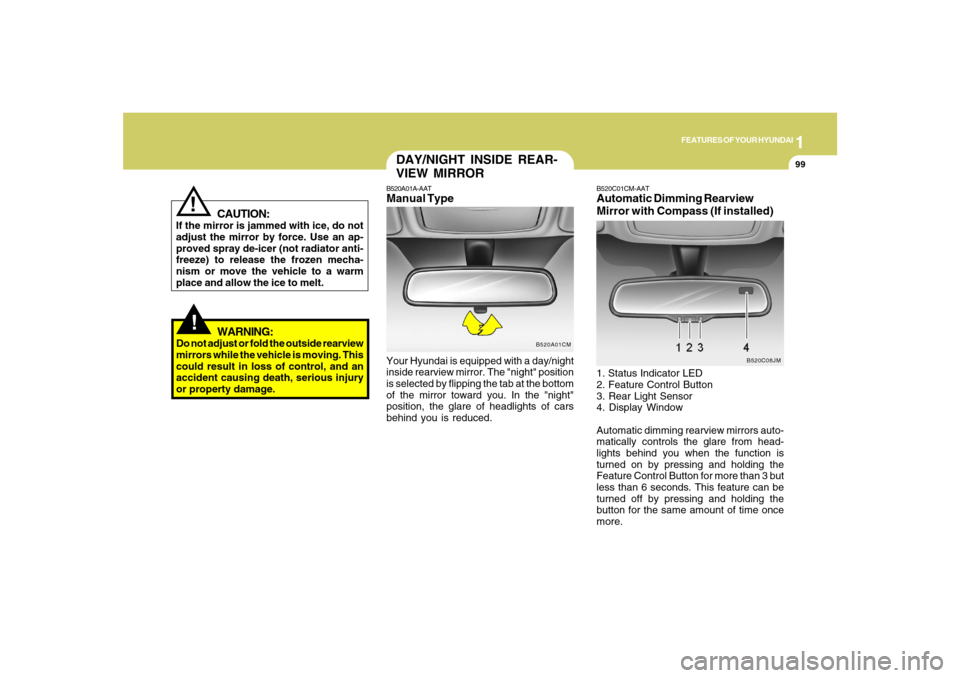
Mirror with Compass (If installed)1. Status Indicator LED
2. Feature Control Button
3. Rear Light Sensor
4. Display Window
Automatic dimming rearview mirrors auto-
matically controls the glare from head-
lights behind you when the function is
turned on by pressing and holding the
Feature Control Button for more than 3 but
less than 6 seconds. This feature can be
turned off by pressing and holding the
button for the same amount of time once
more.
B520C08JM
Page 114 of 355
1FEATURES OF YOUR HYUNDAI
102
HOMELINK MIRRORB520C01CM-AATAutomatic-Dimming Mirror
with Z-Nav™ Electronic Compass
Display and HomeLink
®
(If Installed)Your vehicle comes with a Gentex Auto-
matic-Dimming Mirror with a Z-Nav™ Elec-
tronic Compass Display and an Integrated
HomeLink
® Wireless Control System. Dur-
ing nighttime driving, this feature will auto-
matically detect and reduce rearview mir-
ror glare while the compass indicates the
direction the vehicle is pointed. The
HomeLink® Universal Transceiver allows
you to activate your garage door(s), elec-
tric gate, home lighting, etc.
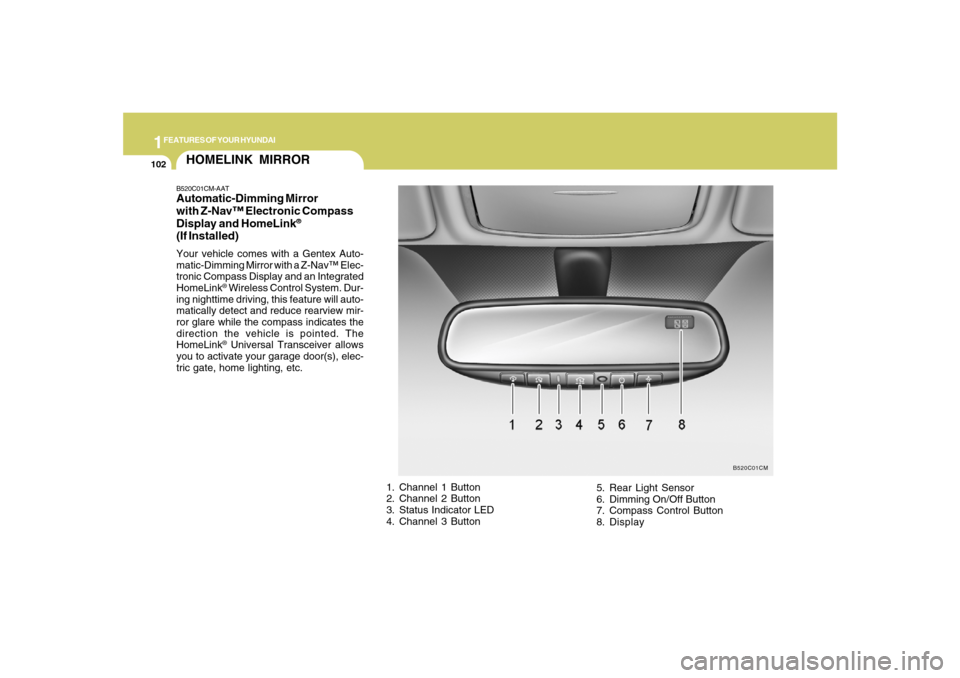
1. Channel 1 Button
2. Channel 2 Button
3. Status Indicator LED
4. Channel 3 Button5. Rear Light Sensor
6. Dimming On/Off Button
7. Compass Control Button
8. Display
B520C01CM
Page 115 of 355
1
FEATURES OF YOUR HYUNDAI
103
Automatic-Dimming Night Vision
Safety™ (NVS
®) Mirror
The NVS
® Mirror in your vehicle is the most
advanced way to reduce glare in the rear-
view mirror during any driving situation.
For more information regarding NVS
® mir-
rors and other applications, please refer to
the Gentex website:
www.gentex.com.
CAUTION:
Too close the NVS
® Mirror automatically
reduces glare during driving conditions
based upon light levels monitored in front
of the vehicle and from the rear of the
vehicle. These light sensors are visible
through openings in the front and rear of
the mirror case. Any object that would
obstruct either light sensor will degrade
the automatic dimming control feature.
!
Automatic-Dimming Function
Your mirror will automatically dim upon
detecting glare from the vehicles traveling
behind you. The auto-dimming function
can be controlled by the Dimming ON/OFF
Button:
1. Pressing the
button turns the auto-
dimming function OFF which is indi-
cated by the green Status Indicator LED
turning off.
2. Pressing the button again turns the
auto-dimming function ON which is in-
dicated by the green Status Indicator
LED turning on.
NOTE:The mirror defaults to the "ON" position
each time the vehicle is started.Compass Function
The Compass can be turned ON and OFF
and will remember the last state when the
ignition is cycled. To turn the display fea-
ture ON/OFF:
1. Press and release the
button to turn
the display feature OFF.
2. Press and release the button again
to turn the display back ON.
Additional options can be set with press
and hold sequences of the button and
are detailed below.
There is a difference between magnetic
north and true north. The compass in the
mirror can compensate for this difference
when it knows the Magnetic Zone in which
it is operating. This is set either by the
dealer or by the user. The operating Zone
Numbers for North America are shown in
the figure on the following section.
Z-Nav™ Compass DisplayThe NVS™ Mirror in your vehicle is also
equipped with a Z-Nav™ Compass that
shows the vehicle Compass heading in
the Display Window using the 8 basic
cardinal headings (N, NE, E, SE, etc.).
Page 119 of 355

1
FEATURES OF YOUR HYUNDAI
107
4. Press and hold the just-trained
HomeLink
® button and observe the red
Status Indicator LED. If the indicator
light stays on constantly, programming
is complete and your device should
activate.
5. To program the remaining two
HomeLink® buttons, follow either steps
1 through 4 above for other Rolling
Code devices or steps 2 through 5 in
Standard Programming for standard
devices.
Gate Operator & Canadian Programming
During programming, your handheld trans-
mitter may automatically stop transmitting.
Continue to press the Integrated
HomeLink
® Wireless Control System but-
ton (note steps 2 through 4 in the Standard
Programming portion of this document)
while you press and re-press ("cycle") your
handheld transmitter every two seconds
until the frequency signal has been learned.
The indicator light will flash slowly and
then rapidly after several seconds upon
successful training.Operating HomeLink
®
To operate, simply press and release the
programmed HomeLink
® button. Activa-
tion will now occur for the trained device
(i.e. garage door opener, gate operator,
security system, entry door lock, home/
office lighting, etc.). For convenience, the
hand-held transmitter of the device may
also be used at any time.
Reprogramming a Single HomeLink
®
Button
To program a new device to a previously
trained HomeLink
® button, follow these
steps:
1. Press and hold the desired HomeLink
®
button. Do NOT release until step 4 has
been completed.
2. When the indicator light begins to flash
slowly (after 20 seconds), position the
handheld transmitter 1 to 3 inches away
from the HomeLink
® surface.
3. Press and hold the handheld transmit-
ter button. The HomeLink
® indicator light
will flash, first slowly and then rapidly.
4. When the indicator light begins to flash
rapidly, release both buttons.5. Press and hold the just-trained
HomeLink
® button and observe the red
Status Indicator LED. If the indicator
light stays on constantly, programming
is complete and your new device should
activate.
Erasing HomeLink
® Buttons
Individual buttons cannot be erased. How-
ever, to erase all three programmed but-
tons:
1. Press and hold the two outer HomeLink
®
buttons until the indicator light begins to
flash-after 20 seconds.
2. Release both buttons. Do not hold for
longer than 30 seconds.
The Integrated HomeLink
® Wireless Con-
trol System is now in the training (learn)
mode and can be programmed at any time
following the appropriate steps in the Pro-
gramming sections above.
Page 120 of 355
1FEATURES OF YOUR HYUNDAI
108
!
WARNING:
The transceiver has been tested and
complies with FCC and Industry Canada
rules. Changes or modifications not ex-
pressly approved by the party respon-
sible for compliance could void the user's
authority to operate the device.
NVS
® is a registered trademark and Z-
Nav™ is a trademark of the Gentex Corpo-
ration, Zeeland, Michigan. HomeLink
® is
a registered trademark owned by Johnson
Controls, Incorporated, Milwaukee, Wis-
consin.
FCC ID: NZLZTVHL3
IC: 4112A-ZTVHL3This device complies with Part 15 FCC
Rules. Operation is subject to the following
two conditions: (1) this device may not
cause harmful interference, and (2) this
device must accept any interference re-
ceived, including interference that may
cause undesired operation.
PARKING BRAKEB530A02CM-AAT
OCM053002
Type A
Type B
OCM053007
Type A
Type B
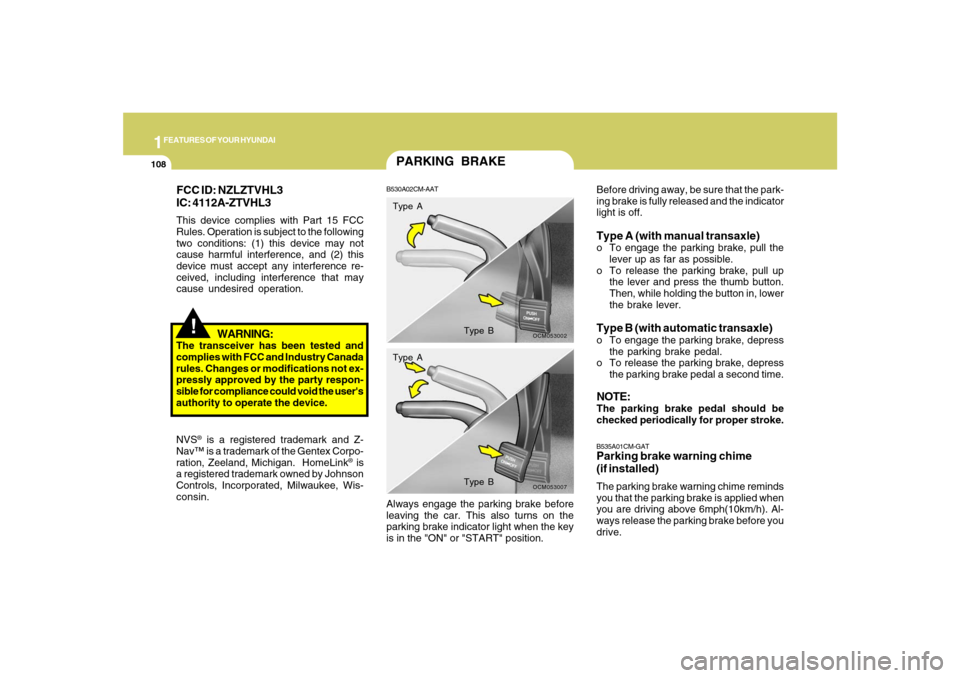
Before driving away, be sure that the park-
ing brake is fully released and the indicator
light is off.Type A (with manual transaxle)o To engage the parking brake, pull the
lever up as far as possible.
o To release the parking brake, pull up
the lever and press the thumb button.
Then, while holding the button in, lower
the brake lever.Type B (with automatic transaxle)o To engage the parking brake, depress
the parking brake pedal.
o To release the parking brake, depress
the parking brake pedal a second time.NOTE:The parking brake pedal should be
checked periodically for proper stroke.B535A01CM-GATParking brake warning chime
(if installed)The parking brake warning chime reminds
you that the parking brake is applied when
you are driving above 6mph(10km/h). Al-
ways release the parking brake before you
drive. Always engage the parking brake before
leaving the car. This also turns on the
parking brake indicator light when the key
is in the "ON" or "START" position.
Page 121 of 355
1
FEATURES OF YOUR HYUNDAI
109
!
!TAIL GATEB540A01CM-AAT
WARNING:
The tail gate should always be kept com-
pletely closed while the vehicle is in
motion. If it is left open or ajar, poisonous
exhaust gases may enter the car result-
ing in serious illness or death to the
occupants. See additional warnings con-
cerning exhaust gases on page 2-2.
o The tail gate is opened by pulling the
outside handle up, raising the tail gate
manually.
o To close, lower the tail gate, then press
down on it until it is closed. To be sure
the tail gate is fully closed, always try to
pull it up again without using the outside
handle.
WARNING:
o Whenever leaving vehicle or parking
always set the parking brake as far as
possible and fully engage the vehicle's
transaxle into the park position. Ve-
hicles not fully engaged in park with
the parking brake set are at risk for
moving inadvertently and injuring
yourself or others.
o To prevent unintentional movement
when stopped and leaving the vehicle,
do not use the gearshift lever in place
of the parking brake. Set the parking
brake AND make sure the gearshift
lever is securely positioned in 1st
(First) gear or R (Reverse) for manual
transaxle equipped vehicles and in P
(Park) for automatic transaxle
equipped vehicles.
o Never allow a person who is unfamil-
iar with the vehicle or children to touch
the parking brake. If the parking brake
is released unintentionally, serious
injury may occur.
LUGGAGE COMPARTMENT
OCM052123L
B640A01S-AATCargo Security Screen
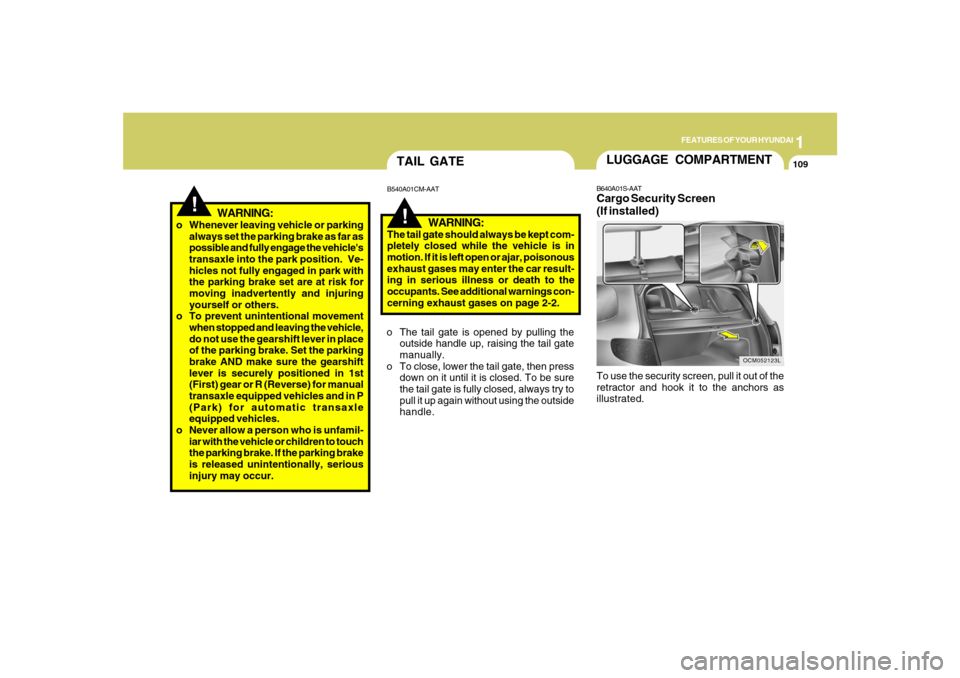
(If installed)To use the security screen, pull it out of the
retractor and hook it to the anchors as
illustrated.