Page 145 of 393
3 129
Features of your vehicle
Rescue mode functionIf your vehicle has any problem on the
vehicle network system, the headlights
(low beam) and parking lights turn on
automatically with the ignition switch in
the ON position even though the head-
light switch is not turned on. At this time,
the emergency lighting is not turned off
when the headlight switch is turned off.
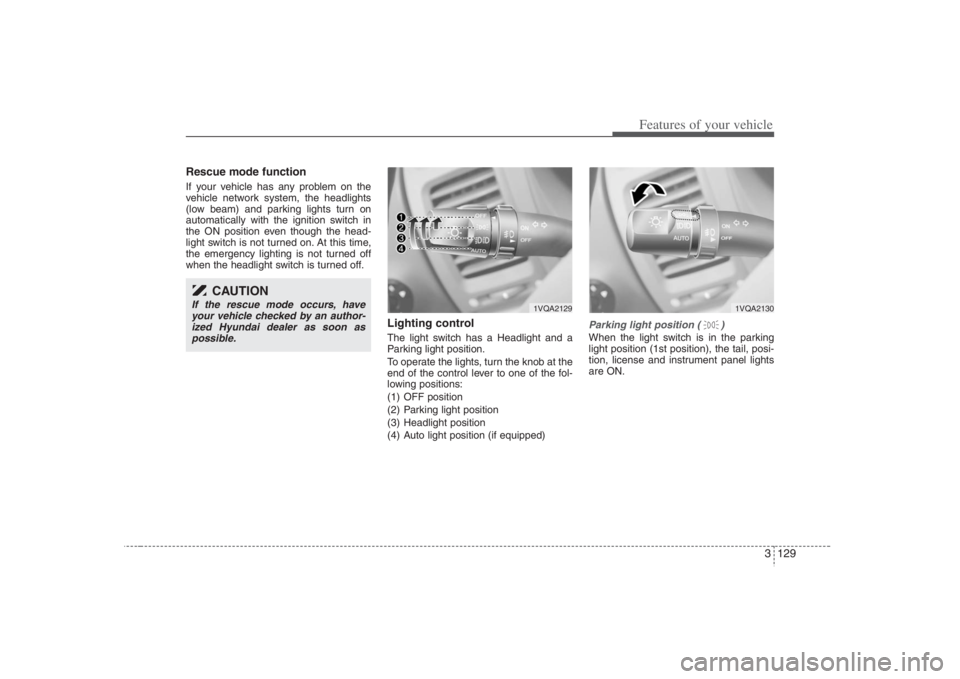
Lighting controlThe light switch has a Headlight and a
Parking light position.
To operate the lights, turn the knob at the
end of the control lever to one of the fol-
lowing positions:
(1) OFF position
(2) Parking light position
(3) Headlight position
(4) Auto light position (if equipped)
Parking light position ( )When the light switch is in the parking
light position (1st position), the tail, posi-
tion, license and instrument panel lights
are ON.
CAUTION
If the rescue mode occurs, have
your vehicle checked by an author-
ized Hyundai dealer as soon as
possible.
1VQA2129
1VQA2130
Page 146 of 393
Features of your vehicle130 3
CAUTION
Never place anything over sensor
(1) located on the instrument
panel, this will ensure better auto-
light system control.
Don’t clean the sensor using a
window cleaner, the cleaner may
leave a light film which could
interfere with sensor operation.
If your vehicle has window tint or
other types of coating on the
front windshield, the Auto light
system may not work properly.
Headlight position ( )When the light switch is in the headlight
position (2nd position) the head, tail,
position, license and instrument panel
lights are ON.
Auto light position (if equipped)When the light switch is in the AUTO light
position, the taillights and headlights will
be turned ON or OFF automatically
depending on the amount of light outside
the vehicle.
1VQA2131
1VQA2132
Page 147 of 393
3 131
Features of your vehicle
High - beam operation To turn on the high beam headlights,
push the lever away from you. Pull it back
for low beams.
The high-beam indicator will light when
the headlight high beams are switched
on.
To prevent the battery from being dis-
charged, do not leave the lights on for a
prolonged time while the engine is not
running.
Flashing headlights To flash the headlights, pull the lever
towards you. It will return to the normal
(low-beam) position when released. The
headlight switch does not need to be on
to use this flashing feature.
Turn signals (A)The ignition switch must be on for the
turn signals to function. To turn on the
turn signals, move the lever up or down.
Green arrow indicators on the instrument
panel indicate which turn signal is oper-
ating. They will self-cancel after a turn is
completed. If the indicator continues to
flash after a turn, manually return the
lever to the OFF position.
1VQA2134
1VQA2133
1VQA2135
Page 148 of 393

Features of your vehicle132 3Lane change signals (B)To signal a lane change, move the turn
signal lever slightly and hold it in position.
The lever will return to the OFF position
when released.
If an indicator stays on and does not
flash or if it flashes abnormally, one of the
turn signal bulbs may be burned out and
will require replacement.✽ ✽
NOTICEIf an indicator flash is abnormally quick
or slow, a bulb may be burned out or
there may be a poor electrical connec-
tion in the circuit.
Front fog light (if equipped) Fog lights are used to provide improved
visibility and avoid accidents when visibil-
ity is poor due to fog, rain or snow etc.
The fog lights will turn on when the fog
light switch (1) is turned to ON after the
headlights are turned on.
To turn off the fog lights, turn the switch
to OFF.
WIPERS AND WASHERS Windshield wipers Operates as follows when the ignition
switch is turned ON.
OFF : Wiper is not in operation
INT : Wiper operates intermittently at
the same wiping intervals. Use
this mode in a light rain or mist. To
vary the speed setting, turn the
speed control knob(1).
OVQ03690N
CAUTION
When in operation, the fog lights
consume large amounts of vehicle
electrical power. Only use the fog
lights when visibility is poor or
unnecessary battery and generator
drain could occur.
OVQ037051N-1
Fast
Slow
Page 153 of 393

3 137
Features of your vehicle
Front windshield deicer
(if equipped)The engine must be running to enable
this feature. To activate the front wind-
shield deicer, press the front windshield
deicer button. The indicator on the button
illuminates when the deicer is ON. The
front windshield deicer automatically
turns off after approximately 20 minutes
or when the ignition switch is turned off.
To turn off the deicer, press the front
windshield deicer button again.The hazard warning flasher causes the
front and rear turn signal lights to flash
on and off, which serves as a warning to
other drivers to exercise caution when
approaching or passing your vehicle.To activate the flasher, depress the haz-
ard warning flasher switch. This switch
operates in any ignition switch position.
To turn the flashers off, depress the
switch again.
HAZARD WARNING FLASHER
OVQ036059NOVQ036060N
Type AType B
❈The location of the front windshield deicer
button may be different depending on your
model.
OVQ036058N
Page 155 of 393
3 139
Features of your vehicle
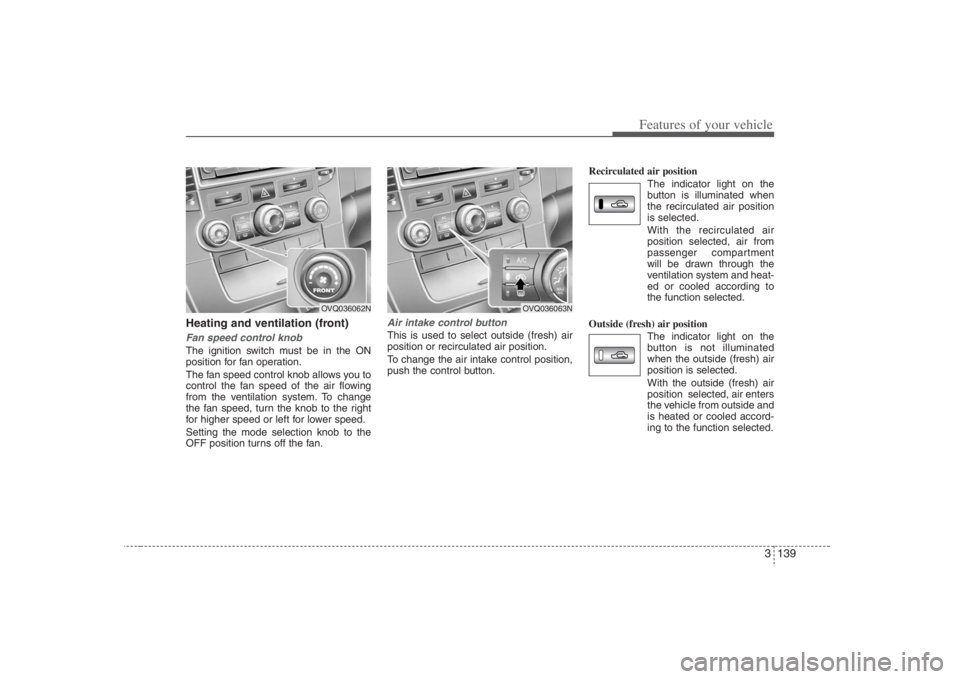
Heating and ventilation (front)Fan speed control knobThe ignition switch must be in the ON
position for fan operation.
The fan speed control knob allows you to
control the fan speed of the air flowing
from the ventilation system. To change
the fan speed, turn the knob to the right
for higher speed or left for lower speed.
Setting the mode selection knob to the
OFF position turns off the fan.
Air intake control button This is used to select outside (fresh) air
position or recirculated air position.
To change the air intake control position,
push the control button.Recirculated air position
The indicator light on the
button is illuminated when
the recirculated air position
is selected.
With the recirculated air
position selected, air from
passenger compartment
will be drawn through the
ventilation system and heat-
ed or cooled according to
the function selected.
Outside (fresh) air position
The indicator light on the
button is not illuminated
when the outside (fresh) air
position is selected.
With the outside (fresh) air
position selected, air enters
the vehicle from outside and
is heated or cooled accord-
ing to the function selected.
OVQ036062N
OVQ036063N
Page 159 of 393
3 143
Features of your vehicle
Air conditioning button
(if equipped) Push the A/C button to turn the air condi-
tioning system on (indicator light will illu-
minate). Push the button again to turn the
air conditioning system off.
1VQA2335/1VQA2168
■Front
■Rear
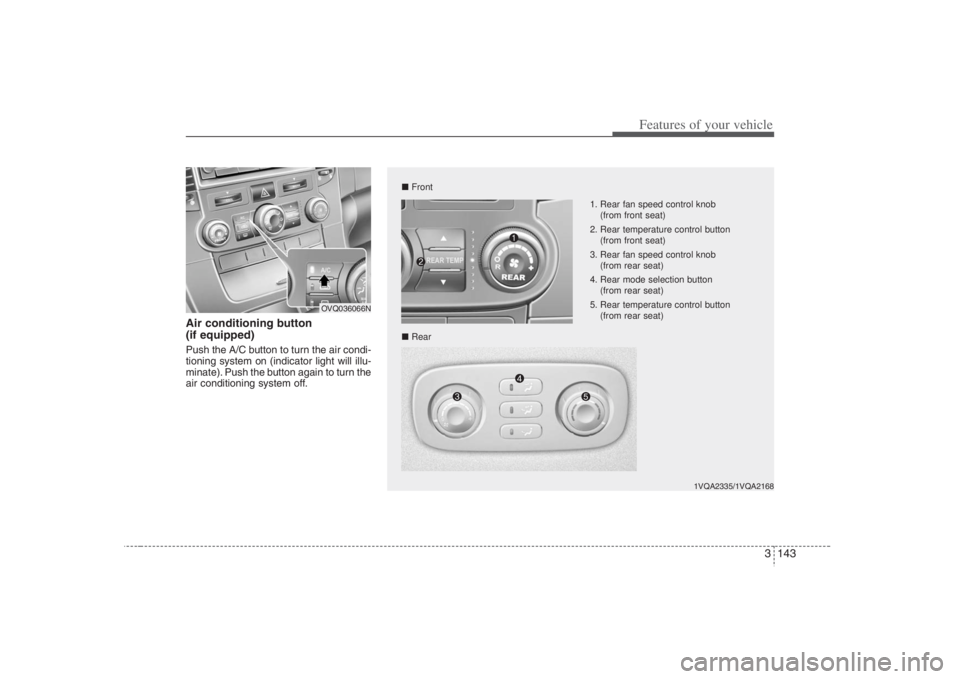
1. Rear fan speed control knob
(from front seat)
2. Rear temperature control button
(from front seat)
3. Rear fan speed control knob
(from rear seat)
4. Rear mode selection button
(from rear seat)
5. Rear temperature control button
(from rear seat)
OVQ036066N
Page 161 of 393
3 145
Features of your vehicle
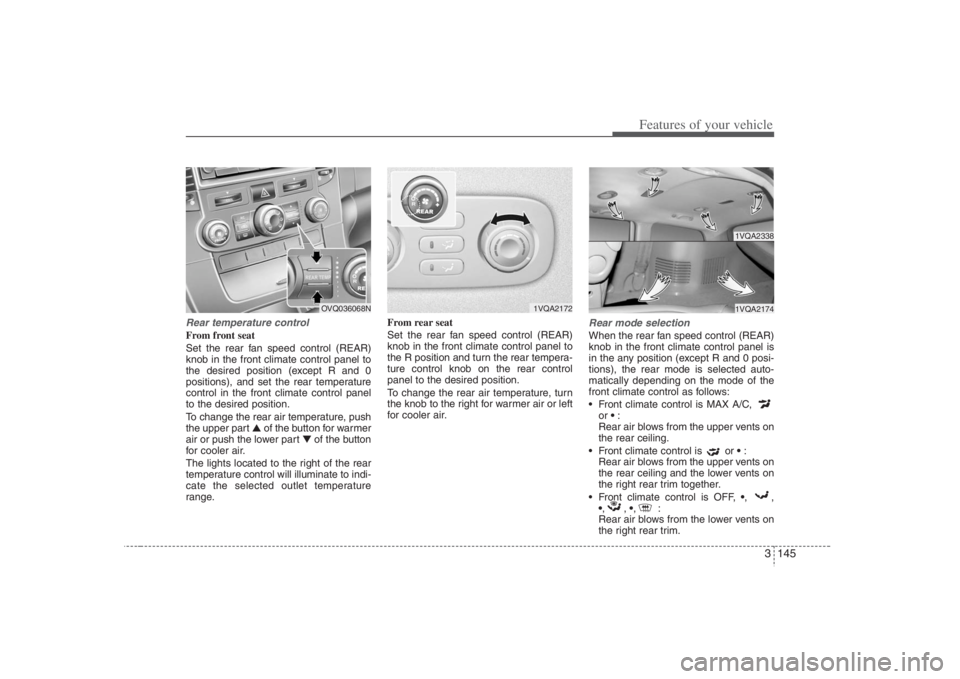
Rear temperature controlFrom front seat
Set the rear fan speed control (REAR)
knob in the front climate control panel to
the desired position (except R and 0
positions), and set the rear temperature
control in the front climate control panel
to the desired position.
To change the rear air temperature, push
the upper part ▲ of the button for warmer
air or push the lower part ▼of the button
for cooler air.
The lights located to the right of the rear
temperature control will illuminate to indi-
cate the selected outlet temperature
range.From rear seat
Set the rear fan speed control (REAR)
knob in the front climate control panel to
the R position and turn the rear tempera-
ture control knob on the rear control
panel to the desired position.
To change the rear air temperature, turn
the knob to the right for warmer air or left
for cooler air.
Rear mode selectionWhen the rear fan speed control (REAR)
knob in the front climate control panel is
in the any position (except R and 0 posi-
tions), the rear mode is selected auto-
matically depending on the mode of the
front climate control as follows:
Front climate control is MAX A/C,
or :
Rear air blows from the upper vents on
the rear ceiling.
Front climate control is or :
Rear air blows from the upper vents on
the rear ceiling and the lower vents on
the right rear trim together.
Front climate control is OFF, ,,
,, ,:
Rear air blows from the lower vents on
the right rear trim.
1VQA2172
1VQA23381VQA2174
OVQ036068N