Page 189 of 345
1
FEATURES OF YOUR HYUNDAI
175175
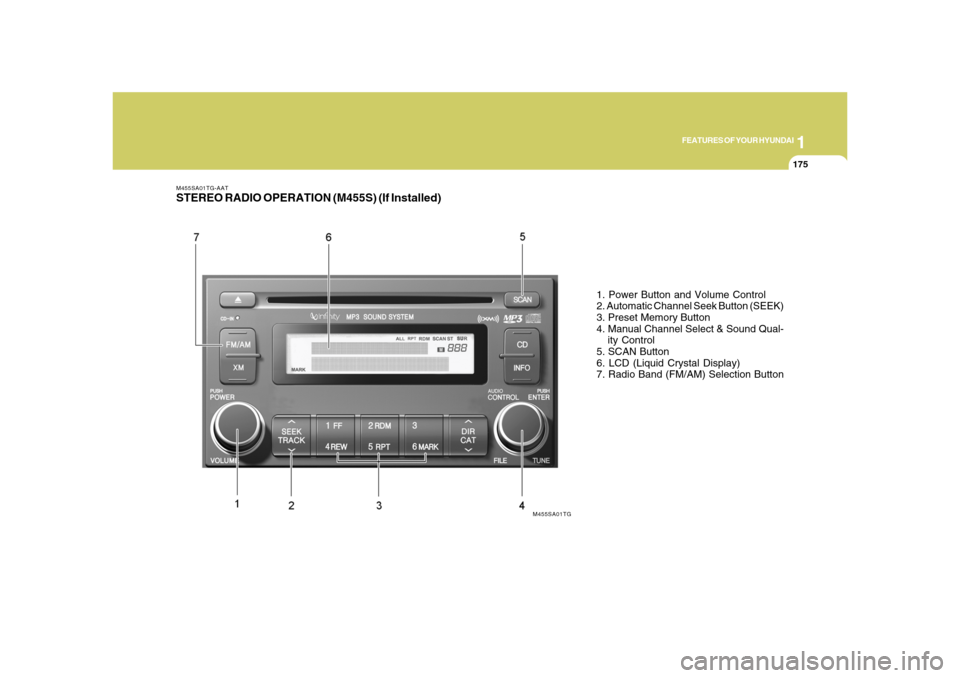
M455SA01TG-AATSTEREO RADIO OPERATION (M455S) (If Installed)
1. Power Button and Volume Control
2. Automatic Channel Seek Button (SEEK)
3. Preset Memory Button
4. Manual Channel Select & Sound Qual-
ity Control
5. SCAN Button
6. LCD (Liquid Crystal Display)
7. Radio Band (FM/AM) Selection Button
M455SA01TG
Page 192 of 345
1FEATURES OF YOUR HYUNDAI
178
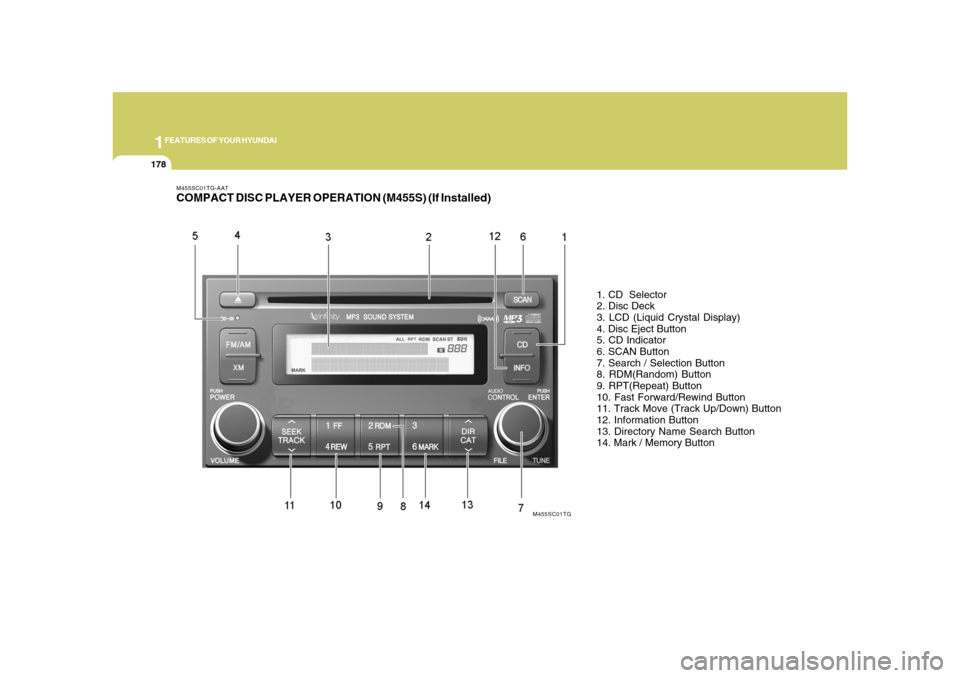
M455SC01TG-AATCOMPACT DISC PLAYER OPERATION (M455S) (If Installed)
1. CD Selector
2. Disc Deck
3. LCD (Liquid Crystal Display)
4. Disc Eject Button
5. CD Indicator
6. SCAN Button
7. Search / Selection Button
8. RDM(Random) Button
9. RPT(Repeat) Button
10. Fast Forward/Rewind Button
11. Track Move (Track Up/Down) Button
12. Information Button
13. Directory Name Search Button
14. Mark / Memory Button
M455SC01TG
Page 196 of 345
1FEATURES OF YOUR HYUNDAI
182
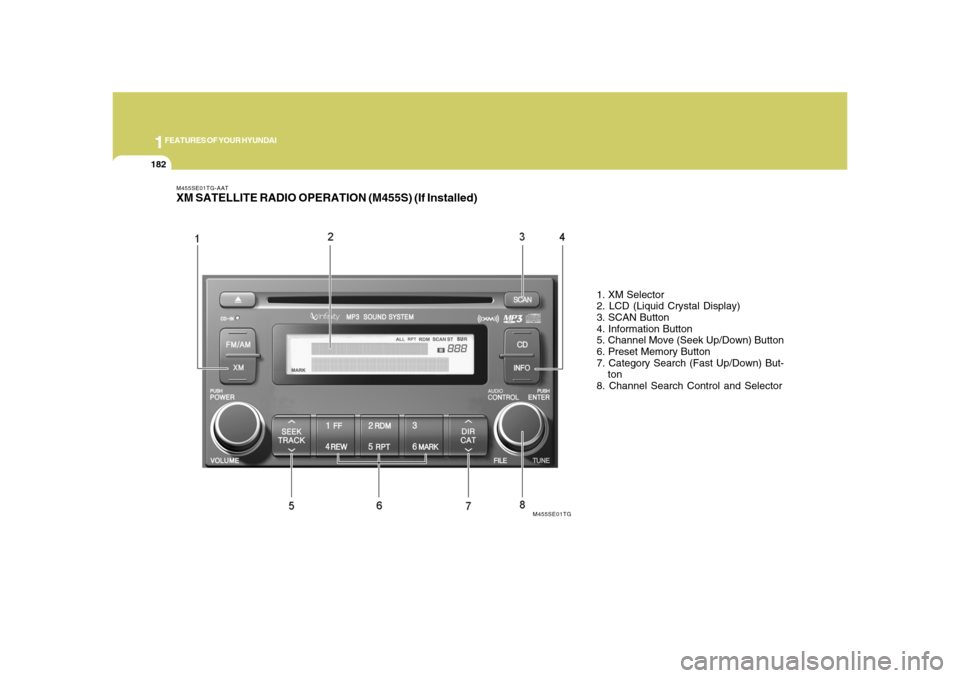
M455SE01TG-AATXM SATELLITE RADIO OPERATION (M455S) (If Installed)
1. XM Selector
2. LCD (Liquid Crystal Display)
3. SCAN Button
4. Information Button
5. Channel Move (Seek Up/Down) Button
6. Preset Memory Button
7. Category Search (Fast Up/Down) But-
ton
8. Channel Search Control and Selector
M455SE01TG
Page 199 of 345
1
FEATURES OF YOUR HYUNDAI
185185
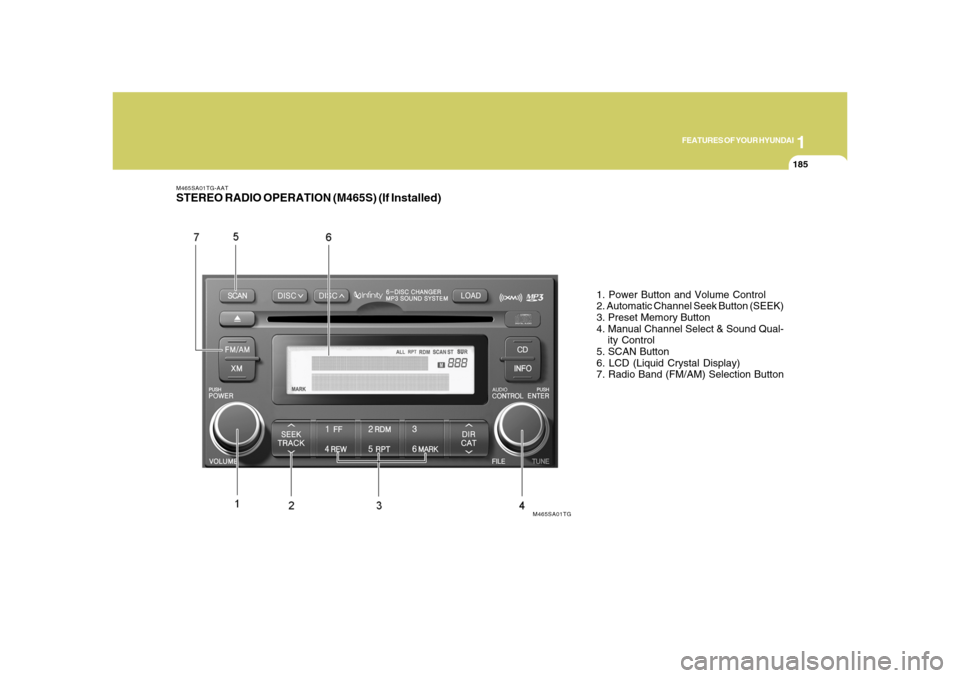
M465SA01TG-AATSTEREO RADIO OPERATION (M465S) (If Installed)
1. Power Button and Volume Control
2. Automatic Channel Seek Button (SEEK)
3. Preset Memory Button
4. Manual Channel Select & Sound Qual-
ity Control
5. SCAN Button
6. LCD (Liquid Crystal Display)
7. Radio Band (FM/AM) Selection Button
M465SA01TG
Page 202 of 345
1FEATURES OF YOUR HYUNDAI
188
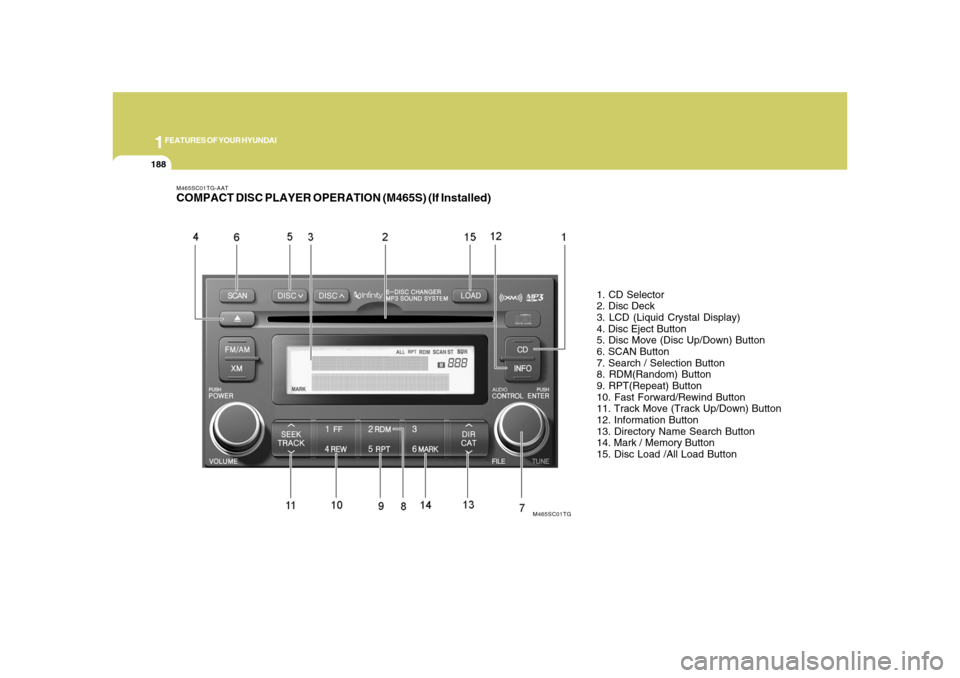
M465SC01TG-AATCOMPACT DISC PLAYER OPERATION (M465S) (If Installed)
1. CD Selector
2. Disc Deck
3. LCD (Liquid Crystal Display)
4. Disc Eject Button
5. Disc Move (Disc Up/Down) Button
6. SCAN Button
7. Search / Selection Button
8. RDM(Random) Button
9. RPT(Repeat) Button
10. Fast Forward/Rewind Button
11. Track Move (Track Up/Down) Button
12. Information Button
13. Directory Name Search Button
14. Mark / Memory Button
15. Disc Load /All Load Button
M465SC01TG
Page 207 of 345
1
FEATURES OF YOUR HYUNDAI
193193
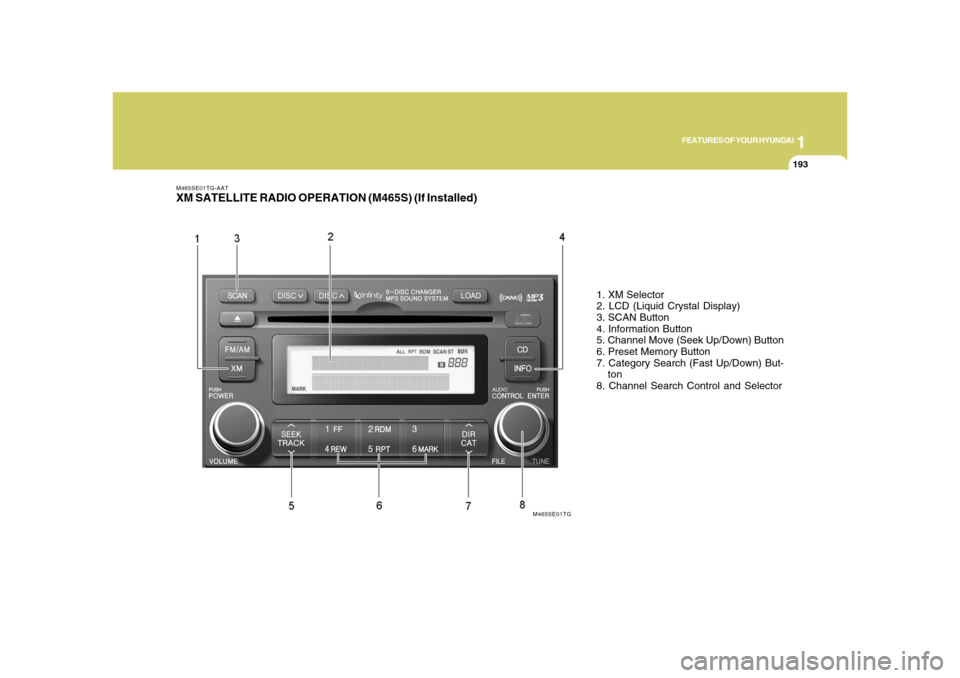
M465SE01TG-AATXM SATELLITE RADIO OPERATION (M465S) (If Installed)
1. XM Selector
2. LCD (Liquid Crystal Display)
3. SCAN Button
4. Information Button
5. Channel Move (Seek Up/Down) Button
6. Preset Memory Button
7. Category Search (Fast Up/Down) But-
ton
8. Channel Search Control and Selector
M465SE01TG
Page 211 of 345
1
FEATURES OF YOUR HYUNDAI
197197
B860A03L
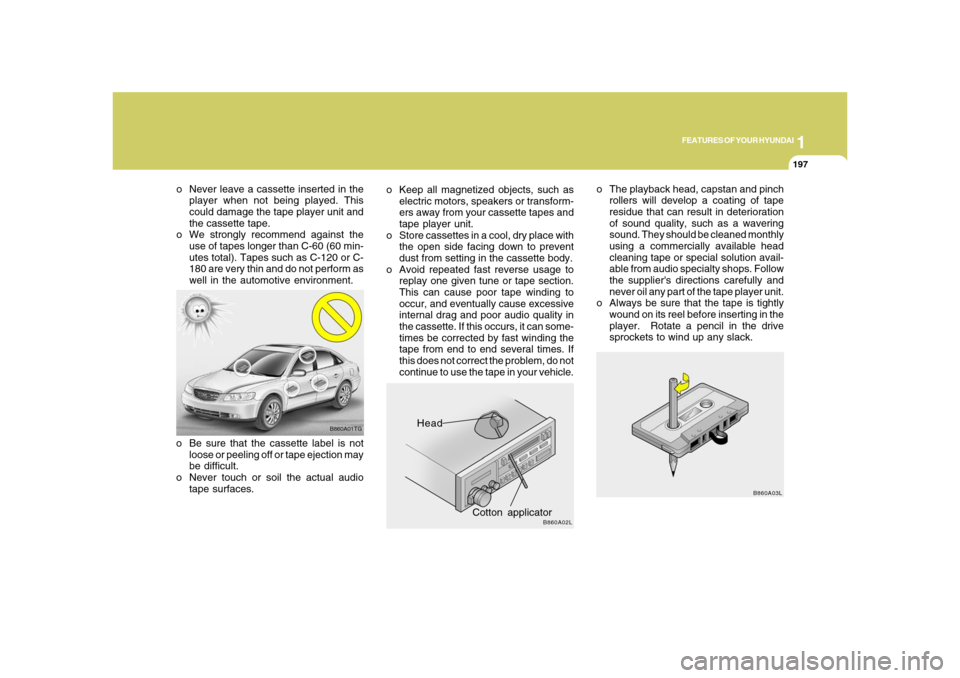
o The playback head, capstan and pinch
rollers will develop a coating of tape
residue that can result in deterioration
of sound quality, such as a wavering
sound. They should be cleaned monthly
using a commercially available head
cleaning tape or special solution avail-
able from audio specialty shops. Follow
the supplier's directions carefully and
never oil any part of the tape player unit.
o Always be sure that the tape is tightly
wound on its reel before inserting in the
player. Rotate a pencil in the drive
sprockets to wind up any slack.
Head
Cotton applicator
B860A02L
o Keep all magnetized objects, such as
electric motors, speakers or transform-
ers away from your cassette tapes and
tape player unit.
o Store cassettes in a cool, dry place with
the open side facing down to prevent
dust from setting in the cassette body.
o Avoid repeated fast reverse usage to
replay one given tune or tape section.
This can cause poor tape winding to
occur, and eventually cause excessive
internal drag and poor audio quality in
the cassette. If this occurs, it can some-
times be corrected by fast winding the
tape from end to end several times. If
this does not correct the problem, do not
continue to use the tape in your vehicle.
B860A01TG
o Be sure that the cassette label is not
loose or peeling off or tape ejection may
be difficult.
o Never touch or soil the actual audio
tape surfaces. o Never leave a cassette inserted in the
player when not being played. This
could damage the tape player unit and
the cassette tape.
o We strongly recommend against the
use of tapes longer than C-60 (60 min-
utes total). Tapes such as C-120 or C-
180 are very thin and do not perform as
well in the automotive environment.
Page 212 of 345
1FEATURES OF YOUR HYUNDAI
198
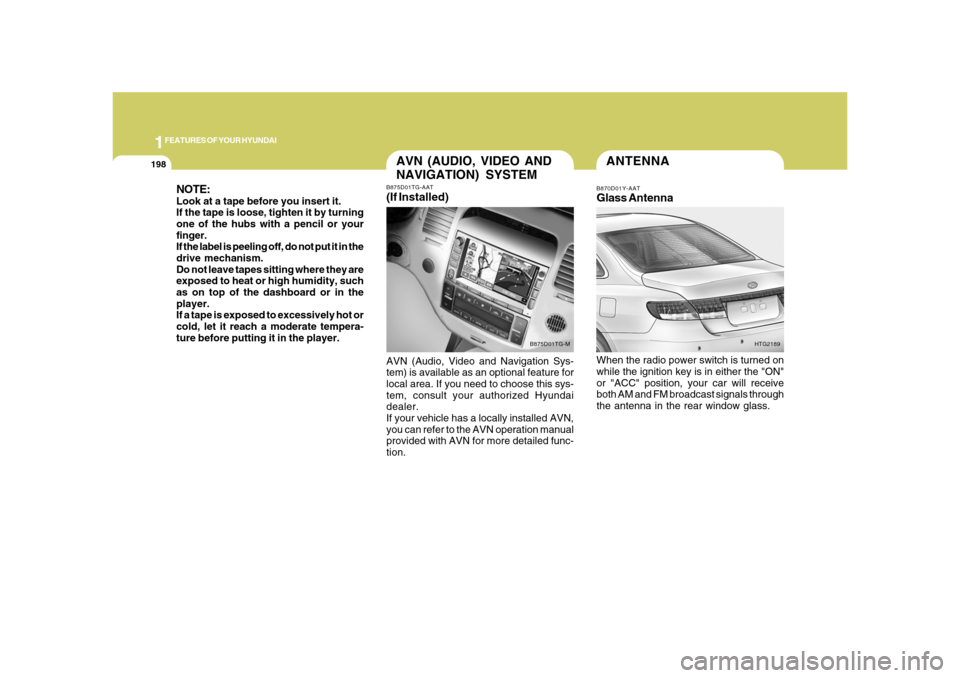
ANTENNAB870D01Y-AATGlass AntennaWhen the radio power switch is turned on
while the ignition key is in either the "ON"
or "ACC" position, your car will receive
both AM and FM broadcast signals through
the antenna in the rear window glass.
HTG2189
NOTE:Look at a tape before you insert it.
If the tape is loose, tighten it by turning
one of the hubs with a pencil or your
finger.
If the label is peeling off, do not put it in the
drive mechanism.
Do not leave tapes sitting where they are
exposed to heat or high humidity, such
as on top of the dashboard or in the
player.
If a tape is exposed to excessively hot or
cold, let it reach a moderate tempera-
ture before putting it in the player.
AVN (AUDIO, VIDEO AND
NAVIGATION) SYSTEMB875D01TG-AAT(If Installed)AVN (Audio, Video and Navigation Sys-
tem) is available as an optional feature for
local area. If you need to choose this sys-
tem, consult your authorized Hyundai
dealer.
If your vehicle has a locally installed AVN,
you can refer to the AVN operation manual
provided with AVN for more detailed func-
tion.
B875D01TG-M