Page 208 of 341

�µTo shif t to second,
pull the shif t lever towards you, then
shif t to the lower gear. This position
locks the transmission in second
gear. It does not downshif t to f irst
gear when you come to a stop.
Use second gear:
For more power when climbing.
To increase engine braking when
going down steep hills.
For starting out on a slippery
surf ace or in deep snow.
To help reduce wheel spin.
When driving downhill with a
trailer.
When towing a trailer on level roads
under normal driving conditions, do
not use D3. This will increase the
automatic transmission f luid
temperature and may cause
overheating.
Shif ting out of the D position will
cancel D3, and cause the D3
indicator to go out. Selecting the D
position again will resume D3, and
the indicator will come on.
Turning the ignition switch to the
LOCK (0) position turns D3 of f . To
use D3 when you restart the engine,
select the D position, and press the
D3 switch again.
TheD3indicatoralsocomesonfora
f ew seconds when you turn the
ignition switch to the ON (II)
position.
When D3 is on, the transmission
selects only the f irst three gears.
Use D3 f or engine braking when
going down a steep hill.
Automatic Transmission
Second (2)
204
D3 INDICATOR
�\f���—�\f���—�����y�
����\f����
���y���
�(���������\f�y�\f���\f���y
2008 Ridgeline
Page 209 of 341

�µTo shif t f rom second to
first, pull the shift lever towards you,
then shif t to the lower gear. This
position locks the transmission in
f irst gear. By upshif ting and
downshif ting through 1, 2, and D,
you can operate the transmission
much like a manual transmission
without a clutch pedal.
If you shif t into f irst position when
the vehicle speed is above 28 mph
(45 km/h), the transmission shif ts
into second gear first to avoid
sudden engine braking. If you exceed the maximum speed
f or the gear you are in, the engine
speed will enter into the tachometer’s
red zone. If this occurs, you may f eel
the engine cut in and out. This is
caused by a limiter in the engine’s
computer controls. The engine will
run normally when you reduce the
rpm below the red zone.
This allows you to move the shif t
lever out of Park if the normal
method of pushing on the brake
pedal and pulling the shif t lever does
not work.
Set the parking brake.
Make sure the ignition switch is in
the LOCK (0) position.
Putaclothonthenotchof the
shif t lock release slot cover. Using
a small f lat-tipped screwdriver or a
metal f ingernail f ile, caref ully pry
on the notch of the cover to
remove it.
1.
2.
3.
CONT INUED
First (1) Engine Speed Limiter Shift Lock Release
Automatic Transmission
Driving
205
�\f���—�\f���—�����y�
����\f��������y���
�(���������\f�y�\f���
�\f�y
2008 Ridgeline
Page 211 of 341

If you become stuck, you can
activatetheVTM-4bypressingthe
VTM-4 LOCK button while in f irst
(1), second (2), or reverse (R) gear
below18mph(30km/h).Thismode
overrides the auto system to send
maximum torque to the rear axle.
This mode is only intended f or
intermittent use at low speed to free
your vehicle if it becomes stuck or
when you encounter a steep grade
with one wheel on a slippery surf ace.
Generally, you should f irst allow the
auto mode to operate to adjust for
the available traction conditions.The vehicle speed must be below
18 mph (30 km/h).
Move the shift lever to first (1),
second (2), or reverse (R) gear. Press the VTM-4 LOCK button.
The indicator in the button comes
on.
To get unstuck, apply light pressure
to the accelerator pedal. Do not spin
the f ront tires f or more than a f ew
seconds. Because of the amount of
torque applied to the rear tires, they
should not spin. This is normal. If
you are not able to move the vehicle,
stop and reverse direction. The VTM-4 Lock will temporarily
disengage when the vehicle speed
exceeds 18 mph (30 km/h). The
indicator in the button will remain on.
do
any of the f ollowing: Press the VTM-4 LOCK button.
Move the shift lever to D.
Turn the ignition switch to the
LOCK (0) position.
1.
2. 3.
VTM-4 System
To Engage the VTM-4 Lock:
To Disengage the VTM-4 L ock,
Driving
207
Do not use the VTM-4 LOCK button on
dry, paved roads. Driving on dry,
paved roads with VTM-4 Lock ON may
damage the rear dif f erential when
making a turn. Strange noise and
vibration can also result.
Do not continuously spin the f ront tires
of your vehicle. Continuously spinning
the f ront tires can cause transmission
or rear dif f erential damage.
�\f���—�\f���—�����y�
����\f��������y���
�(���������\f�y�\f���
���y
2008 Ridgeline
Page 219 of 341

The vehicle stability assist (VSA)
system helps to stabilize the vehicle
during cornering if the vehicle turns
more or less than desired. It also
assists you in maintaining traction
while accelerating on loose or
slippery road surf aces. It does this
by regulating the engine’s output and
by selectively applying the brakes.
The VSA system cannot enhance the
vehicle’s driving stability in all
situations and does not control your
vehicle’s entire braking system. It is
still your responsibility to drive and
corner at reasonable speeds and to
leave a sufficient margin of safety.
When VSA activates, you may notice
that the engine does not respond to
the accelerator in the same way it
does at other times. There may also
be some noise f rom the VSA
hydraulic system. You will also see
the VSA activation indicator blink.When VSA activates, you will see the
VSA activation indicator blink (see
page ).
If the indicator does not come on
when the ignition switch is turned to
the ON (II) position, there may be a
problem with the VSA system. Have
your dealer inspect your vehicle as
soon as possible.
If this indicator comes on while
driving, pull to the side of the road
when it is saf e, and turn of f the
engine. Reset the system by
restarting the engine. If the VSA
system indicator stays on or comes
back on while driving, have the VSA
system inspected by your dealer. If the low tire pressure indicator or
TPMS indicator comes on, the VSA
system automatically turns on even
when the VSA system is turned of f
by pressing the VSA OFF switch
(see page ). If this happens, you
cannot turn the VSA system of f by
pressing the VSA of f switch again.
Without VSA, your vehicle will have
normal braking and cornering ability,
but it will not have VSA traction and
stability enhancement.
67
216
VSA A ctivation Indicator
Vehicle Stability Assist
(VSA ) System Indicator
Vehicle Stability Assist (VSA) System
Driving
215
�\f���—�\f���—�����y�
����\f��������y���
�(���������\f�y�\f�����\f�y
2008 Ridgeline
Page 231 of 341
To disconnect the connectors,
reverse the connection steps, then
make sure the socket lid and
socket cover are securely in place.
Avoid using excessive f orce when
disconnecting the connectors.Electric current f lows through the
electrical supply circuit only when
the ignition switch is in the ON
(II) position.
Using the electrical supply circuit
when the engine is at a stop or
idling can discharge the battery.
Bef ore you submerge the trailer
hitchinwater(suchasataboat
ramp), make sure the connectors
are removed and the socket lid
and socket cover are securely in
place. Failure to do this will result
in electrical system problems.
Af ter the connectors are
submergedinwater,openthe
socket lid and the socket cover to
drain them.
CONT INUED
Import ant Precaut ions
Towing a Trailer
Driving
227
�\f���—�\f���—�����y�
����
�
������y���
�(���������\f�y�\f�������y
2008 Ridgeline
Page 243 of 341

�µ
�µ
�µ
�µ
�µ
�µ
�µ
�µ
�µ
�µ �µ
�µ
CONT INUED
Calculated Engine Oil Lif e (%)
100 % 91 % 90 % 81 %
80 % 71 %
70 % 61 %
60 % 51 %
50 % 41 %
40 % 31 %
30 % 21 %
20 % 16 %
15 % 11 %10 % 6 % 5% 1% 0% Displayed
Engine Oil Lif e (%) 100 %90 %
80 %
70 %
60 %
50 %
40 %
30 %
20 %
15 %
10 %5%
0%
The remaining engine oil lif e is
displayed on the engine oil lif e
display according to the table shown
below.
Based on the engine operating
conditions and accumulated engine
revolutions, the onboard computer in
your vehicle calculates the remaining
engine oil lif e and displays it as a
percentage.
Your vehicle displays engine oil lif e
and maintenance service items on
the inf ormation display to show you
when you should have your dealer do
engine oil replacement and indicated
maintenance service.
To see the current engine oil lif e,
turn the ignition switch to the ON
(II) position, and press the SELECT
button repeatedly until the engine oil
life display appears (see page ).70
Maintenance Minder
Engine Oil L if e Display
Maint enance
239
MAINTENANCE MINDER
INDICATOR
ENGINE OIL LIFE
DISPLAY
�\f���—�\f���—�����y�
����
����\f���y���
�(���������\f�y�\f�������y
2008 Ridgeline
Page 244 of 341

The message changes between
SERVICE and dUE SOON
repeatedly.The message changes between
SERVICE and dUE NOW repeatedly.
If theengineoillifeis15to6percent,
you will see a ‘‘SERVICE dUE
SOON’’ message in the inf ormation
display every time you turn the
ignition switch to the ON (II)
position. The maintenance minder
indicator will also come on, and the
maintenance item code(s) for other
scheduled maintenance items
needing service will be displayed
below the message. When the remaining engine oil lif e is
5 to 1 percent, you will see a
‘‘SERVICE dUE NOW’’ message
along with the same maintenance
item code(s), every time you turn the
ignition switch to the ON (II)
position.
The maintenance item code(s)
indicate the main and sub items
required at the time of the oil change
(see page ).
Press the SELECT button repeatedly
to select the engine oil lif e.
The 15 and 10 percent oil lif e display
reminds you that the time is coming
soon to take your vehicle in for the
required maintenance.
246
Maintenance Minder
240
MAINTENANCE ITEM CODES MAINTENANCE MAIN ITEM
MAINTENANCE SUB ITEMS MAINTENANCE ITEM CODES
MESSAGE
MESSAGE
�\f���—�\f���—�����y�
����
����
���y���
�(���������\f�y�\f�������y
2008 Ridgeline
Page 245 of 341
When you see this message, have
the indicated maintenance
perf ormed by your dealer as soon as
possible.
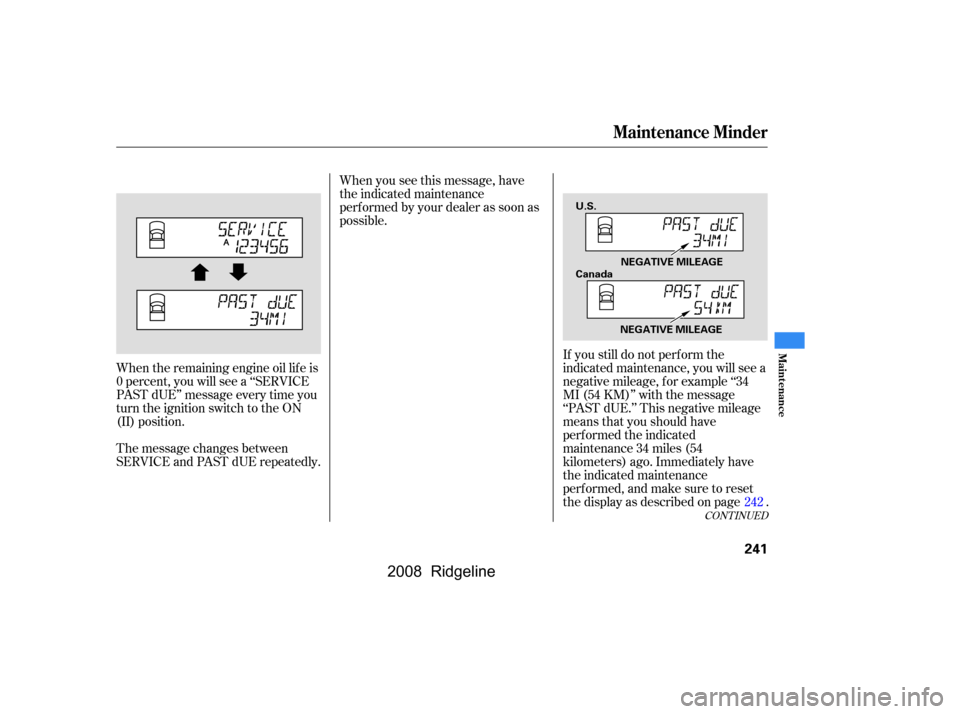
When the remaining engine oil lif e is
0percent,youwillseea‘‘SERVICE
PAST dUE’’ message every time you
turn the ignition switch to the ON
(II) position.
The message changes between
SERVICE and PAST dUE repeatedly. If you still do not perf orm the
indicated maintenance, you will see a
negative mileage, f or example ‘‘34
MI (54 KM)’’ with the message
‘‘PAST dUE.’’ This negative mileage
means that you should have
perf ormed the indicated
maintenance 34 miles (54
kilometers) ago. Immediately have
the indicated maintenance
perf ormed, and make sure to reset
the display as described on page .
242
CONT INUED
Maintenance Minder
Maint enance
241
NEGATIVE MILEAGE
U.S.
Canada
NEGATIVE MILEAGE
�\f���—�\f���—�����y�
����
������
�y���
�(���������\f�y�\f�������y
2008 Ridgeline