Page 187 of 524
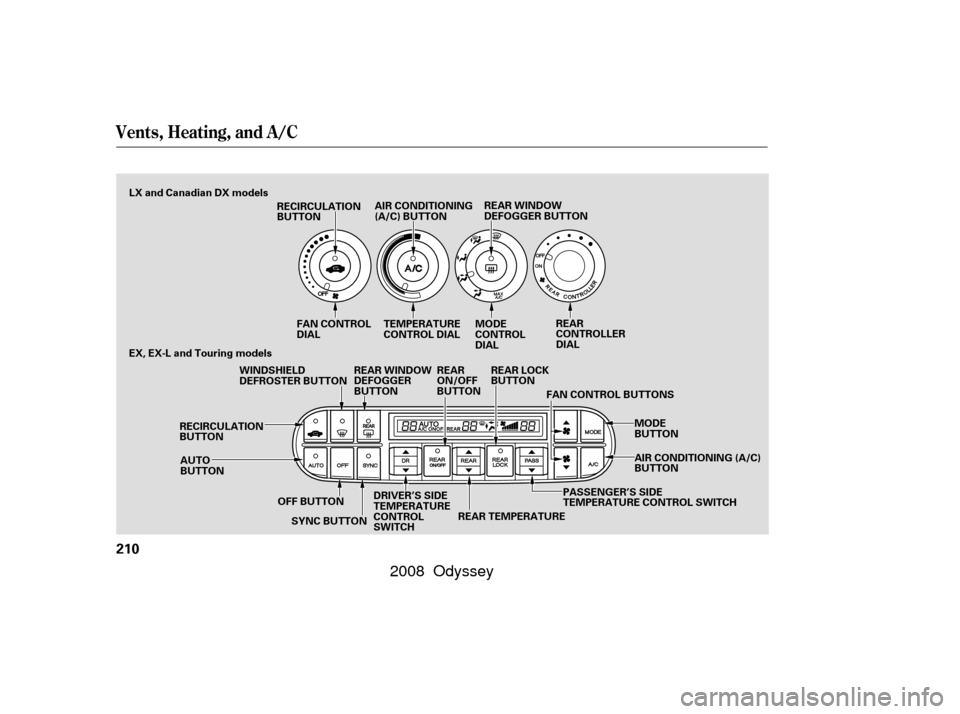
Store a driver’s seat position only
when the vehicle is parked.Turn the ignition switch to the ON
(II) position. You cannot add a
new seat position in memory
unless the ignition switch is in the
ON (II) position. You can recall a
memorized position with the
ignition switch in any position. Press and release the MEMO
button on the driver’s door. You
will hear a beep. Then, both
indicators in the memory buttons
will start to blink. Press and hold
one of the memory buttons (1 or
2) within 5 seconds af ter you press
the MEMO button. When the
system completes storing a new
driving position, you hear two
beeps. The indicator in the stored
memory button will come on.
Your vehicle has a memory feature
f or the driver’s seat and outside
mirror positions.
Two seat and outside mirror
positionscanbestoredinseparate
memories. You select a memorized
position by pushing the appropriate
button or using the appropriate
remote transmitter (Driver 1 or
Driver 2).
You can change the ‘‘MEMORY
POSITION LINK’’ setting on the
multi-inf ormation display (see page
).
This setting can be linked or
unlinked with the remote transmitter.
For more inf ormation, see page .
Adjust the seat to a comfortable
position (see page ).
Adjust the outside mirrors f or best
visibility (see page ).
1.
2.
3.
4.
149
116 170
191
On Touring model onlyStoring a Driving Position in
Memory
Driving Position Memory System
184
MEMO BUTTON
MEMORY
BUTTONS
INDICATORS
�����—�����—�����y���������������y���
�(�����������y���
�����y
2008 Odyssey
Page 188 of 524
Doing any of the f ollowing af ter
pressing the MEMO button will
cancel the storing procedure.Not pressing a memory button
within 5 seconds.
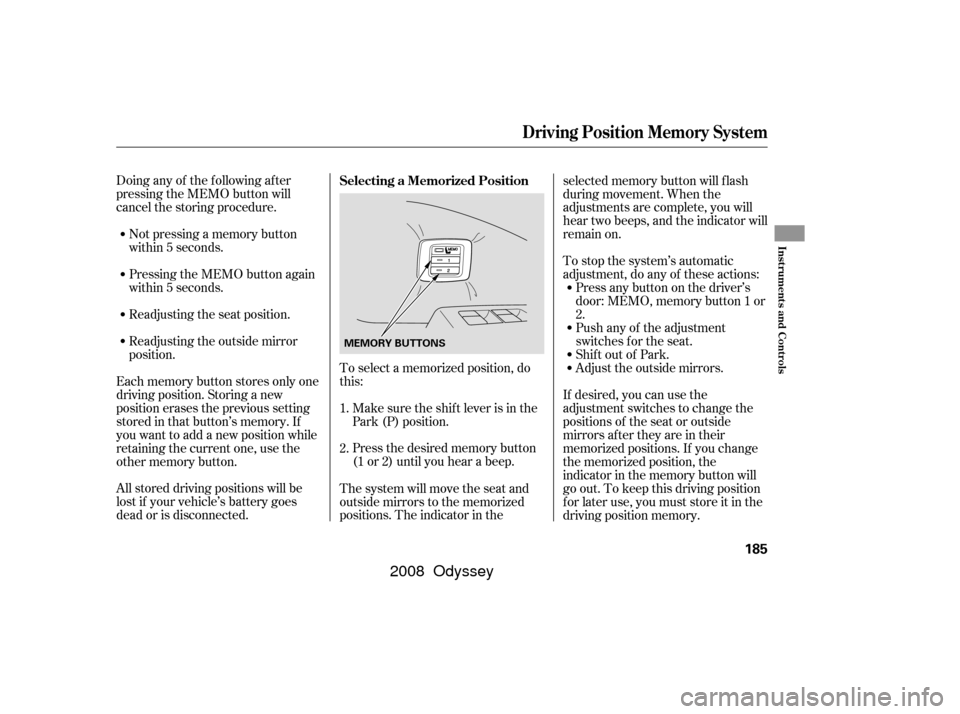
To select a memorized position, do
this:
Pressing the MEMO button again
within 5 seconds.
Press the desired memory button
(1 or 2) until you hear a beep.
Readjusting the seat position.
Readjusting the outside mirror
position.
All stored driving positions will be
lost if your vehicle’s battery goes
dead or is disconnected. Each memory button stores only one
driving position. Storing a new
position erases the previous setting
stored in that button’s memory. If
you want to add a new position while
retaining the current one, use the
other memory button. The system will move the seat and
outside mirrors to the memorized
positions. The indicator in theselected memory button will f lash
during movement. When the
adjustments are complete, you will
hear two beeps, and the indicator will
remain on.
To stop the system’s automatic
adjustment, do any of these actions:
Press any button on the driver’s
door: MEMO, memory button 1 or
2.
Push any of the adjustment
switches f or the seat.
Shif t out of Park.
Adjust the outside mirrors.
If desired, you can use the
adjustment switches to change the
positions of the seat or outside
mirrors af ter they are in their
memorized positions. If you change
the memorized position, the
indicator in the memory button will
go out. To keep this driving position
f or later use, you must store it in the
driving position memory.
Make sure the shif t lever is in the
Park (P) position.
1.
2. Selecting a Memorized Position
Driving Position Memory System
Inst rument s and Cont rols
185
MEMORY BUTTONS
�����—�����—�����y���������������y���
�(�����������y���
�����y
2008 Odyssey
Page 213 of 524
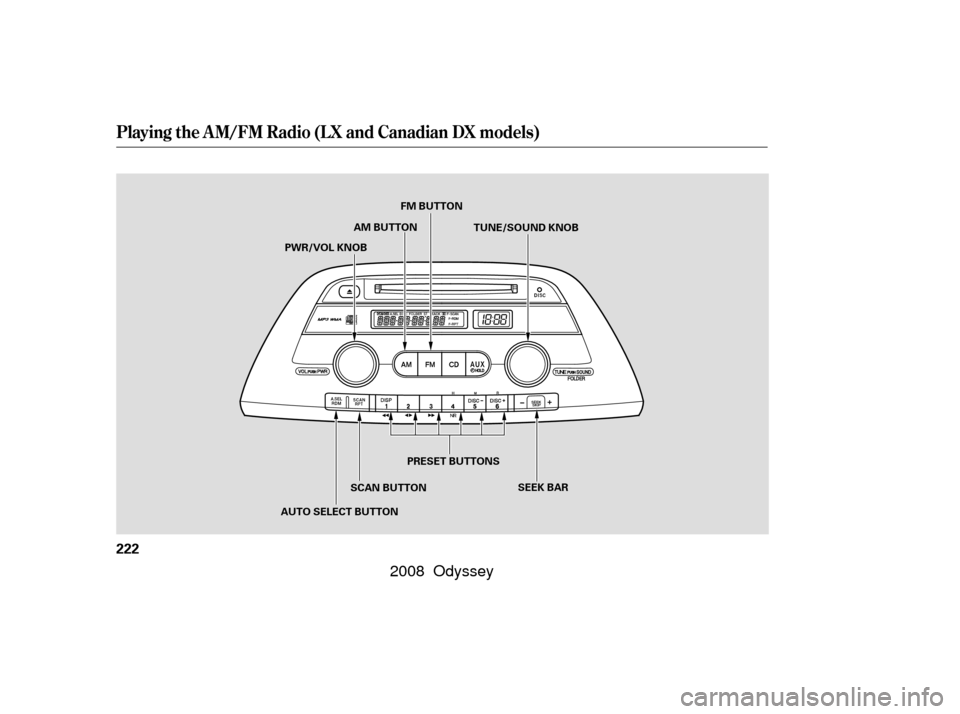
Vents, Heating, and A/C
210
RECIRCULATION
BUTTONREAR WINDOW
DEFOGGER BUTTON
MODE
CONTROL
DIAL
AUTO
BUTTON
RECIRCULATION
BUTTON TEMPERATURE
CONTROL DIAL
REAR
CONTROLLER
DIAL
WINDSHIELD
DEFROSTER BUTTON REAR WINDOW
DEFOGGER
BUTTON
OFF BUTTON
EX, EX-L and Touring models
MODE
BUTTON
AIR CONDITIONING
(A/C) BUTTON
SYNC BUTTON AIR CONDITIONING (A/C)
BUTTON
FAN CONTROL
DIAL
FAN CONTROL BUTTONS
REAR
ON/OFF
BUTTON
REAR LOCK
BUTTON
REAR TEMPERATURE
DRIVER’S SIDE
TEMPERATURE
CONTROL
SWITCH PASSENGER’S SIDE
TEMPERATURE CONTROL SWITCH
LX and Canadian DX models
�����—�
�
�—�����y�
���������
���y���
�(�����������y�����
���y
2008 Odyssey
Page 214 of 524

�Û
�Ý �Û
�Ý
Turn the dial clockwise to increase
the fan speed and airflow. Turn the
dial counterclockwise to decrease it.
Press the button to increase
the fan speed and airflow. Press the
button to decrease it.
Turning this dial clockwise increases
the temperature of the airflow.
Your vehicle has four temperature
control buttons, two f or the driver,
and two for the front passenger.
When the rear passenger’s zone is
turned on using the REAR button on
the f ront control panel, a second row
passenger also can adjust the temperature, f an speed and air f low.
The rear passenger compartment
temperature can also be set
separately. Press the top ( ) of the
appropriate temperature control
button to increase the temperature
of airflow. Press the bottom ( ) of
the button to decrease it. Each set
temperature is shown in the display.
When you set the temperature to its
lower limit or its upper limit, it will be
displayed as ‘‘Lo’’ or ‘‘Hi’’.
When you press this button, the
indicator in the button comes on, and
the passenger’s side temperature
and the rear passenger compartment
is synchronized to the driver’s side
set temperature. Changing the
passenger’s side temperature or the
temperature of the rear passengercompartment makes the indicator to
go off, and takes the system out of
SYNC mode.
This button turns the air
conditioning on and of f . On LX and
Canadian DX models, the indicator in
thebuttonisonwhentheA/Cison.
On EX, EX-L, and Touring models,
you will see A/C ON or A/C OFF in
the display.
When the indicator in the button is
on, air f rom the vehicle’s interior is
sent throughout the system again.
When the indicator is off, air is
brought in f rom the outside of the
vehicle (fresh air mode).
CONT INUED
On EX, EX-L and Touring models
On EX, EX-L and Touring models
On EX, EX-L and Touring models On EX, EX-L and Touring models
On EX, EX-L and Touring models
On LX and Canadian DX models
On LX and Canadian DX models
Vents, Heating, and A/C
Fan Control
T emperature Control Air Conditioning (A/C) Button
Recirculation Button
SYNC Button
Features
211
�����—�
�
�—�����y�
�������������y���
�(�����������y�����
���y
2008 Odyssey
Page 216 of 524

Air conditioning places an extra load
on the engine. Watch the engine
coolant temperature gauge (see page). If it moves near the red mark,
turn of f the A/C until the gauge
reads normally.
Press the A/C button. The
indicator in the button comes on
(LX and Canadian DX models) or
‘‘A/C ON’’ is shown in the display
(EX, EX-L and Touring models)
when a f an speed is selected.
The f low-through ventilation system
draws in outside air, circulates it
through the interior, then exhausts it
through vents near the rear side
panels.
Set the temperature control dial or
button to the lower limit.
Make sure the A/C is of f .
Select and fresh air mode.
Set the f an to the desired speed. The heater uses engine coolant to
warm the air. If the engine is cold, it
will be several minutes bef ore you
f eel warm air coming f rom the
system.
Select and fresh air mode.
Set the f an to the desired speed.
Adjust the warmth of the air with
the temperature control dial or
buttons.
Make sure the temperature is set
to the lower limit.
Select .
If the outside air is humid, select
recirculation mode. If the outside
air is dry, select f resh air mode.
Set the f an to the desired speed.
1.
2.
3.
4.
5.
1.
2.
3.
1.
2.
3.
4. 77
CONT INUED
Vents, Heating, and A/C
Using the A/C
Ventilation Using the Heater
Features
213
�����—�
�
�—�����y�
���������
���y���
�(�����������y�����
���y
2008 Odyssey
Page 225 of 524
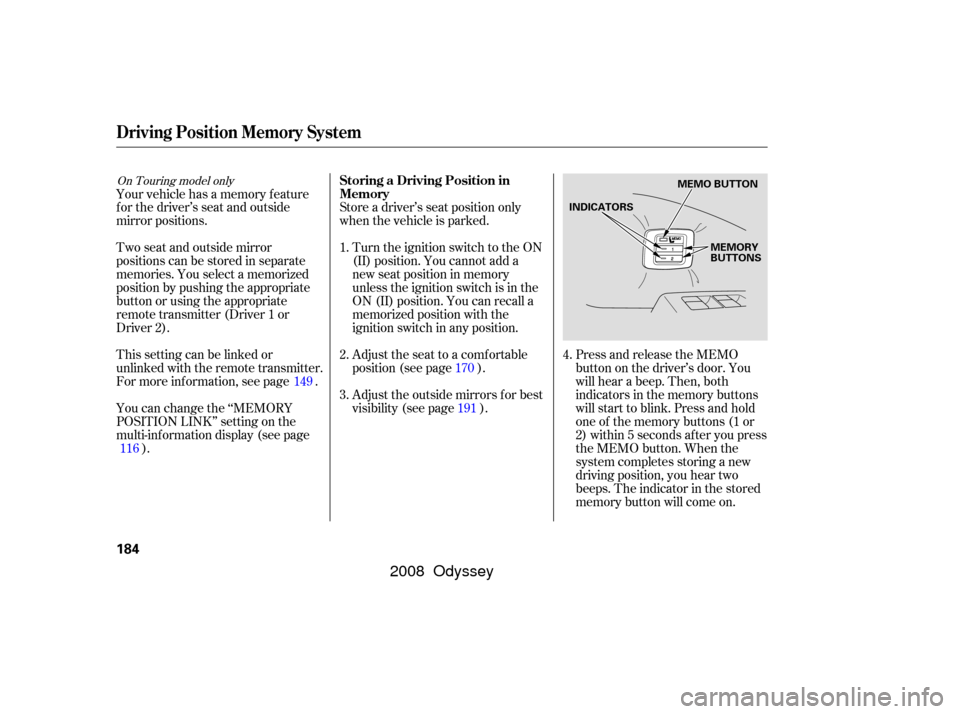
Playing the AM/FM Radio (LX and Canadian DX models)
222
SEEK BAR
AUTO SELECT BUTTON PRESET BUTTONS
PWR/VOL KNOB
SCAN BUTTONFM BUTTON
AM BUTTON TUNE/SOUND KNOB
�����—�
�
�—�����y�
���������
���y���
�(�����������y���������y
2008 Odyssey
Page 226 of 524

�µ
�µ
�µ �´�µ
The ignition switch must be in the
ACCESSORY (I) or ON (II) position.
Turn the system on by pushing the
PWR/VOL knob. Adjust the volume
by turning the same knob.
The band and f requency that the
radio was last tuned to are displayed.
To change bands, press the AM or
FM button. On the FM band, ST will
be displayed if the station is
broadcasting in stereo. Stereo
reproduction in AM is not available.
On the AM band, AM noise
reduction turns on automatically. The scan f unction samples
all stations with strong signals on the
selected band. To activate it, press
the SCAN button, then release it.
You will see SCAN in the display.
The system will scan f or a station
with a strong signal. When it f inds
one, it will stop and play that station
f or about 10 seconds.
If you do nothing, the system will
scan f or the next strong station and
play it f or 10 seconds. When it plays
a station that you want to listen to,
press the SCAN button again.
Use the TUNE knob to
tune the radio to a desired f requency.
Turn the knob right to tune to a
higher f requency, or lef t to tune to a
lower f requency.
The SEEK f unction
searches up and down from the
current f requency to f ind a station
with a strong signal. To activate it
press the or side of the bar,
then release it. You can use any of f ive methods to
f ind radio stations on the selected
band: tune, seek, scan, the preset
buttons, and auto select.
CONT INUED
To Play the AM/FM Radio SCAN
To Select a Station
TUNE
SEEK
Playing the AM/FM Radio (LX and Canadian DX models)
Features
223
�����—�
�
�—�����y�
�����������
�y���
�(�����������y���������y
2008 Odyssey
Page 227 of 524

�µ
�µ If you are
traveling far from home and can no
longer receive your preset stations,
you can use the auto select feature to
find stations in the local area.
Press the A. SEL button. ‘‘A. SEL’’
appears in the display, and the
system goes into scan mode f or
several seconds. It stores the
f requencies of six AM and twelve
FM stations in the preset buttons.
You will see a ‘‘0’’ displayed af ter
pressing a preset button if auto
select cannot f ind a strong station f or
that preset button.
If you do not like the stations auto
select has stored, you can store
other f requencies on the preset
buttons as previously described.
Each preset button can
store one f requency on AM and two
f requencies on FM.
Select the desired band, AM or
FM. FM1 and FM2 let you store
two f requencies with each preset
button.
Usethetune,seek,orscan
function to tune the radio to a
desired station.
Pick a preset button, and hold it
until you hear a beep.
Repeat steps 1 through 3 to store a
total of six stations on AM and
twelve stations on FM. ,pressthe
A. SEL (auto select) button. This
restores the presets you originally
set.
For inf ormation on AM/FM radio
f requencies and reception, see page .
1.
2.
3.
4. 275To turn of f auto select
Playing the AM/FM Radio (LX and Canadian DX models)
AUTO SELECT
Preset
224
�����—�
�
�—�����y�
�������������y���
�(�����������y���������y
2008 Odyssey