Page 103 of 373
When a passenger is seated in the
rear center seating position, make
sure the center head restraint is
properly adjusted.Make sure the removed head
restraints are securely stored.
To remove a head restraint, pull it up
as f ar as it will go. Push the release
button, then pull the restraint out of
the seat-back. Make sure the head restraint locks
in position when you reinstall it.
When reinstalling a head restraint,
put the legs back in place. Then
adjust it to the appropriate height
while pressing the release button.
Seats
Removing t he Head Rest raint
Inst rument s and Cont rols
99
RELEASE BUTTON
RELEASE BUTTON
Rear Outer Position Rear Center
CUSHION
LEGS SEAT-BACK CUSHION
LEGS SEAT-BACK
Failure to reinstall the head
restraints can result in severe
injury during a crash.
Always replace the head
restraints before driving.
�\f���—�\f���—�����y�
�������������y���
�(�,�����
�\f�y�\f�
�\f���y
2008 CR- V
Page 116 of 373
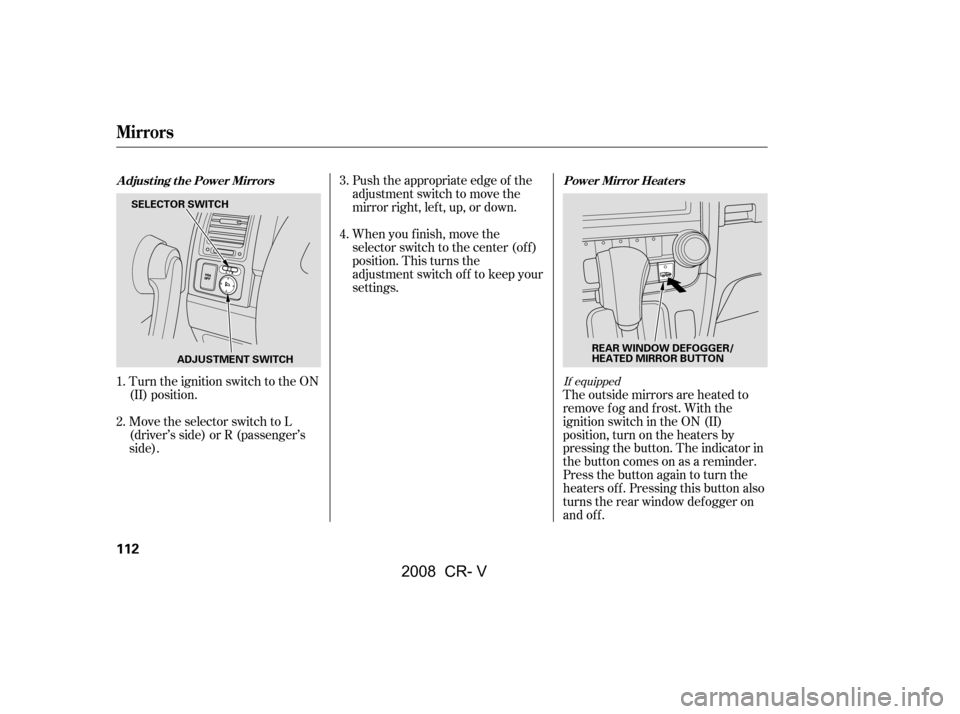
Turn the ignition switch to the ON
(II) position.Push the appropriate edge of the
adjustment switch to move the
mirrorright,left,up,ordown.
When you f inish, move the
selector switch to the center (off)
position. This turns the
adjustment switch of f to keep your
settings.
Move the selector switch to L
(driver’s side) or R (passenger’s
side). The outside mirrors are heated to
remove fog and frost. With the
ignition switch in the ON (II)
position, turn on the heaters by
pressing the button. The indicator in
the button comes on as a reminder.
Press the button again to turn the
heaters off. Pressing this button also
turns the rear window def ogger on
and off.
2.
1. 3.
4.If equipped
Adjusting the Power Mirrors Power Mirror Heaters
Mirrors
112
SELECTOR SWITCH
ADJUSTMENT SWITCH REAR WINDOW DEFOGGER/
HEATED MIRROR BUTTON
�\f���—�\f���—�����y�
���������
���y���
�(�,�����
�\f�y�\f�
�
���y
2008 CR- V
Page 136 of 373

On vehicles with navigation system
The climate control system can also
be operated by voice control. See the
Navi section in your quick start
guide f or an overview of this system,
and the navigation system manual
f or complete details.The automatic climate control
system in your vehicle picks the
proper combination of air
conditioning, heating, and ventilation
to maintain the interior temperature
you select. The system also adjusts
the fan speed and airflow levels.
Press the AUTO button.
Set the desired temperature by
turning the driver’s side
temperature control dial. You will
see AUTO and the selected
temperature in the display. You
can also set the passenger’s side
temperature by turning the
passenger’s side dial.
The system automatically selects the
proper mix of conditioned and/or
heated air that will, as quickly as
possible, raise or lower the interior
temperature to your pref erence. The driver’s side temperature and
the passenger’s side temperature can
be set separately. Turn the dial of
the appropriate temperature control
clockwisetoincreasethe
temperature of airf low. Turn the dial
counterclockwise to decrease it.
Each set temperature is shown in the
display.
When you set the temperature to its
lower limit ( ) or its upper limit
( ), the system runs at f ull
cooling or heating only. It does not
regulate the interior temperature.
When the indicator in the dual
button is on, the driver’s side and
passenger’s side temperature can be
controlled independently (see page
).
1.
2.
136
Climate Control System
Voice Control System Using A utomatic Climate ControlT emperat ure Cont rol
132
�\f���—�\f���—�����y�
���������\f���y���
�(�,�����
�\f�y�\f�
�����y
2008 CR- V
Page 143 of 373
An audio system is standard on all
models. Read the appropriate pages
(as shown below) to use your
vehicle’s audio system.
For LX, models, see pagesthrough .
For EX and EX-L models without
navigation system, see pages through .
For EX-L model with navigation
system, see pages through . 141152
153169 170210
Audio System
Features
139
U.S. EX-L model without
navigation system U.S. EX and Canadian EX, EX-L models
without navigation system
LX model
�\f���—�\f���—�����y�
���������\f�\f�y���
�(�,�����
�\f�y�\f�
�����y
2008 CR- V
Page 168 of 373

Your vehicle’s in-dash disc changer
holdsuptosixdiscs.Press the LOAD button until you
hear a beep and see ‘‘LOAD’’ on
the display.
To load only one CD, press and
release the LOAD button.
The disc number f or an empty
position is highlighted and the red
disc load indicator starts blinking. Insert the disc into the disc slot
when the green disc load indicator
comes on. Insert it only about
half way; the drive will pull it in the
rest of the way. You will see
‘‘BUSY’’ in the display while the
disc load indicator turns red and
blinks as the disc is loaded.
You cannot load and play 3-inch
(8-cm)discsinthissystem.
When the disc load indicator turns
green and ‘‘LOAD’’ appears in the
display again, insert the next disc
in the slot. Do not try to insert a
disc until ‘‘LOAD’’ appears. You
could damage the audio unit.
Repeat this until all six positions
are loaded. If you are not loading
all six positions, the system begins
playing the last disc loaded.You can also load a disc into an
empty position while a disc is playing
by pressing the appropriate preset
button. The system stops playing the
current disc and starts the loading
sequence. It then plays the disc just
loaded.
1.
2.
1. 3.
4.
5.
L oading Discs in the In-dash Disc
Changer
Playing Discs (EX and EX-L models without navigation system)
164
�\f���—�\f���—�����y�
�������������y���
�(�,�����
�\f�y�\f�
�����y
2008 CR- V
Page 169 of 373

�µ�µ
�¼
Each time you press the DISP button,
the display shows you the text data
on a disc, if the disc was recorded
with text data.
With the f older name, you will see
the FOLDER indicator in the display.
The TRACK indicator is shown with
the file or track name.
The display shows up to about 16
characters of selected text data (the
foldername,filename,etc.).If the
text data has more than 16
characters, you will see the first 15
characters and the indicator in
the display. Press and hold the DISP
button until the next 16 characters
are shown. You will also see some text data
under these conditions:
When a new f older, f ile, or track is
selected.
When you change the audio mode
to play a disc with text data or in
MP3 or WMA.
When you insert a disc, and the
system begins to play.
When playing a CD-DA with text
data, the album and track name are
showninthedisplay.Withadiscin
MP3 or WMA, the display shows the
f older and f ile name.
To select a dif f erent disc, press the
appropriate preset button (1 6). If
youselectanemptypositioninthe
disc changer, the system will try to
load the disc in the next available
slot. You can use the SEEK/SKIP bar
while a disc is playing to select
passages and change tracks (f iles in
MP3/WMA mode).
Each time you
press and release the side of
the SEEK/SKIP bar, the player skips
f orward to the beginning of the next
track (f ile in MP3 or WMA mode).
Press and release the side, to
skip backward to the beginning of
the current track. Press it again to
skip to the beginning of the previous
track.
To move rapidly within a track, press
and hold the or side of the
SEEK/SKIP bar.
You can see the album, artist, and
track name in the display. If a disc is
recorded in MP3 or WMA, you can
see the f older and f ile name, and the
artist, album, and track tag.
CONT INUED
T ext Dat a Display Funct ion T o Change or Select T racks/Files
SEEK /SK IP
Playing Discs (EX and EX-L models without navigation system)
Features
165
�\f���—�\f���—�����y�
�������������y���
�(�,�����
�\f�y�\f�
���\f�y
2008 CR- V
Page 172 of 373

�Î
�ÎYou can also eject discs when the
ignition switch is of f . The disc that
was last selected is ejected f irst.
To remove the disc currently in play,
press the eject ( ) button. When
a disc is removed f rom a slot, the
system automatically begins the load
sequence so you can load another
disc in that position. If you do not
remove the disc f rom the changer
within 10 seconds, the system
returns to the previous mode (AM,
FM or satellite radio ). The disc will
reload into the system and will
remainthereinapausemode.
To remove a different disc from the
changer,firstselectitwiththe
appropriate preset button. When that
disc begins playing, press the eject
button. Continue pressing the eject
button to remove all the discs from
the changer.
Press the AM, FM, AUX button, or
CD/AUX, XM button to switch to
the radio or satellite radio (U.S.
models), while a disc is playing.
Press the CD button again to play
the disc.
If you turn the system of f while a
disc is playing, either with the PWR/
VOL knob or by turning of f the
ignition switch, the disc will stay in
the drive. When you turn the system
back on, the disc will begin playing
where it lef t of f .
:OnU.S.EX-Lmodel
Removing Discs f rom the In-dash
Disc Changer
To Stop Playing a Disc
Playing Discs (EX and EX-L models without navigation system)
168
�\f���—�\f���—�����y�
�������������y���
�(�,�����
�\f�y�\f�
�����y
2008 CR- V
Page 178 of 373
�µ�µ
�µ
�µ
�µ
�µ
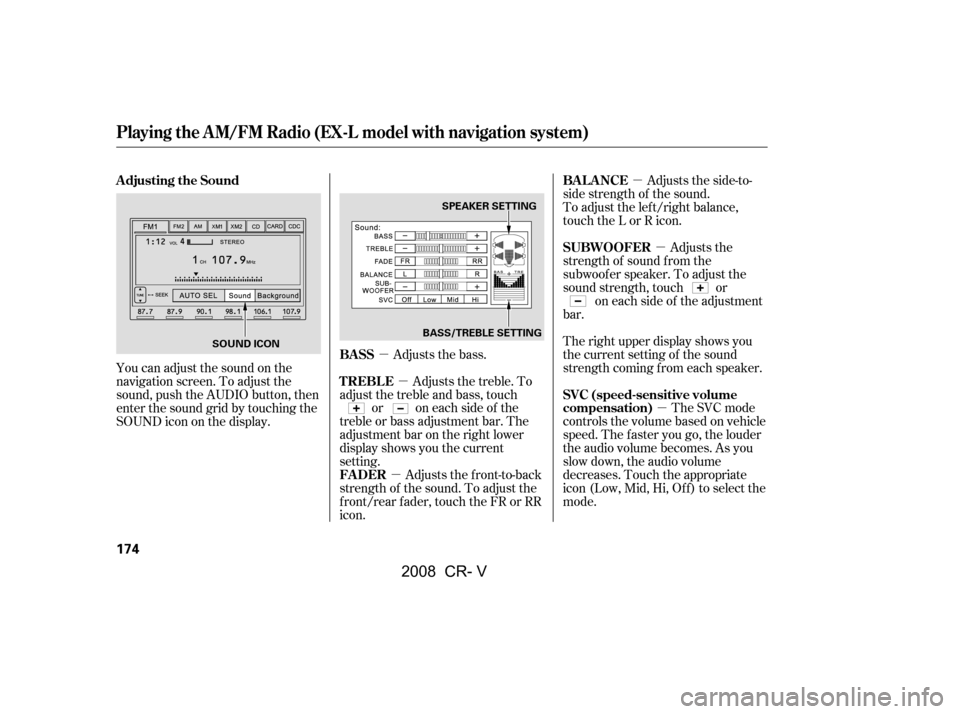
You can adjust the sound on the
navigation screen. To adjust the
sound, push the AUDIO button, then
enter the sound grid by touching the
SOUNDicononthedisplay.
Adjusts the bass.Adjusts the side-to-
side strength of the sound.
To adjust the left/right balance,
touch the L or R icon.
Adjusts the
strength of sound f rom the
subwoof er speaker. To adjust the
sound strength, touch or on each side of the adjustment
bar.
The right upper display shows you
the current setting of the sound
strength coming f rom each speaker.
The SVC mode
controls the volume based on vehicle
speed. The f aster you go, the louder
the audio volume becomes. As you
slow down, the audio volume
decreases. Touch the appropriate
icon (Low, Mid, Hi, Of f ) to select the
mode.
Adjusts the treble. To
adjust the treble and bass, touch or on each side of the
treble or bass adjustment bar. The
adjustment bar on the right lower
display shows you the current
setting.
Adjusts the front-to-back
strength of the sound. To adjust the
front/rear fader, touch the FR or RR
icon.
Adjusting the Sound
BASSBAL ANCE
SUBWOOFER
SVC (speed-sensitive volume
compensation)
TREBLE
FADER
Playing the AM/FM Radio (EX-L model with navigation system)
174
SPEAKER SETTING
BASS/TREBLE SETTING
SOUND ICON
�\f���—�\f���—�����y�
�������������y���
�(�,�����
�\f�y�\f�
�����y
2008 CR- V