2008 HONDA CR-V ECO
[x] Cancel search: ECOPage 124 of 145

124Navigation System
Rear Camera
The media card will not fully insert into the PC card slot.
What is wrong? The PC card edge connector or the pins
in the back of PC card slot may be
damaged.
Never force the card into the slot - the adaptor card should glide smoothly into the slot. See your dealer if the problem persists.
I insert a CD-R with music file s, but the CD button, or “CD”
voice commands do not work. What is wrong? After inserting a CD-R with WMA or
MP3 files, a slight delay may occur
before the CD button operates. Th e system needs to read the tag
information (album, artist, and track na mes) to allow searches - this is
normal.
Ensure that the music files on the CD-R are the WMA or MP3 format. Other formats are not recognized.
Some WMA and MP3 files are copy pr otected, and require that the
copyright authentication files accompany the MP3/WMA files on the CD.
Note:
Never use CD-R discs with stick on labels. The labels can curl and
jam the CD mechanism requiring replacement of the navigation unit,
and subsequent loss of all personal information.
Problem Solution
When I shift gears, the rear camera image is delayed. When shifting into or out of reverse, you may experience delays when the
screen image switches between the navi screen and the rear camera image.
This is normal.
The rear camera image is too dark or too bright, how do I
adjust the brightness. While the camera image is displayed, use the Zoom In/Zoom Out controls to
adjust the brightness. This ad
justment does not affect the Setup screen
brightness adjustments.
Problem
Solution
Frequently Asked Questions
2008 CR- V
Page 128 of 145

128Navigation System
Glossary
Glossary
The following is a glossary of terms
pertaining to the voice recognition
navigation system.
Avoid Area - Areas you wish to avoid
can be entered into the system, and
will be avoided while routing.
Breadcrumbs - Off road tracking dots
that can be followe d on the map to
retrace your route back to a mapped
(digitized) road. This function can be
turned on/off in Setup screen
(second).
Compact Flash - A media chip that can
be used with a PC card adaptor to
play audio music files.
Database - This consists of the map
data, and the POI (Points Of Interest)
data stored on the DVD.
DCA - Detailed Coverage Area. The
main metropolitan areas in the lower
48 states, and southern Canada are
mapped to this level. See page106
for a list of these areas.
Digital Audio Card Reader - The PC
card slot accepts a PCMCIA adaptor
with a flash memory chip (see
page104).
Digitized Road - A road that appears on
the navigation screen. The road name
will appear at the bottom of the
navigation screen. If the user drives
“off road” the navigation system will
display “breadcrumbs,” depending on
how far you drive from a mapped road.
Disclaimer Screen - Screen containing
cautionary information. It is meant to
be read carefully and acknowledged
by the customer when using the
navigation system.
DVD or DVD-ROM - Digital Versatile
Disc. The navigation program and
database resides on this disc. For
information on how to order a
replacement or update DVD, see
page102.
FAQ - Frequently Asked Questions. See
page117 for a list of the customer
FAQs, and troubleshooting
information.
GPS - Global Positioning System. A
network of 24 satellites in orbit
around the earth. The navigation
system can simultaneously receive
signals from up to 12 satellites to
accurately position the vehicle on the
map. GPS Antenna -
Located in the center of
the dash. Electronic items operating
in this general location can interfere
with the GPS signal.
Icon - Symbol representing Points of
Interest (POI) that can be displayed
on the map.
Initialization - This refers to the period
needed to reacquire the GPS satellite
orbital information whenever the
navigation system power has been
disconnected. This can take 10 to 45
minutes with the vehicle out in an
open area.
LCD - Liquid Crystal Display. The
navigation screen.
Map Matching - The received GPS information allows the navigation
system to position the vehicle on the
map. Map matching has occurred if
the map screen is displaying the
current street name in the bottom-
shaded area.
Mic - Abbreviation for the microphone
used for receiving voice commands.
It is located near the map light in the
ceiling.
2008 CR- V
Page 130 of 145

130Navigation System
Glossary
Voice Control - See VR.
VP - Vehicle Position. When in map
mode, this circular icon shows the
vehicle position on the map. Touch
this icon to show the latitude,
longitude, and elevation of your
current position.
VR - Voice Recognition. This allows
voice control of many of the
navigation functions. The hardware
consists of the microphone, voice
control switch ( NAVI TALK/NAVI
Back buttons), and the front
speakers.
Waypoint - A temporary destination you may enter on route (e.g., a gas
station, ATM, etc.). See page62.
WMA - A windows media audio file
that can be played from a CD-R or PC
card.
Yaw Rate Sensor - Senses when the
vehicle makes a turn, which makes
the VP change direction on the map
as you turn.
2008 CR- V
Page 137 of 145
Navigation System137
Voice Command Index
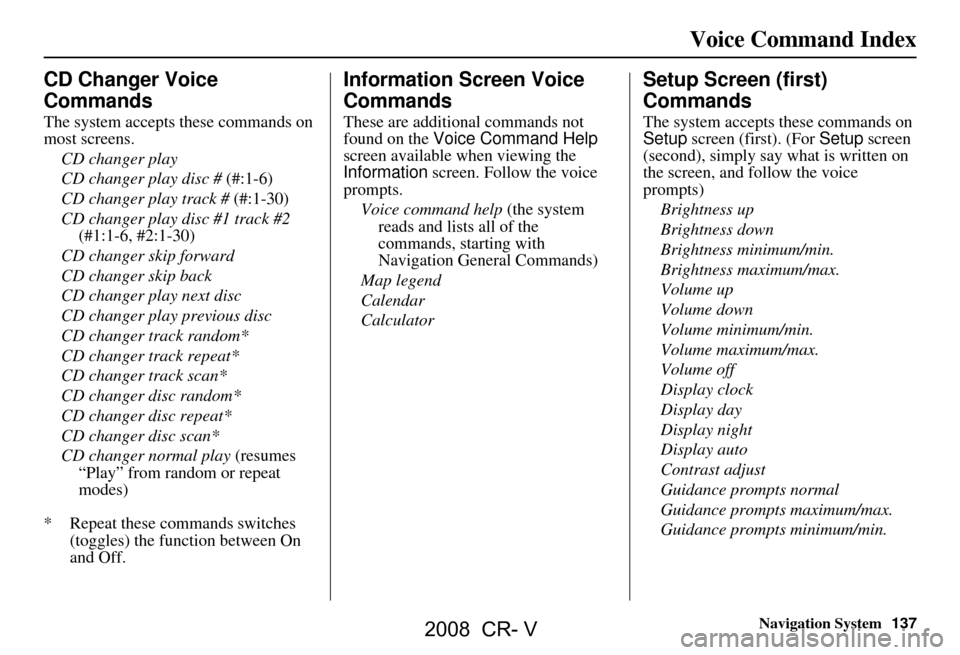
CD Changer Voice
Commands
The system accepts these commands on
most screens.
CD changer play
CD changer play disc # (#:1-6)
CD changer play track # (#:1-30)
CD changer play disc #1 track #2 (#1:1-6, #2:1-30)
CD changer skip forward
CD changer skip back
CD changer play next disc
CD changer play previous disc
CD changer track random*
CD changer track repeat*
CD changer track scan*
CD changer disc random*
CD changer disc repeat*
CD changer disc scan*
CD changer normal play (resumes
“Play” from random or repeat
modes)
* Repeat these commands switches (toggles) the function between On
and Off.
Information Screen Voice
Commands
These are additional commands not
found on the Voice Command Help
screen available when viewing the
Information screen. Follow the voice
prompts.
Voice command help (the system
reads and lists all of the
commands, starting with
Navigation General Commands)
Map legend
Calendar
Calculator
Setup Screen (first)
Commands
The system accepts these commands on
Setup screen (first). (For Setup screen
(second), simply say what is written on
the screen, and follow the voice
prompts)
Brightness up
Brightness down
Brightness minimum/min.
Brightness maximum/max.
Volume up
Volume down
Volume minimum/min.
Volume maximum/max.
Volume off
Display clock
Display day
Display night
Display auto
Contrast adjust
Guidance prompts normal
Guidance prompts maximum/max.
Guidance prompts minimum/min.
2008 CR- V
Page 138 of 145
138Navigation System
On-Screen Commands
The system accepts these commands on
any screen. There are over 100 on-
screen commands. Just say what is
written on the screen (this excludes
keyboard letters, and listed items)
Next (or “Down”)
Previous (or “Up”)
Return
OK (except at Disclaimer screen)
Delete
Done
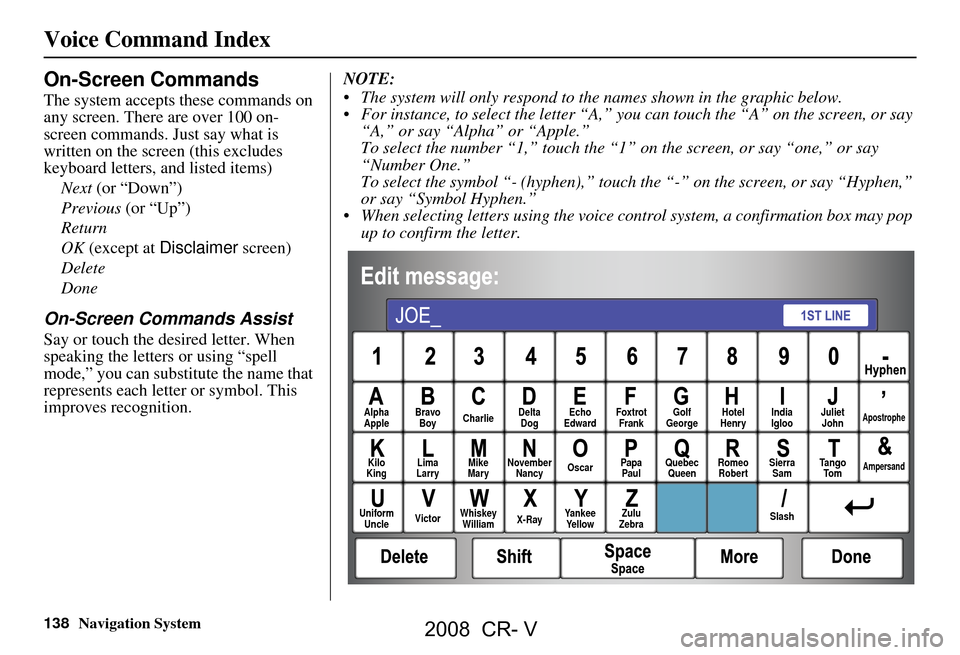
On-Screen Commands Assist
Say or touch the desired letter. When
speaking the letters or using “spell
mode,” you can substitu te the name that
represents each letter or symbol. This
improves recognition. NOTE:
The system will only respond to the names shown in the graphic below.
For instance, to select the letter “A,” yo
u can touch the “A” on the screen, or say
“A,” or say “Alpha” or “Apple.”
To select the number “1,” touch the “1” on the screen, or say “one,” or say
“Number One.”
To select the symbol “- (hyphen),” touc h the “-” on the screen, or say “Hyphen,”
or say “Symbol Hyphen.”
When selecting letters using the voice control system, a confirmation box may pop up to confirm the letter.
Alpha
Apple Bravo
Boy Charlie Delta
Dog Echo
Edward Foxtrot
Frank Golf
George Hotel
Henry Juliet
JohnApostrophe
Kilo
King Lima
Larry Mike
Mary November
Nancy Oscar
Papa
Paul Quebec
Queen Romeo
Robert Sierra
Sam Ta n g o
To mAmpersand
Uniform Uncle Victor
Whiskey
William X-RayYankee
Ye l l o w Zulu
Zebra SlashIndia
Igloo
Voice Command Index
2008 CR- V
Page 143 of 145

Navigation System143
Index
View Routes...................................46
Voice Command Help.....................67
Voice Command Index..................131
Voice Control Basics.......................12
Voice Recognition Feedback............90
Voice Recognition, Improving.........13
Volume..........................................71
W
Waypoints
................................62, 87
Z
ZOOM IN/OUT buttons
..................11
2008 CR- V
Page 144 of 145

144Navigation System
License notice
You have acquired a device (“DEVICE”)
that includes software licensed by ALPINE
ELECTRONICS, INC., from an affiliate of
Microsoft Corporation (collectively “MS”).
Those installed software products of MS
origin, as well as associated media, printed
materials, and “onl ine” or electronic
documentation (“SOFTWARE”) are
protected by international intellectual
property laws a nd treaties. The
SOFTWARE is licensed , not sold. All rights
reserved.
IF YOU DO NOT AGREE TO THIS END
USER LICENSE AGREEMENT
(“EULA”), DO NOT USE THE DEVICE
OR COPY THE SOFTWARE. INSTEAD,
PROMPTLY CONTACT ALPINE
ELECTRONICS,INC., FOR
INSTRUCTIONS ON RETURN OF THE
UNUSED DEVICE(S) FOR A REFUND.
ANY USE OF THE SOFTWARE,
INCLUDING BUT NOT LIMITED TO
USE ON THE DEVICE, WILL
CONSTITUTE YOUR AGREEMENT TO
THIS EULA (OR RATIFICATION OF
ANY PREVIOUS CONSENT). GRANT OF SOFTWARE LICENSE.
This EULA grants you the following
license;
You may use the SOFTWARE only on the
DEVICE.
NOT FAULT TOLERANT. THE
SOFTWARE IS NOT FAULT
TOLERANT. ALPINE ELECTRONICS,
INC., HAS INDEPENDENTLY
DETERMINED HOW TO USE THE
SOFTWARE IN THE DEVICE, AND MS
HAS RELIED UPON ALPINE
ELECTRONICS, INC., TO CONDUCT
SUFFICIENT TESTING TO DETERMINE
THAT THE SOFTWARE IS SUITABLE
FOR SUCH USE.
NO WARRANTIES FOR THE
SOFTWARE. THE SOFTWARE is
provided “AS IS” and with all faults. THE
ENTIRE RISK AS TO SATISFACTORY
QUALITY, PERFORMANCE,
ACCURACY, AND EFFORT
(INCLUDING LACK OF NEGLIGENCE)
IS WITH YOU. ALSO, THERE IS NO
WARRANTY AGAINST
INTERFERENCE WITH YOUR
ENJOYMENT OF THE SOFTWARE OR
AGAINST INFRINGEMENT. IF YOU
HAVE RECEIVED ANY WARRANTIES
REGARDING THE DEVICE OR THE
SOFTWARE, THOSE WARRANTIES DO NOT ORIGINATE FROM, AND ARE
NOT BINDING ON, MS.
No Liability for Certain Damages. EXCEPT
AS PROHIBITED BY LAW, MS SHALL
HAVE NO LIABILITY FOR ANY
INDIRECT, SPECIAL,
CONSEQUENTIAL OR INCIDENTAL
DAMAGES ARISING FROM OR IN
CONNECTION WITH THE USE OR
PERFORMANCE OF THE SOFTWARE.
THIS LIMITATION SHALL APPLY
EVEN IF ANY REMEDY FAILS OF ITS
ESSENTIAL PURPOSE.
IN NO EVENT
SHALL MS BE LIABLE FOR ANY
AMOUNT IN EXCESS OF U.S.TWO
HUNDRED FIFTY DOLLARS
(U.S.$250.00).
Limitations on Reve rse Engineering,
Decompilation, and Di sassembly. You may
not reverse engineer , decompile, or
disassemble the SOFT WARE, except and
only to the extent that such activity is
expressly permitted by applicable law
notwithstanding this limitation.
Additional Software/Services. The
SOFTWARE may permit ALPINE
ELECTRONICS,INC.,, MS, Microsoft
Corporation or their a ffiliates to provide or
make available to you SOFTWARE
updates, supplements, add-on components,
or Internet-based se rvices components of
2008 CR- V
Page 145 of 145

Navigation System145
the SOFTWARE after the date you obtain
your initial copy of the SOFTWARE
(“Supplemental Components”).
If ALPINE ELEC
TRONICS,INC.,
provides or makes available to you
Supplemental Components and no other
EULA terms are provided along with the
Supplemental Components, then the
terms of this EULA shall apply.
If MS, Microsoft Corporation or their affiliates make av ailable Supplemental
Components, and no other EULA terms
are provided, then the terms of this
EULA shall apply, except that the MS,
Microsoft Corporation or affiliate entity
providing the Supplemental
Component(s) shall be the licensor of the
Supplemental Component(s).
ALPINE ELECTRONICS,INC.,, MS,
Microsoft Corporation and their affiliates
reserve the right to di scontinue any Internet-
based services provided to you or made
available to you through the use of the
SOFTWARE. RECOVERY MEDIA.
If SOFTWARE is
provided by ALPINE
ELECTRONICS,INC., on separate media
and labeled “Recovery Media” you may use
the Recovery Media solely to restore or
reinstall the SOFTWARE originally
installed on the DEVICE.
SOFTWARE TRANSFER ALLOWED
BUT WITH RESTRICTIONS. You may
permanently transfer rights under this
EULA only as part of a permanent sale or
transfer of the Device, and only is the
recipient agrees to this EULA. If the
SOFTWARE is an upgrade, any transfer
must also include all prior versions of the
SOFTWARE.
EXPORT RESTRICTIONS. You
acknowledge that SOFTWARE is of US-
origin. You agree to comply with all
applicable international and national laws
that apply to the SOFTWARE, including the
U.S. Export Administrat ion Regulations, as
well as end-user, end-use and
country destination restrictions issued by
U.S. and other governments.
For additional information on exporting the
SOFTWARE, see http://
www.microsoft. com/exporting/. As required by the FCC:
This device complies with Part 15 of the
FCC rules. Operation is subject to the
following two conditions: (1) This device
may not cause harmful interference, and (2)
this device must accept any interference
received, including interference that may
cause undesired operation.
Changes or modificati
ons not expressly
approved by the party responsible for
compliance could void the user’s authority
to operate the equipment.
This device complies with Industry Canada
Standard RSS-210.
Operation is subject to the following two
conditions: (1) this device may not cause
interference, and (2) this device must accept
any interference that may cause undesired
operation of the device.
2008 CR- V