Page 52 of 413

�µ�µ�µ
�µ
�µ
�µ
�Ì Engine oil level Check every
time you fill the fuel tank. See
page .
Engine coolant level Check the
radiator reserve tank every time
you f ill the f uel tank. See page .
Automatic transmission Check
the f luid level monthly. See page
.
Brakes Check the f luid level
monthly. See page .
Tires Check the tire pressure
monthly. Examine the tread f or
wear and foreign objects. See page .
Lights Check the operation of
the headlights, parking lights,
taillights, high-mount brake light,
and license plate lights monthly.
See page .
U.S. Vehicles:
According to state and federal
regulations, f ailure to perf orm
maintenance on the items marked
with will not void your emissions
warranties. However, all
maintenance services should be
perf ormed in accordance with the
intervals indicated by the
inf ormation display.
Youshouldcheckthefollowing
items at the specif ied intervals. If
you are unsure of how to perf orm
any check, turn to the appropriate
page listed.
We recommend using Honda parts
and fluids whenever you have
maintenance done. These are
manuf actured to the same high
quality standards as the original
components, so you can be conf ident
of their perf ormance and durability. 189
191
244
246
242
255
Maintenance Minder
Maintenance,
replacement, or repair of
emissions control devices and
systems may be done by any
automotive repair establishment
or individual using parts that are
‘‘certif ied’’ to EPA standards.
Owner’s Maintenance Checks
230
�����—�����—�
�
�y�
�������������y���
�(�+���������y���������y
However, service at a dealer is not
mandatory to keep your warranties
in effect. Maintenance may be done
by any qualif ied service f acility or
person who is skilled in this type of
automotive service. Make sure to
have the service f acility or person
reset the display as previously
described. Keep all receipts as proof
of completion, and have the person
who does the work fill out your Honda Service History or Canadian Maintenance Log.
Page 58 of 413
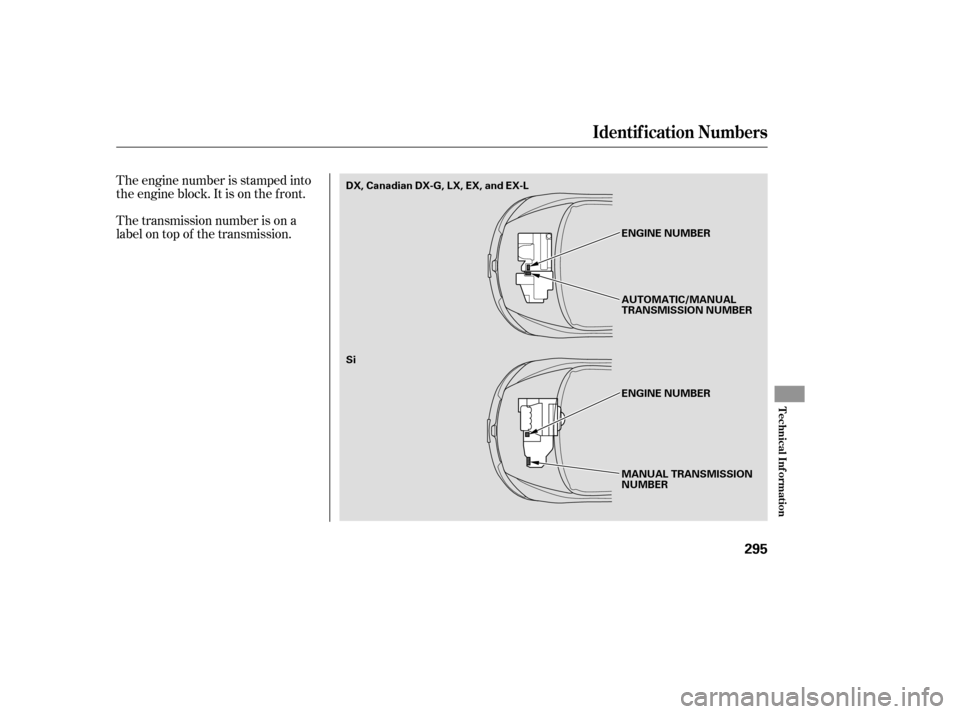
The engine number is stamped into
the engine block. It is on the f ront.
The transmission number is on a
label on top of the transmission.
Identif ication Numbers
T echnical Inf ormation
295
MANUAL TRANSMISSION
NUMBER
Si
ENGINE NUMBER
ENGINE NUMBER
AUTOMATIC/MANUAL
TRANSMISSION NUMBER
DX, Canadian DX-G, LX, EX, and EX-L
�����—�����—�
�
�y�
�������������y���
�(�+���������y���������y
Page 66 of 413
�Î
�Î�Î
�Î
�Î
�Î �Î
CONT INUED: If equipped
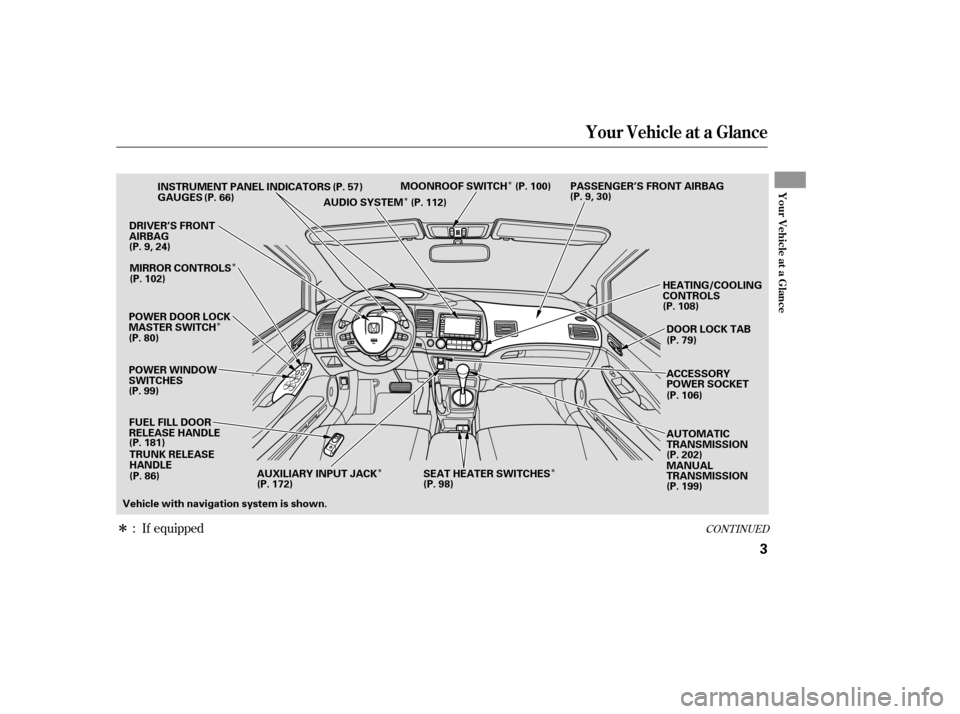
Your Vehicle at a Glance
Your Vehicle at a Glance
3
POWER WINDOW
SWITCHESGAUGES
POWER DOOR LOCK
MASTER SWITCH FUEL FILL DOOR
RELEASE HANDLE TRUNK RELEASE
HANDLE
DRIVER’S FRONT
AIRBAG
HEATING/COOLING
CONTROLS
INSTRUMENT PANEL INDICATORS
AUDIO SYSTEMMOONROOF SWITCH PASSENGER’S FRONT AIRBAG
(P. 57)
(P. 66)
(P.9,24)
(P. 80) MIRROR CONTROLS
(P. 181) (P.9,30)
(P. 108)
(P. 199)
(P. 112)
Vehicle with navigation system is shown. DOOR LOCK TAB
(P. 79)
ACCESSORY
POWER SOCKET
AUTOMATIC
TRANSMISSION
(P. 202)
MANUAL
TRANSMISSION
(P. 102)
(P. 99) (P. 86) (P. 106)
(P. 100)
AUXILIARY INPUT JACK SEAT HEATER SWITCHES
(P. 172) (P. 98)
�����—�����—�����y��������
������y���
�(�#���������y���������y
Page 131 of 413
�Î
�Î �Î
�Î
�Î
�Î
�ΠIf equipped
:
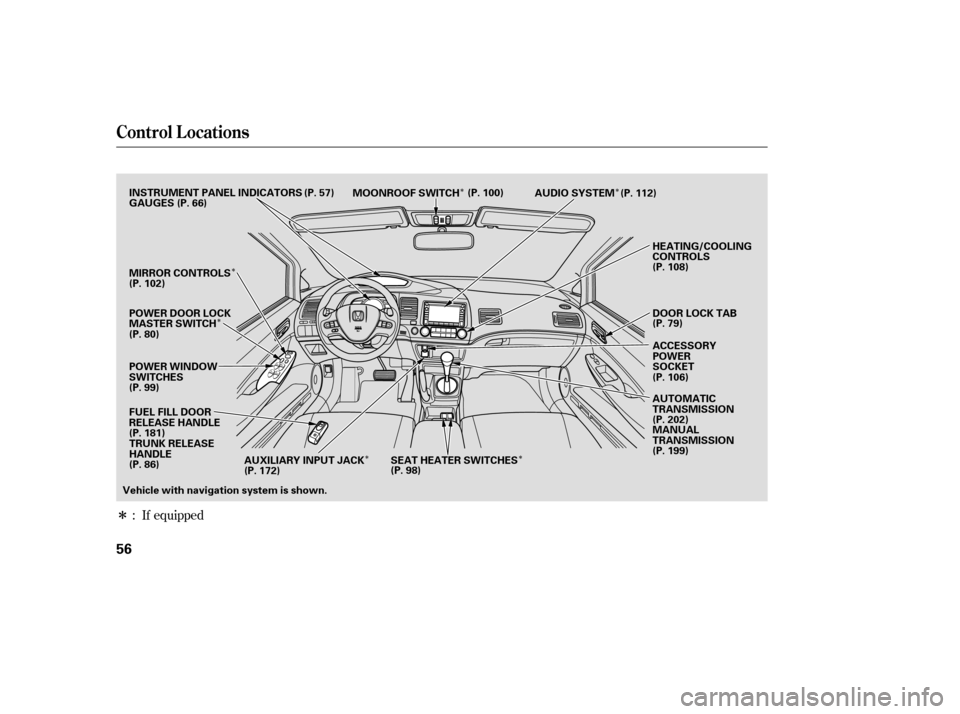
Control L ocations
56
POWER WINDOW
SWITCHES AUDIO SYSTEM
HEATING/COOLING
CONTROLS
POWER DOOR LOCK
MASTER SWITCH MOONROOF SWITCH
INSTRUMENT PANEL INDICATORS
ACCESSORY
POWER
SOCKET
DOOR LOCK TAB
GAUGES
(P. 57)
(P. 66)
(P. 80) (P. 79)
MIRROR CONTROLS
(P. 108)
FUEL FILL DOOR
RELEASE HANDLE
(P. 181) TRUNK RELEASE
HANDLE
Vehicle with navigation system is shown. AUTOMATIC
TRANSMISSION
(P. 202)
MANUAL
TRANSMISSION
(P. 199)
(P. 112)
(P. 100)
(P. 102)
(P. 99) (P. 86) (P. 106)
SEAT HEATER SWITCHES
(P. 98)
AUXILIARY INPUT JACK
(P. 172)
�����—�����—�����y���������������y���
�(�#���������y�������
�y
Page 155 of 413
�µ
�µ
�µ
�µ If the f ront wheels are turned, the
anti-thef t lock may make it dif f icult
to turn the key. Firmly turn the
steering wheel to the lef t or right as
you turn the key.
You can
operate the audio system and the
accessory power sockets in this
position.
This is the normal key
position when driving. Several of the
indicators on the instrument panel
come on as a test when you turn the
ignition switch f rom the
ACCESSORY (I) to the ON (II)
position.
Use this position
only to start the engine. The switch
returns to the ON (II) position when
you let go of the key.
You can insert or
remove the key only in this position.
To turn the key, push it in slightly. If
your vehicle has an automatic
transmission, the shif t lever must
also be in park.
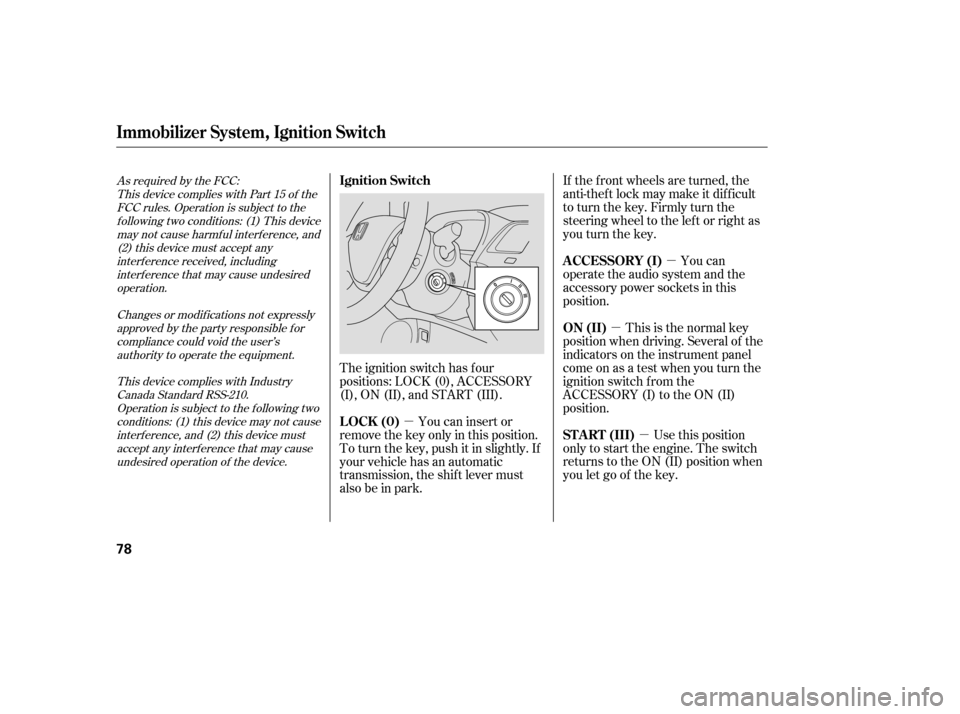
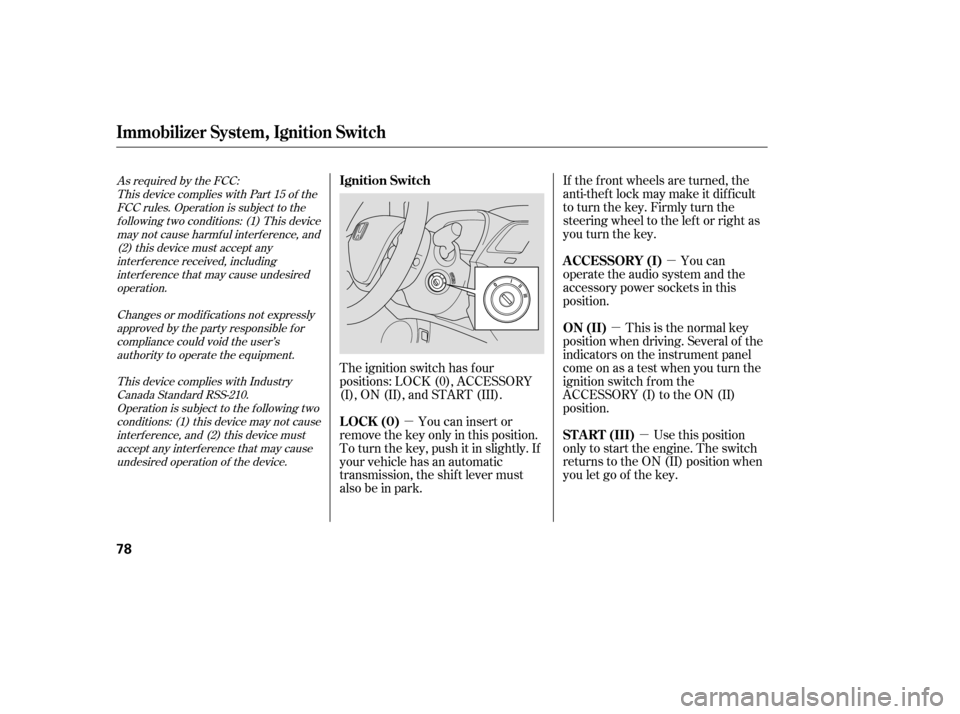
The ignition switch has f our
positions: LOCK (0), ACCESSORY
(I), ON (II), and START (III).
As required by the FCC:
This device complies with Part 15 of theFCC rules. Operation is subject to the
f ollowing two conditions: (1) This devicemay not cause harmf ul interf erence, and (2) this device must accept any
interf erence received, includinginterf erence that may cause undesiredoperation.
Changes or modif ications not expresslyapproved by the party responsible f or
compliance could void the user’sauthority to operate the equipment.
This device complies with IndustryCanada Standard RSS-210.Operation is subject to the f ollowing two
conditions: (1) this device may not causeinterf erence, and (2) this device mustaccept any interf erence that may cause
undesired operation of the device.
Immobilizer Syst em, Ignit ion Switch
A CCESSORY (I)
ON (II)
ST A RT (III)
Ignition Switch
LOCK (0)
78
�����—�����—�����y�����������
�
�y���
�(�#���������y���������y
Page 156 of 413
�µ
�µ
�µ
�µ If the f ront wheels are turned, the
anti-thef t lock may make it dif f icult
to turn the key. Firmly turn the
steering wheel to the lef t or right as
you turn the key.
You can
operate the audio system and the
accessory power sockets in this
position.
This is the normal key
position when driving. Several of the
indicators on the instrument panel
come on as a test when you turn the
ignition switch f rom the
ACCESSORY (I) to the ON (II)
position.
Use this position
only to start the engine. The switch
returns to the ON (II) position when
you let go of the key.
You can insert or
remove the key only in this position.
To turn the key, push it in slightly. If
your vehicle has an automatic
transmission, the shif t lever must
also be in park.
The ignition switch has f our
positions: LOCK (0), ACCESSORY
(I), ON (II), and START (III).
As required by the FCC:
This device complies with Part 15 of theFCC rules. Operation is subject to the
f ollowing two conditions: (1) This devicemay not cause harmf ul interf erence, and (2) this device must accept any
interf erence received, includinginterf erence that may cause undesiredoperation.
Changes or modif ications not expresslyapproved by the party responsible f or
compliance could void the user’sauthority to operate the equipment.
This device complies with IndustryCanada Standard RSS-210.Operation is subject to the f ollowing two
conditions: (1) this device may not causeinterf erence, and (2) this device mustaccept any interf erence that may cause
undesired operation of the device.
Immobilizer Syst em, Ignit ion Switch
A CCESSORY (I)
ON (II)
ST A RT (III)
Ignition Switch
LOCK (0)
78
�����—�����—�����y�����������
�
�y���
�(�#���������y���������y
Page 157 of 413
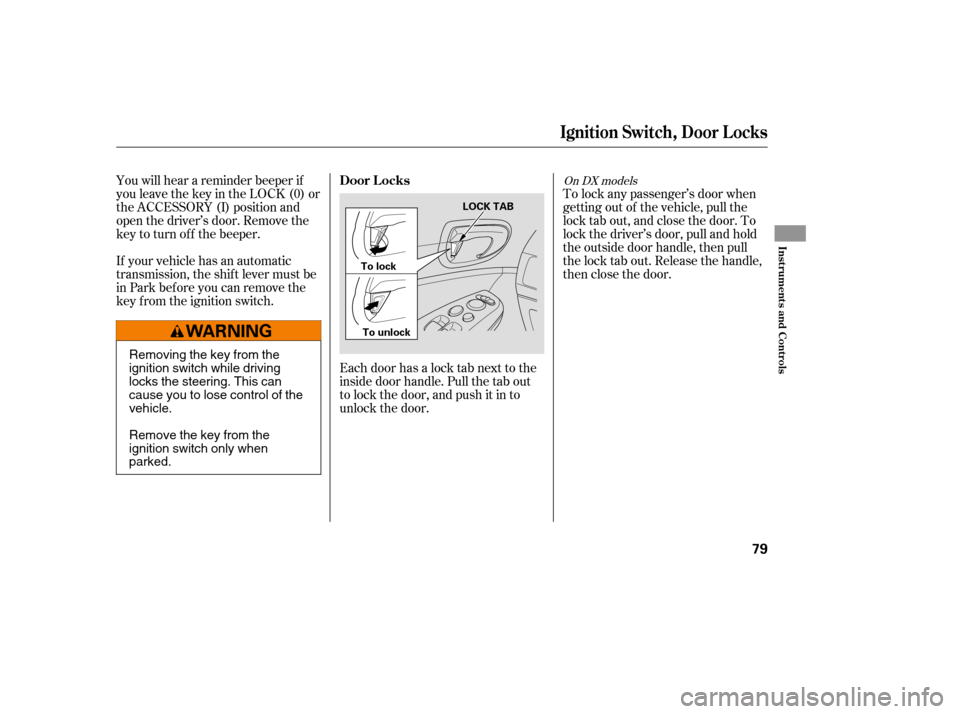
Each door has a lock tab next to the
inside door handle. Pull the tab out
to lock the door, and push it in to
unlock the door.To lock any passenger’s door when
getting out of the vehicle, pull the
lock tab out, and close the door. To
lock the driver’s door, pull and hold
the outside door handle, then pull
the lock tab out. Release the handle,
then close the door.
You will hear a reminder beeper if
you leave the key in the LOCK (0) or
the ACCESSORY (I) position and
open the driver’s door. Remove the
key to turn of f the beeper.
If your vehicle has an automatic
transmission, the shif t lever must be
in Park bef ore you can remove the
key f rom the ignition switch.
On DX models
Ignit ion Swit ch, Door L ocks
Door L ocks
Inst rument s and Cont rols
79
LOCK TAB
To lock
To unlock
Removing the key from the
ignition switch while driving
locks the steering. This can
cause you to lose control of thevehicle.
Remove the key from the
ignition switch only whenparked.
�����—�����—�����y�����������
���y���
�(�#���������y���������y
Page 158 of 413
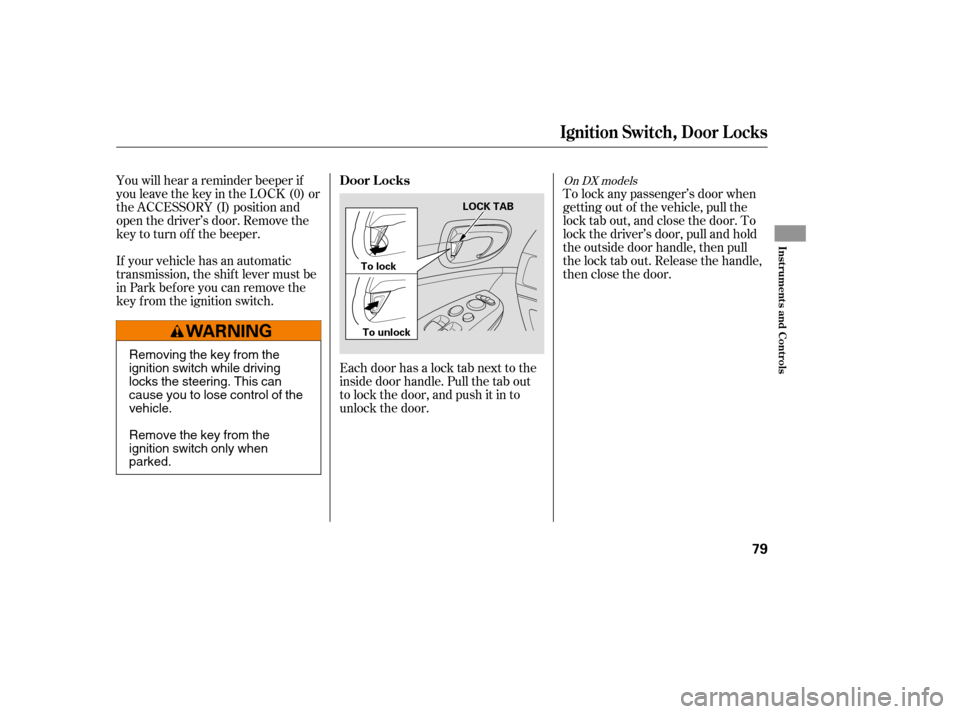
Each door has a lock tab next to the
inside door handle. Pull the tab out
to lock the door, and push it in to
unlock the door.To lock any passenger’s door when
getting out of the vehicle, pull the
lock tab out, and close the door. To
lock the driver’s door, pull and hold
the outside door handle, then pull
the lock tab out. Release the handle,
then close the door.
You will hear a reminder beeper if
you leave the key in the LOCK (0) or
the ACCESSORY (I) position and
open the driver’s door. Remove the
key to turn of f the beeper.
If your vehicle has an automatic
transmission, the shif t lever must be
in Park bef ore you can remove the
key f rom the ignition switch.
On DX models
Ignit ion Swit ch, Door L ocks
Door L ocks
Inst rument s and Cont rols
79
LOCK TAB
To lock
To unlock
Removing the key from the
ignition switch while driving
locks the steering. This can
cause you to lose control of thevehicle.
Remove the key from the
ignition switch only whenparked.
�����—�����—�����y�����������
���y���
�(�#���������y���������y