Page 8 of 303
�Î �Î�Î
�Î
�Î
�Î �Î
�Î
�Î �Î�Î
Only on vehicles equipped with navigation system. Ref er to the navigati
on system manual.
To use the horn, press the center pad of the steering wheel.
If equipped.
1:2:3:
Your Vehicle at a Glance
4
HEADLIGHTS/TURN SIGNALS
REAR WINDOW
DEFOGGER
WINDSHIELD WIPERS/WASHERS
INSTRUMENT PANEL
BRIGHTNESS
SEL/RESET BUTTON
HAZARD WARNING
BUTTON
ACCESSORY POWER
SOCKET
PASSENGER AIRBAG OFF
INDICATOR
(P.29)
DISPLAY CHANGE
BUTTON
HEATED MIRRORS
CRUISE
CONTROL
BUTTONS (P.178)
NAVIGATION SYSTEM VOICE CONTROL BUTTONS
(P.72)
(P.73)(P.66)
(P.65)
(P.104)
(P.217) (P.71)
(P.177)(P.75)
(P.182) (P.105)
(P.74)
AUXILIARY INPUT JACK
MIRROR CONTROLS
VEHICLE
STABILITY
ASSIST (VSA)
SYSTEM OFF
SWITCH
STEERING WHEEL
ADJUSTMENTS
REMOTE AUDIO
CONTROLS HORN
(P.108)(P.74) 3
3
1 3
3
3 32
�����—�����—�
�
�y�
�������������y���
�(�+���������y���������y
Page 54 of 303
�Î
�Î
�Î
�Î
CONT INUED
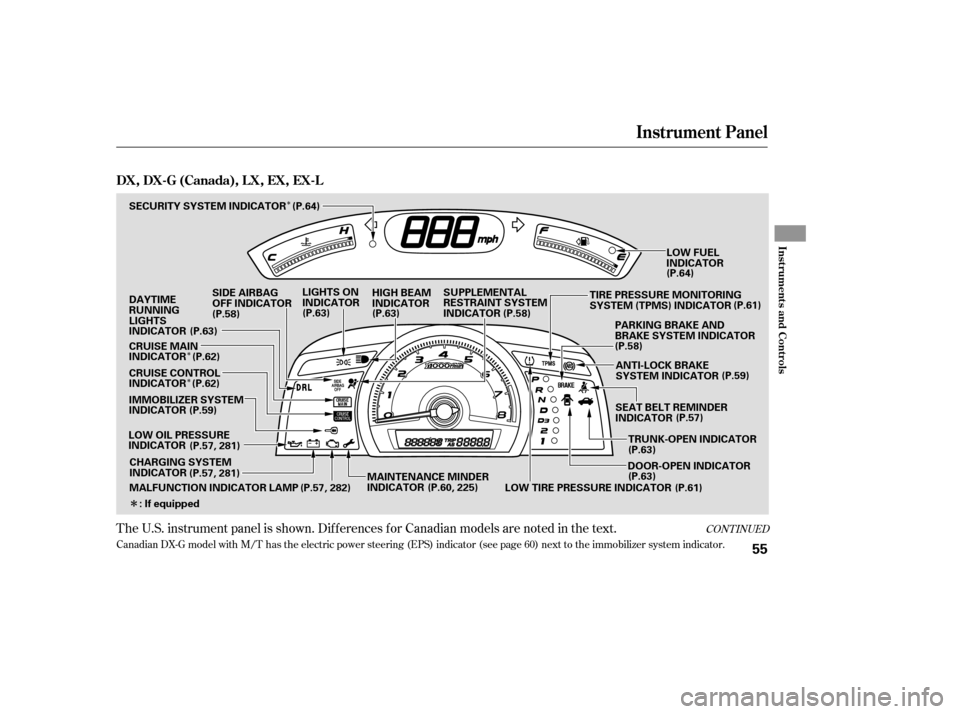
Canadian DX-G model with M/T has the electric power steering (EPS) indicator (see page 60 ) next to the immobilizer system indicator.
The U.S. instrument panel is shown. Dif f erences f or Canadian models are noted in the text.
Instrument Panel
Inst rument s and Cont rols
DX,DX-G(Canada),LX,EX,EX-L
55
IMMOBILIZER SYSTEM
INDICATOR
LOW OIL PRESSURE
INDICATOR DAYTIMERUNNING
LIGHTS
INDICATOR
LOW FUEL
INDICATOR
SUPPLEMENTAL
RESTRAINT SYSTEM
INDICATOR
SEAT BELT REMINDER
INDICATORANTI-LOCK BRAKE
SYSTEM INDICATOR
LIGHTS ON
INDICATOR
HIGH BEAM
INDICATOR
SECURITY SYSTEM INDICATOR
SIDE AIRBAG
OFF INDICATOR
(P.58)
(P.59) (P.63)
(P.57, 281) (P.60, 225)(P.63)
(P.57)
(P.58) (P.64)
(P.58)
(P.63)
PARKING BRAKE AND
BRAKE SYSTEM INDICATOR
(P.59)
MALFUNCTION INDICATOR LAMP (P.57, 282) MAINTENANCE MINDER
INDICATOR TRUNK-OPEN INDICATOR
(P.63)
DOOR-OPEN INDICATOR
CHARGING SYSTEM
INDICATOR
(P.57, 281)
(P.61)
LOW TIRE PRESSURE INDICATOR
: If equipped (P.64)
(P.63) TIRE PRESSURE MONITORING
SYSTEM (TPMS) INDICATOR
(P.61)
CRUISE CONTROL
INDICATOR
CRUISE MAIN
INDICATOR
(P.62)
(P.62)
�����—�
���—�����y�
����
��������y���
�(�+���������y���������y
Page 55 of 303
�Î
�Î�Î
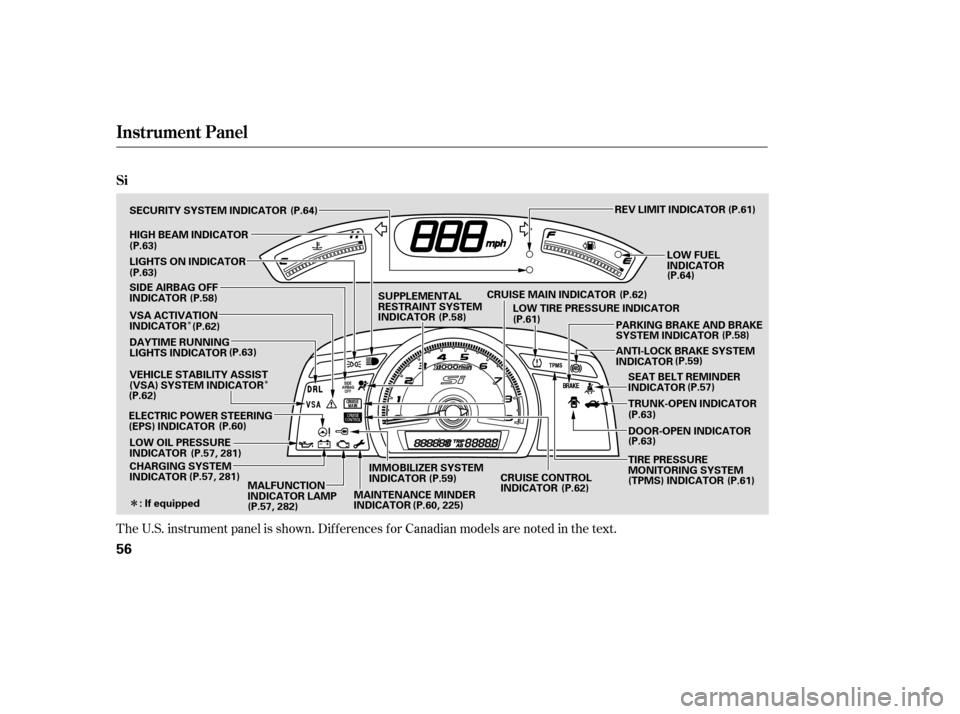
The U.S. instrument panel is shown. Dif f erences f or Canadian models are noted in the text.
Instrument Panel
Si
56
REV LIMIT INDICATOR
DOOR-OPEN INDICATOR
ANTI-LOCK BRAKE SYSTEM
INDICATOR
SEAT BELT REMINDER
INDICATOR
TRUNK-OPEN INDICATOR
CHARGING SYSTEM
INDICATOR
LOW OIL PRESSURE
INDICATOR
ELECTRIC POWER STEERING
(EPS) INDICATOR DAYTIME RUNNING
LIGHTS INDICATOR
SECURITY SYSTEM INDICATOR
LIGHTS ON INDICATOR
SUPPLEMENTAL
RESTRAINT SYSTEM
INDICATOR
HIGH BEAM INDICATOR
: If equipped PARKING BRAKE AND BRAKE
SYSTEM INDICATOR
LOW FUEL
INDICATOR
(P.63)
(P.63)
SIDE AIRBAG OFF
INDICATOR
(P.58)
VSA ACTIVATION
INDICATOR
(P.63)
VEHICLE STABILITY ASSIST
(VSA) SYSTEM INDICATOR
(P.62)
(P.60)
(P.57, 281)
(P.57, 281) (P.64)
(P.61)
(P.64)
CRUISE MAIN INDICATOR LOW TIRE PRESSURE INDICATOR
MALFUNCTION
INDICATOR LAMP IMMOBILIZER SYSTEM
INDICATOR
(P.62)
(P.62)
(P.61) (P.58)
(P.59) (P.57)
(P.63)
(P.63)
(P.57, 282) (P.58)
(P.61)
(P.62)
MAINTENANCE MINDER
INDICATOR (P.60, 225)(P.59)
CRUISE CONTROL
INDICATOR TIRE PRESSURE
MONITORING SYSTEM
(TPMS) INDICATOR
�����—�����—�
�
�y�
����
��������y���
�(�+���������y�������
�y
Page 61 of 303
�Î�Î
�Î
�Î
�Î
�Î �Î
�Î
�Î
�Î �Î�Î
To use the horn, press the center pad of the steering wheel.
If equipped.
Only on vehicles equipped with navigation system. Ref er to the navigati
on system manual.
1:2:3:
Controls Near the Steering Wheel
70
WINDSHIELD WIPERS/WASHERS
INSTRUMENT PANEL
BRIGHTNESS HEADLIGHTS/ TURN SIGNALS
HORN HEATED MIRRORS
AUDIO SYSTEM
Vehicle without navigation system is shown. REMOTE
AUDIO
CONTROLSPASSENGER’S AIRBAG OFF
INDICATOR
MIRROR CONTROLS
NAVIGATION SYSTEM
VOICE CONTROL
BUTTONS REAR WINDOW
DEFOGGER
ACCESSORY POWER
SOCKET
HAZARD WARNING
BUTTON
AUXILIARY INPUT JACK
STEERING WHEEL
ADJUSTMENTS CRUISE CONTROL
BUTTONS
(P.72)
(P.71)
(P.73)
(P.104)
(P.217) (P.177)(P.75) (P.182)
(P.178)(P.74)
(P.105)
(P.74) (P.119)
(P.29)
VEHICLE STABILITY
ASSIST (VSA) SYSTEM
OFF SWITCH (P.108)
1
2
2
2
2
3 2
2
�����—�����—�
�
�y�
����
������
�y���
�(�+���������y���������y
Page 71 of 303
�µ
�µ
�µ
�µ If the f ront wheels are turned, the
anti-thef t lock may make it dif f icult
to turn the key. Firmly turn the
steering wheel to the lef t or right as
you turn the key.
You can
operate the audio system and the
accessory power sockets in this
position.
This is the normal key
position when driving. Several of the
indicators on the instrument panel
come on as a test when you turn the
ignition switch f rom the
ACCESSORY (I) to the ON (II)
position.
Use this position
only to start the engine. The switch
returns to the ON (II) position when
you let go of the key.
You can insert or
remove the key only in this position.
To turn the key, push it in slightly. If
your vehicle has an automatic
transmission, the shif t lever must
also be in park.
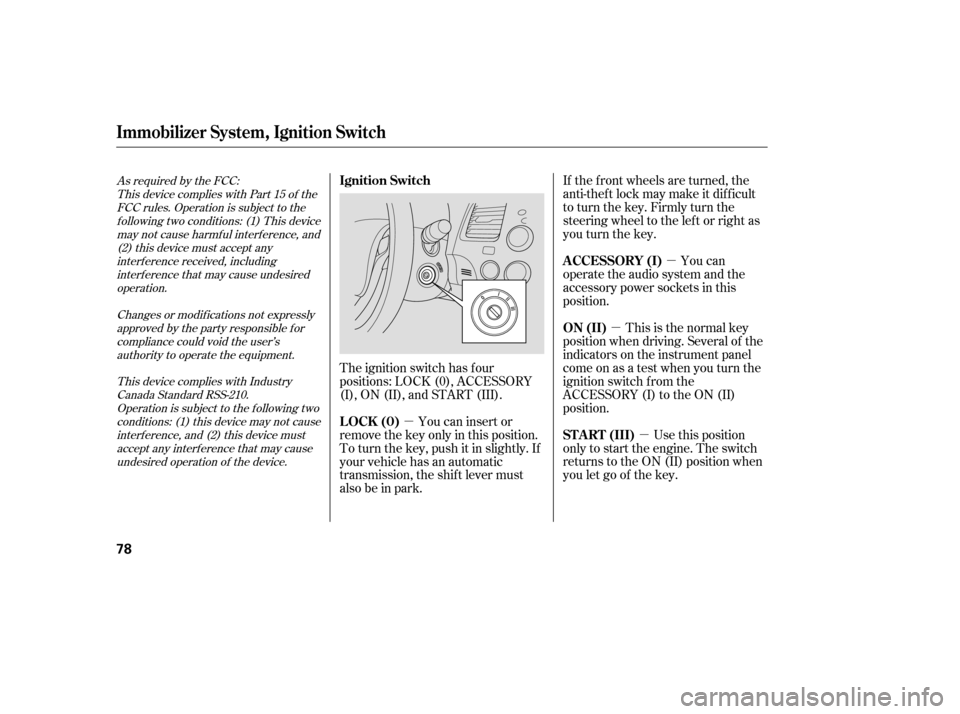
The ignition switch has f our
positions: LOCK (0), ACCESSORY
(I), ON (II), and START (III).
As required by the FCC:
This device complies with Part 15 of theFCC rules. Operation is subject to the
f ollowing two conditions: (1) This devicemay not cause harmf ul interf erence, and (2) this device must accept any
interf erence received, includinginterf erence that may cause undesiredoperation.
Changes or modif ications not expresslyapproved by the party responsible f or
compliance could void the user’sauthority to operate the equipment.
This device complies with IndustryCanada Standard RSS-210.Operation is subject to the f ollowing two
conditions: (1) this device may not causeinterf erence, and (2) this device mustaccept any interf erence that may cause
undesired operation of the device.
A CCESSORY (I)
ON (II)
ST A RT (III)
LOCK (0)
Ignition Switch
Immobilizer Syst em, Ignit ion Switch
78
�����—�����—�
�
�y�
����
��������y���
�(�+���������y���������y
Page 72 of 303
�µ
�µ
�µ
�µ If the f ront wheels are turned, the
anti-thef t lock may make it dif f icult
to turn the key. Firmly turn the
steering wheel to the lef t or right as
you turn the key.
You can
operate the audio system and the
accessory power sockets in this
position.
This is the normal key
position when driving. Several of the
indicators on the instrument panel
come on as a test when you turn the
ignition switch f rom the
ACCESSORY (I) to the ON (II)
position.
Use this position
only to start the engine. The switch
returns to the ON (II) position when
you let go of the key.
You can insert or
remove the key only in this position.
To turn the key, push it in slightly. If
your vehicle has an automatic
transmission, the shif t lever must
also be in park.
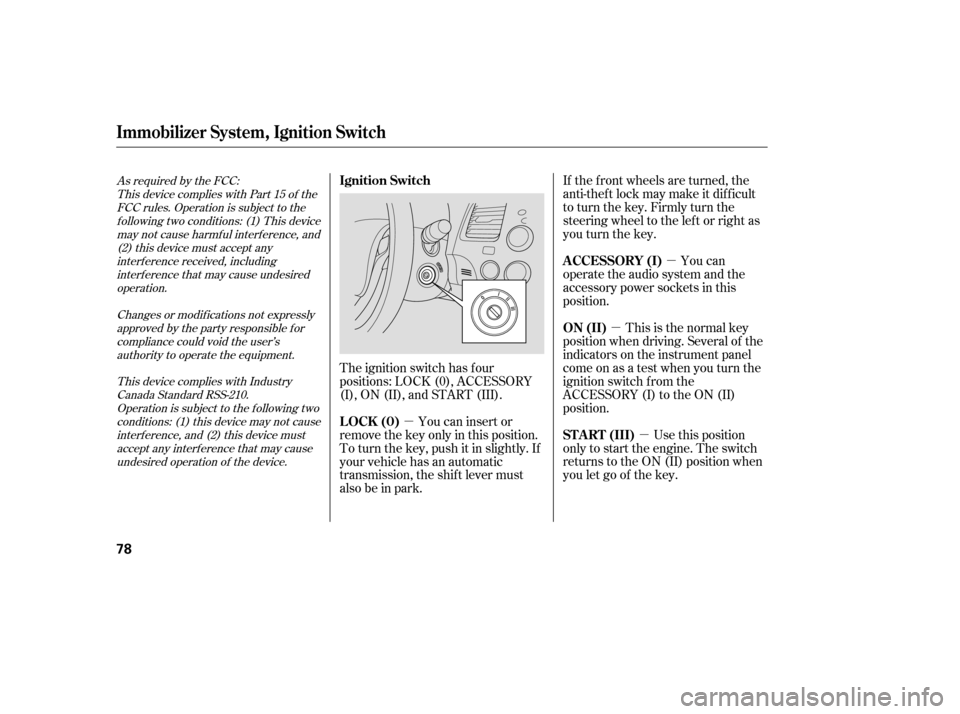
The ignition switch has f our
positions: LOCK (0), ACCESSORY
(I), ON (II), and START (III).
As required by the FCC:
This device complies with Part 15 of theFCC rules. Operation is subject to the
f ollowing two conditions: (1) This devicemay not cause harmf ul interf erence, and (2) this device must accept any
interf erence received, includinginterf erence that may cause undesiredoperation.
Changes or modif ications not expresslyapproved by the party responsible f or
compliance could void the user’sauthority to operate the equipment.
This device complies with IndustryCanada Standard RSS-210.Operation is subject to the f ollowing two
conditions: (1) this device may not causeinterf erence, and (2) this device mustaccept any interf erence that may cause
undesired operation of the device.
A CCESSORY (I)
ON (II)
ST A RT (III)
LOCK (0)
Ignition Switch
Immobilizer Syst em, Ignit ion Switch
78
�����—�����—�
�
�y�
����
��������y���
�(�+���������y���������y
Page 196 of 303

Your vehicle is equipped with f ront
disc brakes. The brakes on the rear
wheels may be disc or drum,
depending on the model. A power
assist helps reduce the ef f ort needed
on the brake pedal. The anti-lock
brake system (ABS) helps you retain
steering control when braking very
hard.The hydraulic system that operates
the brakes has two separate circuits.
Each circuit works diagonally across
the vehicle (the lef t-f ront brake is
connected with the right-rear brake,
etc.). If one circuit should develop a
problem, you will still have braking
at two wheels.
If the brake pads need replacing, you
will hear a distinctive, metallic
screeching sound when you apply
the brake pedal. If you do not have
the brake pads replaced, they will
screech all the time. It is normal f or
the brakes to occasionally squeal or
squeak when you apply them.
Check the brakes after driving
through deep water. Apply the
brakes moderately to see if they f eel
normal. If not, apply them gently and
f requently until they do. Be extra
cautious in your driving.
Constant application of the brakes
when going down a long hill builds
up heat and reduces their ef f ective-
ness. Use the engine to assist the
brakes by taking your f oot of f the
accelerator and downshif ting to a
lower gear.
On vehicles with vehicle stability
assist (VSA) system, the emergency
brake assist system increases the
stopping f orce when you depress the
brake pedal hard in an emergency
situation.
Resting your f oot on the pedal keeps
the brakes applied lightly, builds up
heat, and reduces their ef f ectiveness
and reduces brake pad life. In
addition, f uel economy can be
reduced. It also keeps your brake
lights on all the time, conf using
drivers behind you.
Braking System
Braking System Design
Brake Pad Wear Indicators
Driving
213
�����—�����—�
�
�y�
�������������y���
�(�+���������y�����
���y
Page 207 of 303
�Î�Î
Fluid Locations
DX, Canadian DX-G, L X, EX, and EX-L models
232
RADIATOR CAP
WASHER FLUID
(Blue cap)
ENGINE OIL DIPSTICK
(Orange handle)
BRAKE FLUID
(Black cap)
ENGINE OIL FILL CAP
CLUTCH FLUID
(Manual
transmission only)
(Light gray cap)
ENGINE COOLANT
RESERVOIR
AUTOMATIC
TRANSMISSION
FLUID DIPSTICK
(Yellow loop)
: Except for Canadian DX-G with manual transmission POWER STEERING FLUID
(Red cap)
�����—�
���—�����y�
�������������y���
�(�+���������y���������y


