Page 70 of 420
�Î�Î
�Î
�Î
�Î
�Î
�Î
�Î
�ΠIf equipped
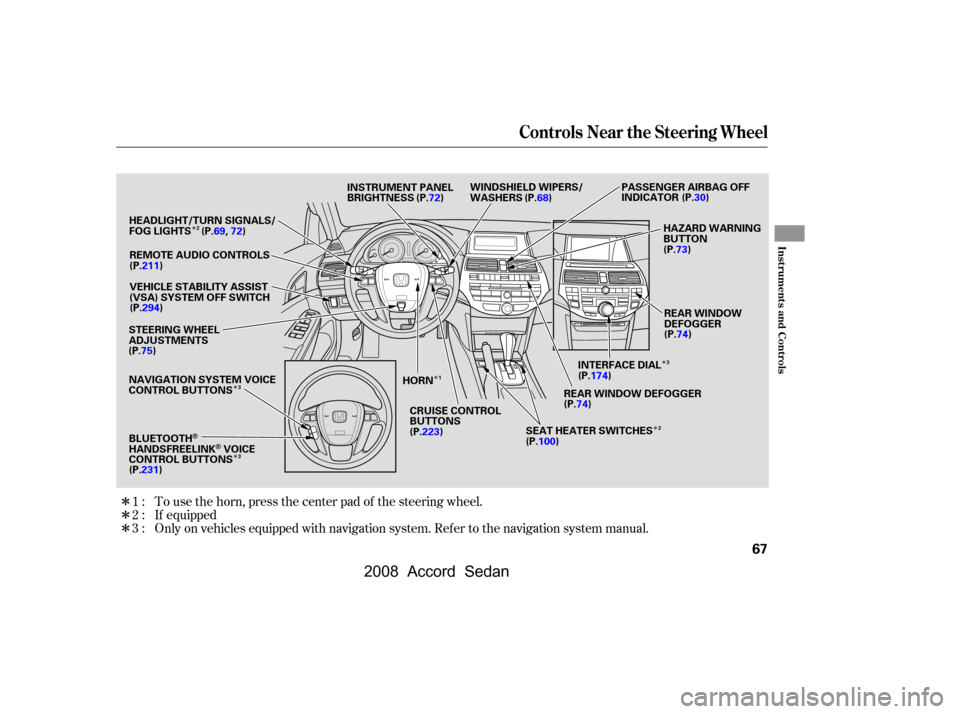
Only on vehicles equipped with navigation system. Ref er to the navigation system manual. To use the horn, press the center pad of the steering wheel.
1:
2:
3:
Controls Near the Steering Wheel
Inst rument s and Cont rols
67
INSTRUMENT PANEL
BRIGHTNESS
REMOTE AUDIO CONTROLS
VEHICLE STABILITY ASSIST
(VSA) SYSTEM OFF SWITCH
REAR WINDOW DEFOGGER
HORN
(P.100)(P.74) HAZARD WARNING
BUTTON
(P.69,72)
(P.75) (P.72)
PASSENGER AIRBAG OFF
INDICATOR
(P.30)
(P.73)
INTERFACE DIAL (P.74)
REAR WINDOW
DEFOGGER
HEADLIGHT/TURN SIGNALS/
FOG LIGHTS
WINDSHIELD WIPERS/
WASHERS
CRUISE CONTROL
BUTTONS
STEERING WHEEL
ADJUSTMENTS
SEAT HEATER SWITCHES
NAVIGATION SYSTEM VOICE
CONTROL BUTTONS (P.68)
(P.211) (P.294)
(P.231) (P.223)
BLUETOOTH
HANDSFREELINKVOICE
CONTROL BUTTONS (P.174)
1
3
2
2
3
3
�����—�����—�
���y�
�
��
������
�y���
�)�����������y���������y
2008 Accord Sedan
Page 72 of 420
�Î�Î
�Î
�µ
�µ
�µ
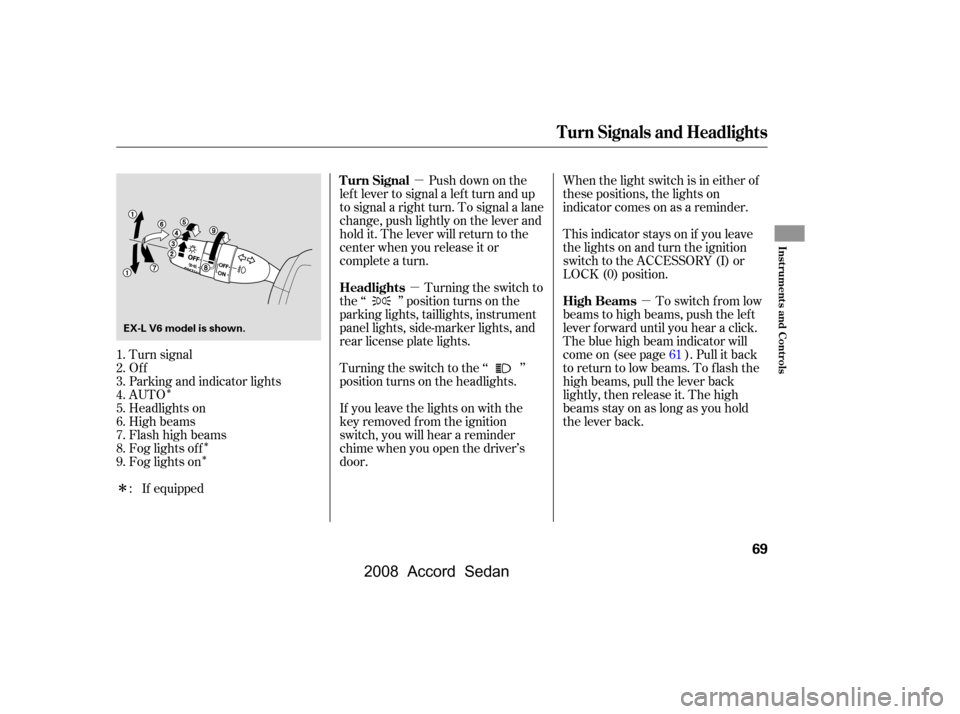
�ΠTurn signal
Of f
Parking and indicator lights
AUTO
Headlights on
High beams
Flashhighbeams
Fog lights of f
Fog lights on Push down on the
lef t lever to signal a lef t turn and up
to signal a right turn. To signal a lane
change, push lightly on the lever and
hold it. The lever will return to the
center when you release it or
complete a turn. When the light switch is in either of
these positions, the lights on
indicator comes on as a reminder.
This indicator stays on if you leave
the lights on and turn the ignition
switch to the ACCESSORY (I) or
LOCK (0) position.
To switch f rom low
beams to high beams, push the lef t
lever f orward until you hear a click.
The blue high beam indicator will
come on (see page ). Pull it back
to return to low beams. To flash the
high beams, pull the lever back
lightly, then release it. The high
beamsstayonaslongasyouhold
the lever back.
If equipped Turning the switch to
the ‘‘ ’’ position turns on the
parking lights, taillights, instrument
panel lights, side-marker lights, and
rear license plate lights.
Turning the switch to the ‘‘ ’’
position turns on the headlights.
If you leave the lights on with the
key removed f rom the ignition
switch, you will hear a reminder
chime when you open the driver’s
door.
1.
2.
3.
4.
5.
6.
7.
8.
9.
: 61
Turn Signals and Headlights
Turn Signal
High Beams
Headlights
Inst rument s and Cont rols
69
EX-L V6 model is shown.
�\f���—�\f���—�
���y�
�
��
����
���y���
�)���\f���\f�\f�y�\f�\f�����y
2008 Accord Sedan
Page 73 of 420

�µEven with the automatic lighting
f eature turned on, we recommend
thatyouturnonthelightsmanually
when driving at night or in a dense
f og, or when you enter dark areas
such as long tunnels or parking
f acilities.
Do not leave the light switch in
AUTO if you will not be driving the
vehicle f or an extended period (a
weekormore).Youshouldalsoturn
of f the lights if you plan to leave the
engine idling or of f f or a long time.
The automatic lighting
f eature turns on the headlights and
all other exterior lights, when it
senses low ambient light.
The lights will remain on when you
turn of f the ignition switch. They will
turn of f automatically when you
remove the key and open the driver’s
door. To turn them on again, either
turn the ignition switch to the ON
(II) position or turn the light switch
to the position.
To turn on automatic lighting, turn
the light switch to AUTO at any time.
The lights will come on automatically
when the outside light level becomes
low (at dusk, f or example). The
lights on indicator comes on as a
reminder. The lights and indicator
will turn of f automatically when the
system senses high ambient light. The automatic lighting f eature is
controlledbyasensorlocatedontop
of the dashboard. Do not cover this
sensor or spill liquids on it.
EX-L and EX-L V6
Headlights
AUTO
70
LIGHT SENSOR
�\f���—�\f���—�
���y�
�
��
��������y���
�)���\f���\f�\f�y�\f�\f�����y
2008 Accord Sedan
Page 74 of 420

This f eature turns of f the headlights,
all other exterior lights, and the
instrument panel lights within 15
seconds after you remove the key
and close the driver’s door.
The automatic lighting of f f eature
activates if you leave the headlight
switch in the ‘‘ ’’ or ‘‘ ’’
position or if the lights are turned on
by setting the switch in the ‘‘AUTO’’
position (if equipped), and you
remove the key, then open and close
the driver’s door.If you turn the ignition switch to the
LOCK (0) position with the
headlight switch on, but do not open
the door and get out, the lights turn
of f af ter 10 minutes (3 minutes, if
the switch is in the ‘‘AUTO’’
position).
If you unlock the door, but do not
open it within 15 seconds, the lights
will go off. With the driver’s door
open, you will hear a lights-on
reminder chime.
The lights will turn on again when
you unlock or open the driver’s door.
The headlights revert to normal
operation when you turn them on
with the switch.
With the headlight switch of f or in
the position, the high beam
headlights and the high beam
indicator come on with reduced
brightness when you turn the
ignition switch to the ON (II)
position and release the parking
brake. They remain on until you turn
the ignition switch of f , even if you
set the parking brake.
Automatic Lighting Of f Feature Daytime Running Lights
Headlights
Inst rument s and Cont rols
71
�\f���—�\f���—�
���y�
�
��
������
�y���
�)���\f���\f�\f�y�\f�\f�����y
2008 Accord Sedan
Page 75 of 420
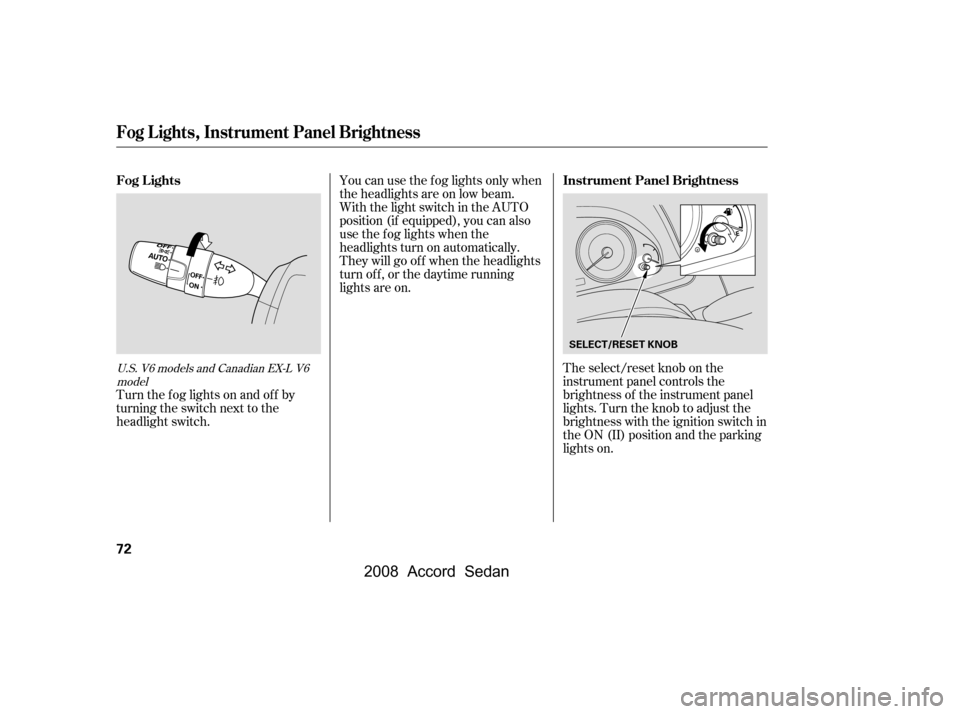
The select/reset knob on the
instrument panel controls the
brightness of the instrument panel
lights. Turn the knob to adjust the
brightness with the ignition switch in
the ON (II) position and the parking
lights on.
Turn the f og lights on and of f by
turning the switch next to the
headlight switch. You can use the f og lights only when
the headlights are on low beam.
With the light switch in the AUTO
position (if equipped), you can also
use the f og lights when the
headlights turn on automatically.
They will go of f when the headlights
turn of f , or the daytime running
lights are on.U.S. V6 models and Canadian EX-L V6
model
Fog L ights, Instrument Panel Brightness
Fog L ights Instrument Panel Brightness
72
SELECT/RESET KNOB
�\f���—�\f���—�
���y�
�
��
��������y���
�)���\f���\f�\f�y�\f�\f�����y
2008 Accord Sedan
Page 76 of 420

Push the button between the center
vents to turn on the hazard warning
lights (f our-way f lashers). This
causes all f our outside turn signals
and both turn indicators in the
instrument panel to f lash. Use the
hazard warning lights if you need to
park in a dangerous area near heavy
traf f ic, or if your vehicle is disabled.
The level of brightness is shown on
the inf ormation display while you
adjust it. It goes out about 5 seconds
af ter you f inish adjusting.
To reduce glare at night, the
instrument panel illumination dims
when you turn the light switch to
or . Turning the select/
reset knob to the right until you hear
a beep will cancel the reduced
brightness. The instrument panel will illuminate
with reduced brightness when you
unlock and open the driver’s door.
The brightness will increase slightly
when you insert the key in the
ignitionswitch,thengotonormal
brightness when you turn the
ignition switch to the ON (II)
position.
If you insert the key but do not turn
the ignition switch to the ON (II)
position, the illumination turns of f in
about 10 seconds.
If you do not insert the key in the
ignition switch af ter opening the
driver’s door, the illumination turns
of f about 30 seconds af ter you close
the door.
Hazard Warning Button
Instrument Panel Brightness, Hazard Warning Button
Inst rument s and Cont rols
73
BRIGHTNESS LEVEL
U.S. model is shown.
�\f���—�\f���—�
���y�
�
��
��������y���
�)���\f���\f�\f�y�\f�\f�����y
2008 Accord Sedan
Page 79 of 420

The master key fits all the locks on
your vehicle. The valet key works
only in the ignition and the driver’s
door lock. You can keep the trunk
release handle, rear seat trunk
access, and glove box locked when
you leave your vehicle and the valet
key at a parking f acility.Youshouldhavereceivedakey
number tag with your keys. You will
need this key number if you ever
have to get a lost key replaced. Use
only Honda-approved key blanks.
These keys contain electronic
circuits that are activated by the
immobilizer system. They will not
work to start the engine if the
circuits are damaged.
Protect the keys f rom direct
sunlight, high temperature, and
high humidity.
Donotdropthekeysorsetheavy
objects on them.
Keep the keys away f rom liquids.
If they get wet, dry them
immediately with a sof t cloth.
The valet key does not contain a
battery. Do not try to take it apart.
Keys and Locks
76
KEY
NUMBER
TAG MASTER
KEY WITH
REMOTE
TRANSMITTER VALET KEY
(Light Grey)
�\f���—�\f���—�
���y�
�
��
����\f���y���
�)���\f���\f�\f�y�\f�\f���
�y
2008 Accord Sedan
Page 81 of 420
�µ�µ
�µ
�µ
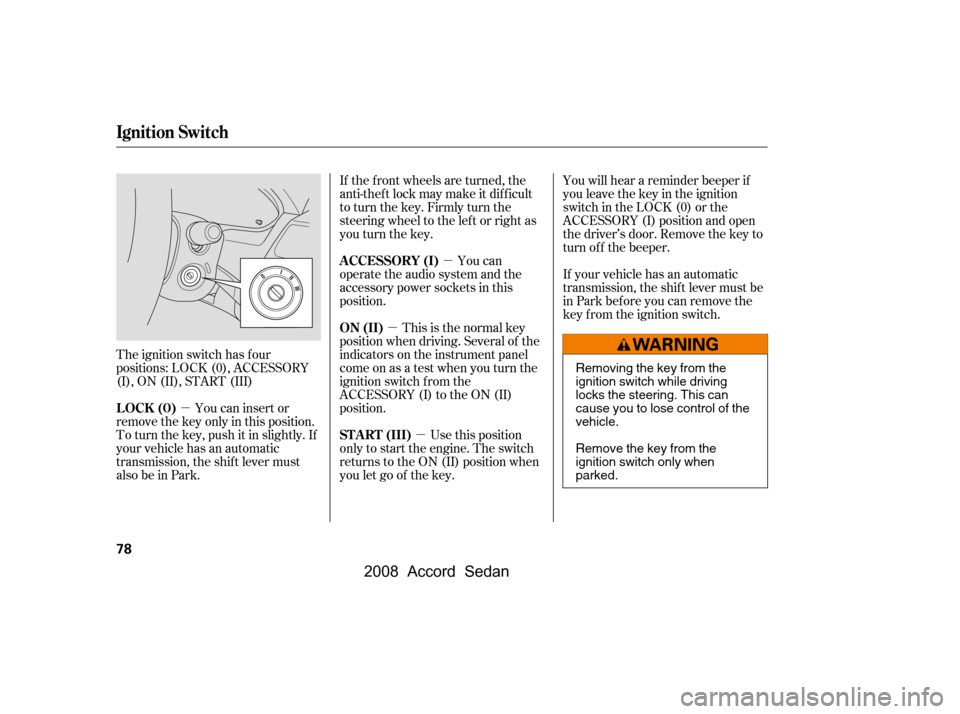
The ignition switch has f our
positions: LOCK (0), ACCESSORY
(I), ON (II), START (III) You can insert or
remove the key only in this position.
To turn the key, push it in slightly. If
your vehicle has an automatic
transmission, the shif t lever must
also be in Park. You will hear a reminder beeper if
you leave the key in the ignition
switch in the LOCK (0) or the
ACCESSORY (I) position and open
the driver’s door. Remove the key to
turn of f the beeper.
If your vehicle has an automatic
transmission, the shif t lever must be
in Park bef ore you can remove the
key f rom the ignition switch.
If the f ront wheels are turned, the
anti-thef t lock may make it dif f icult
to turn the key. Firmly turn the
steering wheel to the lef t or right as
you turn the key.
Use this position
only to start the engine. The switch
returns to the ON (II) position when
you let go of the key. This is the normal key
position when driving. Several of the
indicators on the instrument panel
come on as a test when you turn the
ignition switch f rom the
ACCESSORY (I) to the ON (II)
position. You can
operate the audio system and the
accessory power sockets in this
position.
Ignition Switch
LOCK (0)
ST A RT (III)
ON (II)
A CCESSORY (I)
78
Removing the key from the
ignition switch while driving
locks the steering. This can
cause you to lose control of the
vehicle.
Remove the key from the
ignition switch only when
parked.
�\f���—�\f���—�
���y�
�
��
��������y���
�)���\f���\f�\f�y�\f�\f�����y
2008 Accord Sedan