2008 GMC SIERRA heating
[x] Cancel search: heatingPage 99 of 578

Battery Replacement
Replace the battery if the REPLACE BATTERY IN
REMOTE KEY message displays in the DIC. See
“REPLACE BATTERY IN REMOTE KEY” underDIC
Warnings and Messages on page 3-63for additional
information.
Notice:When replacing the battery, use care not to
touch any of the circuitry. Static from your body
transferred to these surfaces may damage the
transmitter.To replace the battery in the RKE transmitter:
1. Separate the halves of the transmitter with a at,
thin object inserted into the notch on the side.
2. Remove the old battery. Do not use a metal object.
3. Insert the new battery, positive side facing down.
Replace with a CR2032 or equivalent battery.
4. Put the transmitter back together tightly.
Remote Vehicle Start
Your vehicle may have a remote starting feature. This
feature allows you to start the engine from outside of the
vehicle. It may also start up the vehicle’s heating or
air conditioning systems and rear window defogger.
Normal operation of the system will return after the key
is turned to the ON/RUN position.
If your vehicle has an automatic climate control system,
the climate control system will default to a heating or
cooling mode depending on the outside temperatures. If
your vehicle does not have an automatic climate control
system, the system will turn on at the setting the vehicle
was set to when the vehicle was last turned off.
2-7
Page 196 of 578
Certain power accessory plugs may not be compatible
to the accessory power outlet and could result in
blown vehicle or adapter fuses. If you experience a
problem, see your dealer/retailer for additional
information on the accessory power plugs.
The accessory power outlets are powered, even when
the ignition is in LOCK/OFF. Continuing to use
power outlets while the ignition is in LOCK/OFF may
cause the vehicle’s battery to run down.
Notice:Adding any electrical equipment to your
vehicle may damage it or keep other components
from working as they should. The repairs would not
be covered by your warranty. Do not use equipment
exceeding maximum amperage rating of 20
amperes. Check with your dealer/retailer before
adding electrical equipment.
When adding electrical equipment, be sure to follow the
proper installation instructions included with the
equipment.
Notice:Improper use of the power outlet can cause
damage not covered by your warranty. Do not
hang any type of accessory or accessory bracket
from the plug because the power outlets are
designed for accessory power plugs only.Ashtray(s) and Cigarette Lighter
Your vehicle may have a front ashtray located near the
center of the instrument panel. Pull on the door to
open it. The ashtray may have a cigarette lighter.
Notice:If you put papers, pins, or other ammable
items in the ashtray, hot cigarettes or other
smoking materials could ignite them and possibly
damage your vehicle. Never put ammable items in
the ashtray.
To remove the ashtray, open the door and pull the
ashtray bin toward you. To replace the ashtray, insert
the ashtray bin inside the ashtray door and press down
until it engages. To use the cigarette lighter, push it
in all the way, and let go. When it is ready for use, the
lighter pops back out.
Notice:Holding a cigarette lighter in while it is
heating does not let the lighter back away from the
heating element when it is hot. Damage from
overheating can occur to the lighter or heating
element, or a fuse could be blown. Do not hold a
cigarette lighter in while it is heating.
3-24
Page 197 of 578
Climate Controls
Climate Control System (With Air
Conditioning)
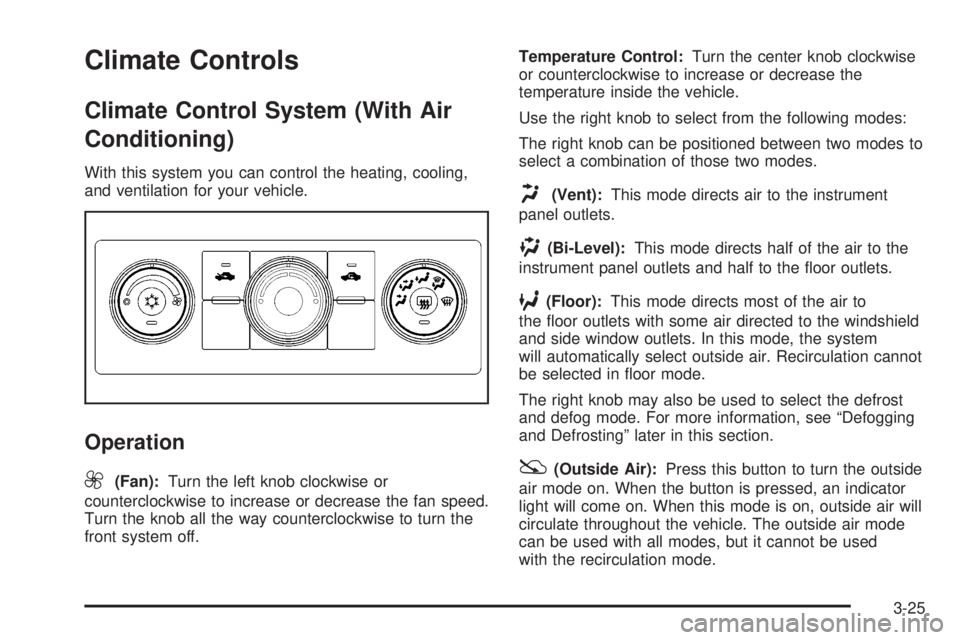
With this system you can control the heating, cooling,
and ventilation for your vehicle.
Operation
9
(Fan):Turn the left knob clockwise or
counterclockwise to increase or decrease the fan speed.
Turn the knob all the way counterclockwise to turn the
front system off.Temperature Control:Turn the center knob clockwise
or counterclockwise to increase or decrease the
temperature inside the vehicle.
Use the right knob to select from the following modes:
The right knob can be positioned between two modes to
select a combination of those two modes.
H(Vent):This mode directs air to the instrument
panel outlets.
)(Bi-Level):This mode directs half of the air to the
instrument panel outlets and half to the oor outlets.
6(Floor):This mode directs most of the air to
the oor outlets with some air directed to the windshield
and side window outlets. In this mode, the system
will automatically select outside air. Recirculation cannot
be selected in oor mode.
The right knob may also be used to select the defrost
and defog mode. For more information, see “Defogging
and Defrosting” later in this section.
:(Outside Air):Press this button to turn the outside
air mode on. When the button is pressed, an indicator
light will come on. When this mode is on, outside air will
circulate throughout the vehicle. The outside air mode
can be used with all modes, but it cannot be used
with the recirculation mode.
3-25
Page 199 of 578
Rear Window Defogger
If your vehicle has a rear window defogger it uses a
warming grid to remove fog from the rear window.
The rear window defogger will only work when
the ignition is in RUN.
<(Rear):Press this button to turn the rear window
defogger on or off. An indicator light on the button
will come on to let you know that the rear window
defogger is activated.
The rear window defogger will only work when the
ignition is in RUN. The rear window defogger will stay
on for approximately 10 minutes after the button is
pressed, unless the ignition is turned to ACC or LOCK.
The defogger can also be turned off by pressing the
button again or by turning off the engine.
Notice:Do not use anything sharp on the inside of
the rear window. If you do, you could cut or
damage the warming grid, and the repairs would not
be covered by your warranty. Do not attach a
temporary vehicle license, tape, a decal or anything
similar to the defogger grid.
Climate Control System
(Heater Only)
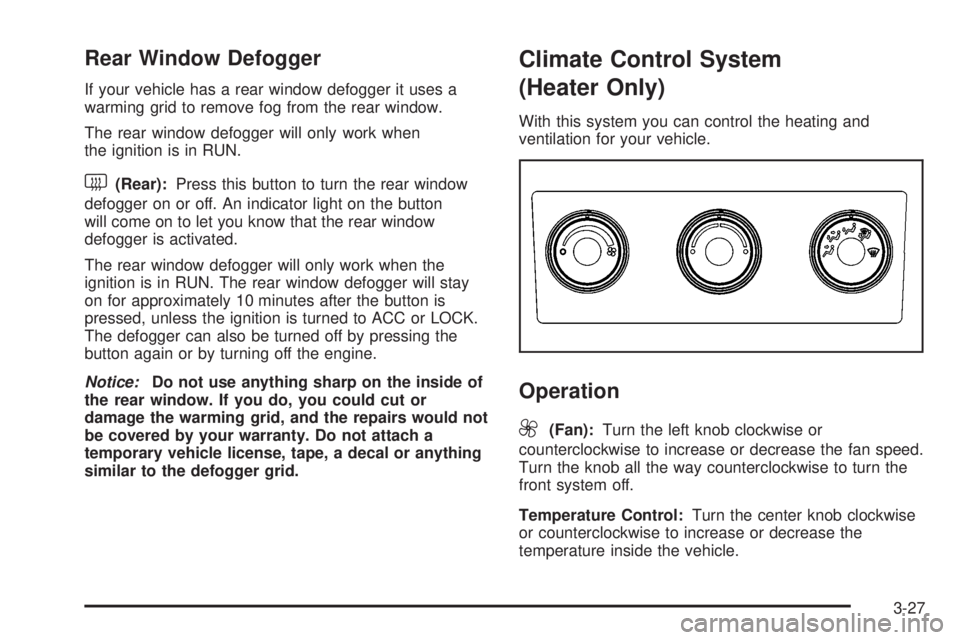
With this system you can control the heating and
ventilation for your vehicle.
Operation
9
(Fan):Turn the left knob clockwise or
counterclockwise to increase or decrease the fan speed.
Turn the knob all the way counterclockwise to turn the
front system off.
Temperature Control:Turn the center knob clockwise
or counterclockwise to increase or decrease the
temperature inside the vehicle.
3-27
Page 200 of 578
Use the right knob to select from the following modes:
The right knob can be positioned between two modes to
select a combination of those two modes.
H(Vent):This mode directs air to the instrument
panel outlets.
)(Bi-Level):This mode directs half of the air to the
instrument panel outlets and to the oor outlets.
6(Floor):This mode directs most of the air to the
oor outlets with some air directed to the windshield,
side window outlets, and second row oor outlets. In this
mode, the system will automatically select outside air.
Defogging and Defrosting
Fog or frost on the inside of windows is a result of high
humidity (moisture) condensing on the cool window
glass. This can be minimized if the climate control
system is used properly.
Turn the right knob to select the defog or defrost mode.
-(Defog):This mode clears the windows of fog or
moisture and warm the passengers. The air is directed to
the windshield, oor outlets, and side window vents.
0(Defrost):This mode removes fog or frost from the
windshield more quickly. A portion of the air is directed
to the windshield and the side window vents, with someair directed to the oor vents. The system will
automatically force outside air into the vehicle.
Do not drive the vehicle until all the windows are clear.
Dual Automatic Climate Control
System
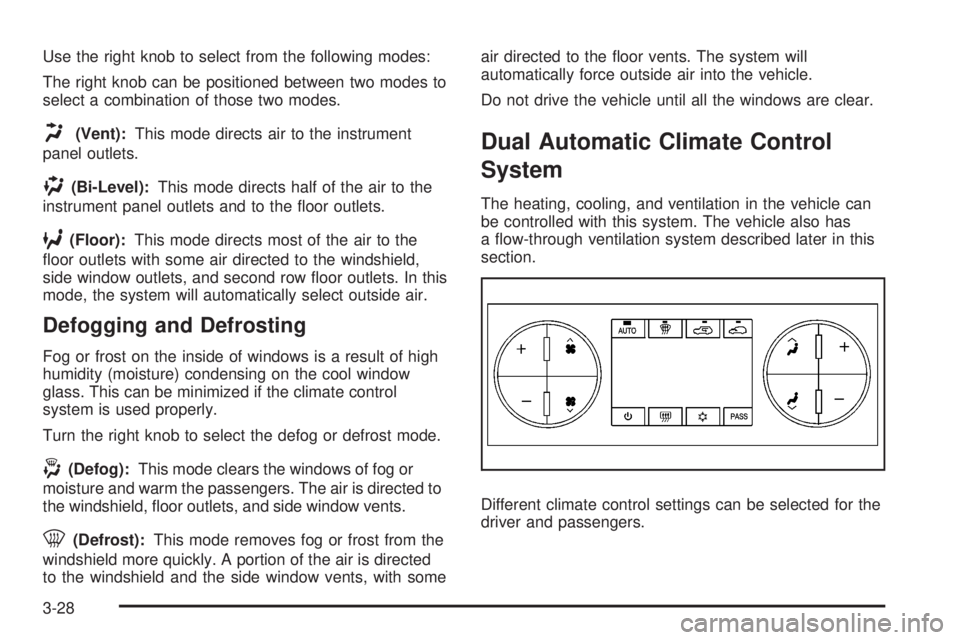
The heating, cooling, and ventilation in the vehicle can
be controlled with this system. The vehicle also has
a ow-through ventilation system described later in this
section.
Different climate control settings can be selected for the
driver and passengers.
3-28
Page 218 of 578
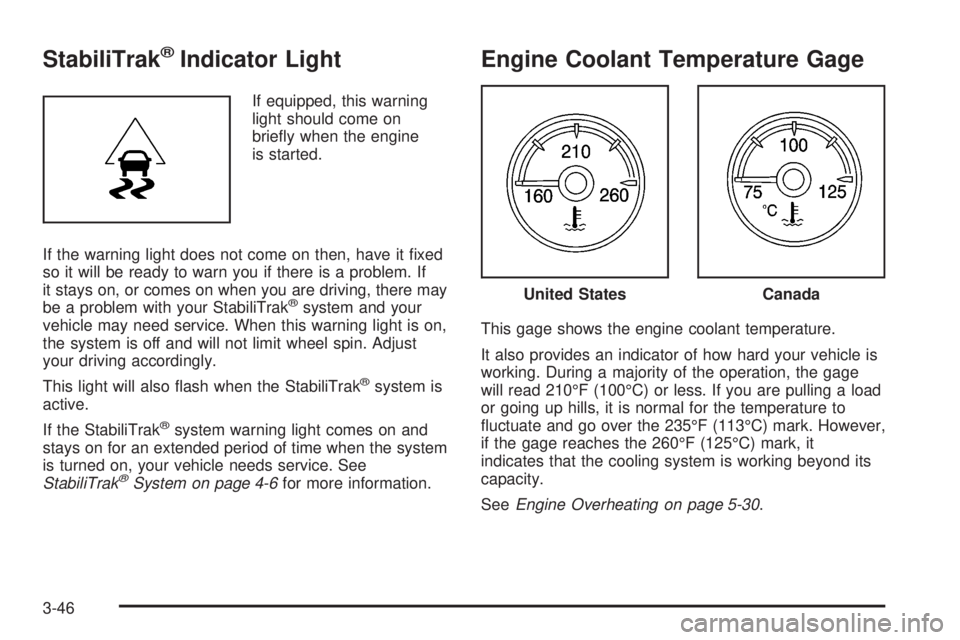
StabiliTrak®Indicator Light
If equipped, this warning
light should come on
briey when the engine
is started.
If the warning light does not come on then, have it xed
so it will be ready to warn you if there is a problem. If
it stays on, or comes on when you are driving, there may
be a problem with your StabiliTrak
®system and your
vehicle may need service. When this warning light is on,
the system is off and will not limit wheel spin. Adjust
your driving accordingly.
This light will also ash when the StabiliTrak
®system is
active.
If the StabiliTrak
®system warning light comes on and
stays on for an extended period of time when the system
is turned on, your vehicle needs service. See
StabiliTrak
®System on page 4-6for more information.
Engine Coolant Temperature Gage
This gage shows the engine coolant temperature.
It also provides an indicator of how hard your vehicle is
working. During a majority of the operation, the gage
will read 210°F (100°C) or less. If you are pulling a load
or going up hills, it is normal for the temperature to
uctuate and go over the 235°F (113°C) mark. However,
if the gage reaches the 260°F (125°C) mark, it
indicates that the cooling system is working beyond its
capacity.
SeeEngine Overheating on page 5-30.
United StatesCanada
3-46
Page 237 of 578

is reconnected. This message also clears if you
acknowledge it. If this message still displays, either your
vehicle or the trailer needs service. See your
dealer/retailer.
See “Integrated Trailer Brake Control System” under
Towing a Trailer on page 4-55for more information.
DRIVER DOOR OPEN
This message displays and a chime sounds if the driver
door is not fully closed and the vehicle is in a drive
gear. Stop and turn off the vehicle, check the door for
obstructions, and close the door again. Check to
see if the message still appears on the DIC.
ENGINE HOT A/C (Air Conditioning)
TURNED OFF
This message displays when the engine coolant
becomes hotter than the normal operating temperature.
SeeEngine Coolant Temperature Gage on page 3-46.
To avoid added strain on a hot engine, the air
conditioning compressor automatically turns off. When
the coolant temperature returns to normal, the air
conditioning compressor turns back on. You can
continue to drive your vehicle.
If this message continues to appear, have the system
repaired by your dealer/retailer as soon as possible
to avoid damage to the engine.
ENGINE OVERHEATED IDLE ENGINE
Notice:If you drive your vehicle while the engine is
overheating, severe engine damage may occur. If
an overheat warning appears on the instrument
panel cluster and/or DIC, stop the vehicle as soon
as possible. SeeEngine Overheating on page 5-30
for more information.
This message displays when the engine coolant
temperature is too hot. Stop and allow the vehicle to
idle until it cools down. SeeEngine Coolant
Temperature Gage on page 3-46.
SeeOverheated Engine Protection Operating Mode (V8
Engines Only) on page 5-33for information on driving
to a safe place in an emergency.
ENGINE OVERHEATED STOP ENGINE
Notice:If you drive your vehicle while the engine
is overheating, severe engine damage may occur. If
an overheat warning appears on the instrument
panel cluster and/or DIC, stop the vehicle as soon
as possible. SeeEngine Overheating on page 5-30
for more information.
This message displays and a chime sounds if the
engine cooling system reaches unsafe temperatures for
operation. Stop and turn off the vehicle as soon as it
is safe to do so to avoid severe damage. This message
clears when the engine has cooled to a safe operating
temperature.
3-65
Page 238 of 578

ENGINE POWER IS REDUCED
This message displays and a chime sounds when the
cooling system temperature gets too hot and the engine
further enters the engine coolant protection mode.
SeeEngine Overheating on page 5-30for further
information.
This message also displays when the vehicle’s engine
power is reduced. Reduced engine power can affect the
vehicle’s ability to accelerate. If this message is on,
but there is no reduction in performance, proceed
to your destination. The performance may be reduced
the next time the vehicle is driven. The vehicle may
be driven at a reduced speed while this message is on,
but acceleration and speed may be reduced. Anytime
this message stays on, the vehicle should be taken
to your dealer/retailer for service as soon as possible.
FAST IDLE ON
If your vehicle has this feature, this message displays
when the fast idle feature is on. SeeFast Idle System on
page 2-25for more information.
FUEL LEVEL LOW
This message displays and a chime sounds if the fuel
level is low. Refuel as soon as possible. SeeFuel Gage
on page 3-53andFuel on page 5-6for more
information.
HOOD OPEN
This message displays and a chime sounds if the hood is
not fully closed. Stop and turn off the vehicle, check the
hood for obstructions, and close the hood again. Check to
see if the message still appears on the DIC.
LEFT REAR DOOR OPEN (Crew Cab)
This message displays and a chime sounds if the driver
side rear door is not fully closed and the vehicle is in
a drive gear. Stop and turn off the vehicle, check
the door for obstructions, and close the door again.
Check to see if the message still appears on the DIC.
OIL PRESSURE LOW STOP ENGINE
Notice:If you drive your vehicle while the engine
oil pressure is low, severe engine damage may
occur. If a low oil pressure warning appears on the
Driver Information Center (DIC), stop the vehicle
as soon as possible. Do not drive the vehicle until
the cause of the low oil pressure is corrected.
SeeEngine Oil (Gasoline Engine) on page 5-15for
more information.
This message displays if low oil pressure levels occur.
Stop the vehicle as soon as safely possible and do
not operate it until the cause of the low oil pressure has
been corrected. Check the oil as soon as possible
and have your vehicle serviced by your dealer/retailer.
SeeEngine Oil (Gasoline Engine) on page 5-15.
3-66