2008 GMC ENVOY trans release
[x] Cancel search: trans releasePage 128 of 468

3. At the same time, press and hold both the Universal
Home Remote button that you would like to use
to control the garage door and the hand-held
transmitter button. Do not release the Universal
Home Remote button or the hand-held transmitter
button until Step 4 has been completed.
Some entry gates and garage door openers may
require you to substitute Step 3 with the procedure
noted in “Gate Operator and Canadian
Programming” later in this section.
4. The indicator light on the Universal Home Remote
will ash slowly at rst and then rapidly after
Universal Home Remote successfully receives the
frequency signal from the hand-held transmitter.
Release both buttons.5. Press and hold the newly-trained Universal Home
Remote button and observe the indicator light.
If the indicator light stays on continuously,
the programming is complete and your garage door
should move when the Universal Home Remote
button is pressed and released. You do not need to
continue the programming Steps 6 through 8 and
can stop here.
If the Universal Home Remote indicator light blinks
rapidly for two seconds and then turns to a constant
light, continue with the programming Steps 6
through 8.
It may be helpful to have another person available
to assist with the remaining steps.
2-54
Page 130 of 468
Gate Operator and Canadian
Programming
If you have questions or need help programming the
Universal Home Remote System, call 1-800-355-3515
or go to www.homelink.com.
Canadian radio-frequency laws require transmitter
signals to time out or quit after several seconds of
transmission. This may not be long enough for Universal
Home Remote to pick up the signal during programming.
Similarly, some U.S. gate operators are manufactured
to time out in the same manner.
If you live in Canada, or you are having difficulty
programming a gate operator or garage door opener
by using the “Programming Universal Home Remote”
procedures, regardless of where you live, replace Step 3
under “Programming Universal Home Remote” with
the following:
Continue to press and hold the Universal Home Remote
button while you press and release every two seconds
(cycle) the hand-held transmitter button until the
frequency signal has been successfully accepted by the
Universal Home Remote. The Universal Home Remote
indicator light will ash slowly at rst and then rapidly.
Proceed with Step 4 under “Programming Universal
Home Remote” to complete.
Using Universal Home Remote
Press and hold the appropriate Universal Home Remote
button for at least half of a second. The indicator light
will come on while the signal is being transmitted.
Erasing Universal Home Remote
Buttons
Erase the programmed buttons when you sell or
terminate your lease.
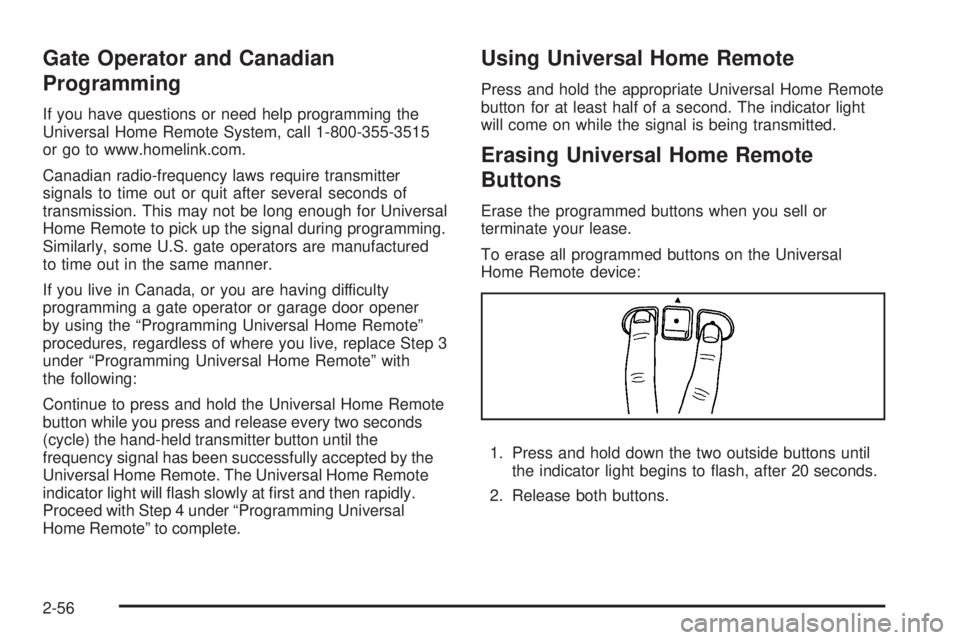
To erase all programmed buttons on the Universal
Home Remote device:
1. Press and hold down the two outside buttons until
the indicator light begins to ash, after 20 seconds.
2. Release both buttons.
2-56
Page 139 of 468

The main components of your instrument panel are the following:
A. Exterior Lamp Control. SeeHeadlamps on
page 3-14. Dome Lamp Override Button.
SeeDome Lamp Override on page 3-17. Instrument
Panel Brightness Control. SeeInstrument Panel
Brightness on page 3-17. Fog Lamp Button
(If Equipped). SeeFog Lamps on page 3-16.
B. Air Outlets. SeeOutlet Adjustment on page 3-28.
C. Turn Signal/Multifunction Lever. SeeTurn
Signal/Multifunction Lever on page 3-7.
D. OnStar and Audio Steering Wheel Controls.
SeeAudio Steering Wheel Controls on page 3-101.
E. Instrument Panel Cluster. SeeInstrument Panel
Cluster on page 3-31.
F. Audio Steering Wheel Controls. SeeAudio Steering
Wheel Controls on page 3-101.
G. Ignition Switch. SeeIgnition Positions on page 2-21.
H. Audio System. SeeAudio System(s) on page 3-65.
I. Climate Controls. SeeDual Climate Control
System on page 3-21.
J. Hood Release. SeeHood Release on page 5-11.K. Driver Information Center (DIC) Steering Wheel
Controls. SeeDriver Information Center (DIC)
on page 3-49.
L. Transfer Case Controls. See “Automatic Transfer
Case” underFour-Wheel Drive on page 2-29.
M. Shift Lever and StabiliTrak
®(If Equipped) Button.
SeeShifting Into PARK (P) on page 2-34and
StabiliTrak
®System on page 4-6.
N. Lighter. SeeAshtray(s) and Cigarette Lighter on
page 3-20.
O. Accessory Power Outlets. SeeAccessory Power
Outlet(s) on page 3-20.
P. Parking Brake. SeeParking Brake on page 2-33.
Q. Rear Window Washer/Wiper. See “Rear Window
Washer/Wiper” underWindshield Washer on
page 3-9.
R. Rear Window Defogger. See “Rear Window
Defogger” underDual Climate Control System on
page 3-21andDual Automatic Climate Control
System on page 3-23.
S. Glove Box. SeeGlove Box on page 2-57.
3-5
Page 148 of 468

Ending Cruise Control
There are three ways to turn off the cruise control:
Step lightly on the brake pedal.
Move the cruise switch to off, or
Shift the transmission to NEUTRAL (N).
Erasing Speed Memory
When you turn off the cruise control or the ignition,
the cruise control set speed memory is erased.
Headlamps
The exterior lamps knob
is located on your
instrument panel to the
left of the steering wheel.
c(Off):Turn the knob to this symbol and release
it to turn off the Daytime Running Lamps (DRL) and the
Automatic Headlamps (AHS). An indicator illuminates
when the position is selected. This position is not
available for vehicles rst sold in Canada.
?(Automatic DRL/AHS):Turn the knob to this
symbol to put the system into automatic headlamp mode.
;(Parking Lamps):Turn the knob to this symbol
to turn on the parking lamps, as well as the following:
Sidemarker Lamps
Taillamps
License Plate Lamps
Instrument Panel Lights
2(Headlamps):Turn the knob to this symbol
to turn on the headlamps, as well as the following:
Parking Lamps
Sidemarker Lamps
Taillamps
License Plate Lamps
Instrument Panel Lights
3-14
Page 150 of 468

There is a delay in the transition between the daytime and
nighttime operation of the Daytime Running Lamps (DRL)
and the automatic headlamp systems, so that driving
under bridges or bright overhead street lights does not
affect the system. The DRL and automatic headlamp
system are only affected when the light sensor sees a
change in lighting lasting longer than the delay.
If you start your vehicle in a dark garage, the automatic
headlamp system comes on after the transmission is
shifted out of PARK (P). Once you leave the garage,
it will take about one minute for the automatic headlamp
system to change to DRL if it is light outside. During
that delay, the instrument panel cluster might not be
as bright as usual. Make sure the instrument panel
brightness control is in the full bright position.
If the vehicle is running and the automatic headlamp
system is already on, it can be turned off by turning
and releasing the headlamp control at the off position.
The automatic headlamp system stays off until you
turn and release the headlamp control at the off
position again. SeeHeadlamps on page 3-14.Fog Lamps
Use the fog lamps for better vision in foggy or misty
conditions. The ignition must be in RUN for the
fog lamps to work.
The fog lamp button is
located on the instrument
panel to the right of the
exterior lamps knob.
Press the button to turn the fog lamps on. Press the
button again to turn them off. A light glows near the
button while the fog lamps are on. Fog lamps turn off
whenever the high-beam headlamps are on.
Some localities have laws that require the headlamps to
be on along with the fog lamps.
3-16
Page 224 of 468

Audio Output
Audio from the DVD player or auxiliary inputs can be
heard through the following possible sources:
Wireless Headphones
Vehicle Speakers
Vehicle wired headphone jacks on the Rear Seat
Audio system (if equipped)
The RSE system always transmits the audio signal to
the wireless headphones, if there is audio available.
See “Headphones” earlier in this section for more
information.
The RSE system is capable of outputting audio to the
vehicle speakers by using the radio. The RSE system can
be selected as an audio source on the radio if the RSE
system power is on. Once the RSE system is selected as
an audio source on the radio, adjust the speaker volume
on the radio, if necessary. If the RSE system power is not
on, the RSE system is not an available source on the
radio. See your vehicle’s radio information.
The RSE system is capable of outputting audio to the
wired headphone jacks on the rear seat audio system
(if equipped). The RSE system can be selected as
an audio source on the rear seat audio system if the
RSE system power is on. SeeRear Seat Audio (RSA)
on page 3-100for more information.
Video Screen
The video screen is located in the overhead console.
To use the video screen, do the following:
1. Push forward on the release button located on the
DVD display console.
2. Pull the screen down, away from you, and adjust its
position as desired.
When the video screen is not in use, push it up into its
locked position.
If a DVD is playing and the screen is raised to its locked
position, the screen shuts off, but the DVD continues
to play through the previous audio or video source.
The video screen contains the IR transmitters for the
wireless headphones and the IR receivers for the remote
control. If the screen is in the closed position, the signals
are not available for the operation of the headphones or
the remote control.
Notice:Avoid directly touching the video screen,
as damage may occur. See “Cleaning the Video
Screen” later in this section for more information.
3-90
Page 257 of 468

Driving Uphill
Once you decide you can safely drive up the hill, you
need to take some special steps.
Use a low gear and get a rm grip on the steering
wheel.
Get a smooth start up the hill and try to maintain
your speed. Do not use more power than you
need, because you do not want the wheels to
start spinning or sliding.
{CAUTION:
Turning or driving across steep hills can be
dangerous. You could lose traction, slide
sideways, and possibly roll over. You could
be seriously injured or killed. When driving up
hills, always try to go straight up.
Try to drive straight up the hill if at all possible.
If the path twists and turns, you might want to
nd another route.
Ease up on your speed as you approach the top of
the hill.
Attach a ag to the vehicle to make you more
visible to approaching traffic on trails or hills.
Sound the horn as you approach the top of the hill
to let opposing traffic know you are there.
Use your headlamps even during the day. They
make your vehicle more visible to oncoming traffic.
{CAUTION:
Driving to the top (crest) of a hill at full speed
can cause an accident. There could be a
drop-off, embankment, cliff, or even another
vehicle. You could be seriously injured or killed.
As you near the top of a hill, slow down and
stay alert.
There are some things you should do if the vehicle stalls,
or is about to stall, and you cannot make it up the hill:
Push the brake pedal to stop the vehicle and keep it
from rolling backwards. Also, apply the parking
brake.
If the engine is still running, shift the transmission to
REVERSE (R), release the parking brake, and slowly
back down the hill in REVERSE (R).
4-19
Page 258 of 468

If the engine has stopped running, you will need to
restart it. With the brake pedal pressed and the
parking brake still applied, shift the transmission
to PARK (P) and restart the engine. Then, shift to
REVERSE (R), release the parking brake, and
slowly back down the hill as straight as possible
in REVERSE (R).
As you are backing down the hill, put your left hand
on the steering wheel at the 12 o’clock position. This
way, you will be able to tell if the wheels are straight
and maneuver as you back down. It is best that you
back down the hill with the wheels straight rather
than in the left or right direction. Turning the wheel
too far to the left or right will increase the possibility
of a rollover.
There are also some things you must not do if you stall,
or are about to stall, when going up a hill:
Never attempt to prevent a stall by shifting into
NEUTRAL (N) to rev-up the engine and regain
forward momentum. This will not work. Your vehicle
will roll backwards very quickly and you could go
out of control.
Instead, apply the regular brake to stop the vehicle.
Then apply the parking brake. Shift to REVERSE (R),
release the parking brake, and slowly back
straight down.
Never attempt to turn around if you are about to stall
when going up a hill. If the hill is steep enough to stall
your vehicle, it is steep enough to cause you to roll
over if you turn around. If you cannot make it up the
hill, you must back straight down the hill.
If, after stalling, you try to back down the hill and decide
you just cannot do it, set the parking brake, put the
transmission in PARK (P) and turn off the engine. Leave
the vehicle and go get some help. Exit on the uphill side
and stay clear of the path the vehicle would take if it rolled
downhill. Do not shift the transfer case to NEUTRAL
when you leave the vehicle. Leave it in some gear.
{CAUTION:
Shifting the transfer case to NEUTRAL
can cause your vehicle to roll even if the
transmission is in PARK (P). This is because
the NEUTRAL position on the transfer case
overrides the transmission. You or someone
else could be injured. If you are going to leave
your vehicle, set the parking brake and shift
the transmission to PARK (P). But do not shift
the transfer case to NEUTRAL. Leave the
transfer case in the Two-Wheel High,
Four-Wheel High or Four-Wheel Low position.
4-20