2008 FORD C MAX Tone
[x] Cancel search: TonePage 37 of 278

Downloaded from www.Manualslib.com manuals search engine GENERAL INFORMATION
ON RADIO FREQUENCIES
CAUTION
The radio frequency used byyour remote control can also beused by other short distance radiotransmissions (e.g. amateur radios,medical equipment, wirelessheadphones, remote controls andalarm systems). If the frequencies arejammed, you will not be able to useyour remote control. You can lockand unlock the doors with the key.
Note:You could unlock the doors ifyou press the buttons on the remotecontrol unintentionally.
The operating range between yourremote control and your vehiclevaries depending on theenvironment.
PROGRAMMING THE
REMOTE CONTROL
A maximum of eight remote controlscan be programmed (including theones delivered with the vehicle). Theremote controls must remain insidethe vehicle during the programmingprocedure. Fasten the front seatbelts and close all doors to ensurethat conflicting chimes do not soundduring programming.
•To programme new remotecontrols turn the ignition key toposition II four times within sixseconds.
•Turn the ignition to position 0. Atone sounds to indicate that it isnow possible to programme theremote controls for ten seconds.
35
Keys and remote controlsE78253 E78254
Page 38 of 278

Downloaded from www.Manualslib.com manuals search engine •Press any button on a newremote control. A tone will soundas confirmation. Repeat this laststep for all your remote controls,including your original. Do notremove the key from the ignitionwhen pressing the button on thisremote control.
•Switch the ignition back on(position II) or wait for tenseconds without programminganother remote control to end thekey programming. Only theremote controls which you havejust programmed are now able tolock and unlock the vehicle.
Reprogramming theunlocking function
You can change the unlockingfunction so that pressing the unlockbutton once deactivates the centrallocking or double locking, disarmsthe anti-theft alarm system andunlocks only the driver’s door.Pressing the unlock button twicewithin three seconds also unlocks thepassengers’ doors.
In order to re-programme thefunction, press and hold the unlockand lock buttons simultaneously forat least four seconds with the ignitionswitched off. The direction indicatorswill flash twice to indicate that theunlocking function has beensuccessfully re-programmed.
Pressing and holding both buttonssimultaneously for at least fourseconds again will change thefunction back.
CHANGING THE REMOTE
CONTROL BATTERY
If the range of the transmitter in theremote control decreases gradually,the battery (type 3V CR 2032) shouldbe replaced.
Remote control type 1
First, press the button to release thekey blade.
Passive key
Remove the spare key.
36
Keys and remote controlsE78255
Page 66 of 278

Downloaded from www.Manualslib.com manuals search engine LIGHTING CONTROL
Lighting control positions
OffA
Side and tail lampsB
HeadlampsC
Front fog lampsD
Rear fog lampsE
Parking lampsF
Parking lamps
CAUTION
Prolonged use of the parkinglamps will discharge the battery.
Switch off the ignition.
Push the lighting control inwards andturn it to position F.
Main and dipped beam
Pull the lever fully towards thesteering wheel to switch betweenmain and dipped beam.
Headlamp flasher
Pull the lever slightly towards thesteering wheel.
Home safe lighting
Switch the ignition off and pull thedirection indicator lever towards thesteering wheel to switch theheadlamps on. You will hear a shorttone. The headlamps will go offautomatically after 3 minutes with anydoor open, or 30 seconds after thelast door has been closed.
With all doors closed, but within the30 second delay, opening any doorwill result in the 3 minute timerstarting again.
The home safe lights can becancelled by either pulling thedirection indicator lever towards thesteering wheel again or by turningthe ignition switch ON.
64
LightingE71094DBCAFE E71095
Page 96 of 278

Downloaded from www.Manualslib.com manuals search engine AUDIBLE WARNINGS
AND INDICATORS
Automatic transmission
If position P is not selected, a warningchime will sound when the driver’sdoor is opened.
Electronic parking brake(EPB)
A warning chime will sound if:
•the driver’s door is opened beforethe EPB is applied.
•the EPB is still applied when thevehicle moves off.
•there is a cut in the power supply.
Frost
WARNING
Even if the temperature rises toabove +4ºC there is noguarantee that the road is free ofhazards caused by inclementweather.
A warning chime will sound in thefollowing conditions:
•+4ºC or lower: frost warning
•0ºC or lower: danger of icy roads
Key outside car
Vehicles with the key freesystem
If the engine is running and a passivekey is no longer detected within thevehicle interior, a chime will sound assoon as the door is closed.
Key-in-ignition
Except vehicles with the keyfree system
A warning tone will sound when thedriver’s door is opened if:
•the key is in the ignition.
Vehicles with the key freesystem
A warning tone will sound when thedriver’s door is opened if:
•the ignition switch is not pulledout.
•the spare key is in the ignition.
Lights on
A warning chime will sound if thedriver’s door is opened with theexterior lights switched on and theignition switched off.
Low fuel
A warning chime will sound at thefollowing ranges: 80 km (50 miles),40 km (25 miles), 20 km (12 miles), 0km (0 miles).
94
Instruments
Page 98 of 278

Downloaded from www.Manualslib.com manuals search engine GENERAL INFORMATION
WARNING
Do not operate the informationdisplay controls when thevehicle is moving.
Various systems can beprogrammed using the informationdisplay and the multi-function leveron the steering column.
Controls
Turn the rotary control to scrollthrough the available displays withina menu or to choose a setting. Toscroll automatically, hold the rotarycontrol in the upward or downwardposition.
Press the SET/RESET button tochoose a sub-menu and adjust thesettings. If the chimes are activated,a short tone will sound each time thebutton is pressed.
Type 2 and 3
Press the up and down arrowbuttons on the steering wheel toscroll through the trip computerdisplays. See Informationmessages (page 103).
96
Information displaysE73265 E73266
Page 164 of 278

Downloaded from www.Manualslib.com manuals search engine PRINCIPLE OF
OPERATION
WARNING
The parking aid does not relieveyou of your responsibility todrive with due care and attention.
CAUTIONS
The sensors may not detectobjects in heavy rain or otherconditions that cause disruptivereflections.
The sensors may not detectobjects with surfaces that absorbultrasonic waves.
The sensors may not detectobjects that are close to thevehicle (approximately 30centimetres [11 inches] to the rearand above or below the sensors).
If you use a high pressure sprayto wash your vehicle, only spraythe sensors briefly from a distancenot less than 20 centimetres (8inches).
Note:The parking aid may emit falsetones if it detects a signal using thesame frequency as the sensors or ifthe vehicle is fully laden.
Note:The outer sensors may detectthe side walls of a garage. If thedistance between the outer sensorand the side wall remains constantfor three seconds, the tone willswitch off. As you continue, the innersensors will detect rearward objects.
USING THE PARKING AID
Note:Keep the sensors free fromdirt, ice and snow. Do not clean withsharp objects.
Switching the parking aidon and off
Note:The parking aid switches offautomatically when you start theengine or when you exceed 16 km/h(10 mph).
Note:Vehicles fitted with a trailertow module not approved by us maynot correctly detect obstacles.
Note:On vehicles fitted with a towball arm, the rear sensors aredeactivated automatically when anytrailer lamps (or lighting boards) areconnected to the 13-pin socket via atrailer tow module we haveapproved. On vehicles fitted with atrailer tow module not approved byus, you have to switch the parkingaid off using the switch.
Note:The front and rear sensors arealways activated or deactivatedtogether.
Note:On vehicles fitted withautomatic transmission, the parkingaid will not operate in position P.
The parking aid is per default off. Toswitch the parking aid on, press theswitch in the instrument panel orselect reverse gear.
The light in the switch illuminateswhen the parking aid is activated.
To turn it off, press the switch again.
162
Parking aid
Page 165 of 278
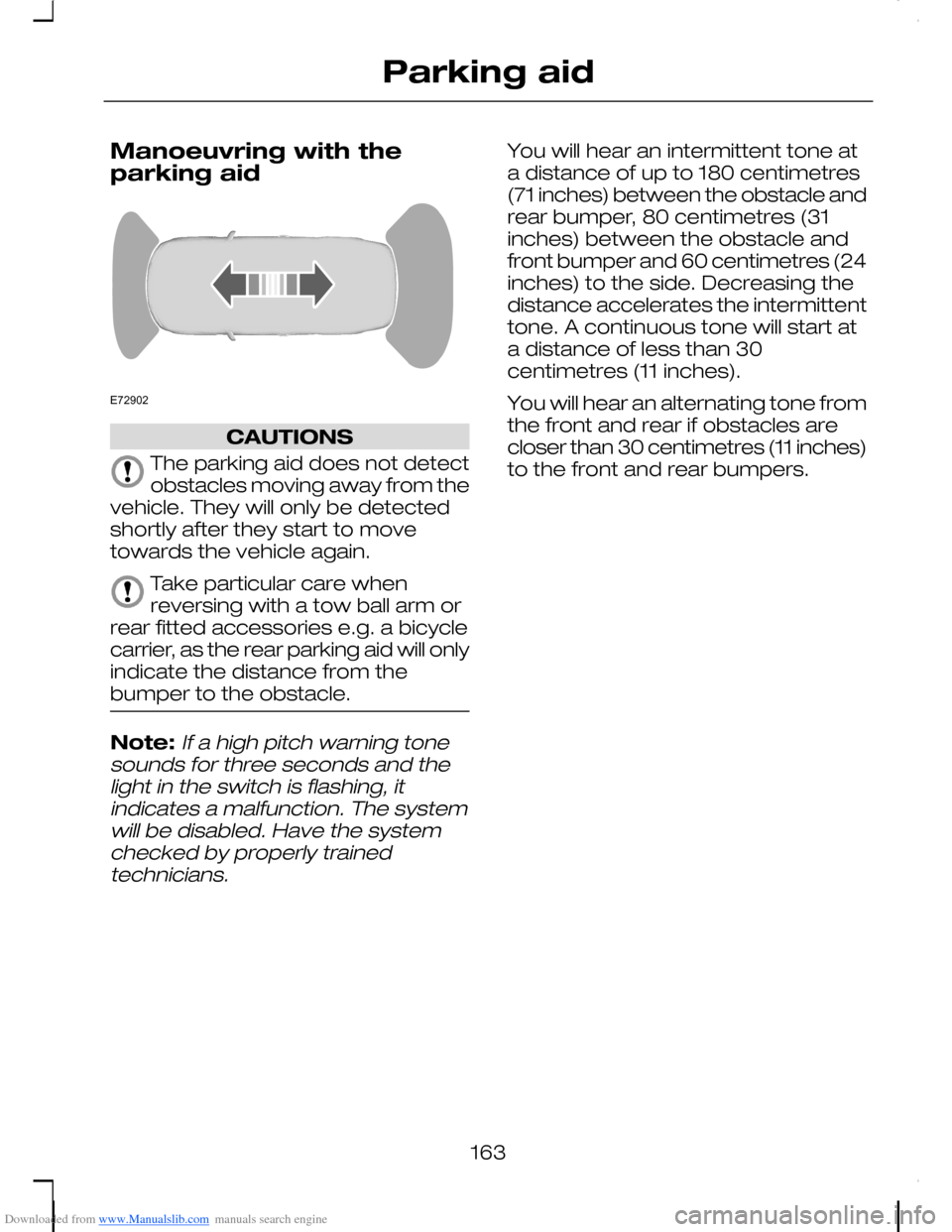
Downloaded from www.Manualslib.com manuals search engine Manoeuvring with theparking aid
CAUTIONS
The parking aid does not detectobstacles moving away from thevehicle. They will only be detectedshortly after they start to movetowards the vehicle again.
Take particular care whenreversing with a tow ball arm orrear fitted accessories e.g. a bicyclecarrier, as the rear parking aid will onlyindicate the distance from thebumper to the obstacle.
Note:If a high pitch warning tonesounds for three seconds and thelight in the switch is flashing, itindicates a malfunction. The systemwill be disabled. Have the systemchecked by properly trainedtechnicians.
You will hear an intermittent tone ata distance of up to 180 centimetres(71 inches) between the obstacle andrear bumper, 80 centimetres (31inches) between the obstacle andfront bumper and 60 centimetres (24inches) to the side. Decreasing thedistance accelerates the intermittenttone. A continuous tone will start ata distance of less than 30centimetres (11 inches).
You will hear an alternating tone fromthe front and rear if obstacles arecloser than 30 centimetres (11 inches)to the front and rear bumpers.
163
Parking aidE72902
Page 210 of 278

Downloaded from www.Manualslib.com manuals search engine CLEANING THE INTERIOR
Seat belts
WARNINGS
Do not use abrasives, orchemical solvents to cleanthem.
Do not allow moisture topenetrate the seat belt retractormechanism.
Clean the seat belts with interiorcleaner or water applied with a softsponge. Let the seat belts drynaturally, away from artificial heat.
Instrument cluster screens,LCD screens, radioscreens
WARNING
Do not use abrasives, orchemical solvents to cleanthem.
REPAIRING MINOR PAINT
DAMAGE
CAUTION
Remove apparently harmlesslooking substances from thepaintwork immediately (e.g. birddroppings, tree resins, insectremains, tar spots, road salt andindustrial fall out).
You should repair paintwork damagecaused by stones from the road orminor scratches as soon as possible.A choice of products is available fromyour Ford Dealer. Read and followthe manufacturer’s instructions.
208
Vehicle care