Page 174 of 666

172 Controls in detailOperating system with steering wheel buttons*
3
Switching the locator lighting on or
off*If you switch the locator lighting to
On,
the following lamps light up in the dark
after you have unlocked the vehicle us-
ing the key:
\4
The parking lamps
\4
The tail lamps
\4
The license plate lamp
\4
The front foglampsThe locator lighting automatically
switches off after 40 seconds or when
you:
\4
open the driver’s door
\4
insert the key into the ignition lock
\4
lock the vehicle with the key
\1
Press the
æ
or
ç
to select the
Lighting
submenu.
\1
Press the
j
or
k
button re-
peatedly until you see the
Loc.
lighting
message in the display.
The current setting is highlighted. USA only:
If you turn the light switch to
C
or
B
, the corresponding light
switches on. Constant headlamp
mode remains activated if the light
switch is turned to
U
.
Canada only:
If you turn the light switch to
B
,
the low-beam headlamps are
switched on. Constant headlamp
mode remains activated if the light
switch is turned to
C
or
U
.
nf_BA.book Page 172 Friday, January 25, 2008 3:53 PM
Page 179 of 666
177 Controls in detail
Operating system with steering wheel buttons*
3
Consumption statistics after start
\1
Press the
è
or
ÿ
button re-
peatedly until you see the
After start
message in the display.
1Distance driven since start
2Time elapsed since start
3Average speed since start
4Average fuel consumption since start
Consumption statistics after reset
\1
Press the
è
or
ÿ
button re-
peatedly until you see the
After start
message in the display.
\1
Press the
j
or
k
button re-
peatedly until you see the
After re-
set
message.
1Distance driven since last reset
2Time elapsed since last reset
3Average speed since last reset
4Average fuel consumption since last
reset
N54.32-2274-31
iIf you turn the key to position
0 in the
ignition lock or remove it, all the val-
ues are reset after approximately 4
hours.
The values will not be reset if you turn
the key back to position
1 or
2 during
this time.
N54.32-2275-31
nf_BA.book Page 177 Friday, January 25, 2008 3:53 PM
Page 188 of 666

186 Controls in detailDriving and parking
3
Starting the engine
Gasoline engine
\1
Turn the key to position
3 in the igni-
tion lock (
\2
page 111) and release it
immediately ("touch-start" function).
The engine starts automatically.
Diesel engine
\1
Switch on the ignition (
\2
page 111).
The
q
preglow indicator lamp in
the instrument cluster comes on.
\1
As soon as the
q
preglow indica-
tor lamp goes out, turn the key to po-
sition
3 in the ignition lock and
release it as soon as the engine is
running.
\1
Warm the engine up quickly.
\1
Do not run the engine at full speed
until it has reached operating tem-
perature.iYou can start the engine without pre-
glow when the engine is warm.After a cold start
Pulling awayWarning
G
Do not downshift for additional engine
braking on a slippery surface. The drive
wheels may lose their grip and the vehicle
could skid.!
CAUTION
Only drive at high speeds once the
engine has warmed up. This protects
the engine.
When driving on slippery surfaces,
avoid spinning the drive wheels
where possible as this could damage
the drive train.
nf_BA.book Page 186 Friday, January 25, 2008 3:53 PM
Page 191 of 666

189 Controls in detail
Driving and parking
3
Apply the brakes so that you can feel
their response after a journey on wet
roads, especially if the road has been
salted. The brake discs will be warmed,
dry more quickly and be protected
against corrosion.
If you make only moderate use of the
service brake, check from time to time
that it is fully functional. To do this,
brake more sharply at a higher vehicle
speed. The brake will grip better as a re-
sult.For safety reasons, the manufacturer
recommends that you only have brake
pads / linings installed on your vehicle
that have been approved for the Sprinter
Vehicle.
Brake pads /linings that have not been
approved for the Sprinter Vehicle could
affect your vehicle’s operating safety.
iIn exceptional cases, the handbrake
can be used for emergency braking if
the service brake fails (
\2
page 192).
ParkingWarning
G
Only remove the key from the ignition
lock when the vehicle is stationary, since
it is not possible to steer the vehicle with
the key removed.
Always apply the handbrake after parking
the vehicle.
Never leave children unsupervised in the
vehicle. They could release the hand-
brake. This could lead to a serious or fatal
accident.
nf_BA.book Page 189 Friday, January 25, 2008 3:53 PM
Page 195 of 666

193 Controls in detail
Driving and parking
3
Stopping the engine\1
Apply handbrake (
\2
page 191).
\1
Move selector lever to
P.
\1
Turn key to position
0 (\2
page 111)
in the ignition lock and remove it.
The immobilizer is activated.
\1
Secure the vehicle at the front axle if
unloaded and at the rear axle if load-
ed, e.g. using a chock (
\2
page 521).
Warning
G
The wheels on the rear axle could lock if
the handbrake lever is applied too abrupt-
ly. The vehicle could then start to skid.
Make sure that you apply the handbrake
lever carefully to ensure that braking ap-
plication is moderated.
!
CAUTION
If the coolant temperature is raised,
e.g. following driving in mountainous
terrain, run the engine at idling speed
for a further 1 or 2 minutes before
you switch off the engine. This allows
the coolant temperature to return to
normal again.
iWhen parking on steep uphill or
downhill gradients, turn the front
wheels towards the curb.
iYou can only remove the key from
the ignition lock when the selector le-
ver is in position
P.
nf_BA.book Page 193 Friday, January 25, 2008 3:53 PM
Page 211 of 666
209 Controls in detail
Good visibility
3
Adjusting the exterior mirrors
electrically*The switch and button for adjusting the
exterior mirrors are located in the interi-
or trim of the driver’s door.
1Exterior mirror on the left-hand side
2Exterior mirror on the right-hand side
3Sets the mirror position\1
Switch on the ignition (
\2
page 111).
\1
Press left-hand side
1
of the switch
for the left-hand mirror or press
right-hand side
2
of the switch
for
the right-hand mirror.
\1
Press button
3
at the top or bot-
tom, right or left until you have ad-
justed the mirror to the correct
position.
nf_BA.book Page 209 Friday, January 25, 2008 3:53 PM
Page 212 of 666
210 Controls in detailGood visibility
3
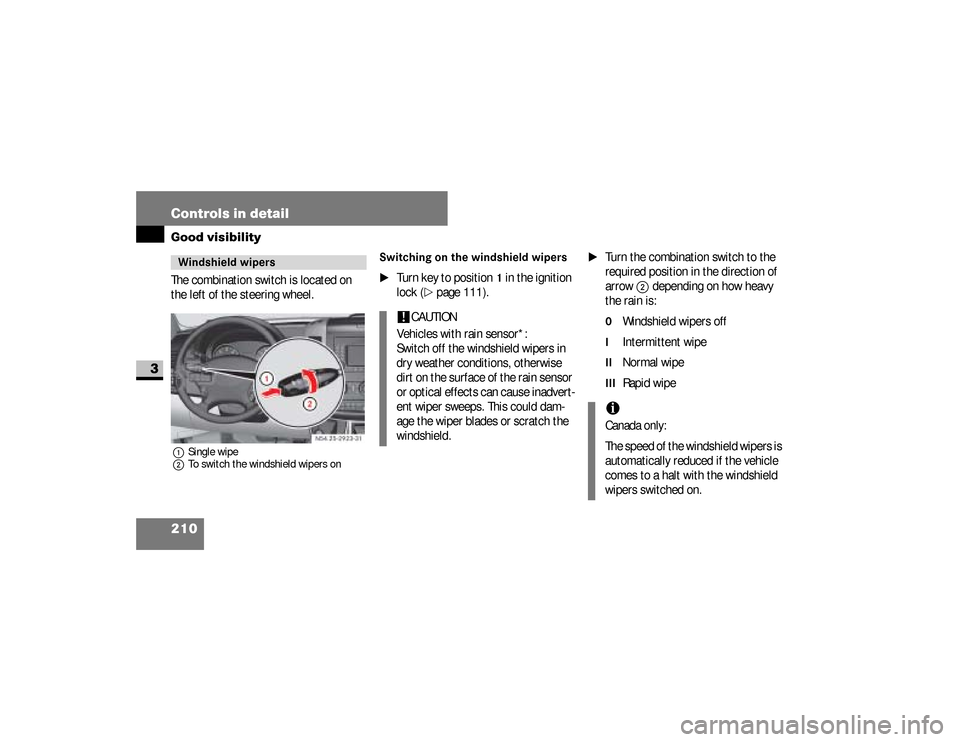
The combination switch is located on
the left of the steering wheel.1Single wipe
2To switch the windshield wipers on
Switching on the windshield wipers
\1
Turn key to position
1 in the ignition
lock (
\2
page 111).
\1
Turn the combination switch to the
required position in the direction of
arrow
2
depending on how heavy
the rain is:
0
Windshield wipers off
I
Intermittent wipe
II
Normal wipe
III
Rapid wipe
Windshield wipers
N54.25-2923-31
!
CAUTION
Vehicles with rain sensor*:
Switch off the windshield wipers in
dry weather conditions, otherwise
dirt on the surface of the rain sensor
or optical effects can cause inadvert-
ent wiper sweeps. This could dam-
age the wiper blades or scratch the
windshield.
iCanada only:
The speed of the windshield wipers is
automatically reduced if the vehicle
comes to a halt with the windshield
wipers switched on.
nf_BA.book Page 210 Friday, January 25, 2008 3:53 PM
Page 214 of 666
212 Controls in detailGood visibility
3
Intermittent wipeOnly switch on intermittent wipe in
damp weather conditions or when it is
raining.
Vehicles with rain sensor*:
The a rain sensor is activated when you
switch on intermittent wipe. The appro-
priate wiping frequency is set automati-
cally according to the rain falling on the
sensor.The switch is in the combination switch
on the left of the steering wheel.
1Switch
2To wipe with windshield washer fluid
3Intermittent wipe
4To switch off the wiper
5To wipe with windshield washer fluid
\1
Turn key to position
1 in the ignition
lock (
\2
page 111).
Switching on intermittent wipe
\1
Turn switch
1
to
3
.
Switching off intermittent wipe
\1
Turn switch
1
to
4
.
Rear window wiper*
N54.25-2924-31
iThe rear window wiper switches on
automatically if you engage reverse
gear and the windshield wipers are
on.
nf_BA.book Page 212 Friday, January 25, 2008 3:53 PM