Page 46 of 426

WARNING!
²Do not put anything on or around the front airbag
covers or attempt to manually open them. You may
damage the airbags and you could be injured
because the airbags are no longer functional. These
protective covers for the airbag cushions are de-
signed to open only when the airbags are inflating.
²If your vehicle is equipped with window bags, do
not stack luggage or other cargo up high enough to
block the location of the window bag. The area
where the window bag is located should remain
free from any obstructions.
²If your vehicle is equipped with window bags, do
not have any accessory items installed which will
alter the roof, including adding a sunroof to your
vehicle. Do not add roof racks that require perma-
nent attachments (bolts or screws) for installation
on the vehicle roof. Do not drill into the roof of the
vehicle for any reason.
NOTE:Do not use a clothing bar mounted to the coat
hooks in this vehicle. A clothing bar will impede the
proper performance of the window bags.
Along with the seat belts, front airbags work with the
instrument panel knee bolsters to provide improved
protection for the driver and front passenger. Window
bags also work with seat belts to improve occupant
protection.
The seat belts are designed to protect you in many types
of collisions. The front airbags deploy in moderate to
severe frontal collisions.
If your vehicle is so equipped, the window bag on the
crash side of the vehicle is triggered in moderate to
severe side collisions. But even in collisions where the
airbags work, you need the seat belts to keep you in the
right position for the airbags to protect you properly.
46 THINGS TO KNOW BEFORE STARTING YOUR VEHICLE
Page 202 of 426

further information, call the toll-free number 888-539-
7474, or visit the Sirius web site at www.sirius.com.
Please have the following information available when
calling:
1. The Electronic Serial Number/Sirius Identification
Number (ESN/SID).
2. Your Vehicle Identification Number.
Electronic Serial Number/Sirius Identification
Number (ENS/SID)
The Electronic Serial Number/Sirius Identification Num-
ber is needed to activate your Sirius Satellite Radio
system. To access the ESN/SID, refer to the following
steps:
ESN/SID Access
With the ignition switch in the ON/RUN or ACCESSORY
position and the radio ON, press the SETUP button and
scroll using the TUNE control knob until Sirius ID isselected. Press the TUNE control knob and the Sirius ID
number will display. The Sirius ID number display will
time out in 2 minutes. Press any button on the radio to
exit this screen.
Selecting Satellite Mode
Press the SAT button until9SAT9appears in the display. A
CD may remain in the radio while in the Satellite radio
mode.
Satellite Antenna
To ensure optimum reception, do not place items on the
roof around the rooftop antenna location or strap items to
the trunk lid around the trunk lid antenna (if equipped).
Metal objects placed within the line of sight of the
antenna will cause decreased performance. Larger lug-
gage items such as bikes should be placed as far rearward
as possible, within the loading design of the rack. Do not
place items directly on or above the antenna.
202 INSTRUMENT PANEL AND CONTROLS
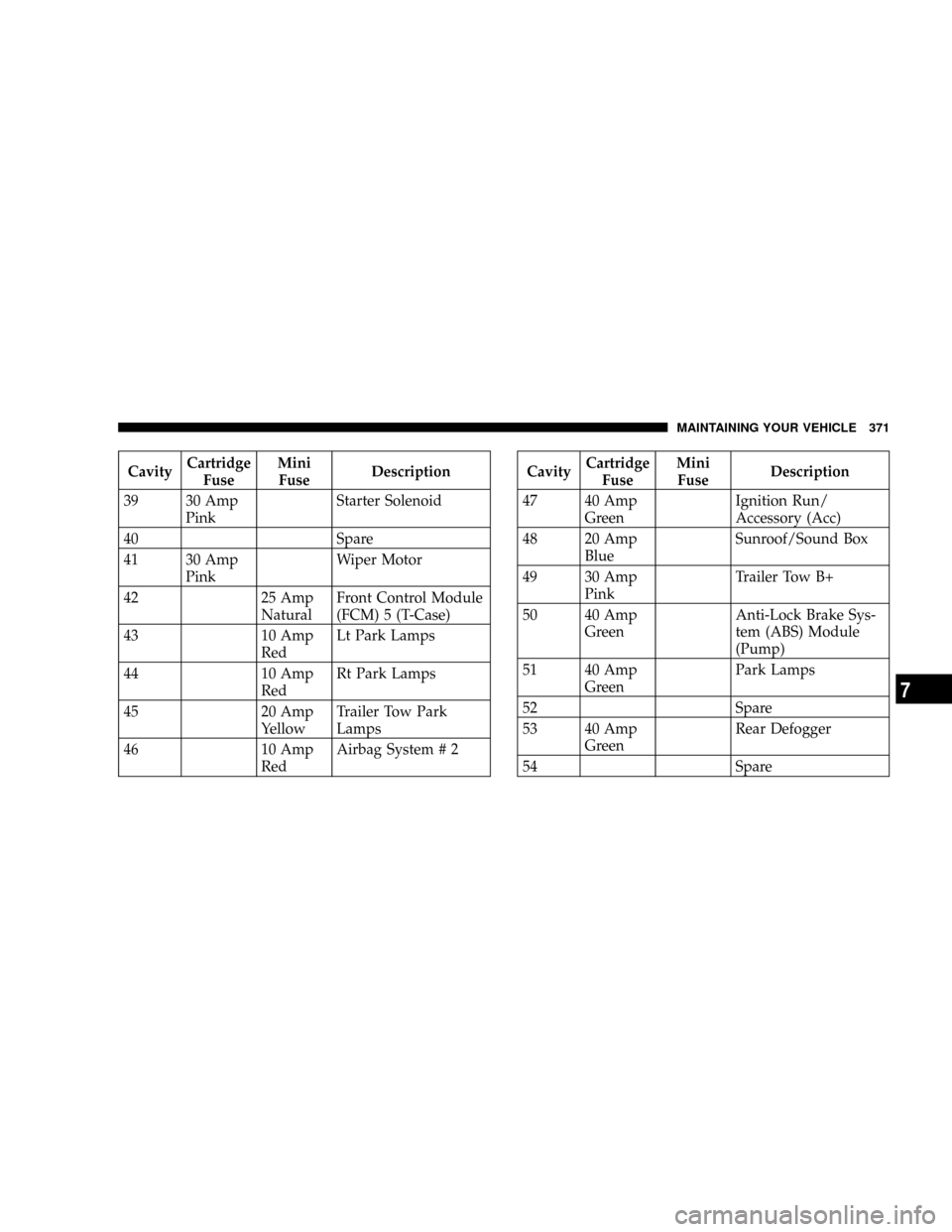
Page 371 of 426
CavityCartridge
FuseMini
FuseDescription
39 30 Amp
PinkStarter Solenoid
40 Spare
41 30 Amp
PinkWiper Motor
42 25 Amp
NaturalFront Control Module
(FCM) 5 (T-Case)
43 10 Amp
RedLt Park Lamps
44 10 Amp
RedRt Park Lamps
45 20 Amp
YellowTrailer Tow Park
Lamps
46 10 Amp
RedAirbag System # 2CavityCartridge
FuseMini
FuseDescription
47 40 Amp
GreenIgnition Run/
Accessory (Acc)
48 20 Amp
BlueSunroof/Sound Box
49 30 Amp
PinkTrailer Tow B+
50 40 Amp
GreenAnti-Lock Brake Sys-
tem (ABS) Module
(Pump)
51 40 Amp
GreenPark Lamps
52 Spare
53 40 Amp
GreenRear Defogger
54 Spare
MAINTAINING YOUR VEHICLE 371
7