Page 102 of 466

entries. To use this feature, dial the number you wish to
call and then press the ªVoice Recognitionº button and
say ªSend.º The system will prompt you to enter the
name or number, say the name of the phonebook entry
you wish to send. The UConnectŸ will then send the
corresponding phone number associated with the phone-
book entry as tones over the phone.
NOTE:
²You may not hear all of the tones due to cellular phone
network configurations, this is normal.
²Some paging and voicemail systems have system
timeout settings too short that may not allow the use
of this feature.
Barge In - Overriding Prompts
The ªVoice Recognitionº button can be used when you
wish to skip part of a prompt and issue your voice
recognition command immediately. For example, if a
prompt is playing9Would you like to pair a phone, cleara{,9you could press the ªVoice Recognitionº button and
say9Pair a Phone9to select that option without having to
listen to the rest of the voice prompt.
Turning Confirmation Prompts On/Off
Turning confirmation prompts off will stop the system
from confirming your choices (e.g., the UConnectŸ
system will not repeat a phone number before you dial
it).
²Press the ªPhoneº button to begin.
²After the9Ready9prompt and the following beep, say
9Setup Confirmations.9The UConnectŸ system will
play the current confirmation prompt status and you
will be given the choice to change it.
Phone and Network Status Indicators
If available on the radio and/or on a premium display
such as the instrument panel cluster, and supported by
your cell phone, the UConnectŸ system will provide
102 UNDERSTANDING THE FEATURES OF YOUR VEHICLE
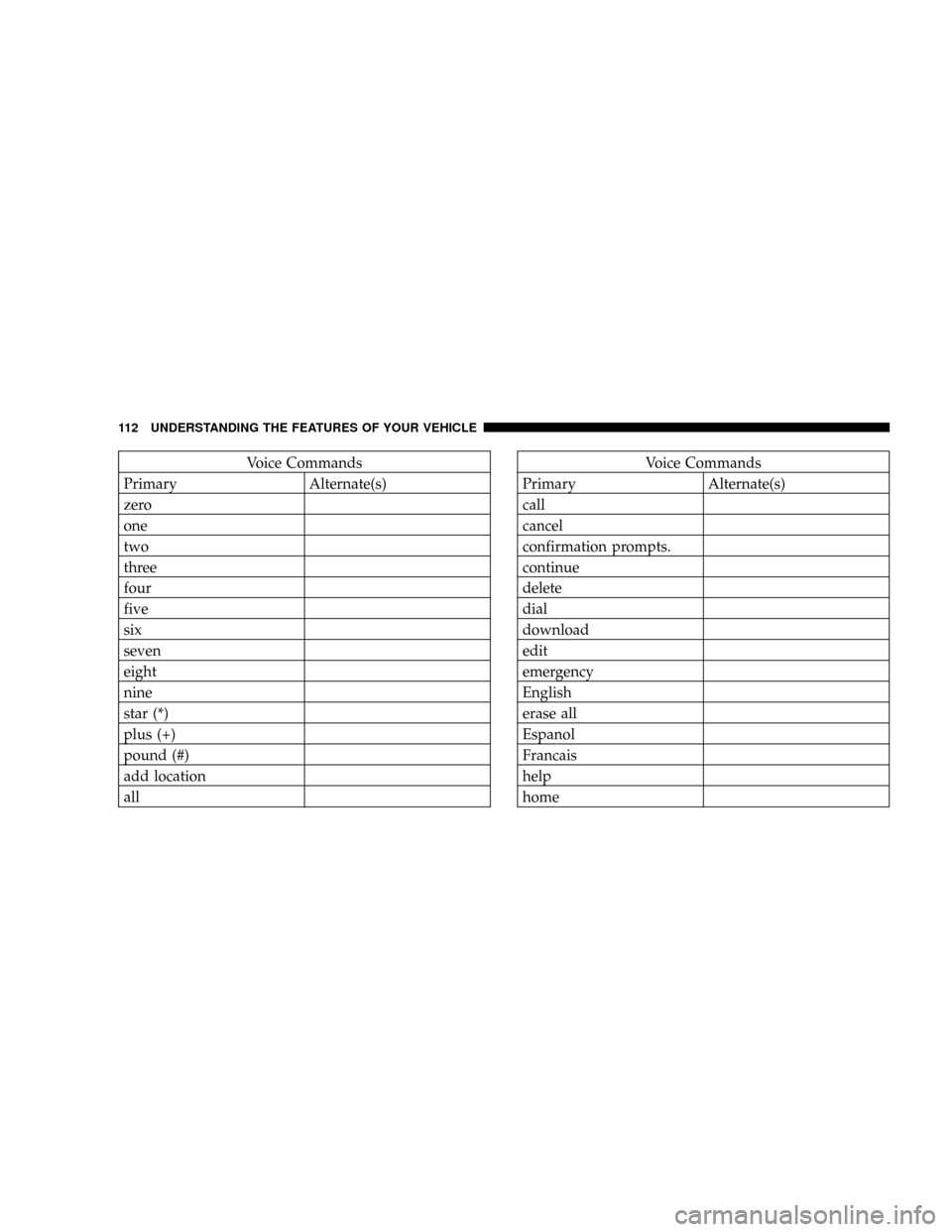
Page 112 of 466
Voice Commands
Primary Alternate(s)
zero
one
two
three
four
five
six
seven
eight
nine
star (*)
plus (+)
pound (#)
add location
allVoice Commands
Primary Alternate(s)
call
cancel
confirmation prompts.
continue
delete
dial
download
edit
emergency
English
erase all
Espanol
Francais
help
home
112 UNDERSTANDING THE FEATURES OF YOUR VEHICLE
Page 120 of 466
WARNING!
Persons who are unable to feel pain to the skin
because of advanced age, chronic illness, diabetes,
spinal cord injury, medication, alcohol use, exhaus-
tion, or other physical condition must exercise care
when using the seat heater. It may cause burns even
at low temperatures, especially if used for long
periods.
Do not place anything on the seat that insulates
against heat, such as a blanket or cushion. This may
cause the seat heater to overheat.
Folding Rear Seat
The rear seatbacks can be folded forward to provide an
additional storage area. Pull on the loops shown in the
illustration to fold down either or both seatbacks. These
loops can be tucked away when not in use.
Folding Rear Seats
120 UNDERSTANDING THE FEATURES OF YOUR VEHICLE
Page 127 of 466

Turn Signals
Move the Multi-Function Lever up or down and the
corresponding turn signal indicator in the instrument
cluster flashes to show proper operation of the front and
rear turn signal lights. You can also signal a lane changeby moving the lever partially up or down without
moving beyond the detent. Releasing the lever at the
detent will provide 3 flashes.
If either indicator has a very fast flash rate, check for a
defective outside light bulb. If an indicator fails to light
when the lever is moved, see your authorized dealer for
service.
NOTE:A ªTurn Signal Onº message will appear in the
Electronic Vehicle Information Center (EVIC) Ð if
equipped and a continuous chime will sound if the
vehicle is driven more than 1 mile (1.6 km) with either
turn signal on.Highbeam/Lowbeam Select Switch
Push the Multi-Function Lever away from you to switch
the headlights to HIGH beam. Pull the Lever towards
you to switch the headlights back to LOW beam.
Multi-Function Lever
UNDERSTANDING THE FEATURES OF YOUR VEHICLE 127
3
Page 145 of 466

Troubleshooting Tips
If you are having trouble programming HomeLinkt, here
are some of the most common solutions:
²Replace the battery in the original transmitter.
²Press the Learn Button on the Garage Door Opener to
complete the training for Rolling Code.
²Did you unplug the device for training, and remember
to plug it back in?
If you are have any problems, or require assistance,
please call toll-free 1±800±355±3515 or, on the Internet at
www.HomeLink.com for information or assistance.
General Information
This device complies with FCC rules part 15 and Industry
Canada RSS-210. Operation is subject to the following
two conditions:
1. This device may not cause harmful interference
2. This device must accept any interference that may be
received including interference that may cause undesired
operation
NOTE:The transmitter has been tested and it complies
with FCC and IC rules. Changes or modifications not
expressly approved by the party responsible for compli-
ance could void the user 's authority to operate the
device.
The term ªIC:º before the certification/registration num-
ber only signifies that Industry Canada technical specifi-
cations were met.
UNDERSTANDING THE FEATURES OF YOUR VEHICLE 145
3
Page 167 of 466

NOTE:Check for a defective outside light bulb if either
indicator flashes at a rapid rate. (See page 127 for more
information.)
10. Airbag Warning Light
This light will turn on for 6 to 8 seconds as a
bulb check when the ignition switch is first
turned ON. If the light is either not on during
starting, or stays on, or turns on while driving,
then have the system inspected at your authorized dealer
as soon as possible. (See page 62 for more information.)
11. Engine Temperature Warning Light
This light will turn on and a single chime will
sound to warn of an overheated engine condition.
When this light turns on, the engine temperature
is critically hot. The vehicle should be turned off imme-
diately and serviced as soon as possible. (See page 345 for
more information.)12. Electronic Stability Program (ESP)/Traction
Control System (TCS) Indicator Light Ð If Equipped
If this indicator light flashes during accelera-
tion, ease up on the accelerator and apply as
little throttle as possible. Adapt your speed and
driving to the prevailing road conditions, and
do not switch off the ESP. (See page 284 for more
information.) (See page 286 for more information.)
13. Electronic Stability Program (ESP) / Brake Assist
System (BAS) Malfunction Indicator Light Ð If
Equipped
The yellow ESP/BAS malfunction indicator
light will turn on when the key in the ignition
switch is turned to the ªONº position. The light
should go out with the engine running. The
system will turn this light on continuously while the
engine running if it detects a malfunction in either the
ESP or the BAS or both. (See page 286 for more informa-
tion.)
UNDERSTANDING YOUR INSTRUMENT PANEL 167
4
Page 172 of 466

21. Vehicle Security Alarm (VSA) Indicator Light Ð If
Equipped
The VSA indicator Light flashes rapidly when the VSA is
arming, and slowly when the VSA is armed. (See page 18
for more information.)
22. Tire Pressure Monitoring Telltale Light Ð If
Equipped
Each tire, including the spare (if provided),
should be checked monthly when cold and
inflated to the inflation pressure recommended
by the vehicle manufacturer on the vehicle
placard or tire inflation pressure label. (If your vehicle
has tires of a different size than the size indicated on the
vehicle placard or tire inflation pressure label, you should
determine the proper tire inflation pressure for those
tires.)
As an added safety feature, your vehicle has been
equipped with a tire pressure monitoring system (TPMS)that illuminates a low tire pressure telltale when one or
more of your tires are significantly under-inflated. Ac-
cordingly, when the low tire pressure telltale illuminates,
you should stop and check your tires as soon as possible,
and inflate them to the proper pressure. Driving on a
significantly under-inflated tire causes the tire to over-
heat and can lead to tire failure. Under-inflation also
reduces fuel efficiency and tire tread life, and may affect
the vehicle's handling and stopping ability.
Please note that the TPMS is not a substitute for proper
tire maintenance, and it is the driver 's responsibility to
maintain correct tire pressure, even if under-inflation has
not reached the level to trigger illumination of the TPMS
low tire pressure telltale.
Your vehicle has also been equipped with a TPMS
malfunction indicator to indicate when the system is not
operating properly. The TPMS malfunction indicator is
combined with the low tire pressure telltale. When the
172 UNDERSTANDING YOUR INSTRUMENT PANEL
Page 186 of 466

display is active, the SCROLL button can be used to scroll
through the list, the FUNCTION SELECT button can be
used to select an item, and the AUDIO MODE button can
be used to return to the previous menu. When the Map
display is active, pressing the FUNCTION SELECT but-
ton will change the Navigation Unit Display to the Menu.
Turn By Turn Directions
The EVIC displays turn-by-turn directions to a pro-
grammed destination when Turn by Turn Navigation is
enabled through Personal Settings. When enabled, the
EVIC displays the name of the approaching road at the
top of the screen, followed by an arrow to indicate the
direction to turn the vehicle, and a count down to
indicate the distance to the turn.
NOTE:Refer to your ªNavigation User's Manualº for
detailed operating instructions.
Personal Settings (Customer Programmable
Features)
Personal Settings allows the driver to set and recall
features when the transmission is in PARK.
Press and release the MENU button until Personal Set-
tings displays in the EVIC.
Use the SCROLL button to display one of the following
choices:
ªLanguageº
When in this display you may select one of five lan-
guages for all display nomenclature, including the trip
functions and the navigation system (if equipped). Press
the FUNCTION SELECT button while in this display to
select English, Espanol, Deutsch, Italiano, or Francais.
Then, as you continue, the information will display in the
selected language.
186 UNDERSTANDING YOUR INSTRUMENT PANEL