Page 163 of 467
WARNING!² The weight and position of cargo and passengers
can change the vehicle center of gravity and ve-
hicle handling. To avoid loss of control resulting
in personal injury, follow these guidelines for
loading your vehicle:
² Always place cargo evenly on the cargo floor. Put
heavier objects as low and as far forward as possible.
² Place as much cargo as possible in front of the rear
axle. Too much weight or improperly placed weight
over or behind the rear axle can cause the rear of the
vehicle to sway.
² Do not pile luggage or cargo higher than the top of the
seatback. This could impair visibility or become a
dangerous projectile in a sudden stop or collision. BEVERAGE COOLER STORAGE BIN Ð IF
EQUIPPED
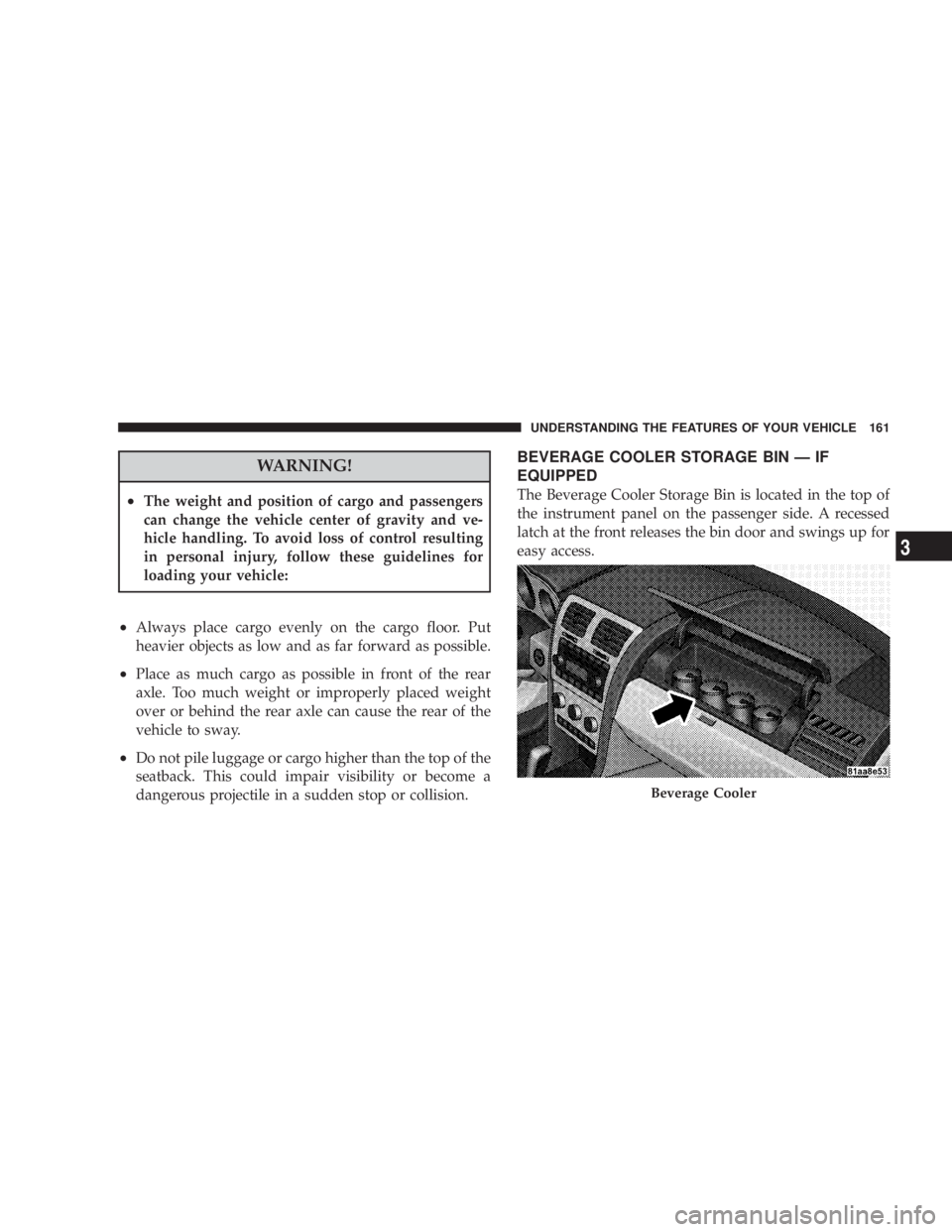
The Beverage Cooler Storage Bin is located in the top of
the instrument panel on the passenger side. A recessed
latch at the front releases the bin door and swings up for
easy access.
Beverage CoolerUNDERSTANDING THE FEATURES OF YOUR VEHICLE 161
3
Page 165 of 467
UNDERSTANDING YOUR INSTRUMENT PANELCONTENTS m Instrument Panel Features .................167
m Instrument Cluster Ð Base ................168
m Instrument Cluster Ð Premium .............169
m Instrument Cluster Descriptions ............170
m Electronic Vehicle Information Center (EVIC) ±
If Equipped ...........................181
N EVIC Displays .......................183
N Oil Change Required ...................184
N Trip Functions .......................184 N Compass Display .....................186
N EVIC Personal Settings
(Customer Programmable Features) ........188
m Radio General Information ................191
N Radio Broadcast Signals .................191
N Two Types Of Signals ..................191
m Sales Code RES Ð AM/FM Stereo Radio With
CD Player (MP3 AUX Jack) ................192
N Operating Instructions - Radio Mode .......1924
Page 166 of 467

N Operation Instructions - CD Mode For CD And
MP3 Audio Play ......................198
N Notes On Playing MP3 Files .............200
N List Button (CD Mode For MP3 Play) .......203
N Info Button (CD Mode For MP3 Play) .......203
m Sales Code REQ Ð AM/FM Stereo Radio And
6±Disc CD/DVD Changer
(MP3/WMA AUX Jack) ..................205
N Operating Instructions - Radio Mode .......205
N Operation Instructions - (Disc Mode For CD
And MP3/WMA Audio Play, DVD-Video) ....213
N Notes On Playing MP3/WMA Files ........215
N List Button (Disc Mode For MP3/WMA Play) . . 218
N
Info Button (Disc Mode For MP3/WMA Play) . . 218 m Sales Code REN Ð Multimedia System Ð
If Equipped ...........................220
N Operating Instructions Ð Satellite Radio
(If Equipped) ........................221
N Operating Instructions Ð Voice Recognition
System (VR) (If Equipped) ...............221
N Operating Instructions Ð Hands-Free
Communication (UConnect t ) (If Equipped) . . . 221
N Clock Setting Procedur e.................221
m Sales Code RER Ð Multimedia System Ð
If Equipped ...........................223
N Operating Instructions Ð Satellite Radio .....224
N Operating Instructions Ð Hands-Free
Communication (UConnect t ) (If Equipped) . . . 224
N Clock Setting Procedur e.................225164 UNDERSTANDING YOUR INSTRUMENT PANEL
Page 167 of 467
m Universal Consumer Interface (UCI) Ð
If Equipped ...........................227
N Connecting The iPod t Device ............227
N Controlling The iPod t Using Radio Buttons . . . 228
N Play Mode ..........................228
N List Or Browse Mode ..................230
m Satellite Radio Ð If Equipped
(REN/REQ/RER/RES/REU Radios Only) .....231
N System Activation .....................231
N Electronic Serial Number/Sirius Identification
Number (ESN/SID) ....................232
N Selecting Satellite Mode .................233
N Satellite Antenna ......................233
N Reception Quality .....................233 N Operating Instructions - Satellite Mode ......233
N Operating Instructions - Hands-Free Phone
(If Equipped) ........................236
N Operating Instructions - Video Entertainment
System (VES t ) (If Equipped) .............236
m Remote Sound System Controls Ð If Equipped . . 236
N Operation With RES / REQ AM/FM Stereo
Radio With CD Player ..................237
N Operation With RER Multi-Media System ....238
m Video Entertainment System (VES) t Ð
If Equipped ...........................239
m Radio Operation And Cellular Phones ........241
m CD/DVD Maintenance ...................241
m Climate Controls .......................242 UNDERSTANDING YOUR INSTRUMENT PANEL 165
4
Page 168 of 467
N Manual Air Conditioning And Heating System . . 242
N Automatic Temperature Control (ATC) Ð
If Equipped .........................246
N Operating Tips .......................252 m Rear Window Features ...................256
N Electric Rear Window Defroster Ð
If Equipped .........................256166 UNDERSTANDING YOUR INSTRUMENT PANEL
Page 169 of 467
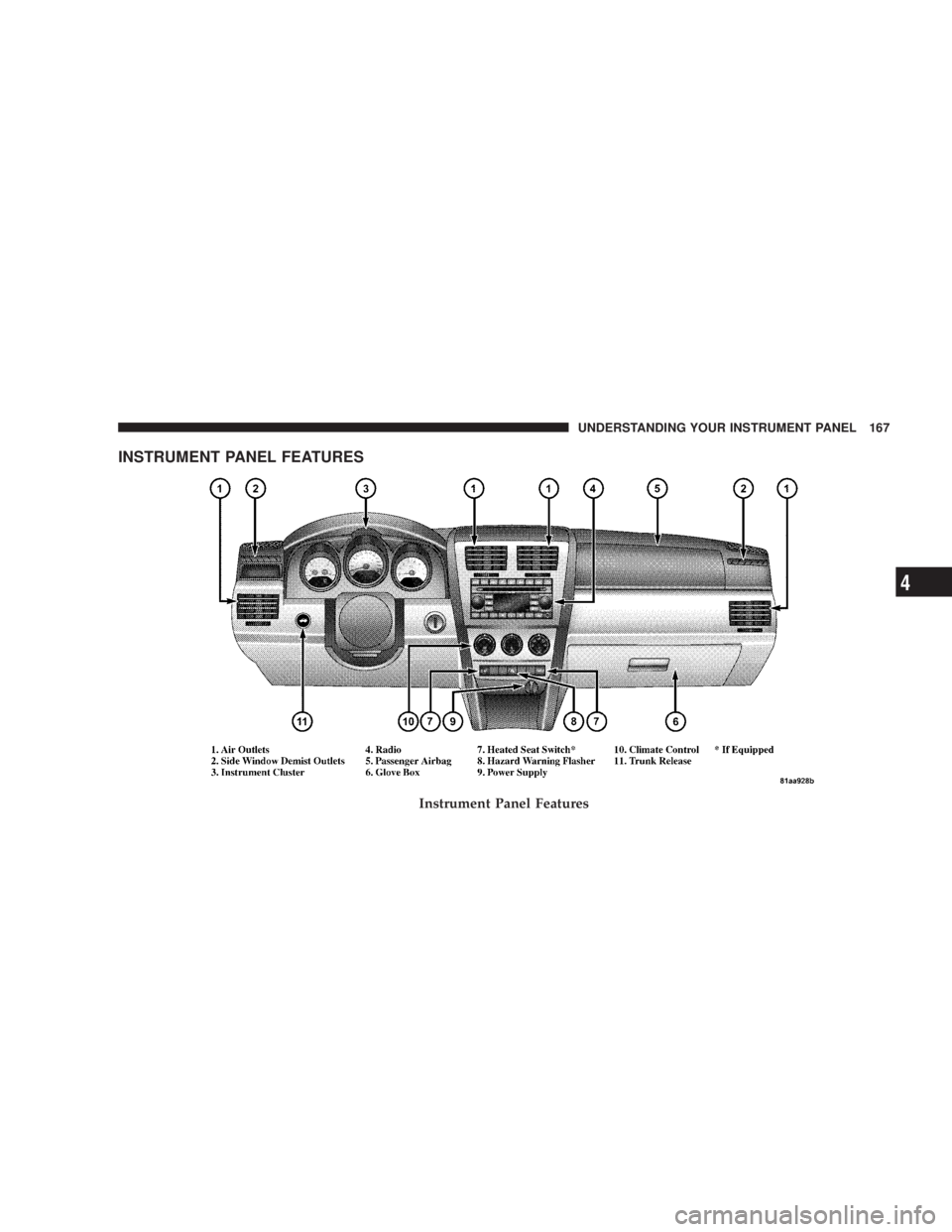
INSTRUMENT PANEL FEATURES
Instrument Panel Features UNDERSTANDING YOUR INSTRUMENT PANEL 167
4
Page 170 of 467
INSTRUMENT CLUSTER Ð BASE 168 UNDERSTANDING YOUR INSTRUMENT PANEL
Page 171 of 467
INSTRUMENT CLUSTER Ð PREMIUM UNDERSTANDING YOUR INSTRUMENT PANEL 169
4