Page 133 of 494
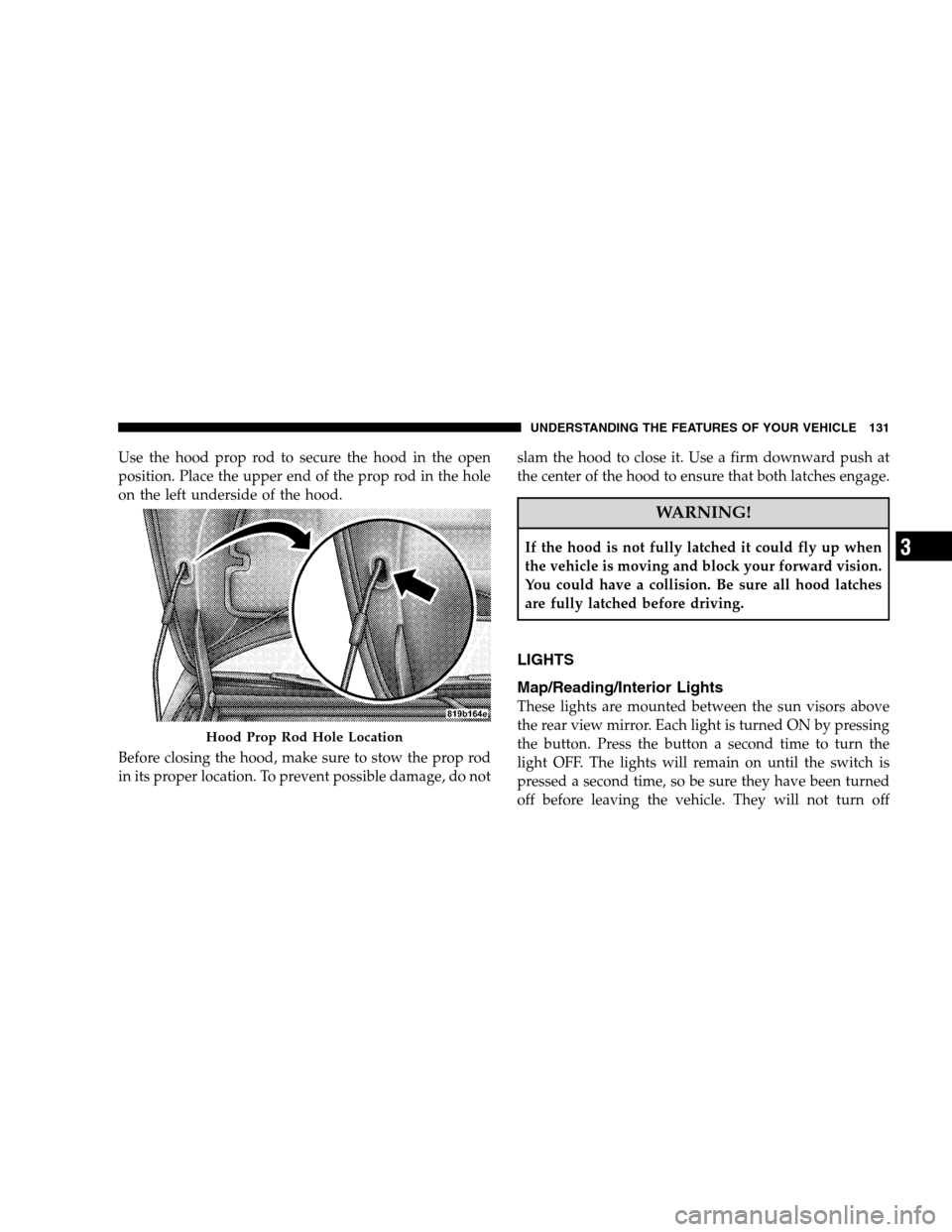
Use the hood prop rod to secure the hood in the open
position. Place the upper end of the prop rod in the hole
on the left underside of the hood.
Before closing the hood, make sure to stow the prop rod
in its proper location. To prevent possible damage, do notslam the hood to close it. Use a firm downward push at
the center of the hood to ensure that both latches engage.
WARNING!
If the hood is not fully latched it could fly up when
the vehicle is moving and block your forward vision.
You could have a collision. Be sure all hood latches
are fully latched before driving.
LIGHTS
Map/Reading/Interior Lights
These lights are mounted between the sun visors above
the rear view mirror. Each light is turned ON by pressing
the button. Press the button a second time to turn the
light OFF. The lights will remain on until the switch is
pressed a second time, so be sure they have been turned
off before leaving the vehicle. They will not turn off
Hood Prop Rod Hole Location
UNDERSTANDING THE FEATURES OF YOUR VEHICLE 131
3
Page 134 of 494
automatically. Interior lighting also comes on when a
door is opened or the dimmer control is turned fully
upward, past the second detent.
There is a second light located midway back in the
headliner.
To protect the battery, the interior lights will turn off
automatically 10 minutes after the ignition switch is
moved to the LOCK position. This will occur if the
interior lights were switched on manually or are on
because a door is open. This includes the glove box light,
but not the trunk light. To restore interior light operation,
either turn the ignition switch ON or cycle the light
switch.Headlights, Parking Lights, Instrument Panel
Lights
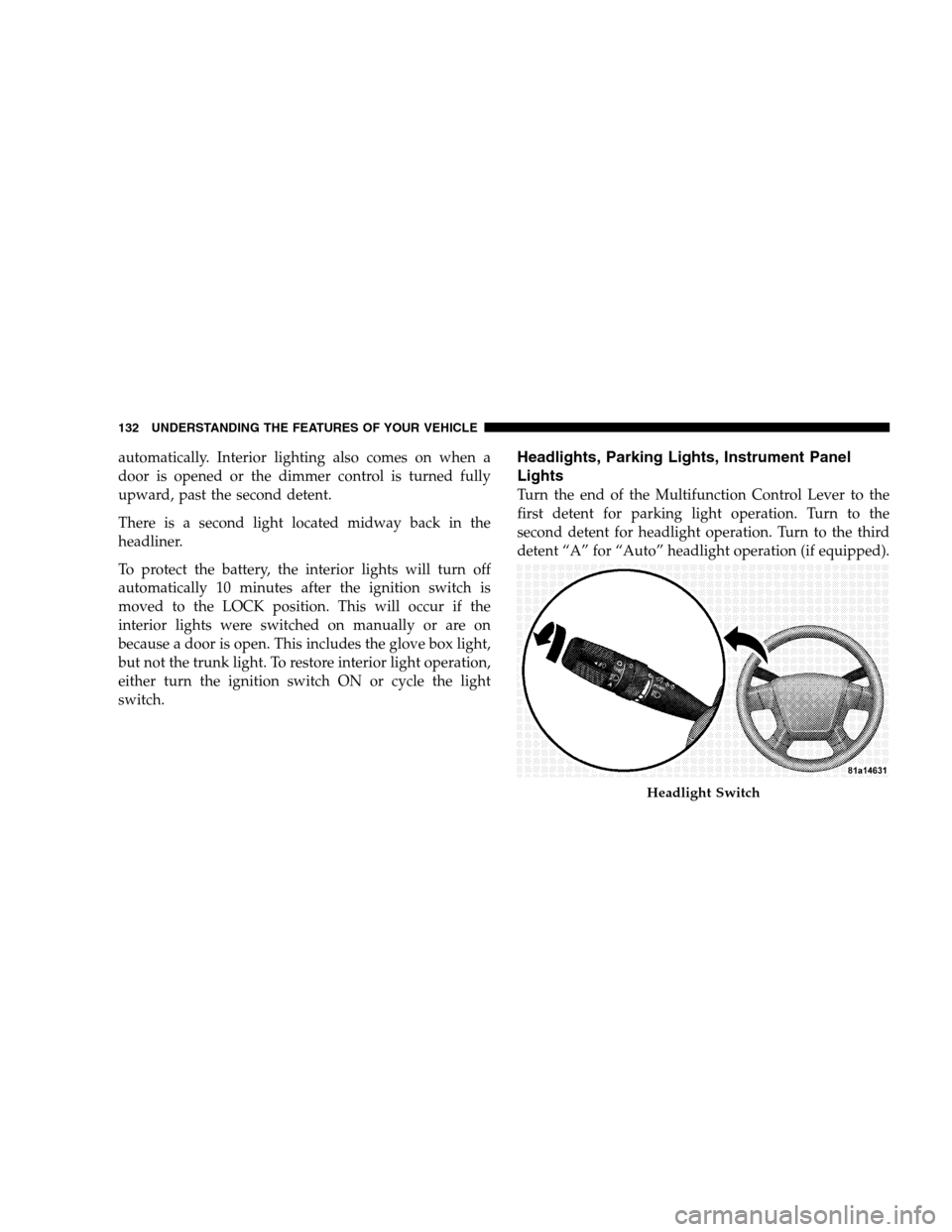
Turn the end of the Multifunction Control Lever to the
first detent for parking light operation. Turn to the
second detent for headlight operation. Turn to the third
detent “A” for “Auto” headlight operation (if equipped).
Headlight Switch
132 UNDERSTANDING THE FEATURES OF YOUR VEHICLE
Page 143 of 494
To unlock the steering column, pull the control handle
outward. To tilt the steering column, move the steering
wheel upward or downward as desired. To lengthen or
shorten the steering column, pull the steering wheeloutward or push it inward as desired. To lock the steering
column in position, push the control handle inward until
fully engaged.
WARNING!
Do not adjust the steering wheel while driving. The
telescoping adjustment must be locked while driv-
ing. Adjusting the steering wheel while driving or
driving without the telescoping adjustment locked
could cause the driver to lose control of the vehicle.
ELECTRONIC SPEED CONTROL — IF EQUIPPED
When engaged, this device takes over the accelerator
operation at speeds greater than 25 mph (40 km/h).
Tilt / Telescoping Steering Wheel Lock
UNDERSTANDING THE FEATURES OF YOUR VEHICLE 141
3
Page 144 of 494
ELECTRONIC SPEED CONTROL OPERATION
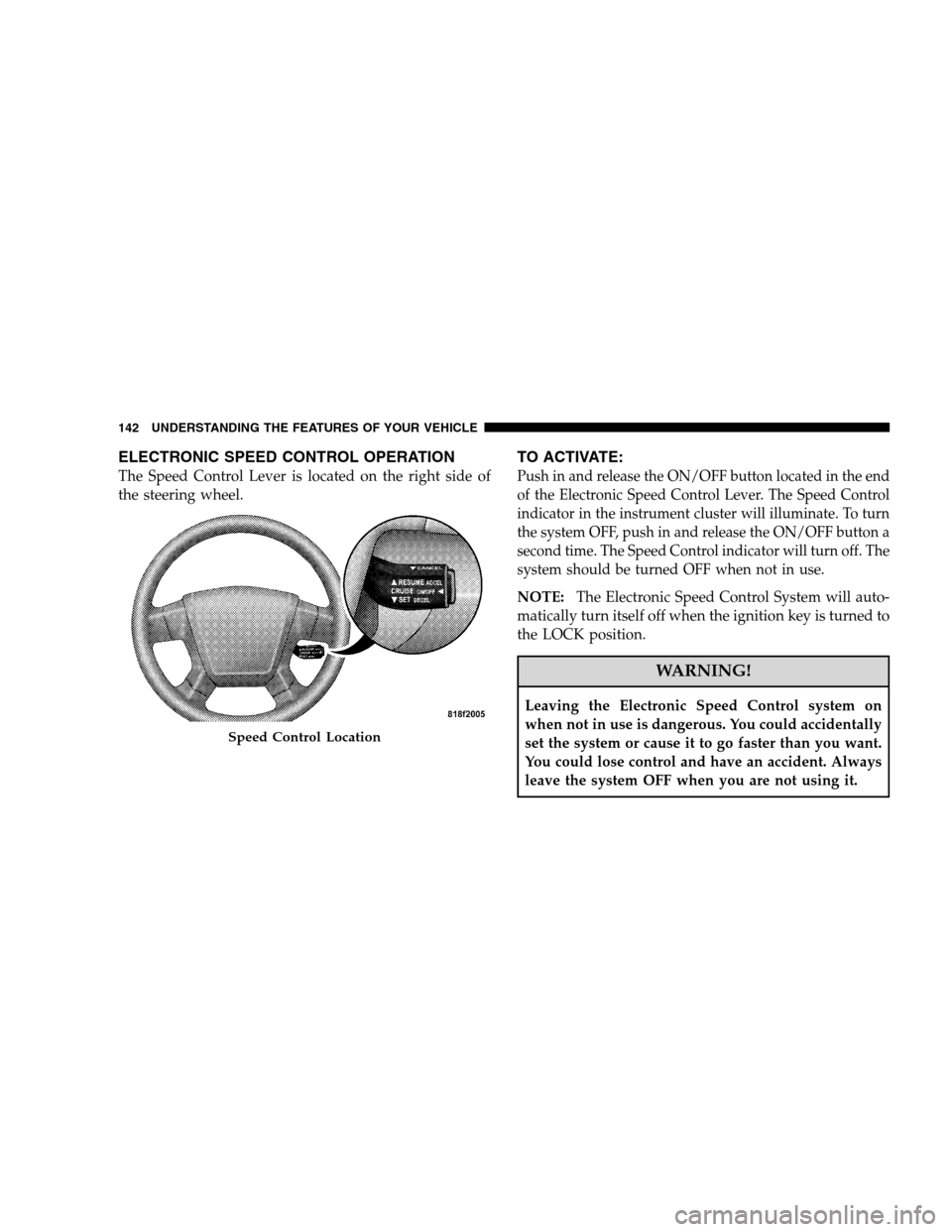
The Speed Control Lever is located on the right side of
the steering wheel.
TO ACTIVATE:
Push in and release the ON/OFF button located in the end
of the Electronic Speed Control Lever. The Speed Control
indicator in the instrument cluster will illuminate. To turn
the system OFF, push in and release the ON/OFF button a
second time. The Speed Control indicator will turn off. The
system should be turned OFF when not in use.
NOTE:The Electronic Speed Control System will auto-
matically turn itself off when the ignition key is turned to
the LOCK position.
WARNING!
Leaving the Electronic Speed Control system on
when not in use is dangerous. You could accidentally
set the system or cause it to go faster than you want.
You could lose control and have an accident. Always
leave the system OFF when you are not using it.
Speed Control Location
142 UNDERSTANDING THE FEATURES OF YOUR VEHICLE
Page 151 of 494
Similar to this Canadian law, some U.S. gate operators are
designed to “time-out” in the same manner.
It may be helpful to unplug the device during the cycling
process to prevent possible overheating of the garage
door or gate motor.
If you are having difficulties programming a garage door
opener or a gate operator, replace “Programming
HomeLink�” Step 3 with the following:
3. Continue to press and hold the HomeLink�button
while you press and release - every two seconds
(“cycle”) your hand-held transmitter until HomeLink�
has successfully accepted the frequency signal. The
indicator light will flash slowly and then rapidly when
fully trained.
If you unplugged the device for training, plug it back in
at this time.Then proceed with Step 4 under “Programming
HomeLink�” earlier in this section.
Using HomeLink�
To operate, simply press and release the programmed
HomeLink�button. Activation will now occur for the
trained device (i.e., garage door opener, gate operator,
Security system, entry door lock, home/office lighting,
etc. The hand-held transmitter of the device may also be
used at any time.
Reprogramming A Single HomeLink�Button
To re-program a channel that has been previously
trained, follow these steps:
1. Turn the ignition switch to the ON/RUN position.
2. Press and hold the desired HomeLink�button until
the indicator light begins to flash after 20 seconds.Do not
release the button.
UNDERSTANDING THE FEATURES OF YOUR VEHICLE 149
3
Page 156 of 494
Sunroof Maintenance
Use only a non-abrasive cleaner and a soft cloth to clean
the glass panel.
Ignition Off Operation
For vehicles not equipped with the Electronic Vehicle
Information Center (EVIC), the power sunroof switch
will remain active for 45 seconds after the ignition switch
is turned off. Opening either front door will cancel this
feature.
For vehicles equipped with the EVIC, the power sunroof
switch will remain active for up to 10 minutes after the
ignition switch is turned off. Opening either front door
will cancel this feature. The time is programmable. For
details, refer to “Key-Off Power Delay,” under “Personal
Settings (Customer Programmable Features)” under
“Electronic Vehicle Information Center (EVIC)” in Sec-
tion 4 of this manual.
ELECTRICAL POWER OUTLETS
There are two 12-volt electrical outlets on this vehicle.
Both of the outlets are protected by a fuse.
The instrument panel power outlet, located below the
climate control knobs, has power available only when the
ignition is on. This outlet will also operate a conventional
cigar lighter unit.
NOTE:If desired, the instrument panel power outlet
can be converted by your authorized dealer to provide
power with the ignition switch while in the LOCK
position.
154 UNDERSTANDING THE FEATURES OF YOUR VEHICLE
Page 164 of 494
WARNING!
If containers of hot liquid are placed in the bottle
holder, they can spill when the door is closed, burn-
ing the occupants. Be careful when closing the doors
to avoid injury.
STORAGE
CARGO AREA
The 60/40 split-folding rear seat provides cargo-carrying
versatility. The seatbacks fold down easily by pulling
nylon tabs between the seatbacks and the bolsters. When
the seats are folded down, they provide a continuous,
nearly flat extension of the load floor.
When the seatback is folded to the upright position, make
sure it is latched by strongly pulling on the top of the
seatback above the seat strap.
WARNING!
•Be certain that the seatback is securely locked into
position. If the seatback in not securely locked
into position, the seat will not provide the proper
stability for child seats and/or passengers. An
improperly latched seat could cause serious injury.
•The cargo area in the rear of the vehicle (with the
rear seatbacks in the locked-up or folded down
position) should not be used as a play area by
children when the vehicle is in motion. They could
be seriously injured in an accident. Children should
be seated and using the proper restraint system.
•To help protect against personal injury, passengers
should not be seated in the rear cargo area. The
rear cargo space is intended for load carrying
purposes only, not for passengers, who should sit
in seats and use seat belts.
162 UNDERSTANDING THE FEATURES OF YOUR VEHICLE
Page 167 of 494
UNDERSTANDING YOUR INSTRUMENT PANEL
CONTENTS
�Instrument Panel Features.................169
�Base Instrument Cluster..................170
�Premium Instrument Cluster...............171
�Instrument Cluster Descriptions............172
�Electronic Vehicle Information Center (EVIC) –
If Equipped...........................183
▫Electronic Vehicle Information Center (EVIC)
Displays............................184
▫Oil Change Required...................185
▫Trip Functions.......................186▫Compass Display.....................187
▫Personal Settings (Customer Programmable
Features)...........................190
�Setting The Analog Clock.................193
�Radio General Information................193
▫Radio Broadcast Signals.................193
▫Two Types Of Signals..................193
▫Electrical Disturbances..................193
▫AM Reception.......................1944