Page 113 of 454

When calling a number with your UConnecttsystem
that normally requires you to enter in a touch-tone
sequence on your cellular phone keypad, you can press
the VOICE RECOGNITION button and say the sequence
you wish to enter, followed by the word9Send.9For
example, if required to enter your PIN number followed
with a pound,3746#,youcanpresstheVOICE
RECOGNITION button and say,93746#Send.9Saying
a number, or sequence of numbers, followed by9Send,9is
also to be used for navigating through an automated
customer service center menu structure, and to leave a
number on a pager.
You can also send stored UConnecttphonebook entries
as tones for fast and easy access to voice mail and pager
entries. To use this feature, dial the number you wish to
call and then press the VOICE RECOGNITION button
and say, ªSend.º The system will prompt you to enter the
name or number, then say the name of the phonebookentry you wish to send. The UConnecttsystem will then
send the corresponding phone number associated with
the phonebook entry, as tones over the phone.
NOTE:
²You may not hear all of the tones due to cellular phone
network configurations; this is normal.
²Some paging and voice mail systems have system time
out settings, too short, that may not allow the use of
this feature.
Barge In - Overriding Prompts
The VOICE RECOGNITION button can be used when
you wish to skip part of a prompt and issue your voice
recognition command immediately. For example, if a
prompt is asking9Would you like to pair a phone, clear
a{,9you could press the VOICE RECOGNITION button
and say,9Pair a Phone9to select that option without
having to listen to the rest of the voice prompt.
UNDERSTANDING THE FEATURES OF YOUR VEHICLE 113
3
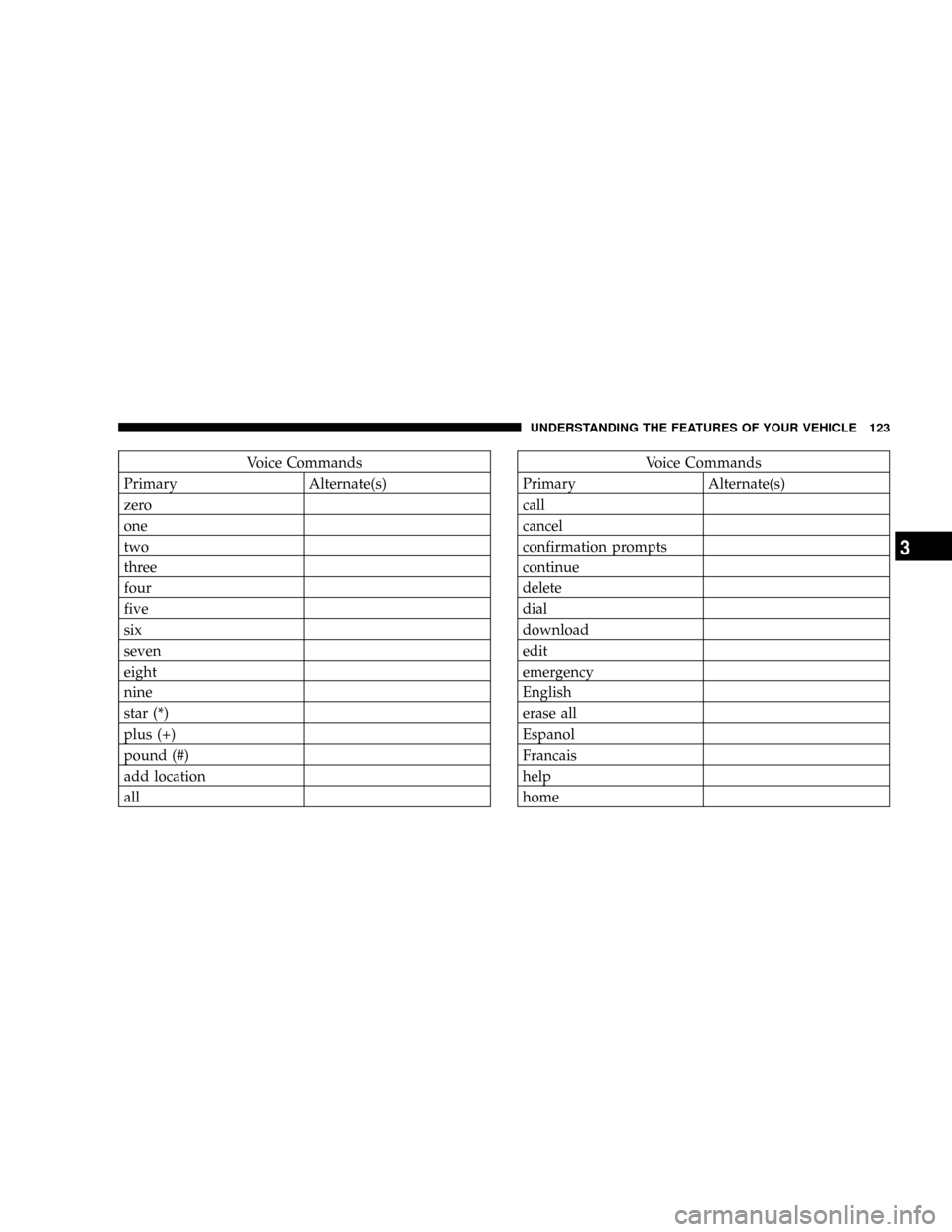
Page 123 of 454
Voice Commands
Primary Alternate(s)
zero
one
two
three
four
five
six
seven
eight
nine
star (*)
plus (+)
pound (#)
add location
allVoice Commands
Primary Alternate(s)
call
cancel
confirmation prompts
continue
delete
dial
download
edit
emergency
English
erase all
Espanol
Francais
help
home
UNDERSTANDING THE FEATURES OF YOUR VEHICLE 123
3
Page 136 of 454
Press the switch once to select high-level heating. Press
the switch a second time to select low-level heating. Press
the switch a third time to shut off the heating elements.
WARNING!
Persons who are unable to feel pain to the skin
because of advanced age, chronic illness, diabetes,
spinal cord injury, medication, alcohol use, exhaus-
tion or other physical condition must exercise care
when using the seat heater. It may cause burns even
at low temperatures, especially if used for long
periods. Do not place anything on the seat that
insulates against heat, such as a blanket or cushion.
This may cause the seat heater to overheat.
Heated Seat Switches
136 UNDERSTANDING THE FEATURES OF YOUR VEHICLE
Page 142 of 454
Turn Signals
Move the Multi-Function Lever upward or downward
and the corresponding turn signal indicator on the in-
strument panel will flash to show proper operation of the
front and rear turn signal lights.You can signal a lane change by moving the lever
partially upward or downward without moving beyond
the detent.
Check for a defective outside light bulb if either light
remains on and does not flash or has a very fast flash rate.
If an indicator fails to light when the lever is moved, it
would suggest that the fuse or indicator is defective.
Highbeam/Lowbeam Select Switch
Push the Multi-Function Control Lever away from you to
switch the headlights to HIGH beam. Pull the Lever
toward you, to switch the headlights back to LOW beam.
Turn Signal Control
142 UNDERSTANDING THE FEATURES OF YOUR VEHICLE
Page 161 of 454

²Press the Learn Button on the Garage Door Opener to
complete the training for Rolling Code.
²Did you unplug the device for training, and remember
to plug it back in?
If you are have any problems, or require assistance,
please call toll-free 1±800±355±3515 or, on the Internet at
www.HomeLink.com for information or assistance.
General Information
This device complies with FCC rules part 15 and Industry
Canada RSS-210. Operation is subject to the following
two conditions:
1. This device may not cause harmful interference
2. This device must accept any interference that may be
received including interference that may cause undesired
operationNOTE:The transmitter has been tested and it complies
with FCC and IC rules. Changes or modifications not
expressly approved by the party responsible for compli-
ance could void the user 's authority to operate the
device.
The term ªIC:º before the certification/registration num-
ber only signifies that Industry Canada technical specifi-
cations were met.ELECTRICAL POWER OUTLETS
There are two 12-volt electrical outlets on this vehicle.
Both of the outlets are protected by a fuse.
The instrument panel power outlet, located below the
climate control knobs, has power available only when the
ignition is on. This outlet will also operate a conventional
cigar lighter unit.
UNDERSTANDING THE FEATURES OF YOUR VEHICLE 161
3
Page 181 of 454

Dual Trip Odometer Ð If Equipped
Press and release this button to change the display from
odometer to ªTrip A.º Press and release it a second time
to change the display to ªTrip B.º Press and release it a
third time to change the display back to the odometer.
To reset the trip odometer, first display the trip mileage
that you want to reset, ªTrip Aº or ªTrip B.º Then push
and hold the button (approximately 2 seconds) until the
display resets to 0. The odometer must be in Trip Mode to
reset the trip odometer.
17. Electronic Throttle Control Indicator Light
This red illuminated light informs you of a
problem with the Electronic Throttle Control
system. If a problem is detected, the light will
come on while the engine is running. If the
light remains lit with the engine running your vehicle
will usually be drivable and not need towing, however
see your dealer for service as soon as possible.If the light is flashing when the engine is running you
may experience power loss, an elevated/rough idle, and
increased brake pedal effort, and your vehicle may
require towing. Immediate service is required.
The light will come on when the ignition switch is first
turned on and remain on briefly as a bulb check. This is
normal. If the light does not come on during starting,
have the system checked by an authorized dealer.
18. Electronic Stability Program (ESP) Indicator
Light/Traction Control System (TCS) Indicator Light Ð
If Equipped
If this indicator light flashes during accelera-
tion, apply as little throttle as possible. While
driving, ease up on the accelerator. Adapt your
speed and driving to the prevailing road con-
ditions, and do not switch off the ESP, or TCS Ð if
equipped.
UNDERSTANDING YOUR INSTRUMENT PANEL 181
4
Page 183 of 454

The operation of the Brake Warning Light can be checked
by turning the ignition switch from the OFF position to
the ON position. The light should illuminate for approxi-
mately two seconds. The light should then turn off unless
the parking brake is applied or a brake fault is detected.
If the light does not illuminate, have the light inspected
by an authorized dealer.
The light also will turn on when the parking brake is
applied with the ignition switch in the ON position.
NOTE:This light shows only that the parking brake is
applied. It does not show the degree of brake application.
20. Turn Signal Indicators
The arrows will flash in unison with the exterior
turn signal, when using the turn signal lever.
21. Front Fog Light Indicator Ð If Equipped
This light shows when the front fog lights are ON.22. Electronic Stability Program (ESP) Indicator Light
The yellow ESP/BAS malfunction indicator
light will turn on when the ignition switch is
turned to the ªONº position. The light should
go out with the engine running. If the light
remains on after several ignition cycles, and you have
driven the vehicle several miles at speeds greater than 30
mph (48 km/h), and the ESP is synchronized (refer to
Synchronizing ESP), see your authorized dealer as soon
as possible to have the problem diagnosed and corrected.
23. Anti-Lock Warning Light (ABS)
This light monitors the ABS. This light will
come on when the ignition key is turned to the
ON position and may stay on for as long as
four seconds.
If the ABS light remains on or comes on during driving,
it indicates that the Anti-Lock portion of the brake system
is not functioning and that service is required, however,
UNDERSTANDING YOUR INSTRUMENT PANEL 183
4
Page 185 of 454

NOTE:Please note that the TPMS is not a substitute for
proper tire maintenance, and it is the driver 's responsi-
bility to maintain correct tire pressure, even if under-
inflation has not reached the level to trigger illumination
of the TPMS low tire pressure telltale.
Your vehicle has also been equipped with a TPMS
malfunction indicator to indicate when the system is not
operating properly. The TPMS malfunction indicator is
combined with the low tire pressure telltale. When the
system detects a malfunction, the telltale will flash for
approximately one minute and then remain continuously
illuminated. This sequence will continue upon subse-
quent vehicle start-ups as long as the malfunction exists.
When the malfunction indicator is illuminated, the sys-
tem may not be able to detect or signal low tire pressure
as intended. TPMS malfunctions may occur for a variety
of reasons, including the installation of replacement or
alternate tires or wheels on the vehicle that prevent the
TPMS from functioning properly. Always check theTPMS malfunction telltale after replacing one or more
tires or wheels on your vehicle to ensure that the replace-
ment or alternate tires and wheels allow the TPMS to
continue to function properly.
CAUTION!
The TPMS has been optimized for the original
equipment tires and wheels. TPMS pressures and
warning have been established for the tire size
equipped on your vehicle. Undesirable system opera-
tion or sensor damage may result when using re-
placement equipment that is not of the same size,
type, and/or style. Aftermarket wheels can cause
sensor damage. Do not use aftermarket tire sealants
or balance beads if your vehicle is equipped with a
TPMS, as damage to the sensors may result.
UNDERSTANDING YOUR INSTRUMENT PANEL 185
4