Page 86 of 457
MIRRORS
Inside Day / Night Mirror
Adjust the mirror to center on the view through the rear
window. A two point pivot system allows for horizontal
and vertical adjustment of the mirror.Annoying headlight glare can be reduced by moving the
small control under the mirror to the night position
(toward rear of vehicle). The mirror should be adjusted
while set in the day position (toward windshield).
Automatic Dimming Mirror Ð If Equipped
When using this feature the mirror will automatically
adjust for annoying headlight glare from vehicles behind
you. You can turn the feature on or off by pressing the
button at the base of the mirror. A light will illuminate to
indicate when this feature is on.
MANUAL REARVIEW MIRROR
86 UNDERSTANDING THE FEATURES OF YOUR VEHICLE
Page 88 of 457
Outside Mirror Ð Passenger's Side
Adjust the convex outside mirror so you can just see the
side of your vehicle in the portion of the mirror closest to
the vehicle. This type of mirror will give a much wider
view to the rear, and especially of the lane next to your
vehicle.
WARNING!
Vehicles and other objects seen in the right side
convex mirror will look smaller and farther away
than they really are. Relying too much on your right
side mirror could cause you to collide with another
vehicle or other object.
Use your inside mirror when judging the size or
distance of a vehicle seen in this convex mirror.
Power Remote-Control Mirrors
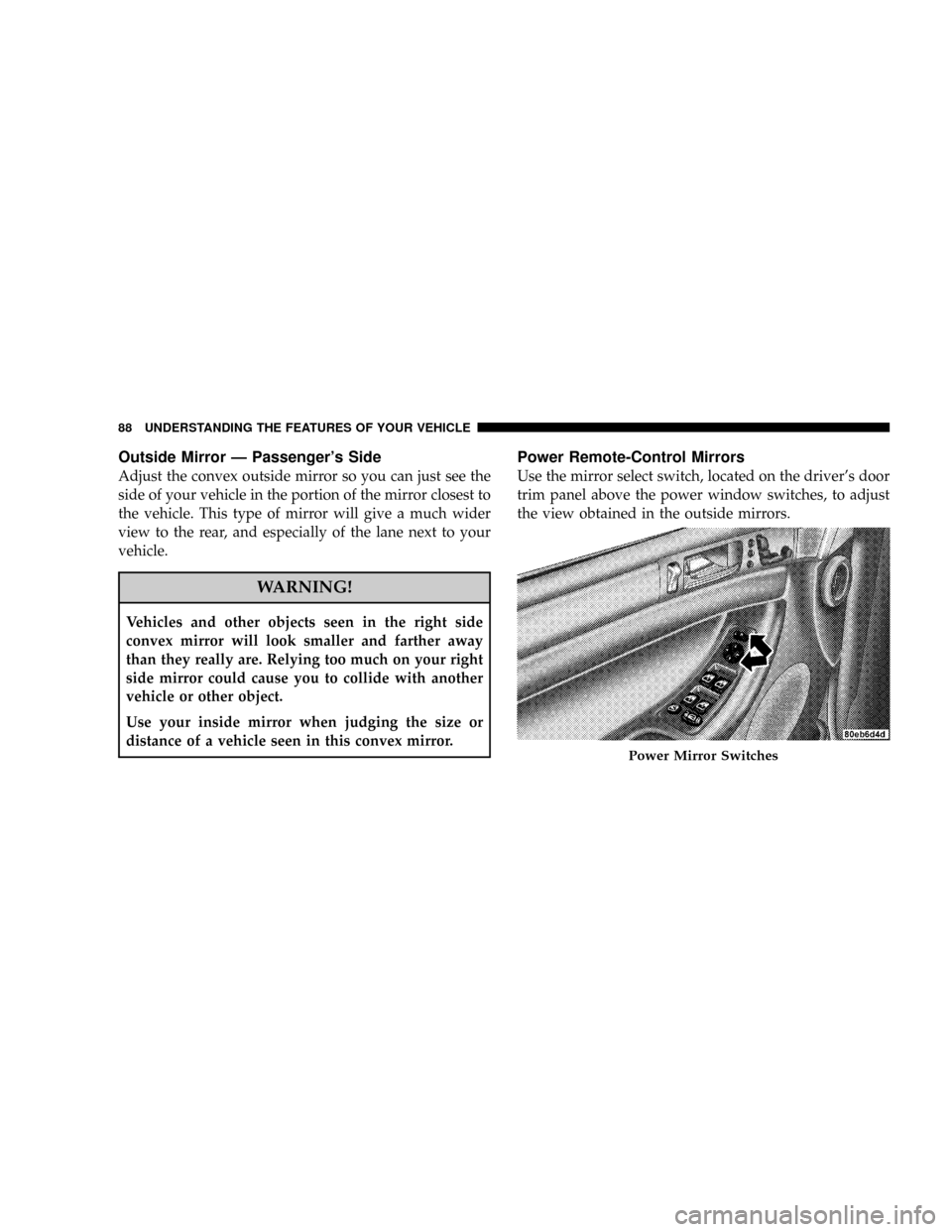
Use the mirror select switch, located on the driver's door
trim panel above the power window switches, to adjust
the view obtained in the outside mirrors.
Power Mirror Switches
88 UNDERSTANDING THE FEATURES OF YOUR VEHICLE
Page 89 of 457

Press the rocker switch to the L or R for Left or Right
mirror selection. Use the center off position to guard
against accidentally moving a mirror position.
Select a mirror and press one of the four arrows for the
direction you want the mirror to move.
Power mirror preselected positions can be controlled by
the optional Driver Memory Seat Feature. Refer to
ªDriver Memory Seatº in section 3 of this manual.
Heated Remote Control Mirrors Ð If Equipped
These mirrors are heated to melt frost or ice. This feature
is activated whenever you turn on the Rear Window
Defrost.
Illuminated Vanity Mirrors
An illuminated vanity mirror is on the sun visor. To use
the mirror, rotate the sun visor down and swing the
mirror cover upward. The lights turn on automatically.
Closing the mirror cover turns off the lights.
Sun Visor Extension
The sun visors may be pulled out to provide extended
coverage of the side glass.
HANDS±FREE COMMUNICATION (UConnectŸ) Ð
IF EQUIPPED
UConnectŸ is a voice-activated, hands-free, in- vehicle
communications system. UConnectŸ allows you to dial
a phone number with your cellular phone using simple
voice commands (e.g.,9Callº{ªMikeº{ºWork9or9Dialº
{ª248-555-12129). Your cellular phone's audio is trans-
mitted through your vehicle's audio system; the system
will automatically mute your radio when using the
UConnectŸ system.
NOTE:The UConnectŸ system use requires a cellular
phone equipped with the Bluetooth9Hands-Free Profile,9
version 0.96 or higher. See www.chrysler.com/uconnect
for supported phones.
UNDERSTANDING THE FEATURES OF YOUR VEHICLE 89
3
Page 107 of 457

²Press the `Voice Recognition' button and say9Setup,
Voice Training9command.
Repeat the words and phrases when prompted by the
UConnectŸ system. For best results, the Voice Training
session should be completed when the vehicle is parked,
engine running, all windows closed, and the blower fan
switched off.
This procedure may be repeated with a new user. The
system will adapt to the last trained voice only.
To restore the Voice Recognition system to factory default
settings, enter the Voice Training session via the above
procedure and follow the prompts.
Voice Recognition (VR)
²
Always wait for the beep before speaking.
²Speak normally, without pausing, just as you would
speak to a person sitting approximately eight (8) feet
away from you.
²Make sure that no one other than you is speaking
during a voice recognition period.
²Performance is maximized under:
²low-to-medium blower setting,
²low-to-medium vehicle speed,
²low road noise,
²smooth road surface,
²fully closed windows,
²dry weather condition.
²Even though the system is designed for users speaking
in North American English, French, and Spanish ac-
cents, the system may not always work for some.
UNDERSTANDING THE FEATURES OF YOUR VEHICLE 107
3
Page 108 of 457

²When navigating through an automated system, such
as voice mail, or when sending a page at the end of
speaking the digit string, make sure to say9send.9
²Storing names in phonebook when vehicle is not in
motion is recommended.
²It is not recommended to store similar sounding
names in the UConnectŸ phonebook.
²UConnectŸ phonebook nametag recognition rate is
optimized for the voice of the person who stored the
name in the phonebook.
²You can say9O9(letter9O9) for909(zero).98009must be
spoken9eight-zero-zero.9
²Even though international dialing for most number
combinations is supported, some shortcut dialing
number combinations may not be supported.
Far End Audio Performance
²
Audio quality is maximized under:
²low-to-medium blower setting.
²low-to-medium vehicle speed.
²low road noise.
²smooth road surface.
²fully closed windows.
²dry weather condition.
²operation from driver seat.
²Performance, such as audio clarity, echo, and loudness
to a large degree rely on the phone and network, and
not the UConnectŸ system.
²Echo at far end can sometime be reduced by lowering
the in-vehicle audio volume.
108 UNDERSTANDING THE FEATURES OF YOUR VEHICLE
Page 141 of 457

Windshield Wiper Operation
Rotate the end of the lever to the second detent for Low
speed wiper operation, or to the third detent for High
speed operation
Intermittent Wiper System
Use the intermittent wiper when weather conditions
make a single wiping cycle, with a variable pause be-
tween cycles, desirable. Rotate the end of the lever to the
first detent position, then turn the end of the lever to
select the desired delay interval. The delay can be regu-
lated from a maximum of approximately 23 seconds
between cycles, to a cycle every second.
Rear Window Wiper/Washer
The switch on the right side of the steering column also
controls operation of the rear wiper/washer function.Rotating the center of the switch up to the DEL (Delay)
position or the ON position will activate the rear wiper.
Push the lever forward to initiate the rear wash function
in any of the three positions. The washer pump will
Windshield Wiper/Washer Control
UNDERSTANDING THE FEATURES OF YOUR VEHICLE 141
3
Page 142 of 457
continue to operate as long as the lever is pressed. Upon
release, the rear wiper will cycle two times before return-
ing to the set position.
Adding Washer Fluid
The fluid reservoir for the windshield washers and the
rear window washer is shared. It is located in the front of
the engine compartment on the driver's side and should
be checked for fluid level at regular intervals. Fill the
reservoir with windshield washer solvent (not radiator
antifreeze) and operate the system for a few seconds to
flush out the residual water.
The washer fluid reservoir will hold a full gallon of fluid
when Low Washer Fluid illuminates in the Electronic
Vehicle Information Center (EVIC).
Washer Fluid Reservoir
142 UNDERSTANDING THE FEATURES OF YOUR VEHICLE
Page 162 of 457
Rear Park Assist Warning Display
The Rear Park Assist Warning Display, located in the
headliner near the liftgate glass, provides both visual and
audible warnings to indicate the distance between the
rear fascia and the detected obstacle.
When the ignition is changed to the RUN/ON position,
the warning display will turn ON all of its LEDs for
about 1 second. Each side of the warning display has 6
yellow and 2 red LEDs. The vehicle is close to the obstacle
when the red LED is ON.The driver can view the LEDs either through the rear
view mirror or by looking at the display above the rear
window.
The system dimly illuminates the two outer most yellow
LEDs when it is ON and detecting no obstacles. The
following chart shows the warning display operation
when the system is detecting an obstacle:
162 UNDERSTANDING THE FEATURES OF YOUR VEHICLE