Page 136 of 457
Multi-Function Lever
The Multi-Function Lever controls the operation of the
headlights, parking lights, turn signals, headlight beam
selection, instrument panel light dimming, interior lights,
the passing lights, and fog lights. The lever is located on
the left side of the steering column.
Headlights, Parking Lights, Instrument Panel
Lights
Turn the end of the Multi-Function Lever to the first
detent for parking light and instrument panel light
operation. Turn to the second detent for headlight, park
light and instrument panel light operation.
To change the brightness of the instrument panel lights,
rotate the center portion of the Multi-Function Lever up
or down.
Dimmer Control
With the parking lights or headlights
on, rotating the dimmer control for the
interior lights on the Multi-Function
Lever upward will increase the bright-
ness of the instrument panel lights.
Multi-Function Control Lever
136 UNDERSTANDING THE FEATURES OF YOUR VEHICLE
Page 139 of 457

NOTE:The fog lights will only operate with the head-
lights on low beam. Selecting high beam headlights will
turn off the fog lights.
Turn Signals
Move the lever up or down to signal a right-hand or
left-hand turn.
The arrow on either side of the instrument cluster flashes
to indicate the direction of the turn, and proper operation
of the front and rear turn signal lights. If an indicator fails
to light when the lever is moved, it would suggest that
the switch or indicator lamp is defective.
If a defective bulb or wiring circuit is detected for the
turn signal system, the arrow indicators will flash at a
faster rate.
You can signal a lane change by moving the lever
partially up or down.NOTE:If a turn signal has been left on for at least a mile
duration, a continuous chime will sound.
Turn Signal Lane Change Auto-Mode
Momentarily engage the multifunction control lever par-
tially up or down to activate the lane change feature
without holding the lever. The signal will flash 3 times,
and automatically turn off.
Highbeam/Lowbeam Select Switch
Pull the Multi-Function Lever towards you to switch the
headlights to HIGH beam. Pull the Lever a second time
to switch the headlights to LOW beam.
Passing Light
You can signal another vehicle with your headlights by
lightly pulling the Multi-Function Lever toward you.
This will cause the headlights to turn on at high beam
and remain on until the lever is released.
UNDERSTANDING THE FEATURES OF YOUR VEHICLE 139
3
Page 143 of 457
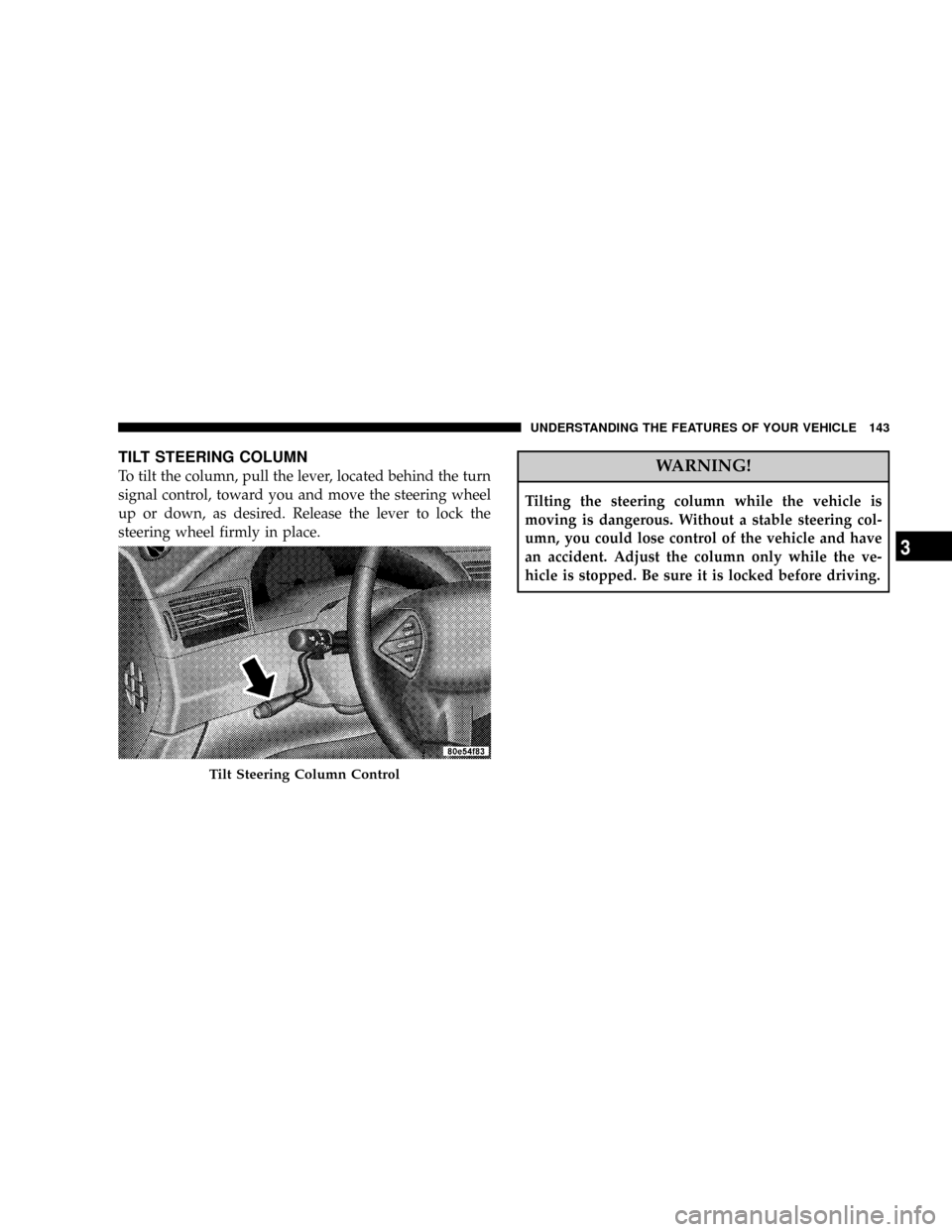
TILT STEERING COLUMN
To tilt the column, pull the lever, located behind the turn
signal control, toward you and move the steering wheel
up or down, as desired. Release the lever to lock the
steering wheel firmly in place.WARNING!
Tilting the steering column while the vehicle is
moving is dangerous. Without a stable steering col-
umn, you could lose control of the vehicle and have
an accident. Adjust the column only while the ve-
hicle is stopped. Be sure it is locked before driving.
Tilt Steering Column Control
UNDERSTANDING THE FEATURES OF YOUR VEHICLE 143
3
Page 148 of 457

to HomeLinktfor more efficient training and accurate
transmission of the radio-frequency signal.
Your vehicle should be parked outside of the garage
while training.
1. Turn the ignition switch to the ON/RUN position.
2. Place the hand-held transmitter 1±3 inches (3±8 cm)
from the HomeLinktbuttons while keeping the indicator
in view.
For optimal training, point the battery end of the hand-
held transmitter away from the HomeLinkt.
3. Simultaneously press and hold both the chosen
HomeLinktbutton and the hand-held transmitter button
until the until the red HomeLinktindicator changes from
a slow to a rapid flash rate or the EVIC display changes
fromªCHANNEL # TRAININGºtoªCHANNEL #
TRAINED.ºThen release both the HomeLinktand hand-held trans-
mitter buttons.
If the EVIC display statesªDID NOT TRAINºrepeat
Step 3. If the signal is too weak, replace the battery in the
original hand-held transmitter.
It may take up to 30 seconds, or longer in rare cases. The
garage door may open & close while you train.
NOTE:Some gate operators and garage door openers
may require you to replace Step #3 with procedures
noted in the ªGate Operator/Canadian Programmingº
section.
4. Press and hold the newly-trained HomeLinktbutton.
If the channel has been trained, the EVIC display will
now stateªCHANNEL # TRANSMIT.º
If the EVIC display still statesªCHANNEL # TRAIN-
INGºrepeat Step 3.
148 UNDERSTANDING THE FEATURES OF YOUR VEHICLE
Page 150 of 457

7. Return to the vehicle and press the programmed
HomeLinktbutton twice (holding the button for 2 sec-
onds each time). If the device is plugged in and activates,
programming is complete.
If the device does not activate, press the button a third
time (for 2 seconds) to complete the training.
NOTE:If you are have any problems, or require assis-
tance, please call toll-free 1±800±355±3515 or, on the
Internet at www.HomeLink.com for information or assis-
tance.
To program the remaining two HomeLinktbuttons,
repeat each step for each remaining button.DO NOT
ERASE THE CHANNELS.Canadian Programming/Gate Programming
Canadian radio-frequency laws require transmitter sig-
nals to9time-out9(or quit) after several seconds of
transmission which may not be long enough for
HomeLinktto pick up the signal during programming.
Similar to this Canadian law, some U.S. gate operators are
designed to9time-out9in the same manner.
It may be helpful to unplug the device during the cycling
process to prevent possible overheating of the garage
door or gate motor.
If you are having difficulties programming a garage door
opener or a gate operator, replace ªProgramming
HomeLinkº Step 3 with the following:
3. Continue to press and hold the HomeLinktbutton
while you press and release - every two seconds
(ªcycleº) your hand-held transmitter until HomeLinkt
has successfully accepted the frequency signal. The red
HomeLinktindicator will change from a slow to rapid
150 UNDERSTANDING THE FEATURES OF YOUR VEHICLE
Page 188 of 457

WARNING!
A hot engine cooling system is dangerous. You or
others could be badly burned by steam or boiling
coolant. You may want to call a service center if your
vehicle overheats. If you decide to look under the
hood yourself, see Section 7 of this manual. Follow
the warnings under the Cooling System Pressure Cap
paragraph.
3. Fuel Gauge
The pointer shows the level of fuel in the fuel tank when
the ignition switch is in the ON position.
The Low Fuel Light will turn on when the fuel level
reaches approximately 2 to 4 gallons (7 to 15 liters)
this light will remain on until fuel is added.4. Turn Signal Indicators
The arrow will flash with the exterior turn signal
when the turn signal lever is operated.
If the vehicle electronics sense that the vehicle has
traveled about one mile with the turn signals on, a chime
will sound to alert you to turn the signals off. If either
indicator flashes at a rapid rate, check for a defective
outside light bulb.
5. Speedometer
Indicates vehicle speed.
6. Anti-Lock Brake Light
This light monitors the Anti-Lock Brake Sys-
tem. The light will turn on when the ignition
switch is turned to the ON position and may
stay on for as long as four seconds.
If the ABS light remains on or turns on while driving, it
indicates that the Anti-Lock portion of the brake system
188 UNDERSTANDING YOUR INSTRUMENT PANEL
Page 199 of 457

When lit solid:There is an AWD system fault. AWD
performance will be at a reduced level. Service the AWD
system soon.
When blinking:The AWD system is temporarily dis-
abled due to overload condition.
ELECTRONIC VEHICLE INFORMATION CENTER
(EVIC) Ð IF EQUIPPED
The Electronic Vehicle Information Center (EVIC) con-
sists of the following:
²Vehicle information warning message displays
²Tire Pressure Monitor System Ð If Equipped
²Customer programmable features
²Compass display
²Mini-Trip functionsPressing the MENU button will change the displayed
programming features. Pressing the STEP button will
display the available choices. Pressing the MENU button
a second time accepts a selected choice.
When the appropriate conditions exist, the Electronic
Vehicle Information Center (EVIC) displays the following
messages.
²LEFT/RIGHT TURN SIGNAL ON (with a continuous
warning chime)
²INVALID KEY & FOB (with a single chime)
²PARK ASSIST DISABLED
²SERVICE PARK ASSIST SYSTEM
²SERVICE IMMOBILIZER (with a single chime)
²KEY FOB BATTERY LOW (with a single chime)
²KEY & FOB PROGRAMMED (with a single chime)
UNDERSTANDING YOUR INSTRUMENT PANEL 199
4
Page 205 of 457

Remote Linked To Memory? (Available with
Memory Seat Only)
When this feature is selected the memory seat, mirror,
and radio settings will return to the memory set position
when the remote keyless entry ªUnlockº button is
pressed. If this feature is not selected then the memory
seat, mirror, and radio settings can only return to the
memory set position using the door mounted switch.
Pressing the STEP button when in this display will select
ªYesº or ªNo.º
Sound Horn On Lock?
When this feature is selected a short horn sound will
occur when the remote keyless entry ªLockº button is
pressed. This feature may be selected with or without the
flash lights on lock/unlock feature. Pressing the STEP
button when in this display will select ªYesº or ªNo.º
Flash Lights On Lock/Unlock?
When this feature is selected, the front and rear turn
signals will flash when the doors are locked or unlocked
using the remote keyless entry transmitter. This feature
may be selected with or without the sound horn on lock
feature selected. Pressing the STEP button when in this
display will select ªYesº or ªNo.º
Headlamp Delay
When this feature is selected the driver can choose, when
exiting the vehicle, to have the headlamps remain on for
30, 60, or 90 seconds, or not remain on. Pressing the STEP
button when in this display will select 30, 60, 90, or OFF.
Headlamp On With Wipers? (Available with Auto
Headlights Only)
When this feature is selected and the headlight switch
has at least once been moved to the AUTO position, the
headlights will turn on in approximately 10 seconds
when the wipers are turned on. The headlights will also
UNDERSTANDING YOUR INSTRUMENT PANEL 205
4