Page 140 of 358

There are two symbols which will appear in the
main odometer display field prior to the next
suggested service. This symbol represents Ser-
vice A.
This second symbol represents Service B.
Depending on operating conditions through-
out the year, the next service is calculated and
displayed next to this symbol in days remain-
ing before the next service is required.
Likewise, the next service may be calculated
and displayed next to this symbol as distance
remaining before the next service is required.
The counter can also be reset by any individual after the
indicated service has been performed. To do so:
1. Turn key to the ON/RUN position.2. Within one second press the knob/button twice.
3. The present status for days or distance is displayed.
Within 10 seconds turn the key to OFF/LOCK.
4. Press and hold the knob/button, while turning the
key to ON/RUN again. The present status for days or
distance is displayed once more. Continue to hold the
knob/button.
After approximately 10 seconds, a signal sounds and
the display shows 7,000 mi (Canada: 11 000 km) for
approximately 10 seconds.
5. Release the knob/button.
If the FSS counter was inadvertently reset, have an
authorized dealer correct it.
The message is displayed for approximately 10 seconds
when turning the key to the ON/RUN position, or while
138 UNDERSTANDING YOUR INSTRUMENT PANEL
Page 141 of 358

driving when reaching the service warning threshold. It
can be canceled manually by pressing the knob/button.
Once the suggested term has passed, the message plus
either the symbol for Service A or the symbol for Service
B preceded by a ± (minus symbol) blinks for approxi-
mately 30 seconds and a signal sounds every time when
turning the key to the ON/RUN position.
The FSS display can also be called up for approximately
10 seconds with the display illuminated by pressing the
knob/button twice within one second.
Following a completed A or B service your authorized
dealer sets the counter to 7,000 mi (Canada: 11 000 km).
NOTE:When disconnecting vehicle battery for one or
more days at a time, such days will not be counted. Any
such days not counted by FSS can be added by your
authorized dealer.The interval between services is determined by the type
of vehicle operation. Driving at extreme speeds, and cold
starts combined with short distance driving in which the
engine does not reach normal operating temperature,
reduce the interval between services.
However you choose to set your reference numbers, the
scheduled services as posted in the Service Booklet must
be followed to properly care for your vehicle.
23. Outside Temperature Display
The temperature display is located on the left side of the
instrument cluster, below the fuel and engine tempera-
ture gauges.
The sensor for the outside temperature indicator is
located in the front fascia area. Due to its location, the
sensor can be affected by road or engine heat during
idling or slow driving. This means that the accuracy of
UNDERSTANDING YOUR INSTRUMENT PANEL 139
4
Page 142 of 358

the displayed temperature can only be verified by com-
parison to a thermometer placed next to the sensor, not
by comparison to external displays (e.g., bank signs, etc.).
Adaptation to ambient temperature takes place in steps
and depends on the prevailing driving conditions (stop-
and- go or moderate, constant driving) and amount of
temperature change.
WARNING!
The outside temperature indicator is not designed to
serve as an ice-warning device and is unsuitable for
that purpose. Indicated temperatures just above the
freezing point do not guarantee that the road surface
is free of ice.24. Airbag Light
The operational readiness of the airbag system
is verified by the airbag indicator light in the
instrument cluster when turning the key in the
ignition switch to the ACC or ON/RUN posi-
tion. If no fault is detected, the light will go out after
approximately four seconds. After the lamp goes out, the
system continues to monitor the components and cir-
cuitry of the airbag system and will indicate a malfunc-
tion by coming on again.
The light will come on and remain on for four seconds as
a bulb check when the ignition switch is first turned ON.
If the bulb is not lit during starting, have it replaced. If
the light stays on, or comes on while driving, have the
system checked by an authorized dealer.
140 UNDERSTANDING YOUR INSTRUMENT PANEL
Page 143 of 358

WARNING!
In the event a malfunction of the airbag is indicated,
the airbag may not be operational. For your safety, we
strongly recommend that you visit an authorized
dealer immediately to have the system checked;
otherwise the airbag may not be activated when
needed in an accident, which could result in serious
or fatal injury, or it might deploy unexpectedly and
unnecessarily which could also result in injury.
25. Telescoping Wheel Indicator Light
With the key in the ignition and turned to the
ON/RUN position, the indicator light in the
instrument cluster comes on. It should go out
when the engine is running. If the indicator
light does not go out after starting the engine, the
telescoping steering column is not locked properly.
WARNING!
Do not drive the vehicle until you have properly
locked the steering column.
26. Check Engine Light
This light is part of an Onboard Diagnostic
system that monitors the emissions and engine
control systems. If a problem is detected in one of these
systems, the Check Engine light will come on. The light
comes on and stays on briefly as a bulb check when the
ignition is first turned ON.
Certain conditions, such as a loose or missing gas cap, or
poor fuel quality may illuminate the light after the engine
is started. Be sure the gas cap is tightened every time you
refuel.
UNDERSTANDING YOUR INSTRUMENT PANEL 141
4
Page 144 of 358

If the Check Engine light remains on continuously and
the vehicle is driving normally, you may still drive the
vehicle. In most situations, the vehicle will not require
towing. However, we recommend that you have the
system checked at an authorized dealer as soon as
possible.
If the vehicle is not driving normally, and the Check
Engine light flashes or remains on continuously, it is an
alert to serious conditions that could lead to loss of power
or severe catalytic converter damage. The vehicle should
be serviced at an authorized dealer as soon as possible.
27. Brake Wear Indicator Light
With the key in the ignition and turned to the
ON/RUN position, the brake wear indicator
light comes on. The light goes out when the
engine is running.
If the indicator light comes on during braking, this
indicates the brake pads are worn down.Have the brake system checked at your authorized dealer
as soon as possible.
28. Oil Level Indicator Light
With the key in the ignition switch turned to
the ON/RUN position, the oil level indicator
light comes on. It should go out immediately
when the engine is running. If the light does
not go out, or comes on while driving, the engine oil level
has dropped to approximately the minimum mark on the
dipstick.
CHECKING ENGINE OIL LEVEL
A sensor in the oil pan allows oil level to be checked
without opening the hood. It provides an accurate mea-
surement of oil level, whereas the low engine oil level
indicator warns that oil level is definitely too low. With
the vehicle parked on a level surface, the engine is
warmed up and shut off for approximately five minutes.
When the ignition switch is turned to the ON/RUN
142 UNDERSTANDING YOUR INSTRUMENT PANEL
Page 145 of 358

position, press the knob to the left of the speedometer
once and wait seven seconds. An ISO oil level icon
appears in the trip odometer window and a ªclockº icon
in the cumulative odometer display. Pressing the knob to
the left of the speedometer twice within one second
displays one of the following messages:
²OK
²-1.0 Q (-1.0L)
²-1.5 Q (-1.5L)
²-2.0 Q (-2.0L)
²HI
The indicated amount of oil must be added to the engine
if the message -2.0 Q (-2.0L) blinks and a signal sounds.
The HI message indicates that the excess oil must be
removed from the pan to avoid possible engine or
catalytic converter damage. If the ISO oil level icon andªclockº icon remain on when attempting to check oil
level and no message follows, or if the low engine oil
level warning lamp comes on, a malfunction in the
engine oil level system is indicated. A conveniently
located dipstick allows manual checking of the oil level.
If no leaks are noted, continue to drive to the nearest
service station where the engine oil should be topped to
the ªfullº mark on the dipstick with an approved oil.
29. Low Fuel Warning Light
When the fuel level drops to about 2 gal (7.5 L), this
symbol will light and remains lit until fuel is added.
ªINFINITY MODULUSº AM/FM STEREO RADIO
WITH SINGLE-DISC CD PLAYER AND GPS
NAVIGATION
(OPTIONAL - See separate User's Manual)
UNDERSTANDING YOUR INSTRUMENT PANEL 143
4
Page 146 of 358
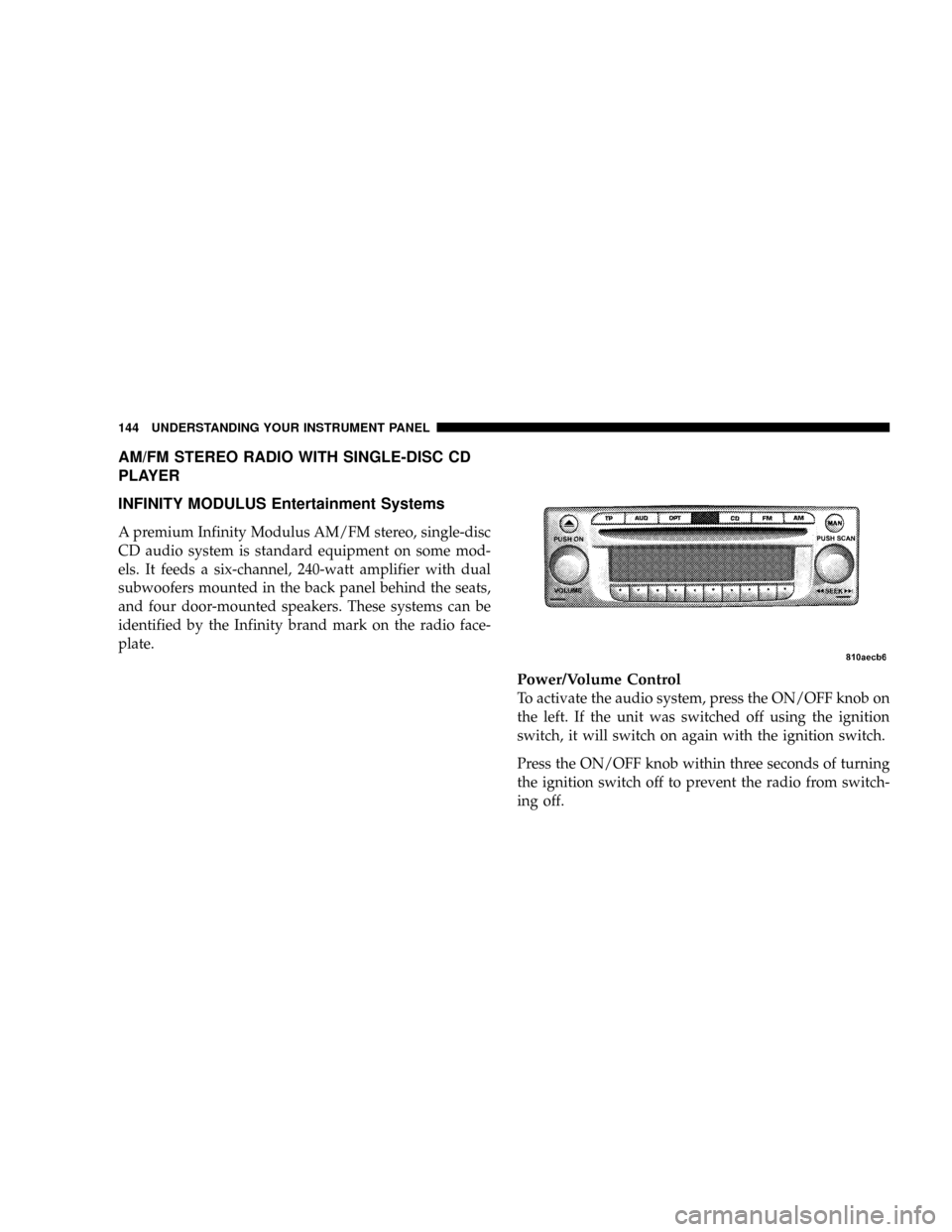
AM/FM STEREO RADIO WITH SINGLE-DISC CD
PLAYER
INFINITY MODULUS Entertainment Systems
A premium Infinity Modulus AM/FM stereo, single-disc
CD audio system is standard equipment on some mod-
els. It feeds a six-channel, 240-watt amplifier with dual
subwoofers mounted in the back panel behind the seats,
and four door-mounted speakers. These systems can be
identified by the Infinity brand mark on the radio face-
plate.
Power/Volume Control
To activate the audio system, press the ON/OFF knob on
the left. If the unit was switched off using the ignition
switch, it will switch on again with the ignition switch.
Press the ON/OFF knob within three seconds of turning
the ignition switch off to prevent the radio from switch-
ing off.
144 UNDERSTANDING YOUR INSTRUMENT PANEL
Page 147 of 358

The unit can also be operated without the ignition switch
turned on by pressing the ON/OFF knob, but it will
switch off automatically after one hour.
The volume is controlled by rotating the ON/OFF knob
to the left or right.
Audio (AUD) Settings
²
Bass (BASS)
Press the AUD button repeatedly until BASS appears.
Rotate the right rotary control for the desired level
(from -9 to +9).
²Treble (TREB)
Press the AUD button repeatedly until TREB appears.
Rotate the right rotary control for the desired level
(from -9 to +9).
²Balance (BAL)Press the AUD button repeatedly until BAL appears.
Rotate the right rotary control for the desired level
(from -9 to +9).
²Linear adjustment (LINEAR)
The tone values for the set signal source (e.g., radio/
FM) are set to ª0º (mean value). Press and hold the
AUD button for more than four seconds until FM
LINEAR appears (which affects FM only). Press and
hold the AUD button for more than eight seconds until
ALL LINEAR appears (which affects both radio and
CD).
²Mute function (MUTE)
To activate the mute function in all modes and wave-
bands, press the TP button. The mute function is
cancelled by either pressing the TP button again, or by
turning the volume control.
UNDERSTANDING YOUR INSTRUMENT PANEL 145
4