2008 CHRYSLER ASPEN park assist
[x] Cancel search: park assistPage 83 of 479

NTo Accelerate For Passing...............159
mRear Park Assist System Ð If Equipped.......160
mRear Camera Ð If Equipped...............163
mOverhead Console......................165
NCourtesy/Reading Lights................166
mOverhead Console With Electronic Vehicle
Information Center (EVIC) Ð If Equipped.....166
NDome/Reading Lights..................166
NElectronic Vehicle Information Center (EVIC) Ð
If Equipped.........................167
NCompass/Temperature Button............173
mGarage Door Opener Ð If Equipped.........176
NProgramming HomeLinkt...............177
NGate Operator/Canadian Programming.....180NUsing HomeLinkt.....................181
NReprogramming A Single HomeLinkt
Button.............................181
NSecurity............................181
NTroubleshooting Tips...................181
NGeneral Information...................182
mPower Sunroof Ð If Equipped.............182
NExpress Open Feature..................183
NWind Buffeting.......................184
NSunroof Maintenance...................184
mElectrical Power Outlets..................185
N115V Inverter Outlet ± If Equipped.........185
NElectrical Outlet Use With Engine Off (Battery
Fed Configuration)....................187
82 UNDERSTANDING THE FEATURES OF YOUR VEHICLE
Page 161 of 479
REAR PARK ASSIST SYSTEM Ð IF EQUIPPED
NOTE:The manufacturer suggests disabling the Rear
Park Assist System when towing a trailer. Refer to
ªPersonal Settings (Customer Programmable Features)º
under ªOverhead Console with Electronic Vehicle Infor-
mation Center (EVIC) ± If Equippedº in Section 3.
This system is used to help drivers determine if an
obstacle is in the way of the vehicle while it is backing up
in addition to the use of inside rearview and outside
mirrors.
When the driver selects REVERSE, the system scans for
objects behind the vehicle using four sensors located in
the rear bumper. Objects can be detected from up to 78.7
in (200 cm). A warning display above the rear window
provides both visible and audible warnings indicating
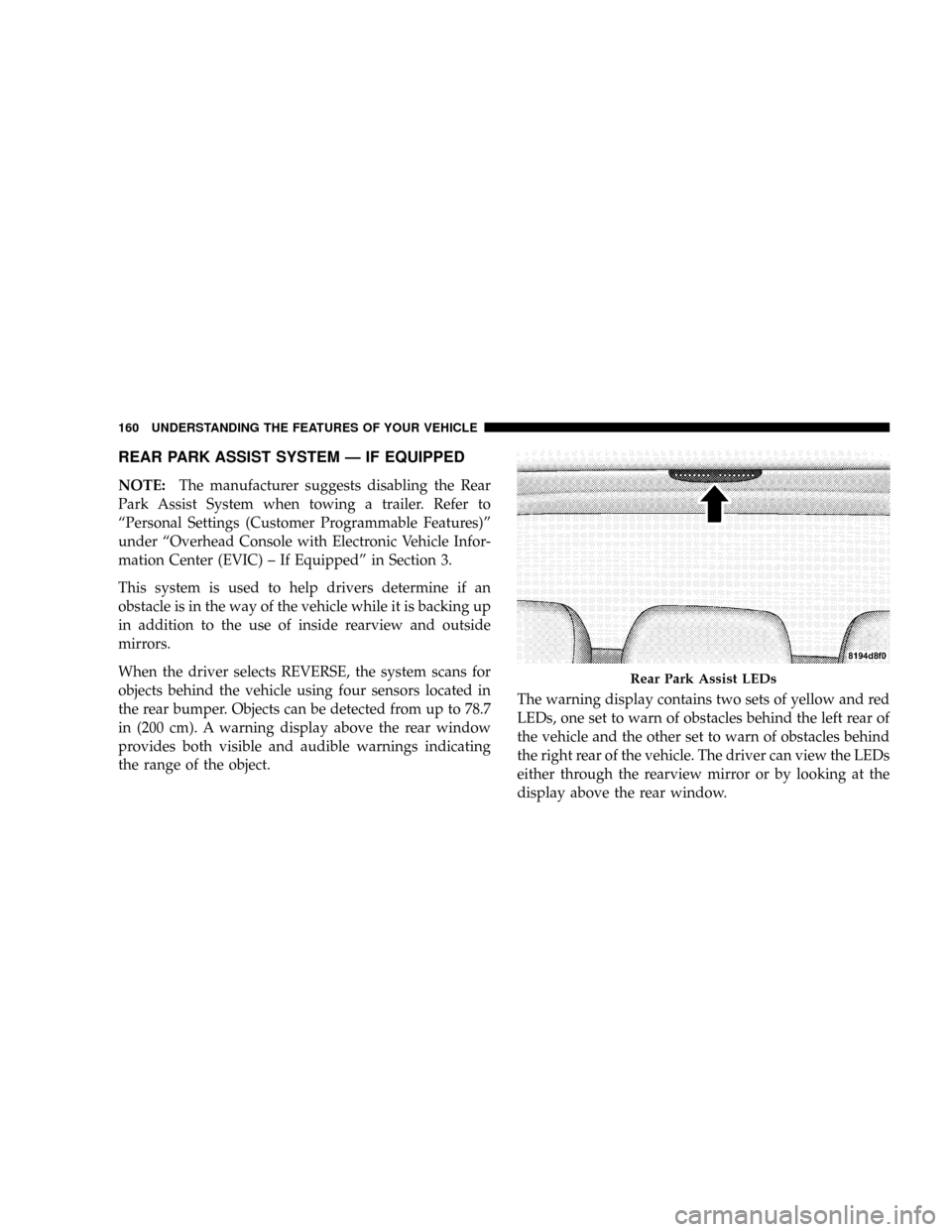
the range of the object.The warning display contains two sets of yellow and red
LEDs, one set to warn of obstacles behind the left rear of
the vehicle and the other set to warn of obstacles behind
the right rear of the vehicle. The driver can view the LEDs
either through the rearview mirror or by looking at the
display above the rear window.
Rear Park Assist LEDs
160 UNDERSTANDING THE FEATURES OF YOUR VEHICLE
Page 162 of 479

The system dimly illuminates the two outermost yellow
LEDs when it is ON and detecting no obstacles. The
following chart shows the warning display operation
when the system is detecting an obstacle:
WARNING DISPLAY DISTANCES
DISPLAY LED OBSTACLE DISTANCE FROM: LED COLOR AUDIBLE SIGNAL
REAR CORNERS REAR CENTER
1st LED 78.7 in (200 cm) Yellow None
2nd LED 51.1 in (130 cm) Yellow None
3rd LED 45.2 in (115 cm) Yellow None
4th LED 31.5 in (80 cm) 39.3 in (100 cm) Yellow None
5th LED 25.5 in (65 cm) 33.5 in (85 cm) Yellow None
6th LED 20 in (50 cm) 27.6 in (70 cm) Yellow None
7th LED 16 in (40 cm) 19.7 in (50 cm) Red at 12 in (30 cm) Intermittent
8th LED 6 in (15 cm) 11.81 in (30 cm) Red at 8 in (20 cm) Continuous
NOTE:The Rear Park Assist system will MUTE the
radio, if on, when the system is sounding an audio tone.
UNDERSTANDING THE FEATURES OF YOUR VEHICLE 161
3
Page 163 of 479

WARNING!
²Drivers must be careful when backing up, even when
using the Rear Park Assist System. Always check
carefully behind your vehicle, look behind you, and
be sure to check for pedestrians, animals, other ve-
hicles, obstructions, and blind spots before backing
up. You are responsible for safety and must continue
to pay attention to your surroundings. Failure to do so
can result in serious injury or death.
²Before using the Rear Park Assist System, it is
strongly recommended that the ball mount and hitch
ball assembly is disconnected from the vehicle when
the vehicle is not used for towing. Failure to do so can
result in injury or damage to vehicles or obstacles
because the hitch ball will be much closer to the
obstacle than the rear fascia when the warning dis-
play turns the red LEDs ON. Also, the sensors could
detect the ball mount and hitch ball assembly, de-
pending on its size and shape, giving a false indica-
tion that an obstacle is behind the vehicle.
CAUTION!
²The Rear Park Assist System is only a parking aid
and it is unable to recognize every obstacle, in-
cluding small obstacles. Parking curbs might be
temporarily detected or not detected at all. Ob-
stacles located above or below the sensors will not
be detected when they are in close proximity.
²The vehicle must be driven slowly when using the
Rear Park Assist System to be able to stop in time
when the obstacle is detected. It is recommended
that the driver look over his/her shoulder when
using the Rear Park Assist System.
162 UNDERSTANDING THE FEATURES OF YOUR VEHICLE
Page 164 of 479
NOTE:
²Ensure that the rear bumper is free of dirt and debris
to keep the system operating properly.
²Jackhammers, large trucks, and other vibrations could
affect the performance of the system.
If ªService Park Assist Systemº appears in the Electronic
Vehicle Information Center (EVIC) after making sure the
rear bumper is clean, please see your authorized dealer.
To turn on/off the rear park assist system, refer to
ªPersonal Settings (Customer Programmable Features)º
under ªOverhead Console with Electronic Vehicle Infor-
mation Center (EVIC) ± If Equippedº in Section 3.
REAR CAMERA Ð IF EQUIPPED
Your vehicle may be equipped with a Rear Camera
system that allows you to see an on-screen image (located
in the screen of your Radio) of the rear of your vehicle
whenever it is put into REVERSE. The camera is located
in the light bar over the rear license plate.
NOTE:Refer to ªSetting Display Propertiesº under
ªSystem Settingsº in the Navigation User's Manual for
instructions regarding navigation screen brightness ad-
justments.
Use the following steps to access the Rear Backup Cam-
era feature:
1. Start the engine.
2. Depress the brake pedal and place the shift lever in
REVERSE.
3. Wait one to two seconds, and the camera view will
display on the Radio screen.
UNDERSTANDING THE FEATURES OF YOUR VEHICLE 163
3
Page 170 of 479

²TURN SIGNALS ON (with a continuous warning
chime)
²PERSONAL SETTINGS NOT AVAILABLE ± Vehicle
not in PARK
²LEFT/RIGHT FRONT DOOR AJAR (one or more,
with a single chime if speed is above 1 mph/1 km/h)
²LEFT/RIGHT REAR DOOR AJAR (one or more, with
a single chime if speed is above 1 mph/1 km/h)
²DOOR(S) AJAR (with a single chime if vehicle is in
motion)
²LOW WASHER FLUID (with a single chime)
²OIL CHANGE REQUIRED (with a single chime)
²SERVICE PARK ASSIST SYSTEM (with a single chime)
²SERVICE PARK ASSIST SYSTEM
²COOLANT LOW
²LIFTGATE OPEN
²CHECK TPM SYSTEM (with single chime) (Premium
TPM System Only)
OIL CHANGE REQUIRED Ð If Equipped
Your vehicle is equipped with an engine oil change
indicator system. The ªOil Change Requiredº message
will flash in the EVIC display for approximately 10
seconds after a single chime has sounded to indicate the
next scheduled oil change interval. The engine oil change
indicator system is duty cycle based, which means the
engine oil change interval may fluctuate dependent upon
your personal driving style.
Unless reset, this message will continue to display each
time you turn the ignition switch to the ON/RUN
position. To turn off the message temporarily, press and
release the MENU button. To reset the oil change indica-
tor system (after performing the scheduled maintenance),
refer to the following procedure.
UNDERSTANDING THE FEATURES OF YOUR VEHICLE 169
3
Page 173 of 479

²ªHEADLAMP OFF DELAY > 0 SECº ± When this
feature is selected, the driver can choose to have the
headlamps remain on for 0, 30, 60, or 90 seconds when
exiting the vehicle. To make your selection, press and
release the RESET button until ª0,º ª30,º ª60,º or ª90º
appears.
NOTE:The headlamp switch must be in the ªAº auto
mode before this feature will work.
²HEADLAMPS W/WIPERS > ON ± When ON is
selected, the headlamps will automatically turn on
when the wiper switch is activated.
²EASY EXIT SEAT > ON ± When ON is selected, and
the key is removed from the ignition, the driver's seat
will automatically move rearward to allow easy exit.
²TILT MIRRORS IN ªRº > ON ± When ON is selected,
and the transmission is put in REVERSE, the outside
mirrors will tilt downward.
²ªKEY OFF POWER DELAY> OFFº ± When this feature
is selected, the power window switches, radio, hands±
free system (if equipped), and power outlets will
remain active for up to 10 minutes after the ignition
switch is turned off. Opening a vehicle door will
cancel this feature. To make your selection, press and
release the RESET button until ªOff,º ª45 sec.,º ª5
min.,º ª10 min.º appears.
²ªILLUMINATED APRCH > OFFº ± When this feature
is selected, the headlights will activate and remain on
for up to 90 seconds when the doors are unlocked with
the RKE Transmitter. To make your selection, press
and release the RESET button until ªOFF,º ª30 sec.,º
ª60 sec.,º or ª90 sec.º appears.
²PARK ASST. SYSTEM > ON ± When YES is selected,
the Rear Park Assist System is activated. When NO is
selected, the System is deactivated.
172 UNDERSTANDING THE FEATURES OF YOUR VEHICLE
Page 269 of 479

NFlowing/Rising Water..................287
NShallow Standing Water.................287
mParking Brake.........................289
mBrake System..........................290
NFour-Wheel Anti-Lock Brake System (ABS) . . . 290
mPower Steering........................293
mElectronic Brake Control System............294
NAnti-Lock Brake System (ABS)............294
NBAS (Brake Assist System)...............295
NTraction Control System (TCS)............297
NElectronic Roll Mitigation (ERM)..........297
NElectronic Stability Program (ESP).........298mMulti-Displacement System (MDS) Ð 5.7L Engine
Only................................303
mTire Safety Information...................303
NTire Markings........................303
NTire Identification Number (TIN)..........307
NTire Loading And Tire Pressure...........308
mTires Ð General Information...............312
NTire Pressure.........................312
NTire Inflation Pressures.................313
NRadial Ply Tires......................315
NCompact Spare Tire Ð If Equipped.........316
NLimited-Use Spare Ð If Equipped.........316
NTire Spinning........................317
268 STARTING AND OPERATING