Page 83 of 479

NTo Accelerate For Passing...............159
mRear Park Assist System Ð If Equipped.......160
mRear Camera Ð If Equipped...............163
mOverhead Console......................165
NCourtesy/Reading Lights................166
mOverhead Console With Electronic Vehicle
Information Center (EVIC) Ð If Equipped.....166
NDome/Reading Lights..................166
NElectronic Vehicle Information Center (EVIC) Ð
If Equipped.........................167
NCompass/Temperature Button............173
mGarage Door Opener Ð If Equipped.........176
NProgramming HomeLinkt...............177
NGate Operator/Canadian Programming.....180NUsing HomeLinkt.....................181
NReprogramming A Single HomeLinkt
Button.............................181
NSecurity............................181
NTroubleshooting Tips...................181
NGeneral Information...................182
mPower Sunroof Ð If Equipped.............182
NExpress Open Feature..................183
NWind Buffeting.......................184
NSunroof Maintenance...................184
mElectrical Power Outlets..................185
N115V Inverter Outlet ± If Equipped.........185
NElectrical Outlet Use With Engine Off (Battery
Fed Configuration)....................187
82 UNDERSTANDING THE FEATURES OF YOUR VEHICLE
Page 177 of 479
GARAGE DOOR OPENER Ð IF EQUIPPED
HomeLinktreplaces up to three remote controls (hand-
held transmitters) that operate devices such as garage
door openers, motorized gates, lighting, or home security
systems. The HomeLinktunit operates off your vehicle's
battery.
The HomeLinktbuttons are located in the overhead
console, and contain one, two, or three dots/lines desig-
nating the different HomeLinktchannels.
NOTE:HomeLinktis disabled when the Vehicle Secu-
rity Alarm is active.
HomeLinktButtons
176 UNDERSTANDING THE FEATURES OF YOUR VEHICLE
Page 182 of 479

Using HomeLinkT
To operate, simply press and release the programmed
HomeLinktbutton. Activation will now occur for the
trained device (i.e., garage door opener, gate operator,
security system, entry door lock, home/office lighting,
etc.) The hand-held transmitter of the device may also be
used at any time.
Reprogramming A Single HomeLinkTButton
To reprogram a channel that has been previously trained,
follow these steps:
1. Turn the ignition switch to the ON/RUN position.
2. Press and hold the desired HomeLinktbutton for 20
seconds until the EVIC display states ªCHANNEL #
TRAINING.ºDo not release the button.
3.Without releasing the button,proceed with Program-
ming HomeLinktStep 2 and follow all remaining steps.
Security
It is advised to erase all channels before you sell or turn
in your vehicle.
To do this, press and hold the two outside buttons for 20
seconds until the EVIC message states ªCHANNELS
CLEARED.º Note that all channels will be erased. Indi-
vidual channels cannot be erased.
The HomeLinktUniversal Transceiver is disabled when
the Vehicle Security Alarm is active.
Troubleshooting Tips
If you are having trouble programming HomeLinkt, here
are some of the most common solutions:
²Replace the battery in the original transmitter.
²Press the learn button on the garage door opener to
complete the training for rolling code.
UNDERSTANDING THE FEATURES OF YOUR VEHICLE 181
3
Page 185 of 479

WARNING!
In an accident, there is a greater risk of being thrown
from a vehicle with an open sunroof. You could also
be seriously injured or killed. Always fasten your
seat belt properly and make sure all passengers are
properly secured too.
Do not allow small children to operate the sunroof.
Never allow fingers or other body parts, or any object
to project through the sunroof opening. Injury may
result.
Wind Buffeting
Wind buffeting can be described as the perception of
pressure on the ears or a helicopter type sound in the
ears. Your vehicle may exhibit wind buffeting with the
windows down, or the sunroof (if equipped) in certain
open or partially open positions. This is a normal occur-
rence and can be minimized. If the buffeting occurs with
the rear windows open, open the front and rear windows
together to minimize the buffeting. If the buffeting occurs
with the sunroof open, adjust the sunroof opening to
minimize the buffeting, or open any window.
Sunroof Maintenance
Use only a nonabrasive cleaner and a soft cloth to clean
the glass panel.
184 UNDERSTANDING THE FEATURES OF YOUR VEHICLE
Page 194 of 479
The side rails between the stantions should be used to tie
down cargo. Check the straps frequently to be sure that
the load remains securely attached.
NOTE:Crossbars are offered by Mopartaccessories.
External racks do not increase the total load carrying
capacity of the vehicle. Be sure that the total occupant
and luggage load inside the vehicle, plus the load on the
luggage rack, do not exceed the maximum vehicle load
capacity.CAUTION!
To avoid damage to the roof rack and vehicle, do not
exceed the maximum roof rack load capacity. Always
distribute heavy loads as evenly as possible and
secure the load appropriately.
Long loads which extend over the windshield, such
as wood panels or surfboards, should be secured to
both the front and rear of the vehicle.
Place a blanket or other protection between the
surface of the roof and the load.
Travel at reduced speeds and turn corners carefully
when carrying large or heavy loads on the roof rack.
Wind forces, due to natural causes or nearby truck
traffic, can add sudden upward loads. This is espe-
cially true on large flat loads and may result in
damage to the cargo or your vehicle.
UNDERSTANDING THE FEATURES OF YOUR VEHICLE 193
3
Page 195 of 479
WARNING!
Cargo must be securely tied down before driving
your vehicle. Improperly secured loads can fly off the
vehicle, particularly at high speeds, resulting in per-
sonal injury or property damage. Follow the roof rack
Cautions when carrying cargo on your roof rack.
CARGO MANAGEMENT SYSTEMÐIF EQUIPPED
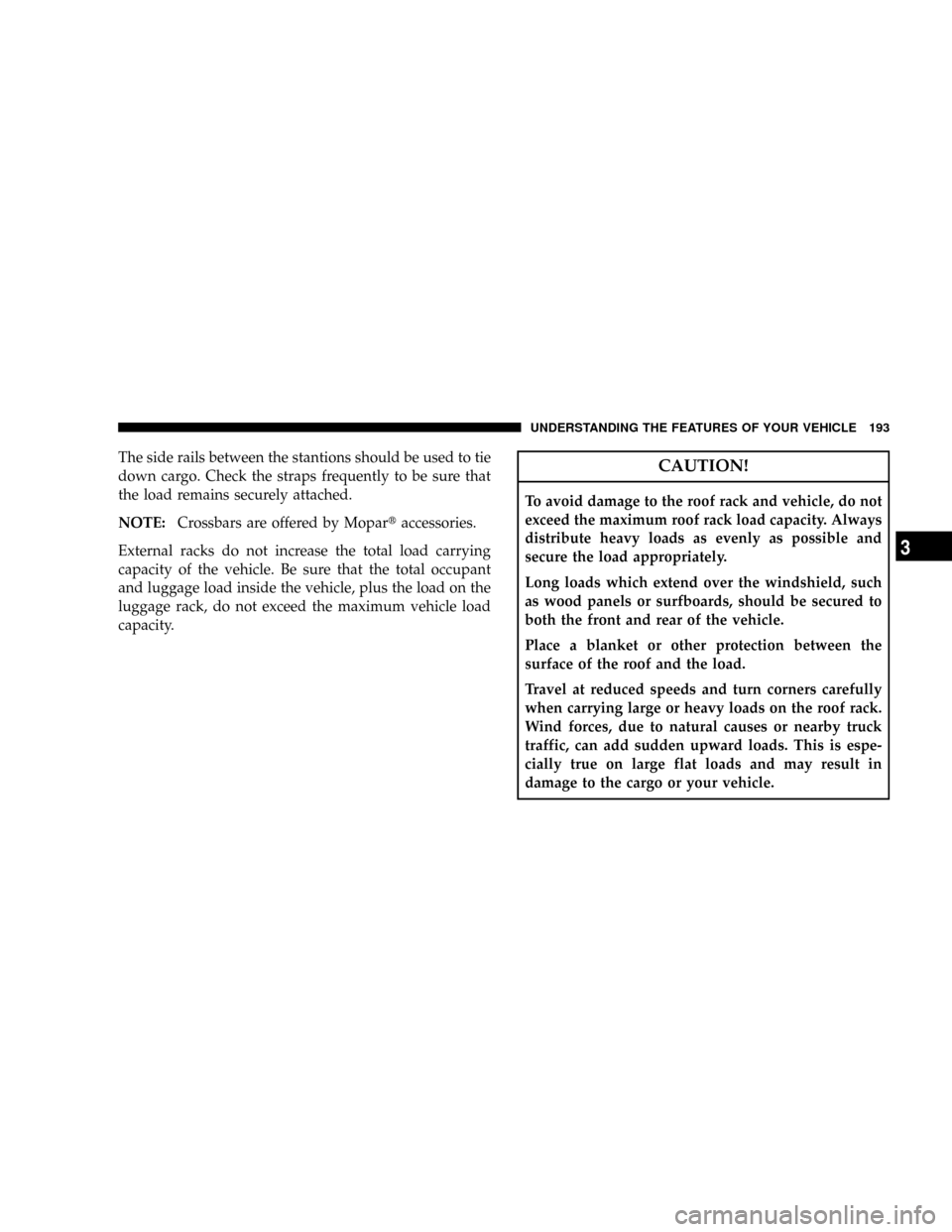
The cargo management system consists of a removable
cargo liner and removable cargo organizer.
To open the side cover, pull on the cover latch, and attach
the cord to the upper cargo net hook.
1 - Side Cover Latch
2 - Main Cover Latch
3 - Cargo Divider Handles 194 UNDERSTANDING THE FEATURES OF YOUR VEHICLE
Page 206 of 479

WARNING!
A hot engine cooling system is dangerous. You or
others could be badly burned by steam or boiling
coolant. You may want to call a service center if your
vehicle overheats. If you decide to look under the
hood yourself, refer to ªCooling System Pressure
Capº under ªCooling Systemº in Section 7. Follow
the warnings under the paragraph.
8. Speedometer
The speedometer shows the speed of the vehicle.
9. Voltage Light
This light monitors the electrical system voltage.
The light should turn on momentarily as the
engine is started. If the light stays on or turns on while
driving, it indicates a problem with the charging system.
See your authorized dealer for service immediately.10. Security Light
This light will flash rapidly for approximately 15 seconds
when the Vehicle Security Alarm is arming. The light will
flash at a slower speed continuously after the alarm is set.
The Security light will also come on for about three
seconds when the ignition is first turned on.
11. ABS Warning Light
This light monitors the Anti-Lock Brake System
(ABS) which is described elsewhere in this
manual. This light will come on when the
ignition key is turned to the ON position and
may stay on for approximately three seconds. If this light
remains on or comes on during driving, it indicates that
the Anti-Lock portion of the brake system is not func-
tioning and that service is required. See your authorized
dealer immediately. With the ABS malfunctioning, the
Brake Assist System (BAS) and Electronic Stability Pro-
gram (ESP) are also switched off. Both malfunction
indicator lights illuminate with the engine running. If the
INSTRUMENT PANEL AND CONTROLS 205
4
Page 282 of 479

different speeds. This eliminates driveline binding and
component wear normally associated with driving the
vehicle in the 4WD LOCK position on dry, hard-surfaced
roads. This feature provides the safety, security, and
convenience of operating in all-wheel drive at all times
regardless of road conditions.
When additional traction is required, the 4WD LOCK
and 4WD LOW positions can be used to lock the front
and rear driveshafts together, through the transfer case
inter-axle differential, and force the front and rear wheels
to rotate at the same speed. This is accomplished by
rotating the 4WD Control Switch to these positions. The
4WD LOCK and 4WD LOW positions are intended for
loose, slippery road surfaces only. Driving in the 4WD
LOCK and 4WD LOW positions on dry, hard-surfaced
roads may cause increased tire wear and damage to the
driveline components.The transfer case NEUTRAL position is selected by
depressing the recessed button located on the lower left
hand corner of the 4WD Control Switch.
NOTE:The transfer case NEUTRAL position is to be
used for recreational towing only. Refer to ªRecreational
Towingº under Section 5 for specific procedures on
shifting into and out of NEUTRAL.
Transfer Case Position Indicator Lights
Transfer case position indicator lights are located on the
instrument cluster. If there are no indicator lights on or
flashing, the transfer case position is 4-wheel drive
(4WD) and indicates the current and desired transfer case
selection (4WD,4WD LOCK).
The ªSVC 4WDº warning light monitors the electric shift
4WD system. If this light remains on after engine start up
or illuminates during driving, it means that the 4WD
system is not functioning properly and that service is
required. See your authorized dealer for service.
STARTING AND OPERATING 281
5