Page 111 of 482
•smooth road surface,
•fully closed windows,
•dry weather conditions, and
•operation from the drivers seat.
•Performance, such as audio clarity, echo, and loudness
to a large degree rely on the phone and network, and
not the UConnect�system.
•Echo at the far end can sometimes be reduced by
lowering the in-vehicle audio volume.
•In a convertible vehicle, system performance may be
compromised with the convertible top down.
Bluetooth�Communication Link
Cellular phones have been found to lose connection to
the UConnect�system. When this happens, the connec-
tion can generally be re-established by switching the
phone off/on. Your cell phone is recommended to remain
in Bluetooth�ON mode.
Power-Up
After switching the ignition key from OFF to either ON
or ACC position, or after a language change, you must
wait at least five seconds prior to using the system.
UNDERSTANDING THE FEATURES OF YOUR VEHICLE 109
3
Page 118 of 482

If you ever wish to interrupt the system while it lists
options, press the VR hard-key, listen for the beep, and
say your command.
Pressing the VR hard-key while the system is speaking is
known as “barging in.” The system will be interrupted
and you can add or change commands. This will become
helpful once you start to learn the options.
NOTE:At any time, you can say the words CANCEL,
HELP, or MAIN MENU.
These commands are universal and can be used from any
menu. All other commands can be used depending upon
the active application.
For example, if you are in the disc menu and you are
listening to FM radio, you can speak commands from the
disc menu or from the FM radio menu.
When using this system, you should speak clearly and at
a normal speaking volume.The system will best recognize your speech if the win-
dows are closed, and the heater/air-conditioning fan is
set to low.
At any point, if the system does not recognize one of your
commands, you will be prompted to repeat it.
To hear the first available Menu, press the VR hard-key
and say HELP or MAIN MENU.
Commands
The Voice Recognition System understands two types of
commands. Global commands are available at all times.
Local commands are available if the supported radio
mode is active.
Changing the Volume
1. Start a dialogue by pressing the VR hard-key.
2. Say a command (e.g., HELP).
116 UNDERSTANDING THE FEATURES OF YOUR VEHICLE
Page 119 of 482

3. Use the ON/OFF VOLUME rotary knob to adjust the
volume to a comfortable level while the voice recognition
system is speaking. Please note the volume setting for VR
is different then the audio system.
Main Menu
Start a dialogue by pressing the VR hard-key. You may
say MAIN MENU to switch to the main menu.
In this mode, you can say the following commands:
•RADIO (to switch to the radio mode)
•DISC (to switch to the disc mode)
•MEMO (to switch to the memo recorder)
Radio AM (or Radio Long Wave or Radio Medium
Wave - if equipped)
To switch to the AM band say AM or RADIO AM. In this
mode, you may say the following commands:
•FREQUENCY (to change the frequency)
•NEXT STATION (to select the next station)
•PREVIOUS STATION (to select the previous station)
•RADIO MENU (to switch to the radio menu)
•MAIN MENU (to switch to the main menu)
Radio FM
To switch to the FM band say FM or RADIO FM. In this
mode, you may say the following commands:
•FREQUENCY (to change the frequency)
•NEXT STATION (to select the next station)
•PREVIOUS STATION (to select the previous station)
•RADIO MENU (to switch to the radio menu)
•MAIN MENU (to switch to the main menu)
UNDERSTANDING THE FEATURES OF YOUR VEHICLE 117
3
Page 120 of 482

Satellite Radio
To switch to satellite radio mode say SAT or SATELLITE
RADIO. In this mode, you may say the following com-
mands:
•CHANNEL NUMBER (to change the channel by its
spoken number)
•NEXT CHANNEL (to select the next channel)
•PREVIOUS CHANNEL (to select the previous chan-
nel)
•LIST CHANNEL (to hear a list of available channels)
•SELECT NAME (to say the name of a channel)
•RADIO MENU (to switch to the radio menu)
•MAIN MENU (to switch to the main menu)
Disc
To switch to the disc mode say DISC. In this mode, you
may say the following commands:
•TRACK (#) (to change the track)
•NEXT TRACK (to play the next track)
•PREVIOUS TRACK (to play the previous track)
•MAIN MENU (to switch to the main menu)
Memo
To switch to the voice recorder mode say MEMO. In this
mode, you may say the following commands:
•NEW MEMO (to record a new memo) — During the
recording you may press the VR hard-key to stop
recording. You continue by saying one of the following
commands:
SAVE (to save the memo)
118 UNDERSTANDING THE FEATURES OF YOUR VEHICLE
Page 136 of 482
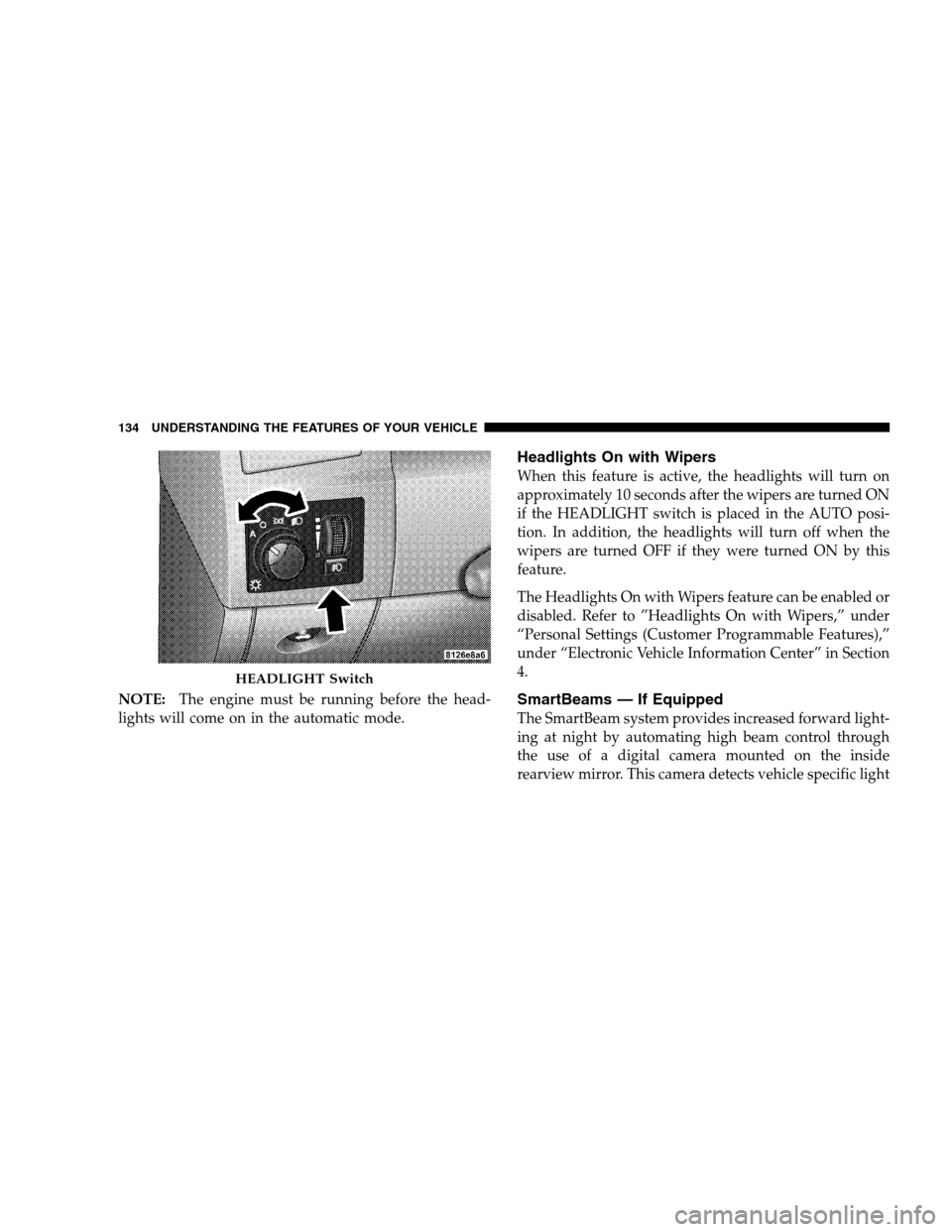
NOTE:The engine must be running before the head-
lights will come on in the automatic mode.
Headlights On with Wipers
When this feature is active, the headlights will turn on
approximately 10 seconds after the wipers are turned ON
if the HEADLIGHT switch is placed in the AUTO posi-
tion. In addition, the headlights will turn off when the
wipers are turned OFF if they were turned ON by this
feature.
The Headlights On with Wipers feature can be enabled or
disabled. Refer to ”Headlights On with Wipers,” under
“Personal Settings (Customer Programmable Features),”
under “Electronic Vehicle Information Center” in Section
4.
SmartBeams — If Equipped
The SmartBeam system provides increased forward light-
ing at night by automating high beam control through
the use of a digital camera mounted on the inside
rearview mirror. This camera detects vehicle specific light
HEADLIGHT Switch
134 UNDERSTANDING THE FEATURES OF YOUR VEHICLE
Page 142 of 482
Dome Light Position
Rotate the dimmer control completely upward to the
second detent to turn on the interior lights. The interior
lights will remain on when the dimmer control is in this
position.
Interior Light Defeat (OFF)
Rotate the dimmer control to the extreme bottom OFF
position. The interior lights will remain off when the
doors are open.
Parade Mode (Daytime Brightness Feature)
Rotate the dimmer control upward to the first detent.
This feature brightens all text displays such as the
odometer, EVIC, and radio when the parking lights or
headlights are on.
WINDSHIELD WIPERS AND WASHERS
The multifunction lever operates the windshield
wipers and washer when the ignition switch is in
the ON position. The lever is located on the left
side of the steering column.
Windshield Wiper/Washer Control
140 UNDERSTANDING THE FEATURES OF YOUR VEHICLE
Page 156 of 482

ACC will allow you to keep cruise control engaged in
light to moderate traffic conditions without the constant
need to reset your cruise control. ACC utilizes an infrared
sensor designed to detect a vehicle directly ahead in your
path.
NOTE:
•If the sensor does not detect a vehicle directly ahead of
you, ACC will function in the same way as a standard
cruise control system. For additional information, refer
to “Electronic Speed Control” in this section.
•If the ACC sensor detects a vehicle ahead, ACC will
apply limited braking or acceleration automatically so
that your vehicle maintains a preset following dis-
tance.
WARNING!
•Adaptive Cruise Control (ACC) is a convenience system. It is not
a substitute for active driving involvement. It is always the
driver ’s responsibility to be attentive of road, traffic, and weather
conditions, vehicle speed, distance to the vehicle ahead; and, most
importantly, brake operation to ensure safe operation of the
vehicle under all road conditions. Your complete attention is
always required while driving to maintain safe control of your
vehicle. Failure to follow these warnings can result in an accident
or serious personal injury.
•The ACC system:
Does not react to pedestrians, oncoming vehicles, and stationary
objects (i.e., a stopped vehicle in a traffic jam or a disabled
vehicle).
Does not predict the lane curvature or the movement of preceding
vehicles and will not compensate for such changes.
Cannot take street, traffic, and weather conditions into account,
and may be limited upon adverse sight distance conditions.
Does not always fully recognize complex driving conditions,
which can result in wrong or missing distance warnings.
May not detect a vehicle ahead when strong light (for example,
sunrise or sunset) is directly shining on the front of the vehicle.
Can only apply a maximum of 25% of the vehicle’s braking
capability, and will not bring the vehicle to a complete stop.
154 UNDERSTANDING THE FEATURES OF YOUR VEHICLE
Page 180 of 482

WARNING!
Your motorized door or gate will open and close
while you are training the Universal Transceiver. Do
not train the transceiver if people or pets are in the
path of the door or gate. Only use this transceiver
with a garage door opener that has a “stop and
reverse” feature as required by federal safety stan-
dards. This includes most garage door opener models
manufactured after 1982. Do not use a garage door
opener without these safety features. Call toll-free
1–800–355–3515 or, on the Internet at
www.HomeLink.com for safety information or
assistance.
WARNING!
Vehicle exhaust contains carbon monoxide, a danger-
ous gas. Do not run your vehicle in the garage while
training the transceiver. Exhaust gas can cause seri-
ous injury or death.
Programming HomeLink�
Before You Begin
If you have not trained any of the HomeLink�buttons,
erase all channels before you begin training.
To do this, press and hold the two outside buttons for 20
seconds. The EVIC will display “CLEARING CHAN-
NELS.” Release the buttons when the EVIC message
states “CHANNELS CLEARED.”
178 UNDERSTANDING THE FEATURES OF YOUR VEHICLE