Page 280 of 519

Vehicles equipped with steering wheel mounted buttons
are also equipped with the Electronic Vehicle Information
Center (EVIC). The EVIC features a driver-interactive
display. This is located in the upper part of the instru-
ment cluster between the speedometer and tachometer.
The VOLUME button controls the sound level
of the sound system. Press the top of the
VOLUME button to increase the sound level.
Press the bottom of the VOLUME button to
decrease the sound level.
Press the AUDIO MODE button to select the
Compass/Temp/Audio screen. This screen
displays radio and media mode information
depending on which radio is in the vehicle.If the Compass/Temp/Audio screen is already displayed
when the AUDIO MODE button is pressed, then the
mode will change (i.e. from AM to FM, to Media mode,
etc., depending on which radio is in the vehicle).
When the EVIC is in the Compass/Temp/
Audio screen, press the FUNCTION SELECT
button to operate various radio, media, and
Universal Customer Interface (UCI) functions
(i.e. advance presets, select next folder, jump to
or start playing songs in playlists, etc., depend-
ing on which radio is in the vehicle and if
equipped with UCI).
When the EVIC is in the Compass/Temp/
Audio screen, press the SCROLL button to seek
up and down radio stations, tracks, chapters,
files, etc., depending on which radio is in the
vehicle.
VOL-
UME
Button
AUDIO
MODE
Button
FUNC-
TION
SELECT
Button
SCROLL
Button
280 UNDERSTANDING YOUR INSTRUMENT PANEL
Page 315 of 519
CAUTION!
Coasting the vehicle or driving for any other reason
with selector lever in NEUTRAL can result in trans-
mission damage.
WARNING!
Do not coast in “N” (Neutral) and never turn off the
ignition to coast down a hill. These are unsafe
practices that limit your response to changing traffic
or road conditions. You might lose control of the
vehicle and have an accident.“D” (Drive)
This range should be used for most city and highway
driving. It provides the smoothest upshifts and down-
shifts and the best fuel economy.
The transmission automatically upshifts through fifth
gear. The “D” (Drive) position provides optimum driving
characteristics under all normal operating conditions.
When frequent transmission shifting occurs when using
the Overdrive range, such as when operating the vehicle
under heavy loading conditions (in hilly terrain, travel-
ing into strong head winds, or while towing heavy
trailers, use the AutoStick�mode and select the “3”
range.
AutoStick�Gear selection
The AutoStick�feature can be selected by pressing the
selector lever to the right or the left with the lever in the
“D” (Drive) position. The gear currently selected is
indicated in the instrument cluster display. Briefly, press
STARTING AND OPERATING 315
5
Page 318 of 519
In Permanent Limp Home Mode, “P” (Park), “R” (Re-
verse), and “N” (Neutral) will continue to operate. Sec-
ond gear will operate in the “D” (Drive) shifter position.
The malfunction indicator light may illuminate.
AUTOSTICK�— IF EQUIPPED
Autostick�is a driver-interactive transmission that offers
manual gear shifting to provide you with more control of
the vehicle. Autostick�allows you to maximize engine
braking, eliminate undesirable upshifts and downshifts,
and improve overall vehicle performance. This system
can also provide you with more control during passing,
city driving, cold slippery conditions, mountain driving,
trailer towing, and many other situations.
Autostick�Operation
By placing the selector lever in the “D” (Drive) position,
it can be moved from side to side. This allows the driver
to select a higher or lower range of gears. Moving the
selector lever to the Left (-) triggers a downshift and to
the Right (+) an upshift. The gear position will display in
the instrument cluster on the transmission range indica-
tor.
You can shift in or out of the Autostick�mode at any time
without taking your foot off the accelerator pedal. If you
choose the Overdrive mode, the transmission will oper-
ate automatically, shifting between the five available
gears. When you wish to engage Autostick�, simply
move the selector lever to the Right or Left (D+/D-) while
in the “D” (Drive) position. The transmission will remain
in the current gear until an upshift or downshift is
chosen.
318 STARTING AND OPERATING
Page 323 of 519
otherwise the load on the transmission locking mecha-
nism may make it difficult to move the selector out of
park. As an added precaution, turn the front wheels
toward the curb on a downhill grade and away from the
curb on an uphill grade.
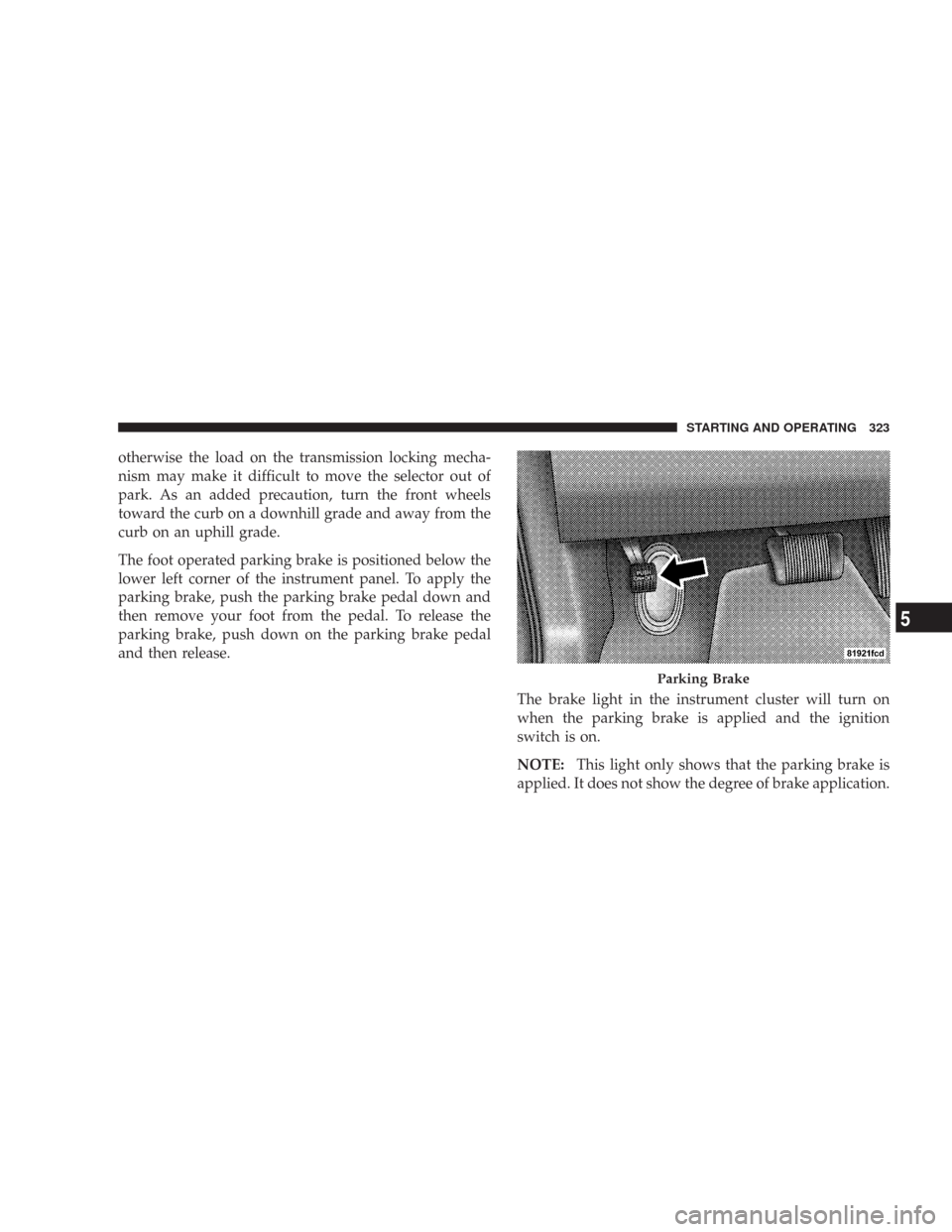
The foot operated parking brake is positioned below the
lower left corner of the instrument panel. To apply the
parking brake, push the parking brake pedal down and
then remove your foot from the pedal. To release the
parking brake, push down on the parking brake pedal
and then release.
The brake light in the instrument cluster will turn on
when the parking brake is applied and the ignition
switch is on.
NOTE:This light only shows that the parking brake is
applied. It does not show the degree of brake application.
Parking Brake
STARTING AND OPERATING 323
5
Page 329 of 519

The TCS monitors the amount of wheel spin of each
driven wheel. If wheel spin is detected, brake pressure is
applied to the slipping wheel(s) and engine power is
reduced to provide enhanced acceleration and stability.
The ESP/TCS indicator light, located in the
instrument cluster, starts to flash as soon as the
tires lose traction and the ESP system becomes
active. The indicator light also flashes when the
TCS is active. If the indicator light begins to flash during
acceleration, ease up on the accelerator and apply as little
throttle as possible. Be sure to adapt your speed and
driving to the prevailing road conditions.
When the TCS is switched off, the torque reduction
feature is cancelled. However, a feature of the system
remains active. This feature controls wheel spin across an
axle quite similarly to a limited slip differential. If one
wheel on an axle is spinning faster than the other, the
system will apply the brake of the spinning wheel andallow more engine torque to be applied to the wheel that
is not spinning. This wheel slip control is active up to 50
mph (80 km/h).
CAUTION!
When the ESP/TCS indicator light is illuminated
continuously, the ESP is switched off. Avoid spin-
ning one drive wheel. This may cause serious dam-
age to the drive train.
NOTE:
•The Traction Control System comes on each time the
ignition switch is turned ON. This will occur even if
you used the ESP OFF button to turn OFF the system.
•The Traction Control System will make buzzing or
clicking sounds when in operation.
STARTING AND OPERATING 329
5
Page 332 of 519
The ESP/TCS indicator light, located in the
instrument cluster, starts to flash as soon as the
tires lose traction and the ESP system becomes
active. The indicator light also flashes when the
TCS is active. If the indicator light begins to flash during
acceleration, ease up on the accelerator and apply as little
throttle as possible. Be sure to adapt your speed and
driving to the prevailing road conditions.
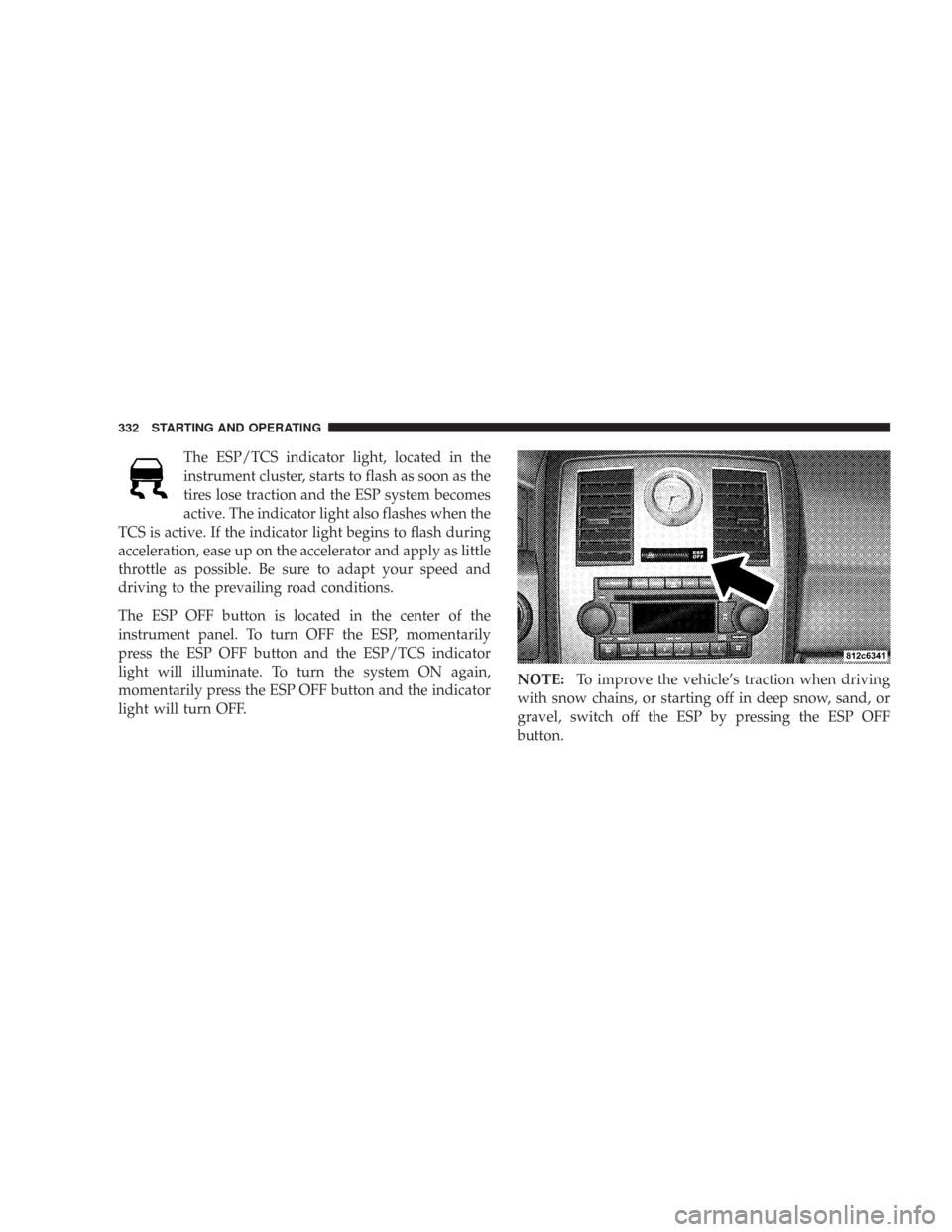
The ESP OFF button is located in the center of the
instrument panel. To turn OFF the ESP, momentarily
press the ESP OFF button and the ESP/TCS indicator
light will illuminate. To turn the system ON again,
momentarily press the ESP OFF button and the indicator
light will turn OFF.NOTE:To improve the vehicle’s traction when driving
with snow chains, or starting off in deep snow, sand, or
gravel, switch off the ESP by pressing the ESP OFF
button.
332 STARTING AND OPERATING
Page 334 of 519
yellow ESP/TCS indicator light in the instrument cluster
both come on when the ignition switch is turned to the
“ON” position. They should go out with the engine
running.
The system will turn the ESP/BAS malfunction indicator
light on continuously while the engine running if it
detects a malfunction in either the ESP or the BAS or
both. If the light remains on after several ignition cycles,
and you have driven the vehicle several miles at speeds
greater than 30 mph (48 km/h), and the ESP is synchro-
nized (refer to Synchronizing ESP), see your authorized
dealer as soon as possible to have the problem diagnosed
and corrected.TIRE SAFETY INFORMATION
Tire Markings
NOTE:
•P (Passenger)-Metric tire sizing is based on U.S. design
standards. P-Metric tires have the letter “P” molded
into the sidewall preceding the size designation. Ex-
ample: P215/65R15 95H.
334 STARTING AND OPERATING
Page 358 of 519
•Seasonal temperature changes will affect tire pressure,
and the TPMS will monitor the actual tire pressure in
the tire.
Base System — If Equipped
The Tire Pressure Monitor System (TPMS) uses wireless
technology with wheel rim mounted electronic sensors to
monitor tire pressure levels. Sensors, mounted to each
wheel as part of the valve stem, transmit tire pressure
readings to the Receiver Module.
NOTE:It is particularly important for you to check the
tire pressure in all of the tires on your vehicle monthly
and to maintain the proper pressure.
The TPMS consists of the following components:
•Receiver Module
•4 Tire Pressure Monitoring Sensors
•Tire Pressure Monitoring Telltale LightThe matching full size spare wheel and tire assembly (if
equipped) has a tire pressure monitoring sensor. The
matching full size spare can be used in place of any of the
four road tires. The TPMS will only monitor the pressure
in the full size spare when it is used in place of a road tire.
Otherwise, a spare with a pressure below the low-
pressure limit will not cause the Tire Pressure Monitoring
Telltale Light to illuminate or the chime to sound.
Tire Pressure Monitoring Low Pressure Warnings
The Tire Pressure Monitoring Telltale Light will
illuminate in the instrument cluster and a chime
will sound when tire pressure is low in one or
more of the four active road tires. Should this occur, you
should stop as soon as possible, check the inflation
pressure of each tire on your vehicle, and inflate each tire
to the vehicle’s recommended cold placard pressure
value. Once the system receives the updated tire pres-
sures, the system will automatically update and the Tire
Pressure Monitoring Telltale Light will turn off. The
358 STARTING AND OPERATING