Page 32 of 519
2. Cycle the ignition switch between LOCK and ON and
then back to LOCK 4 times ending up in the LOCK
position.
3. Depress the power door lock switch to lock the doors.
4. A single chime will indicate the completion of the
programming.
5. Repeat these steps if you want to return this feature to
its previous setting.
NOTE:Use the Automatic Door Locks feature in accor-
dance with local laws.
Automatic Unlock Doors on Exit
The doors will unlock automatically on vehicles with
power door locks if:
1. The Automatic Unlock Doors On Exit feature is en-
abled.2. The transmission was in gear and the vehicle speed
returned to 0 mph (0 km/h).
3. The transmission is in “N” (Neutral) or “P” (Park).
4. The driver door is opened.
5. The doors were not previously unlocked.
6. The vehicle speed is 0 mph (0 km/h).
Automatic Unlock Doors on Exit Programming
The Automatic Unlock Doors On Exit feature can be
enabled or disabled as follows:
•For vehicles equipped with the Electronic Vehicle
Information Center (EVIC), refer to “Personal Settings
(Customer Programmable Features)” under “Elec-
tronic Vehicle Information Center (EVIC)” in Section 4
of this manual for details.
•For vehicles not equipped with the EVIC, performing
the following procedure:
32 THINGS TO KNOW BEFORE STARTING YOUR VEHICLE
Page 33 of 519
1. Close all doors and place the key in the ignition.
2. Cycle the ignition switch between LOCK and ON and
then back to LOCK 4 times ending up in the LOCK
position.
3. Depress the power door unlock switch to unlock the
doors.
4. A single chime will indicate the completion of the
programming.
5. Repeat these steps if you want to return this feature to
its previous setting.
NOTE:Use the Automatic Unlock Doors On Exit feature
in accordance with local laws.Child Protection Door Lock
To provide a safer environment for small children riding
in the rear seats, the rear doors are equipped with a child
protection door lock system.
To Engage the Child Protection Door Lock
1. Open the rear door.
THINGS TO KNOW BEFORE STARTING YOUR VEHICLE 33
2
Page 36 of 519
WINDOWS
Power Windows
The window controls on the driver’s door control all the
door windows.There are single window controls on each passenger door
trim panel, which operate the passenger door windows.
The window controls will operate only when the ignition
switch is in the ON or ACC position.
WARNING!
Never leave children in a vehicle, with the keys in
the ignition switch. Occupants, particularly unat-
tended children, can become entrapped by the win-
dows while operating the power window switches.
Such entrapment may result in serious injury or
death.
Auto Down Feature
The driver door power window switch, and some model
passenger door power window switches have an auto
Power Window Switches
36 THINGS TO KNOW BEFORE STARTING YOUR VEHICLE
Page 37 of 519
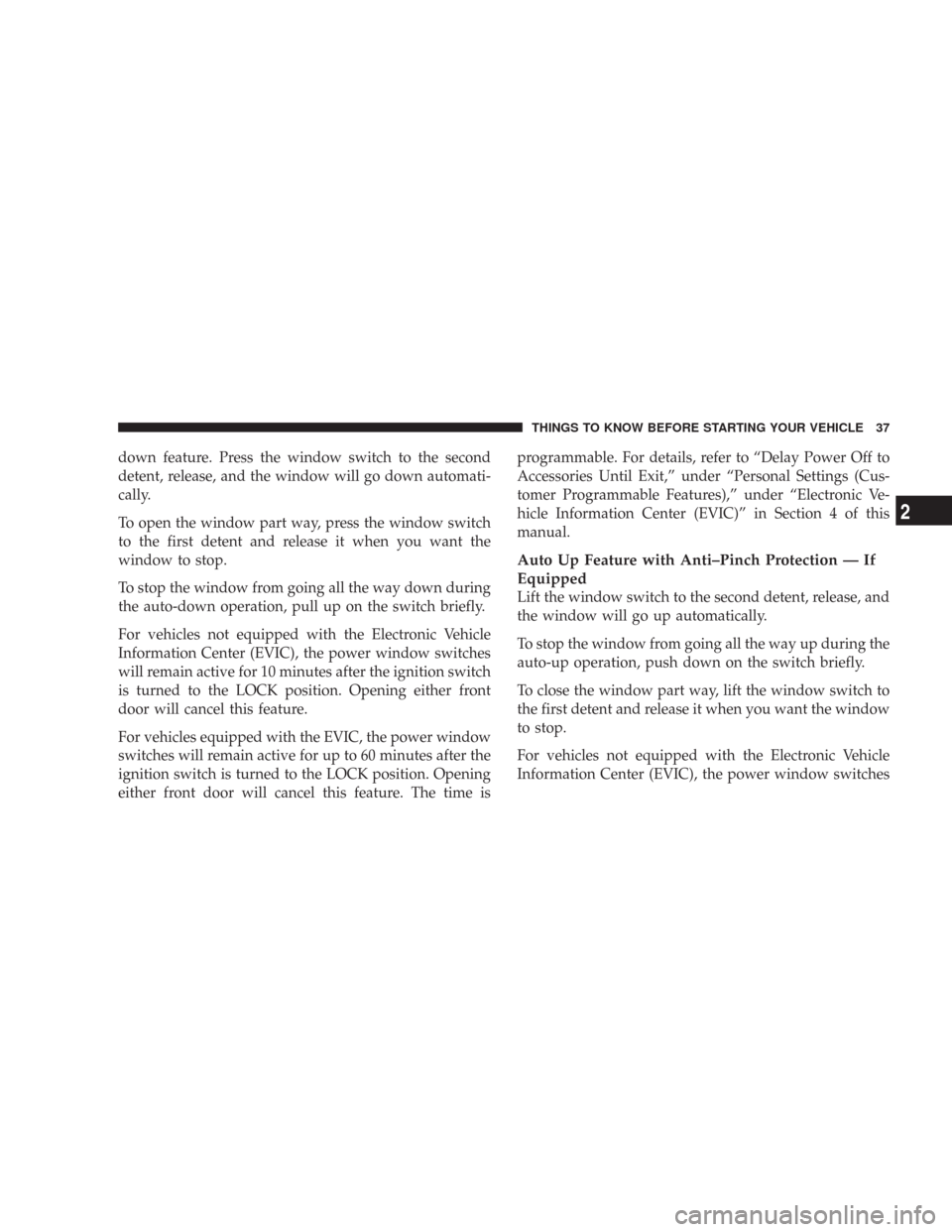
down feature. Press the window switch to the second
detent, release, and the window will go down automati-
cally.
To open the window part way, press the window switch
to the first detent and release it when you want the
window to stop.
To stop the window from going all the way down during
the auto-down operation, pull up on the switch briefly.
For vehicles not equipped with the Electronic Vehicle
Information Center (EVIC), the power window switches
will remain active for 10 minutes after the ignition switch
is turned to the LOCK position. Opening either front
door will cancel this feature.
For vehicles equipped with the EVIC, the power window
switches will remain active for up to 60 minutes after the
ignition switch is turned to the LOCK position. Opening
either front door will cancel this feature. The time isprogrammable. For details, refer to “Delay Power Off to
Accessories Until Exit,” under “Personal Settings (Cus-
tomer Programmable Features),” under “Electronic Ve-
hicle Information Center (EVIC)” in Section 4 of this
manual.
Auto Up Feature with Anti–Pinch Protection — If
Equipped
Lift the window switch to the second detent, release, and
the window will go up automatically.
To stop the window from going all the way up during the
auto-up operation, push down on the switch briefly.
To close the window part way, lift the window switch to
the first detent and release it when you want the window
to stop.
For vehicles not equipped with the Electronic Vehicle
Information Center (EVIC), the power window switches
THINGS TO KNOW BEFORE STARTING YOUR VEHICLE 37
2
Page 38 of 519

will remain active for 10 minutes after the ignition switch
is turned to the LOCK position. Opening either front
door will cancel this feature.
For vehicles equipped with the EVIC, the power window
switches will remain active for up to 60 minutes after the
ignition switch is turned to the LOCK position. Opening
either front door will cancel this feature. The time is
programmable. For details, refer to “Delay Power Off to
Accessories Until Exit,” under “Personal Settings (Cus-
tomer Programmable Features),” under “Electronic Ve-
hicle Information Center (EVIC)” in Section 4 of this
manual.
NOTE:
•If the window runs into any obstacle during auto-
closure, it will reverse direction and then stop. Remove
the obstacle and use the window switch again to close
the window.
•Any impact due to rough road conditions may trigger
the auto reverse function unexpectedly during auto-
closure. If this happens, pull the switch lightly to the
first detent and hold to close window manually.
WARNING!
There is no anti-pinch protection when the window
is almost closed. Be sure to clear all objects from the
window before closing.
Window Lockout Switch
The window lockout switch on the driver’s door trim
panel allows you to disable the window controls on the
passenger doors. To disable the window controls, press
and release the window lock button (setting it in the
down position). To enable the window controls, press
and release the window lock button again (setting it in
the up position).
38 THINGS TO KNOW BEFORE STARTING YOUR VEHICLE
Page 40 of 519
TRUNK LOCK AND RELEASE
The trunk lid can be released from inside the vehicle by
pressing the Trunk Release Button located on the instru-
ment panel to the left of the steering wheel.
NOTE:The transmission must be in “P” (Park) before
the switch will operate.The trunk lid can be released from outside the vehicle by
pressing the trunk button on the Remote Keyless Entry
(RKE) transmitter twice within 5 seconds.
With the ignition switch in the ON position, the trunk
open symbol will display in the instrument cluster indi-
cating that the trunk is open. The odometer display will
reappear once the trunk is closed.
With the ignition switch in the LOCK position or the key
removed from the ignition switch, the trunk open symbol
will display until the trunk is closed.
Trunk Release Button
40 THINGS TO KNOW BEFORE STARTING YOUR VEHICLE
Page 49 of 519

Enhanced Seat Belt Reminder System (BeltAlert�)
If the driver’s seat belt has not been buckled within 60
seconds of starting the vehicle and if the vehicle speed is
greater than 5 mph (8 km/h), the Enhanced Warning
System (BeltAlert�) will alert the driver to buckle their
seat belt. The driver should also instruct all other occu-
pants to buckle their seat belts. Once the warning is
triggered, the Enhanced Warning System (BeltAlert�)
will continue to chime and flash the Seat Belt Reminder
Light for 96 seconds or until the driver’s seat belt is
buckled. The Enhanced Warning System (BeltAlert�) will
be reactivated if the driver’s seat belt is unbuckled for
more than 10 seconds and the vehicle speed is greater
than 5 mph (8 km/h).
BeltAlert�Programming
The Enhanced Warning System (BeltAlert�) can be en-
abled or disabled by your authorized dealer or by
performing the following steps:NOTE:DaimlerChrysler does not recommend deacti-
vating the Enhanced Warning System (BeltAlert�).
1. With all doors closed, and the ignition switch in any
position except ON or START, buckle the driver’s seat
belt.
2. Turn the ignition switch to the ON position, but do not
start the engine. Wait for the Seat Belt Reminder Light to
turn off and then proceed to the next step.
NOTE:You must perform the following steps within 60
seconds of turning the ignition switch to the ON position.
3. Within 60 seconds of turning the ignition switch to the
ON position, unbuckle and then re-buckle the driver’s
seat belt at least three times within 10 seconds, ending
with the seat belt buckled.
THINGS TO KNOW BEFORE STARTING YOUR VEHICLE 49
2
Page 50 of 519

NOTE:Watch for the Seat Belt Reminder Light to turn
on while unbuckling the seat belt and turn off while
re-buckling the seat belt. It may be necessary to retract
the seat belt.
4. Turn the ignition switch to the LOCK position. A
single chime will sound to signify that you have success-
fully completed the programming.
The Enhanced Warning System (BeltAlert�) can be reac-
tivated by repeating this procedure.
NOTE:When the Enhanced Warning System
(BeltAlert�) is deactivated, the Seat Belt Reminder Light
will continue to illuminate as long as the driver’s seat belt
is unbuckled.Automatic Locking Mode — If Equipped
In this mode, the shoulder belt is automatically pre-
locked. However, the belt will still retract to remove slack
in the shoulder belt. Use The Automatic Locking Mode
any time a child safety seat is installed in a seating
position that has a seat belt with this feature. Seat belts
that have the Automatic Locking Mode feature have a
distinctive label on the webbing. Children 12 years old
and under should be properly restrained in the rear seat
whenever possible.
How To Engage The Automatic Locking Mode
1. Buckle the combination lap and shoulder belt.
2. Grasp the shoulder portion and pull downward until
the entire belt is extracted.
3. Allow the belt to retract. As the belt retracts, you will
here a clicking sound. This indicates the safety belt is
now in the automatic locking mode.
50 THINGS TO KNOW BEFORE STARTING YOUR VEHICLE