2008 CHRYSLER 300 C lights
[x] Cancel search: lightsPage 213 of 520

driving, turn off some of the vehicle’s non-essential
electrical devices (i.e. radio) or slightly increase engine
speed (if at idle). If the light remains on, it means that the
charging system is experiencing a problem. See your
local authorized dealer to obtain SERVICE IMMEDI-
ATELY.
24. Malfunction Indicator Light
This light is part of an onboard diagnostic system
called OBD. The OBD system monitors engine
and automatic transmission control systems. The
light will turn on when the key is in the ON position
before engine start. If the light does not come on when
turning the key from OFF to ON, have the condition
checked promptly.
Certain conditions such as a loose or missing gas cap,
poor fuel quality, etc. may illuminate the light after
engine start. The vehicle should be serviced if the lightstays on through several of your typical driving cycles. In
most situations, the vehicle will drive normally and will
not require towing.
The Malfunction Indicator Light flashes to alert you to
serious conditions that could lead to immediate loss of
power or severe catalytic converter damage. The vehicle
should be serviced as soon as possible if this occurs. (See
page 417 for more information.)
25. Oil Pressure Warning Light
This light shows low engine oil pressure. The light
should turn on momentarily when the engine is
started. If the light turns on while driving, stop the
vehicle, and shut off the engine as soon as possible. A
single chime will sound when this light turns on.
Do not operate the vehicle until the cause is corrected.
This light does not show how much oil is in the engine.
The engine oil level must be checked using the procedure
shown in section 7. (See page 421 for more information.)
212 UNDERSTANDING YOUR INSTRUMENT PANEL
Page 229 of 520

“Remote Key Unlock”
WhenDriver Door 1st Pressis selected, only the driver’s
door will unlock on the first press of the remote keyless
entry unlock button. When Driver Door 1st Press is
selected, you must press of the remote keyless entry
unlock button twice to unlock the passenger’s doors.
WhenAll Doors 1st Pressis selected, all of the doors will
unlock on the first press of the remote keyless entry
unlock button. To make your selection, press and release
the FUNCTION SELECT button until “Driver Door 1st
Press” or “All Doors 1st Press” appears.
“Recall Memory with Remote Key Unlock” — If
Equipped
When ON is selected, you can use your Remote Keyless
Entry Transmitter to recall one of two pre-programmed
memory profiles. Each memory profile contains desired
position settings for the driver seat, side mirror, adjust-
able pedals (if equipped), and power tilt and telescopic
steering column (if equipped), and a set of desired radiostation presets. When OFF is selected, only the memory
switch on the driver’s door panel will recall memory
profiles. To make your selection, press and release the
FUNCTION SELECT button until “ON” or “OFF” ap-
pears. Refer to “Driver Memory Seat” in Section 3 of this
manual for more information.
“Sound Horn with Remote Key Lock”
When ON is selected, a short horn sound will occur when
the remote keyless entry “Lock” button is pressed. This
feature may be selected with or without the flash lights
on lock/unlock feature. To make your selection, press
and release the FUNCTION SELECT button until “ON”
or “OFF” appears.
“Rain Sensing Intermittent Wipers” — If Equipped
When ON is selected, the system will automatically
activate the windshield wipers if it senses moisture on
the windshield. To make your selection, press and release
228 UNDERSTANDING YOUR INSTRUMENT PANEL
Page 230 of 520

the FUNCTION SELECT button until “ON” or “OFF”
appears. When OFF is selected, the system reverts to the
standard intermittent wiper operation.
“Automatically Move Seat Back on Exit” — If
Equipped
This feature provides automatic driver seat positioning to
enhance driver mobility when entering and exiting the
vehicle. To make your selection, press and release the
FUNCTION SELECT button until “ON” or “OFF” ap-
pears.
NOTE:The seat will return to the memorized seat
location (if Recall Memory with Remote Key Unlock is set
to ON) when the remote keyless entry transmitter is used
to unlock the door. Refer to “Easy Entry/Exit Seat” under
“Driver Memory Seat” in Section 3 of this manual for
more information.
“Flash Lights with Remote Key Lock”
When ON is selected, the front and rear turn signals will
flash when the doors are locked or unlocked with the
remote keyless entry transmitter. This feature may be
selected with or without the sound horn on lock feature
selected. To make your selection, press and release the
FUNCTION SELECT button until “ON” or “OFF” ap-
pears.
“Headlights On with Wipers” (Available with Auto
Headlights Only)
When ON is selected, and the headlight switch is in the
AUTO position, the headlights will turn on approxi-
mately 10 seconds after the wipers are turned on. The
headlights will also turn off when the wipers are turned
off if they were turned on by this feature. To make your
selection, press and release the FUNCTION SELECT
button until “ON” or “OFF” appears.
UNDERSTANDING YOUR INSTRUMENT PANEL 229
4
Page 231 of 520

NOTE:Turning the headlights on during the daytime
causes the instrument panel lights to dim. To increase the
brightness, refer to “Lights” in Section 3 of this manual.
“Delay Turning Headlights Off”
When this feature is selected, the driver can choose to
have the headlights remain on for 0, 30, 60, or 90 seconds
when exiting the vehicle. To make your selection, press
and release the FUNCTION SELECT button until “0,”
“30,” “60,” or “90” appears.
“Tilt Mirrors Down in Reverse” — If Equipped
When ON is selected, the outside rearview mirrors will
tilt downward when the ignition switch is in the ON
position and the transmission is in the “R” (Reverse)
position. The mirrors will move back to their previous
position when the transmission is shifted out of “R”
(Reverse). To make your selection, press and release the
FUNCTION SELECT button until “ON” or “OFF” ap-
pears.
“Turn Headlights On with Remote Key Unlock”
When this feature is selected, the headlights will activate
and remain on for up to 90 seconds when the doors are
unlocked with the remote keyless entry transmitter. To
make your selection, press and release the FUNCTION
SELECT button until “OFF,” “30 sec.,” “60 sec.,” or “90
sec.” appears.
“Delay Power Off to Accessories Until Exit”
When this feature is selected, the power window
switches, radio, hands–free system (if equipped), DVD
video system (if equipped), power sunroof (if equipped),
and power outlets will remain active for up to 60 minutes
after the ignition switch is turned off. Opening a vehicle
door will cancel this feature. To make your selection,
press and release the FUNCTION SELECT button until
“Off,” “45 sec.,” “5 min.,” “10 min.,” “30 min.,” or “60
min.” appears.
230 UNDERSTANDING YOUR INSTRUMENT PANEL
Page 232 of 520

“Confirmation of Voice Commands” — If
Equipped
When ON is selected, all voice commands from the
UConnect™ system are confirmed. To make your selec-
tion, press and release the FUNCTION SELECT button
until “ON” or “OFF” appears.
“Park Assist System” — If Equipped
When ON is selected, the system will scan for objects
behind the vehicle when the transmission is in the “R”
(Reverse) or “N” (Neutral) position. To make your selec-
tion, press and release the FUNCTION SELECT button
until “ON” or “OFF” appears.
“Turn by Turn Navigation” — If Equipped
When ON is selected, the Turn-by-Turn directions will
appear in the display as the vehicle approaches a desig-
nated turn within a programmed route. To make your
selection, press and release the FUNCTION SELECT
button until “ON” or “OFF” appears.
“Display Units of Measure in”
The EVIC, odometer, and navigation system (if
equipped) can be changed between English and Metric
units of measure. To make your selection, press and
release the FUNCTION SELECT button until “US” or
“METRIC” appears.
“Automatic High Beams” — If Equipped
When this feature is selected, the high beam headlights
will deactivate automatically under certain conditions. To
make your selection, press and release the FUNCTION
SELECT button until “ON” or “OFF” appears. Refer to
“SmartBeams” in section 3 of this manual for more
information.
UNDERSTANDING YOUR INSTRUMENT PANEL 231
4
Page 297 of 520
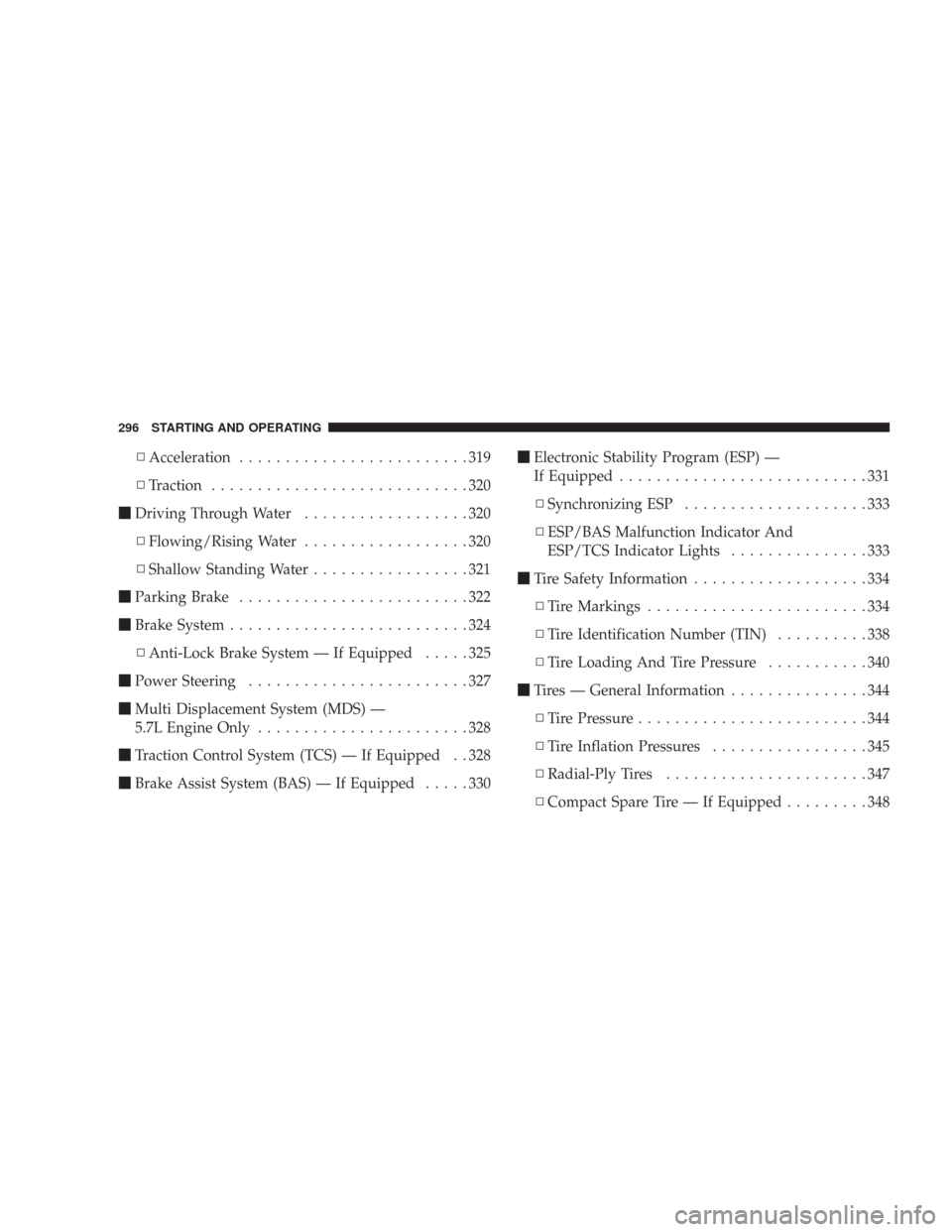
\3Acceleration.........................319
\3Traction............................320
\1Driving Through Water..................320
\3Flowing/Rising Water..................320
\3Shallow Standing Water.................321
\1Parking Brake.........................322
\1Brake System..........................324
\3Anti-Lock Brake System — If Equipped.....325
\1Power Steering........................327
\1Multi Displacement System (MDS) —
5.7L Engine Only.......................328
\1Traction Control System (TCS) — If Equipped . . 328
\1Brake Assist System (BAS) — If Equipped.....330\1Electronic Stability Program (ESP) —
If Equipped...........................331
\3Synchronizing ESP....................333
\3ESP/BAS Malfunction Indicator And
ESP/TCS Indicator Lights...............333
\1Tire Safety Information...................334
\3Tire Markings........................334
\3Tire Identification Number (TIN)..........338
\3Tire Loading And Tire Pressure...........340
\1Tires — General Information...............344
\3Tire Pressure.........................344
\3Tire Inflation Pressures.................345
\3Radial-Ply Tires......................347
\3Compact Spare Tire — If Equipped.........348
296 STARTING AND OPERATING
Page 334 of 520

CAUTION!
When the ESP/TCS indicator light is illuminated
continuously, the ESP is switched off. Avoid spin-
ning one drive wheel. This may cause serious dam-
age to the drive train.
CAUTION!
If the vehicle is towed with the front axle raised, the
engine must be shut off (key in the ignition switch to
the LOCK or ACC position). Otherwise, the ESP will
immediately be engaged and it will apply the rear
wheel brakes.
Synchronizing ESP
The malfunction indicator light for the ESP is
combined with BAS indicator. If the power
supply is interrupted (battery disconnected or
discharged), the ESP/BAS malfunction indica-
tor light may illuminate with the engine running. If this
should occur, turn the steering wheel completely to the
left and then to the right. The ESP/BAS malfunction
indicator light should go out. However, if the light
remains on, have the ESP and BAS checked at your
authorized dealer as soon as possible.
ESP/BAS Malfunction Indicator and ESP/TCS
Indicator Lights
The malfunction indicator light for the ESP is
combined with the BAS indicator. The yellow
ESP/BAS malfunction indicator light and the
STARTING AND OPERATING 333
5
Page 387 of 520

WARNING!
Do not connect trailer brakes to your vehicle’s hy-
draulic brake lines. It can overload your brake sys-
tem and cause it to fail. You might not have brakes
when you need them and could have an accident.
Towing any trailer will increase your stopping dis-
tance. When towing, you should allow for additional
space between your vehicle and the vehicle in front
of you. Failure to do so could result in an accident.
Towing Requirements — Trailer Lights & Wiring
Whenever you pull a trailer, regardless of the trailer size,
stoplights and turn signals on the trailer are required for
motoring safety.
The Trailer Tow Package may includea4and7pin
wiring harness. Use a factory approved trailer harness
and connector.
NOTE:Do not cut or splice wiring into the vehicles
wiring harness.
The electrical connections are all complete to the vehicle
but you must mate the harness to a trailer connector.
Refer to the following illustrations.
386 STARTING AND OPERATING