2008 CHEVROLET UPLANDER light
[x] Cancel search: lightPage 233 of 476
SERVICE TRACTION SYSTEM
If your vehicle has the Traction Control System (TCS),
this message displays when the system is not functioning
properly. A warning light also appears on the instrument
panel cluster. SeeTraction Control System (TCS)
Warning Light on page 3-42. SeeTraction Control
System (TCS) on page 4-6for more information.
Have the TCS serviced by your dealer/retailer as
soon as possible.
This message displays only while the ignition is in
ON/RUN. Press any of the DIC buttons to acknowledge
this message and to clear it from the screen.
This message continues to display for two seconds
if it has not been acknowledged when the engine
is turned off. It also re-displays for two seconds if the
message has been acknowledged, but the condition
still exists when the engine is turned off.
If the condition still exists, the message re-appears
when the engine is turned on.
SERVICE VEHICLE SOON
This message displays when a non-emissions related
malfunction occurs. Have the vehicle serviced by
your dealer/retailer as soon as possible.This message displays only while the ignition is in
ON/RUN. Press any of the DIC buttons to acknowledge
this message and to clear it from the screen.
This message continues to display for two seconds
if it has not been acknowledged when the engine
is turned off. It also re-displays for two seconds if the
message has been acknowledged, but the condition
still exists when the engine is turned off.
If the condition still exists, the message re-appears
when the engine is turned on.
STABILITY CONTROL ACTIVE
If your vehicle has StabiliTrak®, this message displays
when StabiliTrak®is actively assisting you with directional
control of the vehicle. Slippery road conditions may exist
when this message is displayed, so adjust your driving
accordingly. SeeStabiliTrak
®System on page 4-7.
This message displays only while the ignition is in
ON/RUN. This message stays on until road conditions
change and StabiliTrak
®is not active.
This message cannot be acknowledged and cleared
from the screen.
3-73
Page 236 of 476
DIC Vehicle Personalization
(Uplevel Only)
Your vehicle may have customization capabilities that
allow you to program certain features to one preferred
setting. Customization features can only be programmed
to one setting on the vehicle and cannot be programmed
to a preferred setting for two different drivers.
The customization features include the following:
Exterior lighting delay
Interior lighting delay
Delayed locking
Content theft
Remote keyless entry feedback
Remote start
Rear park chime
Your vehicle may also have personalization capabilities
that allow you to program certain features to a preferred
setting for up to two drivers. The rst personalized key
corresponds to driver 1 and the second personalized
key corresponds to driver 2. The driver number also
corresponds to the numbers, 1 or 2, on the back of
the Remote Keyless Entry (RKE) transmitters.The personalization features include the following:
Radio station presets
Auto door unlock preferences
Remote keyless entry unlock preferences
All of the customization and personalization options
may not be available on your vehicle. Only the options
available will be displayed on your DIC.
The default settings for the customization and
personalization features were set when your vehicle left
the factory, but may have been changed from their
default setting since then.
The customization preferences are automatically
recalled.
The driver’s personalization preferences are recalled
by using the key programmed for driver 1 or 2. The
driver number also corresponds to the numbers, 1 or 2,
on the back of the RKE transmitters.
To change customization and personalization
preferences, use the following procedure.
3-76
Page 238 of 476
ALL KEYS RESET
This screen will only display if YES was selected on the
FACTORY DEFAULTS screen.
Press the set/reset button to scroll through the following
choices:
CANCEL (default):The features will not be set to their
factory default settings and the DIC will return to the
FACTORY DEFAULTS screen.
OK:The features will be set to their factory default
settings, the DIC will exit the personal program menu,
and PERSONAL OPTIONS SAVED will display.
EXT (Exterior) LIGHT DELAY
This feature allows you to set the amount of time the
exterior lamps remain on after the key is removed from
the ignition or the vehicle is unlocked using the RKE
transmitter.
Press the menu button until EXT LIGHT DELAY
appears on the DIC display. Press the set/reset button
to scroll through the following choices:
OFF:The exterior lamps will not turn on.
15 seconds:The exterior lamps will stay on for
15 seconds.30 seconds (default):The exterior lamps will stay on
for 30 seconds.
60 seconds:The exterior lamps will stay on for
60 seconds.
90 seconds:The exterior lamps will stay on for
90 seconds.
To select a setting and move on to the next feature,
press the menu button while the desired setting is
displayed on the DIC.
INT (Interior) LIGHTS KEYS REMOVED
This feature enables the interior lamps in the vehicle to
turn on for about 25 seconds after the key is removed
from the ignition.
Press the menu button until INT LIGHTS KEYS
REMOVED appears on the DIC display. Press the
set/reset button to scroll through the following choices:
OFF:Removing the key from the ignition will not
cause the interior lamps to turn on.
ON (default):Removing the key from the ignition will
cause the interior lamps to be turned on for about
25 seconds.
To select a setting and move on to the next feature,
press the menu button while the desired setting is
displayed on the DIC.
3-78
Page 240 of 476
CONTENT THEFT
If your vehicle has the content theft-deterrent system,
once this feature is turned on, the system will activate
if someone tries to enter the vehicle without using
the RKE transmitter or the correct key. It will also
activate when an incorrect key is used in the ignition.
Press the menu button until CONTENT THEFT appears
on the DIC display. Press the set/reset button to
scroll through the following choices:
OFF:The content theft-deterrent system will be
turned off.
ON (default):The content theft-deterrent system will be
turned on.
When ON is selected, the content theft-deterrent system
will be armed when the vehicle is locked by pressing
the lock button on the RKE transmitter or by pressing
the power door lock switch. SeeContent Theft-Deterrent
on page 2-27andPower Door Locks on page 2-11for
more information.
To select a setting and move on to the next feature,
press the menu button while the desired setting is
displayed on the DIC.
FOB LOCK FEEDBACK
This feature allows you to select the type of feedback
you will receive when locking the vehicle with the
RKE transmitter.
Press the menu button until FOB LOCK FEEDBACK
appears on the DIC display. Press the set/reset button
to scroll through the following choices:
OFF:There will be no feedback when locking the
vehicle.
LIGHTS:The exterior lamps will ash when you press
the lock button on the RKE transmitter.
LIGHTS and HORN (default):The exterior lamps
will ash when you press the lock button on the RKE
transmitter, and the horn will sound when the lock button
is pressed again within ve seconds of the previous
command.
To select a setting and move on to the next feature,
press the menu button while the desired setting is
displayed on the DIC.
3-80
Page 253 of 476
Care of Your CDs
If playing a CD-R, the sound quality can be reduced due
to CD-R quality, the method of recording, the quality of
the music that has been recorded, and the way the CD-R
has been handled. Handle them carefully. Store CD-R(s)
in their original cases or other protective cases and away
from direct sunlight and dust. The CD player scans the
bottom surface of the disc. If the surface of a CD is
damaged, such as cracked, broken, or scratched, the
CD does not play properly or not at all. Do not touch the
bottom side of a CD while handling it; this could damage
the surface. Pick up CDs by grasping the outer edges or
the edge of the hole and the outer edge.
If the surface of a CD is soiled, take a soft, lint free
cloth or dampen a clean, soft cloth in a mild, neutral
detergent solution mixed with water, and clean it.
Make sure the wiping process starts from the center
to the edge.
Care of Your CD and DVD Player
Do not add any label to a CD, it could get caught in the
CD or DVD player. If a CD is recorded on a personal
computer and a description label is needed, try labeling
the top of the recorded CD with a marking pen.
The use of CD lens cleaners for CDs is not advised,
due to the risk of contaminating the lens of the CD
optics with lubricants internal to the CD or DVD player
mechanism.
Notice:If a label is added to a CD, or more than
one CD is inserted into the slot at a time, or an
attempt is made to play scratched or damaged CDs,
the CD player could be damaged. While using the
CD player, use only CDs in good condition without
any label, load one CD at a time, and keep the
CD player and the loading slot free of foreign
materials, liquids, and debris.
If an error displays, see “CD Messages” later in this
section.
X(Eject):Press to eject CD(s). Eject can be activated
with either the ignition or radio off.
To eject the CD that is currently playing, press and
release.
3-93
Page 262 of 476

Navigation/Radio System
Your vehicle may have a navigation radio system.
The navigation system has built-in features intended
to minimize driver distraction. Technology alone,
no matter how advanced, can never replace your
own judgment. See the Navigation System manual for
some tips to help you reduce distractions while driving.
Rear Seat Entertainment (RSE)
System
Vehicles with a Rear Seat Entertainment (RSE) system
have a DVD player, a video display screen, auxiliary
inputs, two sets of wireless headphones, and a remote
control.
Parental Control
rj
(Parental Control):This button is located behind
the video screen, next to the auxiliary jacks. Press this
button while using rear seat audio (RSA) to make the
video screen go blank and to mute the audio while a DVD
or CD is playing. The power indicator lights on the DVD
player ash. Turning on the parental control also disables
all other button operations from the remote control andthe DVD player, except for the eject button. Press this
button again to restore operation of the RSA, DVD player,
and remote control.
This button can also be used to turn the DVD player
power on and to automatically resume play of a disc that
is in the player while the ignition is on. If no disc is in the
player, the system powers up with no display on the LCD
screen.
Before You Drive
The RSE is designed for rear seat passengers only.
The driver cannot safely view the video screen
while driving and should not try to do so.
Normal operation could be limited under extremely low
or high temperatures, in order to protect the system
from damage. Operate the RSE system under normal
or comfortable cabin temperature ranges.
Headphones
Notice:Do not store the headphones in heat or
direct sunlight. This could damage the headphones
and repairs will not be covered by your warranty.
Storage in extreme cold can weaken the batteries.
Keep the headphones stored in a cool, dry place.
3-102
Page 263 of 476
Wireless Headphones
The RSE system may include two sets of wireless
headphones (batteries may be included with the
headphone sets).
The wireless headphones have an ON/OFF switch, a
channel select switch, and a volume control. To use the
headphones, turn the ON/OFF switch to ON. An indicator
light on the headphones come on. If the light does not
come on, the batteries might need to be replaced.
See “Battery Replacement” later in this section for
more information. Switch the headphones to OFF
when not in use.
The headphones shut off automatically to save
the battery power if the RSE system is off or if the
headphones are out of range of the transmitters for
more than three minutes. The transmitters are located
next to the DVD faceplate. If the person using the
headphones moves too far forward or steps out of
the vehicle, the headphones lose the audio signal.
DVD and auxiliary audio are always found on channel
(CHA or CH1) of the wireless headphones. RSA audio is
dedicated to CHB or CH2 of the wireless headphones.
To adjust the volume on the wireless headphones,
use the volume control located on the headphones.
If there is a decreased audio signal during CD, MP3, or
DVD play, there could be a low hissing noise through
the speakers and/or headphones. If the hissing sound inthe wireless headphones seems excessive, make sure
that the headphone batteries are fully charged. Some
amount of hissing is normal.
Both sets of rear seat headphones could include foam
ear pads that can be replaced.
These foam ear pads can become worn or damaged
if they are not handled or stored properly. They can
be replaced separately from the headphone set.
See your dealer/retailer for more information.
Battery Replacement
To change the batteries on the headphones, do the
following:
1. Turn the screw to loosen the battery door located
on the left side of the headphones. Slide the
battery door open.
2. Replace the two batteries in the compartment.
Make sure that they are installed correctly, using the
diagram on the inside of the battery compartment.
3. Replace the battery door and tighten the door
screw.
If the headphones are to be stored for a long period of
time, remove the batteries, and keep them in a cool,
dry place.
3-103
Page 264 of 476
Wired Headphones
There is a right and left wired headphone jack.
To adjust the volume, do the following:
1. Plug the headphone into the corresponding jack,
located behind the video screen, next to the
auxiliary jacks.
2. Press the headphone volume control button until
Wired Headset Volume displays and the Left wired
headphone is highlighted for selection. Press the
volume control button again to select the Right
volume control.
Another way to select either the Left or Right
Wired Headset Volume is to press the up or
down arrows on the DVD faceplate.
3. Press the right and left arrow buttons on the DVD
faceplate to increase or to decrease the volume.
Press the headphone volume control button again or
wait for a few seconds until the screen disappears.
The wired headphones work as follows:
DVD on / RSA off: The wired headphones plays
RSE audio.
DVD off / RSA on: The wired headphones plays
RSA audio.
DVD on / RSA on: The wired headphones plays
RSA audio.
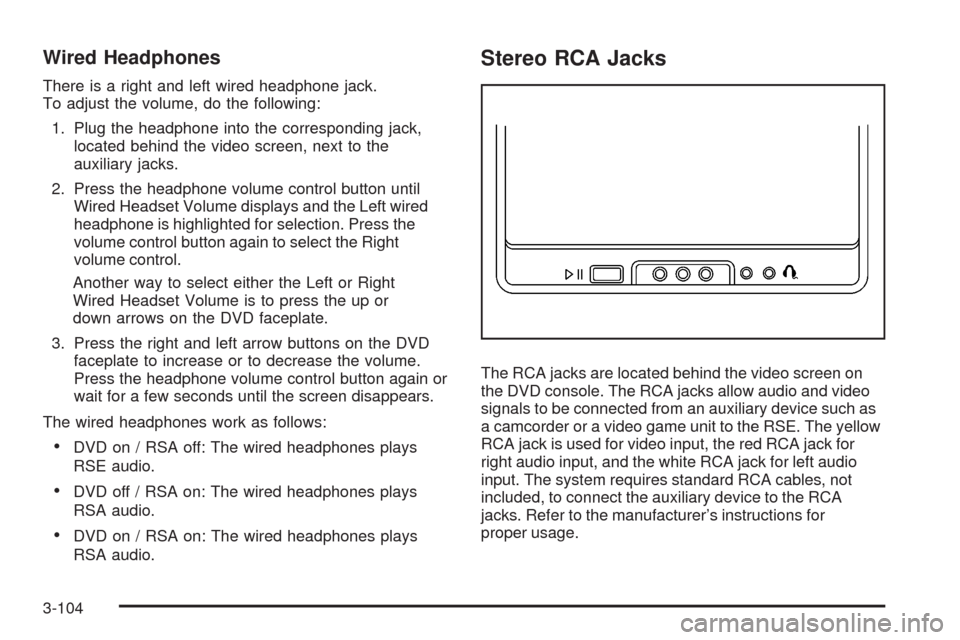
Stereo RCA Jacks
The RCA jacks are located behind the video screen on
the DVD console. The RCA jacks allow audio and video
signals to be connected from an auxiliary device such as
a camcorder or a video game unit to the RSE. The yellow
RCA jack is used for video input, the red RCA jack for
right audio input, and the white RCA jack for left audio
input. The system requires standard RCA cables, not
included, to connect the auxiliary device to the RCA
jacks. Refer to the manufacturer’s instructions for
proper usage.
3-104