2008 CHEVROLET TRAIL BLAZER ignition
[x] Cancel search: ignitionPage 205 of 472
Radio Messages for XM™ Only
SeeXM Radio Messages on page 3-87later in this
section for further detail.
Playing a CD
Insert a CD partway into the slot, label side up.
The player pulls it in and the CD should begin playing.
For the Base Radio, if you want to insert a CD with
the ignition off, rst press the eject button or the
INFO knob.
If the ignition or radio is turned off, with a CD in the
player, it stays in the player. When the ignition or radio
is turned on, the CD starts playing where it stopped,
if it was the last selected audio source.
When a CD is inserted, the CD symbol displays. As each
new track starts to play, the track number displays.
The CD player can play the smaller 3 inch (8 cm) single
CDs with an adapter ring. Full-size CDs and the
smaller CDs are loaded in the same manner.
Care of Your CDs
If playing a CD-R, the sound quality can be reduced
due to CD-R quality, the method of recording,
the quality of the music that has been recorded, and
the way the CD-R has been handled. Handle them
carefully. Store CD-R(s) in their original cases or other
protective cases and away from direct sunlight and
dust. The CD player scans the bottom surface of the
disc. If the surface of a CD is damaged, such as
cracked, broken, or scratched, the CD does not play
properly or not at all. Do not touch the bottom side of a
CD while handling it; this could damage the surface.
Pick up CDs by grasping the outer edges or the edge of
the hole and the outer edge.
If the surface of a CD is soiled, take a soft, lint free
cloth or dampen a clean, soft cloth in a mild, neutral
detergent solution mixed with water, and clean it.
Make sure the wiping process starts from the center
to the edge.
3-75
Page 206 of 472
Care of Your CD and DVD Player
Do not add any label to a CD, it could get caught in the
CD player. If a CD is recorded on a personal computer
and a description label is needed, try labeling the top
of the recorded CD with a marking pen.
The use of CD lens cleaners for CDs is not advised,
due to the risk of contaminating the lens of the CD optics
with lubricants internal to the CD and DVD player
mechanism.
Notice:If a label is added to a CD, or more than
one CD is inserted into the slot at a time, or an
attempt is made to play scratched or damaged CDs,
the CD player could be damaged. While using the
CD player, use only CDs in good condition without
any label, load one CD at a time, and keep the
CD player and the loading slot free of foreign
materials, liquids, and debris.
If an error displays, see “CD Messages” later in this
section.
For vehicles that have a radio with a Six-Disc CD
player, see the following:
LOAD:Press to load CDs into the CD player.
This CD player holds up to six CDs.To insert one CD, do the following:
1. Turn the ignition on.
2. Press and release the LOAD button.
3. Wait for the indicator light, located to the right of the
slot, to turn green.
4. Load a CD. Insert the CD part way into the slot,
label side up. The player pulls the CD in.
To insert multiple CDs, do the following:
1. Turn the ignition on.
2. Press and hold the LOAD button for two seconds.
A beep sounds and the indicator light, located to
the right of the slot, begins to ash and MULTI
LOAD # displays.
3. Once the light stops ashing and turns green,
INSERT CD # displays, load a CD. Insert the
CD part way into the slot, label side up.
The player pulls the CD in.
Once the CD is loaded, the indicator light begins
ashing again. Once the light stops ashing
and turns green, you can load another CD. The CD
player takes up to six CDs. Do not try to load
more than six.
3-76
Page 207 of 472
To load more than one CD but less than six, complete
Steps 1 through 3. When nished loading CDs,
press the LOAD button to cancel the loading function.
The radio begins to play the last CD loaded.
If more than one CD has been loaded, a number for
each CD displays.
Playing a Specic Loaded CD
For every CD loaded, a number displays. To play a
specic CD, rst press the CD AUX button (if not already
in CD mode), then press the numbered pushbutton
that corresponds to the CD. A small bar displays under
the CD number that is playing and the track number
displays.
Z(Eject) (Base or MP3 Radio):Press to eject a
CD. Eject can be activated with either the ignition
or radio off. CDs can be loaded with the radio and
ignition off if this button is pressed rst.
CD
Z(Eject):Press to eject CD(s).
To eject the CD that is currently playing, press and
release this button.To eject multiple CDs, do the following:
1. Press and hold the
Zbutton for two seconds.
A beep is heard and the indicator light, located to
the right of the slot, begins to ash and EJECT
ALL displays.
2. Once the light stops ashing, REMOVE CD #
displays. The CD ejects and can be removed.
Once the CD is removed, the indicator light begins
ashing again and another CD ejects.
To stop ejecting the CDs, press the
Zbutton.
If the CD is not removed, after 25 seconds, the CD
automatically pulls back into the player. If CD is pushed
back into the player, before the 25-second time period
is complete, the player senses an error and tries to eject
the CD several times before stopping.
Do not repeatedly press the
Zbutton to eject a CD
after pushing it in manually. The player’s 25-second
eject timer resets at each press of eject, causing
the player to not eject the CD until the 25-second time
period has elapsed.
3-77
Page 215 of 472
File System and Naming
The song name that displays is the song name that is
contained in the ID3 tag. If the song name is not present
in the ID3 tag, then the radio displays the le name
without the extension (such as .mp3) as the track name.
Track names longer than 32 characters or four pages
are shortened. Parts of words on the last page of
text and the extension of the le name does not display.
Preprogrammed Playlists
Preprogrammed playlists that were created using
WinAmp™, MusicMatch™, or Real Jukebox™ software
can be accessed, however, they cannot be edited
using the radio. These playlists are treated as special
folders containing compressed audio song les.
Playing an MP3/WMA
Insert a CD partway into the slot, label side up. The
player pulls it in, and READING displays. The CD should
begin playing and the CD symbol displays. To insert a
CD while the ignition is off, rst press the
Zbutton
or the DISPL knob.If the ignition or radio is turned off with a CD in the
player it stays in the player. When the ignition or radio
is turned on, the CD starts to play where it stopped, if it
was the last selected audio source.
As each new track starts to play, the track number and
song title displays.
1 FLD
x(Previous Folder):Press this button to go to
the rst track in the previous folder. Press this button
while in folder random mode to go to the rst track in the
previous folder and random the tracks in that folder.
2 FLD
w(Next Folder):Press this button to go to the
rst track in the next folder. Press this button while
in folder random mode to go to the rst track in the next
folder and random the tracks in that folder.
3 REV (Reverse):Press and hold this pushbutton to
reverse quickly within a track. Press and hold this
pushbutton for less than two seconds to reverse at
10 times the normal playing speed. Press and hold it for
more than two seconds to reverse at 20 times the normal
playing speed. Release this pushbutton to play the
passage. REV and the elapsed time of the track displays.
3-85
Page 217 of 472
To change the default on the display, press the DISPL
knob until the desired display appears, then press and
hold this knob for two seconds. The radio produces one
beep and the selected display becomes the default.
INFO (Information):INFO displays when a current
track has ID3 tag information. Press this button
to display the artist name and album contained in the
tag. INFO disappears from the display when the
information in the ID3 tag has nished.
BAND:Press this button to listen to the radio when a
CD is playing. The inactive CD remains inside the radio
for future listening.
CD AUX (Auxiliary):Press this button to play a CD
when listening to the radio. The CD symbol displays
when a CD is loaded.
Z(Eject):Press this button to eject a CD. Eject can
activate while either the ignition or the radio is off.
CDs can be loaded while the ignition and the radio is
off if this button is pressed rst.
XM Radio Messages
If you have a Radio with CD or Radio with Six-Disc CD,
you can receive these radio display messages.
XL (Explicit Language Channels):These channels, or
any others, can be blocked at a customer’s request,
by calling 1-800-852-XMXM (9696).
Updating:The encryption code in the receiver is being
updated, and no action is required. This process
should take no longer than 30 seconds.
No Signal:The system is functioning correctly, but the
vehicle is in a location that is blocking the XM™
signal. When the vehicle is moved into an open area,
the signal should return.
Loading XM:The audio system is acquiring and
processing audio and text data. No action is needed.
This message should disappear shortly.
CH Off Air:This channel is not currently in service.
Tune to another channel.
CH Unavail:This previously assigned channel is no
longer assigned. Tune to another station. If this station
was one of the presets, choose another station for
that preset button.
3-87
Page 220 of 472
Before You Drive
The RSE system is for rear seat passengers only and is
not intended for the driver while driving.
Parental Control
This button is located behind the video screen. Press
this button while a DVD or CD is playing to freeze
the video and mute the audio. The video screen displays
Parental Control ON and the power indicator light on
the DVD player ashes. It also disables all other button
operations from the remote control and the DVD
player, with the exception of the eject button. Press this
button again to restore operation of the DVD player.
This button can also be used to turn the DVD player
power on and automatically resume play if the ignition
is in RUN, ACCESSORY, or if Retained Accessory
Power (RAP) is active.
Headphones
The RSE system includes two sets of wireless
headphones.
Each set of headphones has an ON/OFF control.
An indicator light illuminates on the headphones when
they are on. If the light does not illuminate, the batteries
may need to be replaced. See “Battery Replacement”
following for more information.
Each set of headphones has a volume knob. To adjust
the volume, adjust this knob.
The transmitters are located below the video display
screen. The headphones shut off automatically if
they lose the signal from the system after about four
minutes to save battery power. The signal can be lost if
the system is turned off or if the headphones are out
of range of the transmitters.
3-90
Page 224 of 472
DVD Player
The DVD player is located in the overhead console and
is controlled by the buttons on the DVD player or on
the remote control. See “Remote Control” later in
this section for more information.
The DVD player power can be turned on while the
ignition is in ON/RUN, ACC/ACCESSORY, or when
Retained Accessory Power (RAP) is active.
The RSE system DVD player is only compatible with
DVDs of the appropriate region code in the country that
the vehicle was sold. The DVD region code is printed
on the jacket of most DVDs.
Standard audio CDs, CD-R, CD-RW, Video CD and
Photo CD/CD-R media are fully supported by this DVD
player. DVD-R and DVD-RW media is supported if
formatted as DVD-Video. DVD+R and DVD+RW media
may or may not be supported by the DVD player.
The DVD player does not support DVD-RAM, DVD-ROM,
and DVD Audio media. An error message displays if this
type of media is inserted into the DVD player.
When using the wired headphones, not included, if the
front seat passengers play a CD in the Radio with
Six-Disc CD (if equipped) or use XM™ Satellite RadioService (if equipped), the audio for these sources will be
heard, instead of the DVD or CD that is currently
playing through the RSE.
If an error message displays on the video screen,
see “DVD Messages” later in this section.
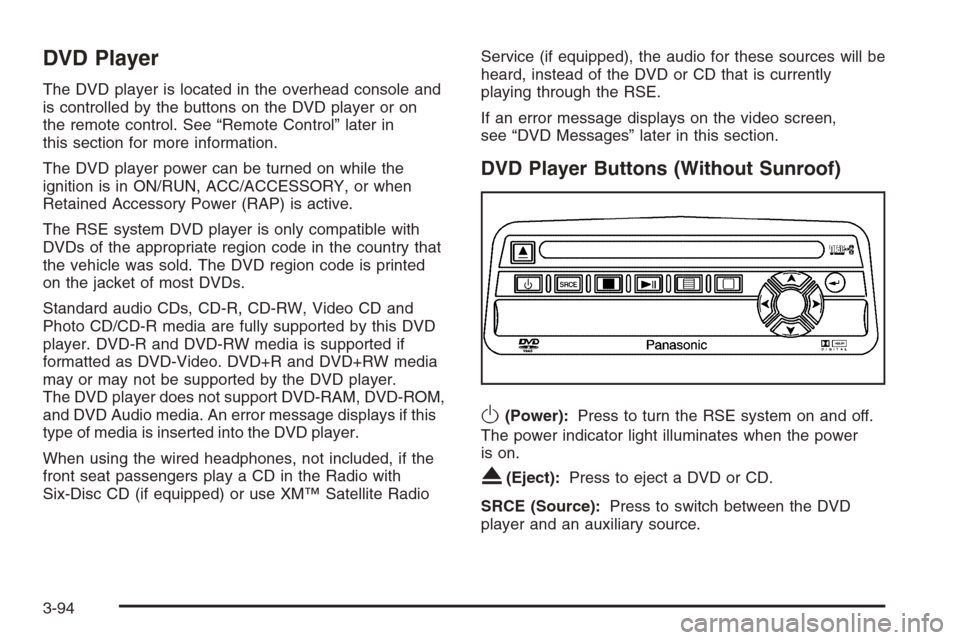
DVD Player Buttons (Without Sunroof)
O(Power):Press to turn the RSE system on and off.
The power indicator light illuminates when the power
is on.
X(Eject):Press to eject a DVD or CD.
SRCE (Source):Press to switch between the DVD
player and an auxiliary source.
3-94
Page 229 of 472
|(Camera Angle):Press to change camera angles
on DVDs that have this feature when a DVD is playing.
The format and content of this function will vary for
each disc.
{(Subtitle):Press to turn on subtitles and to move
through subtitle options when a DVD is playing.
The format and content of this function will vary for
each disc.
[(Fast Forward):Press to fast forward the DVD or
CD. To stop fast forwarding, press again. This button
might not work while the DVD is playing the copyright
information or the previews.
s(Play/Pause):Press to start play of a DVD or CD.
Press while a DVD or CD is playing to pause it.
Press again to continue the play of the DVD or CD.
When the DVD is playing, press this button then press
the fast forward button. The DVD continues playing
in a slow play mode. To cancel slow play mode, press
this button.
u(Next Track/Chapter):Press to advance to the
beginning of the next track or chapter. This button
might not work when the DVD is playing the copyright
information or the previews.
Battery Replacement
To change the remote control batteries, do the following:
1. Remove the battery compartment door located on
the bottom of the remote control.
2. Replace the two batteries in the compartment.
Make sure that they are installed correctly, using
the diagram on the inside of the battery
compartment.
3. Close the battery door securely.
If the remote control is to be stored for a long period of
time, remove the batteries and keep them in a cool,
dry place.
Problem Recommended Action
No power. The ignition might not
be in ON/RUN or
ACC/ACCESSORY.
The parental control
button might have been
turned on. The power
indicator light ashes.
3-99