2008 CHEVROLET TRAIL BLAZER tow
[x] Cancel search: towPage 155 of 472
toward the passenger. The passenger’s temperature
setting can be set to match and link to the driver’s
temperature setting by pressing and holding the AUTO
button for three seconds. When adjusting the driver’s
side temperature setting, the passenger’s side
temperature setting will follow and both arrows will
appear on the display. The passenger’s side
temperature setting also resets and relinks to the
driver’s side temperature setting if the vehicle has been
off for more than three hours.
Outside Air Temperature Display
A new outside temperature reading will be displayed if
the vehicle has been off for more than three hours.
If the vehicle has been off for less than three hours,
the old temperature reading may be displayed because
underhood heat is affecting the true outside temperature.
Underhood heat can also affect the outside temperature
while the engine is running. It may also take several
minutes of driving before the display updates to
the actual outside temperature.
Automatic Operation
AUTO (Automatic):When automatic operation is
active, the system will control the inside temperature,
the air delivery mode, and the fan speed.
Use the steps below to place the entire system in
automatic mode:
1. Press the AUTO button.
When AUTO is selected, the air conditioning
operation and air outlet mode will be automatically
controlled. The air conditioning compressor will run
continuously when the outside temperature is over
approximately 40°F (4°C). The air inlet will normally
be set to outside air. If it’s hot outside, the air inlet will
automatically switch to recirculate inside air to help
quickly cool down your vehicle.
2. Set the driver’s and passenger’s temperature.
To nd your comfort setting, start with a 72°F (22°C)
temperature setting and allow about 20 minutes
for the system to adjust. Turn the driver’s or
passenger’s side temperature knob to adjust the
temperature setting as necessary. If you choose the
temperature setting of 60°F (15°C), the system
will remain at the maximum cooling setting. If you
choose the temperature setting of 90°F (32°C),
the system will remain at the maximum heat setting.
Choosing either maximum setting may not cause
the vehicle to heat or cool any faster.
3-25
Page 156 of 472
Manual Operation
To change the current setting, select one of the
following:
w9x(Fan):This button allows you to manually adjust
the fan speed. Press the up arrow to increase fan speed
and the down arrow to decrease fan speed. The display
will change to show you the selected fan speed and the
driver’s side temperature setting for ve seconds.
C(Mode):Press this button to manually change the
direction of the airow in your vehicle. Keep pressing the
button until the desired mode appears on the display.
The display will change to show you the selected
air delivery mode and the driver’s temperature setting
for ve seconds.
H(Vent):This mode directs air to the instrument
panel outlets.
)(Bi-Level):This mode directs approximately half of
the air to the instrument panel outlets, then directs
the remaining air to the oor outlets. A little air is
directed toward the windshield and the side window
outlets. Cooler air is directed to the upper outlets and
warmer air to the oor outlets.
6(Floor):This mode directs most of the air to the
oor outlets. Some air also comes out of the defroster
and side window outlets. The recirculation button
cannot be selected in oor mode.
@(Recirculation):Press this button to turn
recirculation mode on or off. When this button is
pressed, an indicator light in the button will also come
on to let you know that it is activated. Recirculation
mode is used to recirculate the air inside of your vehicle.
Use this mode to help prevent outside odors and/or
dust from entering your vehicle or to help cool the air
inside of your vehicle more quickly. Recirculation
mode can be used with vent and bi-level modes, but it
cannot be used with oor, defog or defrost modes.
Defog and defrost modes are described later in
this section.
If recirculation mode is selected with oor, defog, or
defrost modes, the indicator will ash three times and
then turn off indicating the selection is not available.
You may also notice that the air conditioning compressor
will run while in recirculation mode. This is normal
and will help to prevent fogging.
If the weather is cold and damp, the system may cause
the windows to fog while using recirculation mode.
If the windows do start to fog, select defog or defrost
mode and increase fan speed.
Recirculation mode, if selected, will be cleared when the
engine is turned off.
3-26
Page 168 of 472
You can only drive for a short time with the reading in
either warning zone. If you must drive, turn off all
unnecessary accessories.
Readings in either warning zone indicate a possible
problem in the electrical system. Have the vehicle
serviced as soon as possible.
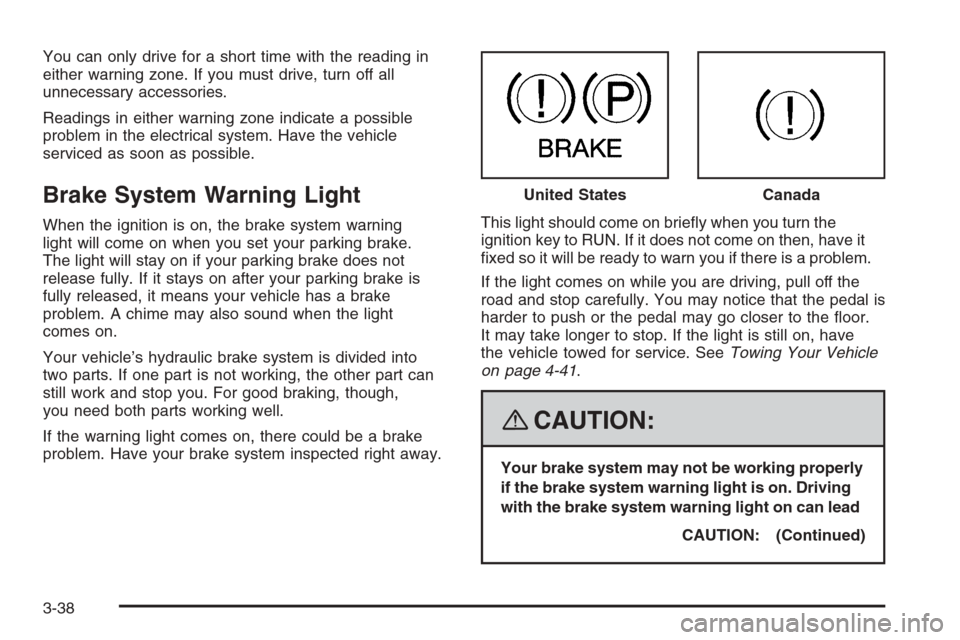
Brake System Warning Light
When the ignition is on, the brake system warning
light will come on when you set your parking brake.
The light will stay on if your parking brake does not
release fully. If it stays on after your parking brake is
fully released, it means your vehicle has a brake
problem. A chime may also sound when the light
comes on.
Your vehicle’s hydraulic brake system is divided into
two parts. If one part is not working, the other part can
still work and stop you. For good braking, though,
you need both parts working well.
If the warning light comes on, there could be a brake
problem. Have your brake system inspected right away.This light should come on briey when you turn the
ignition key to RUN. If it does not come on then, have it
xed so it will be ready to warn you if there is a problem.
If the light comes on while you are driving, pull off the
road and stop carefully. You may notice that the pedal is
harder to push or the pedal may go closer to the oor.
It may take longer to stop. If the light is still on, have
the vehicle towed for service. SeeTowing Your Vehicle
on page 4-41.
{CAUTION:
Your brake system may not be working properly
if the brake system warning light is on. Driving
with the brake system warning light on can lead
CAUTION: (Continued) United States
Canada
3-38
Page 169 of 472
CAUTION: (Continued)
to an accident. If the light is still on after you
have pulled off the road and stopped carefully,
have the vehicle towed for service.
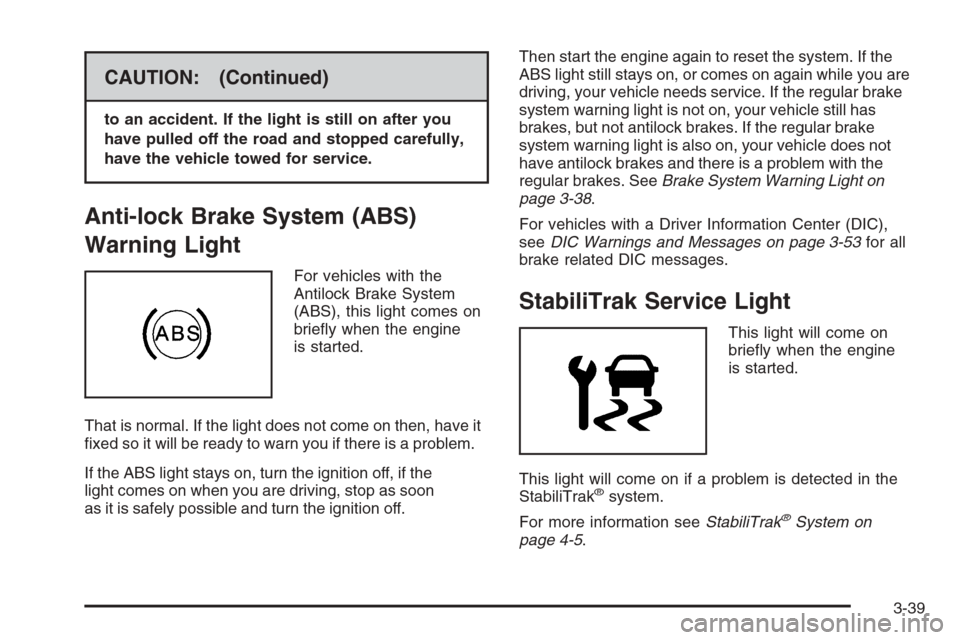
Anti-lock Brake System (ABS)
Warning Light
For vehicles with the
Antilock Brake System
(ABS), this light comes on
briey when the engine
is started.
That is normal. If the light does not come on then, have it
xed so it will be ready to warn you if there is a problem.
If the ABS light stays on, turn the ignition off, if the
light comes on when you are driving, stop as soon
as it is safely possible and turn the ignition off.Then start the engine again to reset the system. If the
ABS light still stays on, or comes on again while you are
driving, your vehicle needs service. If the regular brake
system warning light is not on, your vehicle still has
brakes, but not antilock brakes. If the regular brake
system warning light is also on, your vehicle does not
have antilock brakes and there is a problem with the
regular brakes. SeeBrake System Warning Light on
page 3-38.
For vehicles with a Driver Information Center (DIC),
seeDIC Warnings and Messages on page 3-53for all
brake related DIC messages.
StabiliTrak Service Light
This light will come on
briey when the engine
is started.
This light will come on if a problem is detected in the
StabiliTrak
®system.
For more information seeStabiliTrak
®System on
page 4-5.
3-39
Page 172 of 472
Malfunctions often are indicated by the system before
any problem is apparent. This can prevent more serious
damage to your vehicle. This system is also designed
to assist your service technician in correctly diagnosing
any malfunction.
Notice:If you keep driving your vehicle with this
light on, after a while, the emission controls
might not work as well, your vehicle’s fuel economy
might not be as good, and the engine might not
run as smoothly. This could lead to costly repairs
that might not be covered by your warranty.
Notice:Modications made to the engine,
transmission, exhaust, intake, or fuel system of
your vehicle or the replacement of the original tires
with other than those of the same Tire Performance
Criteria (TPC) can affect your vehicle’s emission
controls and can cause this light to come on.
Modications to these systems could lead to costly
repairs not covered by your warranty. This could
also result in a failure to pass a required Emission
Inspection/Maintenance test. SeeAccessories
and Modifications on page 5-3.This light comes on, as a check to show it is working,
when the ignition is turned ON/RUN but the engine is not
running. If the light does not come on, have it repaired.
This light also comes on during a malfunction in
one of two ways:
Light Flashing— A misre condition has been
detected. A misre increases vehicle emissions and
could damage the emission control system on your
vehicle. Diagnosis and service might be required.
Light On Steady— An emission control system
malfunction has been detected on your vehicle.
Diagnosis and service might be required.
If the Light is Flashing
The following can prevent more serious damage to
your vehicle:
Reduce vehicle speed.
Avoid hard accelerations.
Avoid steep uphill grades.
If you are towing a trailer, reduce the amount of
cargo being hauled as soon as it is possible.
3-42
Page 201 of 472
Adjusting the Speakers (Balance/Fade)
AUDIO:To adjust the balance between the right
and the left speakers, push and release until BAL
(balance) displays. Turn to move the sound toward the
right or the left speakers.
To adjust the fade between the front and rear speakers,
push and release this knob until FADE or FAD
displays. Turn to move the sound toward the front or the
rear speakers.
To adjust the balance or the fade to the middle position
while it is displayed, push and hold the AUDIO knob.
On some radios, push the AUDIO knob, then push
it again and hold it until one beep is heard.
To adjust all tone and speaker controls to the middle
position, push and hold the AUDIO knob when no tone
or speaker controls display. ALL CENTERED displays
and a beep is heard.
Finding a Program Type (PTY) Station
(RDS and XM™)
For all Radios except the MP3 Radio, select and nd a
desired PTY perform the following:
1. Press the TYPE button to activate program type
select mode. TYPE or P-TYPE and the last
selected PTY displays.
2. Turn the TYPE knob or press and release the
TYPE button to select a PTY.
3. Press either SEEK or TYPE arrow to select and to
go to the PTY’s rst station.
4. To go to another station within that PTY, press the
TYPE button, then press either SEEK or TYPE
arrow once.
5. Press either SEEK or TYPE arrow twice to exit the
program type select mode.
For the Base Radio, if the radio cannot nd the desired
program type, NONE displays and the radio returns
to the last station you were listening to.
3-71
Page 231 of 472
Problem Recommended Action
After stopping the player,
I push Play but
sometimes the DVD
starts where I left off
and sometimes at the
beginning.If the stop button was
pressed one time, the
DVD player resumes
playing where the DVD
was stopped. If the stop
button was pressed two
times the DVD player
begins to play from the
beginning of the DVD.
The auxiliary source is
running but there is no
picture or sound.Check that the DVD
player is in the auxiliary
source mode.
Check the auxiliary input
connections at both
devices.
My disc is stuck in the
player. The Load/Eject
button does not work.Turn the DVD power off,
then on, then press the
load/eject button on the
DVD player.
Do not attempt to forcibly
remove the disc from the
DVD player. This could
permanently damage the
disc and DVD player.Problem Recommended Action
Sometimes the wireless
headphone audio cuts out
or buzzes.Check for obstructions,
low batteries, reception
range, and interference
from cellular telephone
towers or by using your
cellular telephone in
the vehicle.
Check that the
headphones are facing
the front of the vehicle.
I lost the remote and/or
the headphones.See your dealer/retailer
for assistance.
The DVD is playing, but
there is no picture or
sound.Check that the DVD
player is in DVD mode.
The audio/video skips
or jumps.The DVD or CD could be
dirty, scratched, or
damaged.
The audio from the
radio for the Radio with
Six-Disc CD and XM™
has taken over the audio
from the DVD or CD
when using the wired
headphones.The RSE is working
correctly.
Use the wireless
headphones or have the
front seat passengers
listen to another audio
source.
3-101
Page 239 of 472
Your Driving, the Road, and Your Vehicle..........4-2
Defensive Driving...........................................4-2
Drunk Driving.................................................4-2
Control of a Vehicle........................................4-3
Braking.........................................................4-3
Antilock Brake System (ABS)...........................4-4
Braking in Emergencies...................................4-5
Locking Rear Axle..........................................4-5
StabiliTrak
®System........................................4-5
All-Wheel Drive (AWD) System
(TrailBlazer SS).........................................4-10
Steering......................................................4-10
Off-Road Recovery.......................................4-12
Passing.......................................................4-12
Loss of Control.............................................4-12
Competitive Driving.......................................4-13
Off-Road Driving (Except SS).........................4-14
Driving at Night............................................4-26Driving in Rain and on Wet Roads..................4-26
Before Leaving on a Long Trip.......................4-27
Highway Hypnosis........................................4-28
Hill and Mountain Roads................................4-28
Winter Driving..............................................4-29
If Your Vehicle is Stuck in Sand, Mud, Ice,
or Snow...................................................4-33
Rocking Your Vehicle to Get It Out.................4-34
Recovery Hooks...........................................4-34
Loading Your Vehicle....................................4-35
Adding a Snow Plow or Similar Equipment.......4-41
Towing..........................................................4-41
Towing Your Vehicle.....................................4-41
Recreational Vehicle Towing...........................4-42
Electronically Controlled Air Suspension
System....................................................4-47
Towing a Trailer...........................................4-48
Section 4 Driving Your Vehicle
4-1