2008 CHEVROLET SILVERADO steering
[x] Cancel search: steeringPage 121 of 596
Before you start driving, fully press the brake pedal to
conrm the adjustment is right for you. While driving,
make only small adjustments.
Your vehicle may have a memory function which lets
pedal settings be saved and recalled. SeeMemory Seat,
Mirrors, and Pedals on page 1-6for more information.
Engine Coolant Heater
The engine coolant heater, if available, can help in cold
weather conditions at or below 0°F (−18°C) for easier
starting and better fuel economy during engine warm-up.
Plug in the coolant heater at least four hours before
starting your vehicle. An internal thermostat in the
plug-end of the cord may exist which will prevent
engine coolant heater operation at temperatures
above 0°F (−18°C).
If your vehicle has the DURAMAX
®Diesel engine, see
the DURAMAX®Diesel manual for more information.
To Use the Engine Coolant Heater
1. Turn off the engine.
2. Open the hood and unwrap the electrical cord.
The cord is located on the driver’s side of the
engine compartment, near the power steering
uid reservoir.
3. Plug the cord into a normal, grounded 110-volt
AC outlet.
{CAUTION:
Plugging the cord into an ungrounded outlet
could cause an electrical shock. Also, the
wrong kind of extension cord could overheat
and cause a re. You could be seriously injured.
Plug the cord into a properly grounded
three-prong 110-volt AC outlet. If the cord
will not reach, use a heavy-duty three-prong
extension cord rated for at least 15 amps.
4. Before starting the engine, be sure to unplug and
store the cord as it was before to keep it away
from moving engine parts. If you do not, it could
be damaged.
2-27
Page 127 of 596
To use this feature, do the following:
1. Move the shift lever to the MANUAL MODE (M).
2. Press the plus/minus buttons, located on the
steering column shift lever, to select the desired
range of gears for your current driving conditions.
When MANUAL MODE (M) is selected a number
displays next to the M, indicating the current gear.
This number is the highest gear that can be used.
However, your vehicle can automatically shift to lower
gears as it adjusts to driving conditions. This means
that all gears below that number are available. When
FIFTH (5) is selected, FIRST (1) through FIFTH (5)
gears are automatically shifted by the vehicle, but
SIXTH (6) cannot be used until the plus/minus button
located on the steering column lever is used to change
to the gear.
Grade Braking is not available when the Range
Selection Mode is active. SeeTow/Haul Mode on
page 2-34While using the Range Selection mode feature, cruise
control and the Tow/Haul mode can be used.
Notice:Spinning the tires or holding the vehicle
in one place on a hill using only the accelerator
pedal may damage the transmission. The repair will
not be covered by your warranty. If you are stuck,
do not spin the tires. When stopping on a hill,
use the brakes to hold the vehicle in place.
Low Traction Mode
If your vehicle has the Allison Transmission®,orthe
Hydra-Matic®6-Speed Automatic Transmission, it has a
Low Traction Mode that assist in vehicle acceleration
when road conditions are slippery, such as with ice or
snow. While the vehicle is at a stop, select the second
gear range using the Range Selection system. This will
limit torque to the wheels after it detects wheel slip,
preventing the tires from spinning.
2-33
Page 130 of 596
Grade Braking (Allison Transmission®
or Hydra-Matic®6-Speed Automatic
Transmission)
The Grade Braking shift modes can be activated by
pressing the button on the end of the shift control lever.
While in Range Selection Mode, Grade Braking is
deactivated allowing the driver to select a desired
range of gears.
Grade Braking is only active while the Tow/Haul Mode is
selected and you are not in the Range Selection Mode.
See “Tow/Haul Mode listed previously andAutomatic
Transmission Operation on page 2-28for more
information on the Range Selection Mode. Grade Braking
assists in maintaining desired vehicle speeds when
driving on downhill grades by automatically implementing
a shift schedule that utilizes the engine and transmission
to slow the vehicle. This reduces wear on the braking
system and increases control of the vehicle. Grade
Braking monitors vehicle speed, acceleration, engine
torque and brake pedal usage. Using this information,
it detects when the truck is on a downhill grade and the
driver desires to slow the vehicle by pressing the brake.
See the diesel supplement for information on Cruise
Grade Braking.
Also seeTowing a Trailer on page 4-55for more
information.
Four-Wheel Drive
If your vehicle has Four-Wheel Drive, you can send the
engine’s driving power to all four wheels for extra traction.
To get the most satisfaction out of Four-Wheel Drive, you
must be familiar with its operation. Read the part that
follows before using Four-Wheel Drive. See the
appropriate text for the transfer case in your vehicle.
Notice:Driving on clean, dry pavement in
Four-Wheel-Drive High or Four-Wheel-Drive Low for
an extended period of time may cause premature
wear on your vehicle’s powertrain. Do not drive on
clean, dry pavement in Four-Wheel-Drive High or
Four-Wheel-Drive Low for extended periods of time.
While driving on clean dry pavement and during tight
turns, you may experience vibration in the steering
system.
Front Axle
The front axle engages and disengages automatically
when you shift the transfer case. Some delay for
the axle to engage or disengage is normal.
2-36
Page 135 of 596
Shifting In or Out of NEUTRAL
1. With the vehicle running and the engine at an idle
set the parking brake.
2. Place the transmission into NEUTRAL (N).
Shift the transfer case in one continuous motion into or
out of the NEUTRAL position.
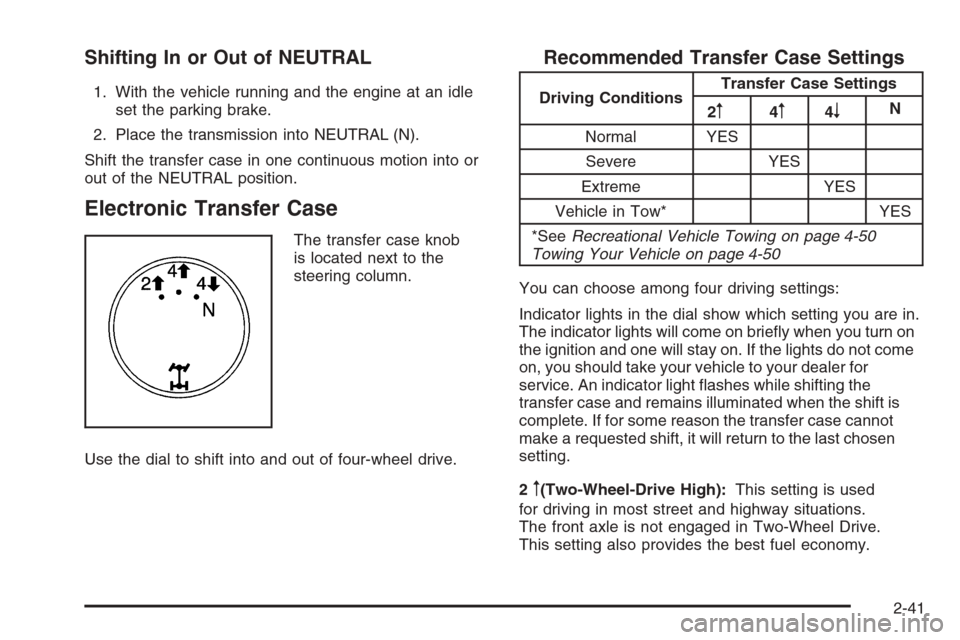
Electronic Transfer Case
The transfer case knob
is located next to the
steering column.
Use the dial to shift into and out of four-wheel drive.
Recommended Transfer Case Settings
Driving ConditionsTransfer Case Settings
2m4m4nN
Normal YES
Severe YES
Extreme YES
Vehicle in Tow* YES
*SeeRecreational Vehicle Towing on page 4-50
Towing Your Vehicle on page 4-50
You can choose among four driving settings:
Indicator lights in the dial show which setting you are in.
The indicator lights will come on briey when you turn on
the ignition and one will stay on. If the lights do not come
on, you should take your vehicle to your dealer for
service. An indicator light ashes while shifting the
transfer case and remains illuminated when the shift is
complete. If for some reason the transfer case cannot
make a requested shift, it will return to the last chosen
setting.
2
m(Two-Wheel-Drive High):This setting is used
for driving in most street and highway situations.
The front axle is not engaged in Two-Wheel Drive.
This setting also provides the best fuel economy.
2-41
Page 139 of 596
Shifting Out of NEUTRAL
To shift out of NEUTRAL do the following:
1. Set the parking brake and apply the regular
brake pedal.
2. Shift the transmission to NEUTRAL (N) and turn the
ignition to RUN with the engine off.
3. Turn the transfer case dial to Two-Wheel-Drive High.
After the transfer case has shifted out of NEUTRAL
the NEUTRAL light will go out.
4. Release the parking brake prior to moving the
vehicle.
Notice:Shifting the transmission into gear
before the requested mode indicator light has
stopped ashing could damage the transfer case.
To help avoid damaging your vehicle, always
wait for the mode indicator lights to stop ashing
before shifting the transmission into gear.
5. Start the engine and shift the transmission to the
desired position.
Excessively shifting the transfer case into or out of the
different modes may cause the transfer case to enter the
shift protection mode. This will protect the transfer case
from possible damage and will only allow the transfer
case to respond to one shift per 10 seconds. The transfer
case may stay in this mode for up to three minutes.
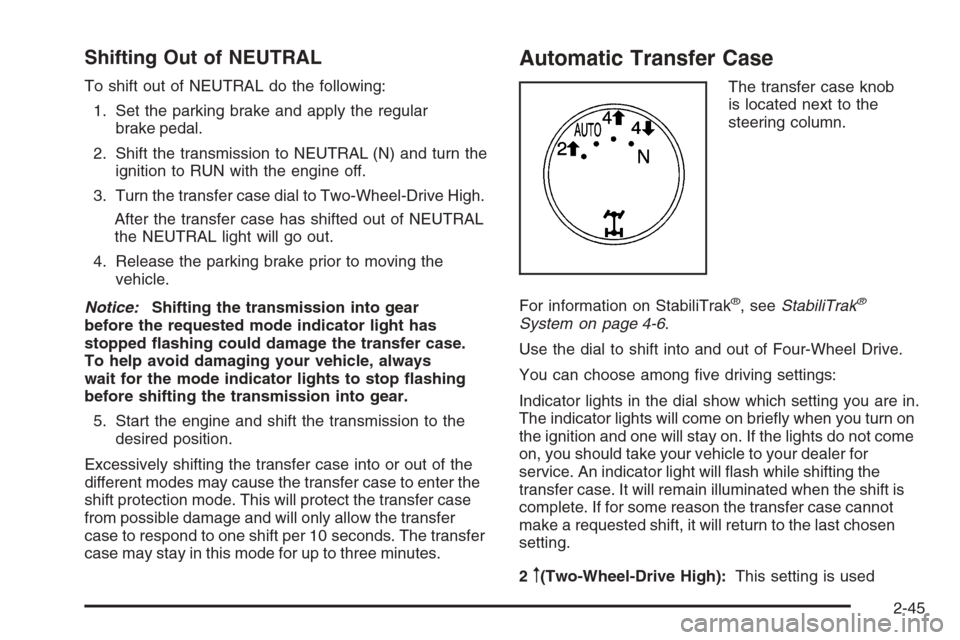
Automatic Transfer Case
The transfer case knob
is located next to the
steering column.
For information on StabiliTrak
®, seeStabiliTrak®
System on page 4-6.
Use the dial to shift into and out of Four-Wheel Drive.
You can choose among ve driving settings:
Indicator lights in the dial show which setting you are in.
The indicator lights will come on briey when you turn on
the ignition and one will stay on. If the lights do not come
on, you should take your vehicle to your dealer for
service. An indicator light will ash while shifting the
transfer case. It will remain illuminated when the shift is
complete. If for some reason the transfer case cannot
make a requested shift, it will return to the last chosen
setting.
2
m(Two-Wheel-Drive High):This setting is used
2-45
Page 163 of 596

Available Services included with
Directions & Connections Plan
All Safe and Sound Plan Services
Driving Directions - Advisor delivered or OnStar
Turn-by-Turn Navigation (If equipped)
RideAssist
Information and Convenience Services
OnStar Hands-Free Calling
OnStar Hands-Free Calling allows eligible OnStar
subscribers to make and receive calls using voice
commands. Hands-Free Calling is fully integrated
into the vehicle, and can be used with OnStar Pre-Paid
Minute Packages. Hands-Free Calling may also be linked
to a Verizon Wireless service plan in the U.S. or a Bell
Mobility service plan in Canada, depending on eligibility.
To nd out more, refer to the OnStar Owner’s Guide
in the vehicle’s glove box, visit www.onstar.com or
www.onstar.ca, or speak with an OnStar advisor by
pressing the OnStar button or calling 1-888-4-ONSTAR
(1-888-466-7827).
OnStar Virtual Advisor
OnStar Virtual Advisor is a feature of OnStar
Hands-Free Calling that uses your minutes to access
location-based weather, local traffic reports, and stock
quotes. By pressing the phone button and giving a few
simple voice commands, you can browse through the
various topics. See the OnStar Owner’s Guide for more
information (Only available in the continental U.S.).
OnStar Steering Wheel Controls
Your vehicle may have a Talk/Mute button that can
be used to interact with OnStar Hands-Free Calling.
SeeAudio Steering Wheel Controls on page 3-132
for more information.
On some vehicles, you may have to hold the button
for a few seconds and give the command “ONSTAR”
to activate the OnStar Hands-Free Calling.
On some vehicles, the mute button can be used to
dial numbers into voicemail systems, or to dial phone
extensions. See the OnStar Owner’s Guide for
more information.
2-69
Page 180 of 596

StabiliTrak®Indicator Light.............................3-48
Engine Coolant Temperature Gage..................3-48
Tire Pressure Light.......................................3-49
Malfunction Indicator Lamp.............................3-49
Oil Pressure Gage........................................3-52
Oil Pressure Light.........................................3-53
Security Light...............................................3-53
Fog Lamp Light............................................3-53
Cruise Control Light......................................3-54
Highbeam On Light.......................................3-54
Four-Wheel-Drive Light..................................3-54
Tow/Haul Mode Light....................................3-54
Fuel Gage...................................................3-55
Low Fuel Warning Light.................................3-56
Driver Information Center (DIC).......................3-56
DIC Operation and Displays
(With DIC Buttons)....................................3-57
DIC Operation and Displays
(Without DIC Buttons)................................3-63DIC Warnings and Messages.........................3-66
DIC Vehicle Customization (With DIC Buttons) . . .3-76
Audio System(s).............................................3-84
Setting the Clock..........................................3-86
Radio(s)......................................................3-88
Using an MP3 (Radio with CD or
Six-Disc CD Player).................................3-108
Using an MP3 (Radio with CD and
DVD Player)...........................................3-114
XM Radio Messages...................................3-119
Navigation/Radio System..............................3-120
Rear Seat Entertainment (RSE) System.........3-121
Rear Seat Audio (RSA)................................3-130
Theft-Deterrent Feature................................3-132
Audio Steering Wheel Controls......................3-132
Radio Reception.........................................3-133
Fixed Mast Antenna....................................3-134
XM™ Satellite Radio Antenna System............3-134
Section 3 Instrument Panel
3-2
Page 183 of 596
C. Driver Information Center (DIC) Buttons. SeeDriver
Information Center (DIC) on page 3-56.
D. Hazard Warning Flasher Button. SeeHazard
Warning Flashers on page 3-8.
E. Instrument Panel Cluster. SeeInstrument Panel
Cluster on page 3-37.
F. Shift Lever. SeeAutomatic Transmission Operation on
page 2-28. Tow/Haul Selector Button (If Equipped).
SeeTow/Haul Mode on page 2-34. Range Selection
Mode (Allison Transmission and Hydra-Matic
®
6-Speed Button (If Equipped). SeeAutomatic
Transmission Operation on page 2-28.
G. Audio System. SeeAudio System(s) on page 3-84.
H. Instrument Panel Storage Area. SeeInstrument
Panel Storage on page 2-78.
I. Integrated Trailer Brake Controller (If Equipped).
SeeTowing a Trailer on page 4-55.
J. Exterior Lamp Controls. SeeExterior Lamps on
page 3-17.
K. Hood Release. SeeHood Release on page 5-13.
L. Parking Brake. SeeParking Brake on page 2-50.
M. Dome Lamp Override Button. SeeDome Lamp
Override on page 3-21. Dome Lamp Knob.
SeeDome Lamps on page 3-21. Fog Lamp Button
(If Equipped). SeeFog Lamps on page 3-20.
N. Cruise Control Buttons. SeeCruise Control on
page 3-13.O. Tilt Wheel Lever. SeeTilt Wheel on page 3-8.
P. Horn. SeeHorn on page 3-8.
Q. Audio Steering Wheel Controls (If Equipped).
SeeAudio Steering Wheel Controls on page 3-132.
R. Automatic Transfer Case Control (If Equipped).
SeeFour-Wheel Drive on page 2-36.
S. Ashtray (If Equipped). SeeAshtray(s) and Cigarette
Lighter on page 3-24.
T. StabiliTrak
®Button (If Equipped). SeeStabiliTrak®
System on page 4-6. Ultrasonic Rear Park Assist
Disable Button (If Equipped). SeeUltrasonic
Rear Parking Assist (URPA) on page 2-64. Pedal
Adjust Button (If Equipped). SeeAdjustable Throttle
and Brake Pedal on page 2-26. Heated Windshield
Washer Fluid Button (If Equipped).Windshield
Washer on page 3-12.
U. Accessory Power Outlet. SeeAccessory Power
Outlet(s) on page 3-23.
V. Climate Control System. SeeClimate Control System
(With Air Conditioning ) on page 3-25orClimate
Control System (Heater Only) on page 3-28andDual
Automatic Climate Control System on page 3-29.
W. Power Take Off (PTO) Control (If Equipped).
See Power Take Off (PTO) in the Duramax Diesel
Supplement Index.
X. Passenger Airbag Off Control (If Equipped).
SeeAirbag Off Switch on page 1-78.
Y. Glove Box. SeeGlove Box on page 2-78.
3-5