2008 CHEVROLET MALIBU headlamp
[x] Cancel search: headlampPage 145 of 412
Ending Cruise Control
There are two ways to disengage the cruise control:
Step lightly on the brake pedal to disengage
the cruise control.
Press the on/off button, to turn off the cruise
control.
Erasing Speed Memory
The cruise control set speed memory is erased when
the cruise control or the ignition are turned off.
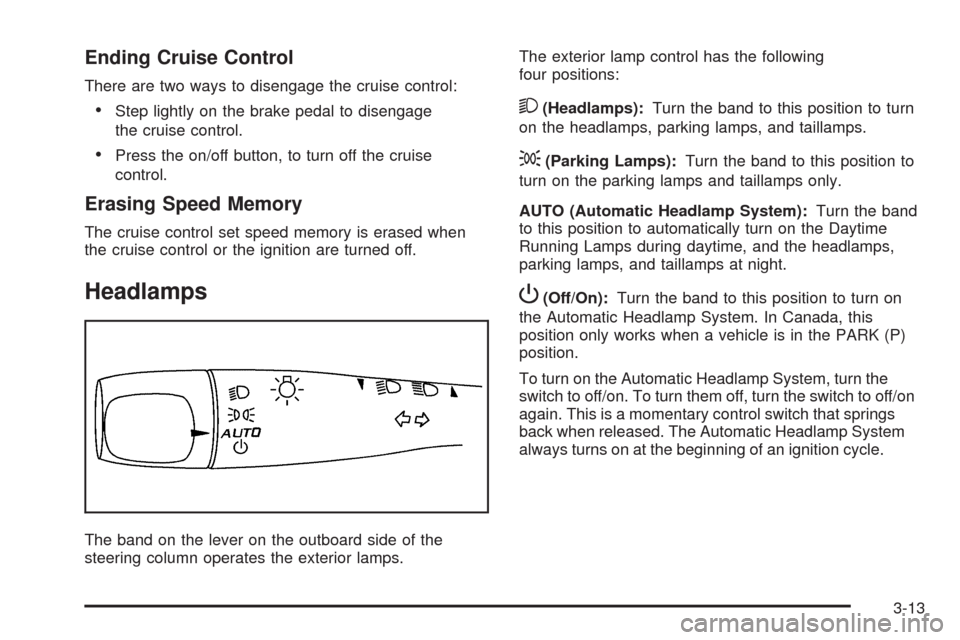
Headlamps
The band on the lever on the outboard side of the
steering column operates the exterior lamps.The exterior lamp control has the following
four positions:
2(Headlamps):Turn the band to this position to turn
on the headlamps, parking lamps, and taillamps.
;(Parking Lamps):Turn the band to this position to
turn on the parking lamps and taillamps only.
AUTO (Automatic Headlamp System):Turn the band
to this position to automatically turn on the Daytime
Running Lamps during daytime, and the headlamps,
parking lamps, and taillamps at night.
P(Off/On):Turn the band to this position to turn on
the Automatic Headlamp System. In Canada, this
position only works when a vehicle is in the PARK (P)
position.
To turn on the Automatic Headlamp System, turn the
switch to off/on. To turn them off, turn the switch to off/on
again. This is a momentary control switch that springs
back when released. The Automatic Headlamp System
always turns on at the beginning of an ignition cycle.
3-13
Page 146 of 412
Headlamps on Reminder
If you open the driver’s door and turn off the
ignition while leaving the lamps on, you will hear a
warning chime.
Headlamps Off in Park
This feature works when the ignition is in the ON/RUN
position and it is dark outside. To turn the headlamps
off when it is dark outside but keep other exterior lights
on, turn the exterior lamp control to the parking lamp
position.
To turn on the headlamps along with the other lamps
when it is dark outside, turn the exterior lamp control to
the AUTO or headlamp position.
This function does not work for vehicles rst sold in
Canada.
Delayed Headlamps
The delayed headlamps feature keeps the headlamps
on for 20 seconds after the key is turned to LOCK/OFF,
then the headlamps automatically turn off.
To override the 20 second delayed headlamp feature
while it is active turn the turn signal/multifunction
lever up one position and then back to AUTO.
Daytime Running Lamps (DRL)
Daytime Running Lamps (DRL) can make it easier for
others to see the front of your vehicle during the
day. DRL are helpful in many different driving conditions,
but they can be especially helpful in the short periods
after dawn and before sunset. Fully functional DRL
are required on all vehicles rst sold in Canada. The
vehicle has a light sensor on top of the instrument panel
that controls the DRL. Make sure it is not covered, or
the head lamps will be on when they are not needed.
The DRL system makes the low-beam headlamps come
on at a reduced brightness when the following conditions
are met:
The ignition is on.
The exterior lamps control is in AUTO.
The exterior lamps control is in the parking lamps
only position (This applies only to vehicles that are
rst sold in Canada).
The light sensor detects daytime light.
The parking brake is released or the vehicle is
not in PARK.
When the DRL system is on, the taillamps, sidemarker
lamps, parking lamps, and instrument panel lights
are not on unless you turn the exterior lamps control to
the parking lamp position.
As with any vehicle, you should turn on the regular
headlamp system when they are needed.
3-14
Page 147 of 412
Automatic Headlamp System
When it is dark enough outside, the automatic headlamp
system turns on the headlamps at the normal brightness
along with other lamps such as the taillamps,
sidemarker, parking lamps, and the instrument panel
lights. The radio lights will also be dim.
Your vehicle has a light sensor on top of the instrument
panel that controls the automatic headlamp system.
Make sure it is not covered or the automatic headlamp
system will be on when it is not needed.
There is a delay in the transition between the daytime
and nighttime operation of the DRL and the automatic
headlamp systems so that driving under bridges or
bright overhead street lights does not affect the system.
The DRL and automatic headlamp systems will only
be affected when the light sensor sees a change
in lighting lasting longer than this delay.If vehicle is started in a dark garage, the automatic
headlamp system comes on immediately. Once
the vehicle leaves the garage, it takes about one minute
for the automatic headlamp system to change to DRL
if it is light outside. During that delay, the instrument
panel cluster may not be as bright as usual. Make sure
the instrument panel brightness control is in the full
bright position. See “Instrument Panel Brightness
Control” underInstrument Panel Brightness on
page 3-16.
To idle the vehicle with the automatic headlamp system
off, turn the ignition on and set the exterior light
switch to the off/on position. For vehicles rst sold in
Canada, the transmission must stay in PARK (P) for this
function.
The regular headlamps should be used when needed.
3-15
Page 148 of 412
Fog Lamps
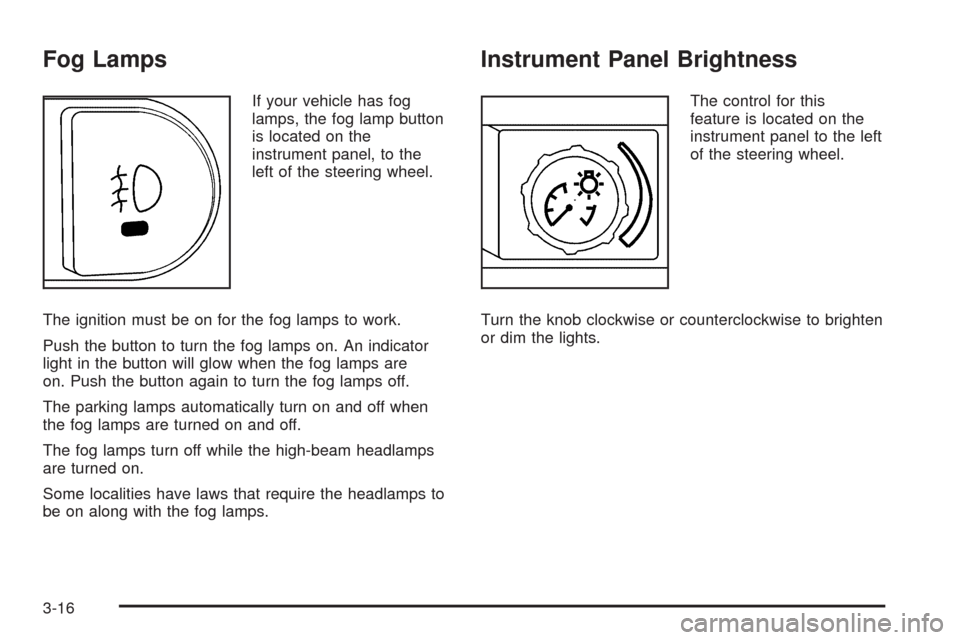
If your vehicle has fog
lamps, the fog lamp button
is located on the
instrument panel, to the
left of the steering wheel.
The ignition must be on for the fog lamps to work.
Push the button to turn the fog lamps on. An indicator
light in the button will glow when the fog lamps are
on. Push the button again to turn the fog lamps off.
The parking lamps automatically turn on and off when
the fog lamps are turned on and off.
The fog lamps turn off while the high-beam headlamps
are turned on.
Some localities have laws that require the headlamps to
be on along with the fog lamps.
Instrument Panel Brightness
The control for this
feature is located on the
instrument panel to the left
of the steering wheel.
Turn the knob clockwise or counterclockwise to brighten
or dim the lights.
3-16
Page 177 of 412
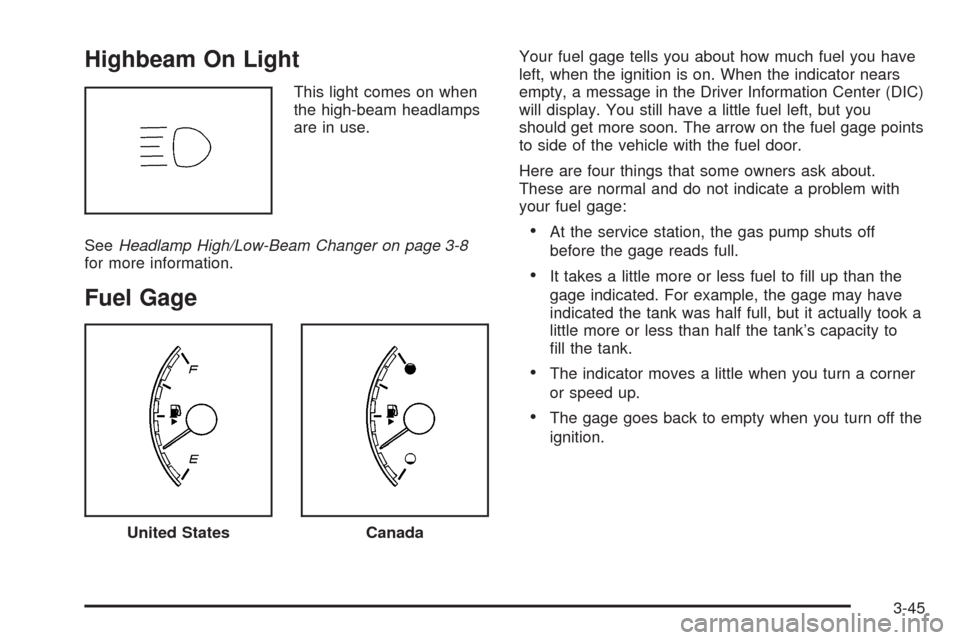
Highbeam On Light
This light comes on when
the high-beam headlamps
are in use.
SeeHeadlamp High/Low-Beam Changer on page 3-8
for more information.
Fuel Gage
Your fuel gage tells you about how much fuel you have
left, when the ignition is on. When the indicator nears
empty, a message in the Driver Information Center (DIC)
will display. You still have a little fuel left, but you
should get more soon. The arrow on the fuel gage points
to side of the vehicle with the fuel door.
Here are four things that some owners ask about.
These are normal and do not indicate a problem with
your fuel gage:
At the service station, the gas pump shuts off
before the gage reads full.
It takes a little more or less fuel to ll up than the
gage indicated. For example, the gage may have
indicated the tank was half full, but it actually took a
little more or less than half the tank’s capacity to
ll the tank.
The indicator moves a little when you turn a corner
or speed up.
The gage goes back to empty when you turn off the
ignition.
United StatesCanada
3-45
Page 180 of 412
OIL LIFE
Press the information button until OIL LIFE displays.
The engine oil life system shows an estimate of the oil’s
remaining useful life. It shows 100% when the system
is reset after an oil change. It alerts you to change the oil
on a schedule consistent with your driving conditions.
In addition to the engine oil life system monitoring the oil
life, additional maintenance is recommended in the
Maintenance Schedule in this manual. SeeEngine Oil
on page 5-19andScheduled Maintenance on page 6-4.
Always reset the engine oil life system after an oil
change. See “How to Reset the Engine Oil Life System”
underEngine Oil Life System on page 5-22.
Tire Pressure
The pressure for each tire can be viewed in the DIC.
The tire pressure is shown in either pounds per square
inch (psi) or kilopascals (kPa). Press the information
button until LF ## PSI (kPa) ## RF displays for the
front tires. Press the information button again until
LR ## PSI (kPa) ## RR displays for the rear tires.
If a low tire pressure condition is detected by the system
while driving, a message advising you to check the
tire pressure appears in the display. SeeInflation - Tire
Pressure on page 5-60andDIC Warnings and
Messages on page 3-48for more information.
DIC Warnings and Messages
These messages appear if there is a problem detected
in one of your vehicle’s systems.
A message clears when the vehicle’s condition is no
longer present. To acknowledge a message and clear it
from the display, press and hold any of the DIC
buttons. If the condition is still present, the warning
message comes back on the next time the vehicle is
turned off and back on. With most messages, a warning
chime sounds when the message displays. Your
vehicle may have other warning messages.
AUTO (Automatic) LIGHTS OFF
This message displays if the automatic headlamp
system is disabled with the headlamp switch. See
Automatic Headlamp System on page 3-15for more
information.
AUTO (Automatic) LIGHTS ON
This message displays if the automatic headlamp
system is enabled with the headlamp switch. See
Automatic Headlamp System on page 3-15for more
information.
3-48
Page 185 of 412
TRACTION OFF
If your vehicle has the Traction Control System (TCS),
this message displays and the ESC/TCS light on
the instrument panel cluster comes on solid when the
system is turned off. Adjust your driving accordingly.
SeeTraction Control System (TCS) on page 4-6
andElectronic Stability Control (ESC)/Traction Control
System (TCS) Indicator/Warning Light on page 3-39
for more information.
TRUNK AJAR
This message displays when the trunk is not closed
completely. Make sure that the trunk is closed
completely. SeeTrunk on page 2-13for more
information.
DIC Vehicle Personalization
Your vehicle has personalization capabilities that allow
you to program certain features to a preferred setting.
All of the features listed may not be available on
your vehicle. Only the features available will be
displayed on the DIC.The default settings for the features were set when your
vehicle left the factory, but may have been changed
from their default state since that time.
To change feature settings, use the following procedure:
Entering Personalization Menu
1. Turn the ignition on while the vehicle is stopped.
To avoid excessive drain on the battery, it is
recommended that the headlamps are turned off.
2. Press and hold the information and reset buttons at
the same time for one second, then release to enter
the personalization menu.
If the vehicle speed is greater than 2 mph (3 km/h),
only the UNITS menu will be accessible.
3. Press the information button to scroll through the
available personalization menu modes.
Press the reset button to scroll through the available
settings for each mode.
If you do not make a selection within ten seconds,
the display will go back to the previous information
displayed.
3-53
Page 229 of 412
Driving at Night
Night driving is more dangerous than day driving
because some drivers are likely to be impaired — by
alcohol or drugs, with night vision problems, or by fatigue.
Night driving tips include:
Drive defensively.
Do not drink and drive.
Reduce headlamp glare by adjusting the inside
rearview mirror.
Slow down and keep more space between you and
other vehicles because headlamps can only light up
so much road ahead.
Watch for animals.
When tired, pull off the road.
Do not wear sunglasses.
Avoid staring directly into approaching headlamps.
Keep the windshield and all glass on your vehicle
clean — inside and out.
Keep your eyes moving, especially during turns or
curves.
No one can see as well at night as in the daytime.
But, as we get older, these differences increase.
A 50-year-old driver might need at least twice as much
light to see the same thing at night as a 20-year-old.
Driving in Rain and on Wet Roads
Rain and wet roads can reduce vehicle traction
and affect your ability to stop and accelerate. Always
drive slower in these types of driving conditions
and avoid driving through large puddles and
deep-standing or owing water.
{CAUTION:
Wet brakes can cause crashes. They might not
work as well in a quick stop and could cause
pulling to one side. You could lose control of
the vehicle.
After driving through a large puddle of water
or a car/vehicle wash, lightly apply the brake
pedal until the brakes work normally.
Flowing or rushing water creates strong
forces. Driving through owing water could
cause your vehicle to be carried away. If this
happens, you and other vehicle occupants
could drown. Do not ignore police warnings
and be very cautious about trying to drive
through owing water.
4-15