2008 CHEVROLET HHR clutch
[x] Cancel search: clutchPage 103 of 430
Retained Accessory Power (RAP)
These vehicle accessories may be used for up to
10 minutes after the engine is turned off.
Audio System
Power Windows
Sunroof
The power windows and sunroof will continue to work
for up to 10 minutes or until any door is opened.
The radio will work when the key is in ON/RUN or
ACC/ACCESSORY. Once the key is turned from
ON/RUN to OFF/LOCK, the radio will continue to work
for 10 minutes or until the driver’s door is opened.
Starting the Engine
Place the transmission in the proper gear.
Automatic Transmission
Move the shift lever to PARK (P) or NEUTRAL (N). The
engine will not start in any other position -- this is a
safety feature. To restart when you are already moving,
use NEUTRAL (N) only.
Notice:Do not try to shift to PARK (P) if your
vehicle is moving. If you do, you could damage the
transmission. Shift to PARK (P) only when your
vehicle is stopped.
Manual Transmission
The shift lever should be in neutral position and the
parking brake engaged. Hold the clutch pedal down to
the oor and start the engine. Your vehicle will not
start if the clutch pedal is not all the way down. That is
a safety feature.
2-25
Page 109 of 430
Manual Transmission Operation
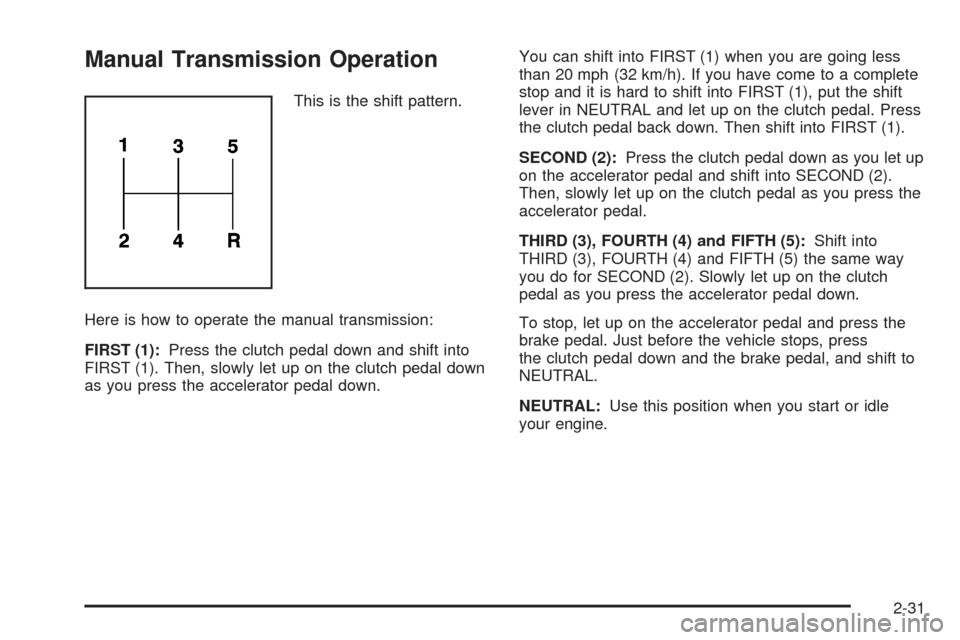
This is the shift pattern.
Here is how to operate the manual transmission:
FIRST (1):Press the clutch pedal down and shift into
FIRST (1). Then, slowly let up on the clutch pedal down
as you press the accelerator pedal down.You can shift into FIRST (1) when you are going less
than 20 mph (32 km/h). If you have come to a complete
stop and it is hard to shift into FIRST (1), put the shift
lever in NEUTRAL and let up on the clutch pedal. Press
the clutch pedal back down. Then shift into FIRST (1).
SECOND (2):Press the clutch pedal down as you let up
on the accelerator pedal and shift into SECOND (2).
Then, slowly let up on the clutch pedal as you press the
accelerator pedal.
THIRD (3), FOURTH (4) and FIFTH (5):Shift into
THIRD (3), FOURTH (4) and FIFTH (5) the same way
you do for SECOND (2). Slowly let up on the clutch
pedal as you press the accelerator pedal down.
To stop, let up on the accelerator pedal and press the
brake pedal. Just before the vehicle stops, press
the clutch pedal down and the brake pedal, and shift to
NEUTRAL.
NEUTRAL:Use this position when you start or idle
your engine.
2-31
Page 110 of 430
REVERSE (R):To back up, press down the clutch
pedal and shift into REVERSE (R). Let up on the clutch
pedal slowly while pressing the accelerator pedal.
Notice:Shifting to REVERSE (R) while your vehicle
is moving forward could damage the transmission.
The repairs would not be covered by your warranty.
Shift to REVERSE (R) only after your vehicle is
stopped.
Also, use REVERSE (R), along with the parking brake,
for parking your vehicle.
Shift Speeds
{CAUTION:
If you skip a gear when you downshift, you
could lose control of your vehicle. You could
injure yourself or others. Do not shift down
more than one gear at a time when you
downshift.
Up-Shift Light
If you have a manual
transmission, you may
have an up-shift light. This
light will show you when
to shift to the next
higher gear for the best
fuel economy.
When this light comes on, you can shift to the next
higher gear if weather, road, and traffic conditions let
you. For the best fuel economy, accelerate slowly
and shift when the light comes on.
While you accelerate, it is normal for the light to go on
and off if you quickly change the position of the
accelerator. Ignore the light when you downshift.
2-32
Page 114 of 430
Shifting Out of PARK (P) (Automatic
Transmission)
This vehicle is equipped with an electronic shift lock
release system. The shift lock release is designed to:
Prevent ignition key removal unless the shift
lever is in PARK (P) with the shift lever button fully
released, and
Prevent movement of the shift lever out of PARK (P)
unless the ignition is in ON/RUN or
ACC/ACCESSORY and the regular brake pedal is
applied.
The shift lock release is always functional except in the
case of a an uncharged or low voltage (less than 9 volt)
battery.
If your vehicle has an uncharged battery or a battery
with low voltage, try charging or jump starting the
battery. SeeJump Starting on page 5-38for more
information.To shift out of PARK (P):
1. Apply the brake pedal.
2. Then press the shift lever button.
3. Move the shift lever to the desired position.
If you still are unable to shift out of PARK (P):
1. Fully release the shift lever button.
2. While holding down the brake pedal, press the shift
lever button again.
3. Move the shift lever to the desired position.
If you still cannot move the shift lever from PARK (P),
consult your dealer or a professional towing service.
Parking Your Vehicle (Manual
Transmission)
Before leaving your vehicle, fully press the clutch pedal
down, move the shift lever into REVERSE (R), and
rmly apply the parking brake. Once the shift lever has
been placed in REVERSE (R) with the clutch pedal
pressed down, you can turn the ignition key to LOCK,
remove the key and release the clutch pedal. See
Manual Transmission Operation on page 2-31.
2-36
Page 145 of 430
J(On/Off):Press this button to turn the cruise control
system on and off. The indicator light on the button
will be on when the cruise control is on and go off when
the cruise control is turned off.
RES+ (Resume):Press this button to resume a set
speed and to accelerate the speed.
SET−(Set):Press this button to set a speed and to
decrease the speed.
To set a speed do the following:
1. Press the on/off button to turn cruise control on.
The indicator light on the button will come on.
2. Get to the speed you want.
3. Press the SET−control button and release it. The
CRUISE ENGAGED message will appear on the
Driver Information Center (DIC) to show the system
is engaged.
4. Take your foot off the accelerator pedal.
When you apply the brakes or operate the clutch pedal,
the cruise control will shut off.
If the vehicle is in cruise control and the Traction
Control System (TCS) begins to limit wheel spin, the
cruise control will automatically disengage. SeeTraction
Control System (TCS) on page 4-6andEnhanced
Traction System (ETS) on page 4-9. When road
conditions allow, the cruise control can be used again.Resuming a Set Speed
Suppose the cruise control is set at a desired speed
and then the brake is applied. This will disengage
the cruise control. To return to the previously set speed,
you do not need to go through the set process again.
Once the vehicle is going about 25 mph (40 km/h)
or more, you can press the RES+ part of the button
briey.
The vehicle goes back to the previously set speed.
Increasing Speed While Using Cruise
Control
There are two ways to go to a higher speed.
1. Disengage the cruise control by applying the brake
pedal, but do not turn it off. Accelerate to a higher
speed and reset the cruise control.
2. If the cruise control system is already engaged,
press the RES+ button. Hold it there until reach
the desired speed, and then release the button. To
increase the vehicle speed in very small amounts,
press the RES+ button briey and then release
it. Each time this is done, the vehicle goes about
1 mph (1.6 km/h) faster.
3-13
Page 146 of 430
Reducing Speed While Using Cruise
Control
If the cruise control system is already engaged,
Push and hold the SET−button until the lower
speed desired is reached, then release it.
To slow down in very small amounts, push the
SET−button briey. Each time this is done,
the vehicle goes about 1 mph (1.6 km/h) slower.
Passing Another Vehicle While Using
Cruise Control
Use the accelerator pedal to increase the vehicle speed.
When you take your foot off the pedal, the vehicle
slows down to the cruise control speed you set earlier.
Using Cruise Control on Hills
How well your cruise control will work on hills depends
upon the vehicle speed, load and the steepness of
the hills. When going up steep hills, you might have to
step on the accelerator pedal to maintain the vehicle
speed. When going downhill, you might have to brake or
shift to a lower gear to keep the vehicle speed down.
When the brakes are applied the cruise control turns off.
Many drivers nd this to be too much trouble and do
not use cruise control on steep hills.
Ending Cruise Control
To end cruise control, step lightly on the brake pedal or
the clutch pedal if your vehicle has a manual
transmission.
Stepping on the brake pedal or clutch pedal will only end
the current cruise control session. Press the cruise
control on/off button to turn the system completely off.
Erasing Speed Memory
The cruise control set speed memory is erased when
the cruise control or the ignition is turned off.
3-14
Page 255 of 430
Service............................................................5-3
Accessories and Modications..........................5-3
California Proposition 65 Warning.....................5-3
California Perchlorate Materials Requirements.....5-4
Doing Your Own Service Work.........................5-4
Adding Equipment to the Outside of Your
Vehicle......................................................5-4
Fuel................................................................5-5
Gasoline Octane............................................5-5
Gasoline Specications....................................5-5
California Fuel...............................................5-6
Additives.......................................................5-6
Fuels in Foreign Countries...............................5-7
Filling the Tank..............................................5-7
Filling a Portable Fuel Container.....................5-10
Checking Things Under the Hood....................5-10
Hood Release..............................................5-11
Engine Compartment Overview.......................5-12
Engine Oil...................................................5-15
Engine Oil Life System..................................5-19
Engine Air Cleaner/Filter................................5-20
Automatic Transmission Fluid.........................5-23
Manual Transmission Fluid.............................5-23
Hydraulic Clutch...........................................5-23
Engine Coolant.............................................5-24
Pressure Cap...............................................5-26Engine Overheating.......................................5-26
Cooling System............................................5-28
Windshield Washer Fluid................................5-33
Brakes........................................................5-34
Battery........................................................5-37
Jump Starting...............................................5-38
Headlamp Aiming...........................................5-43
Bulb Replacement..........................................5-46
Halogen Bulbs
..............................................5-46
Headlamps, Front Turn Signal, and Parking
Lamps.....................................................5-46
Center High-Mounted Stoplamp (CHMSL).........5-48
Taillamps, Turn Signal, Stoplamps and
Back-up Lamps.........................................5-49
License Plate Lamp......................................5-50
Replacement Bulbs.......................................5-50
Windshield Wiper Blade Replacement..............5-50
Tires..............................................................5-52
Tire Sidewall Labeling...................................5-53
Tire Terminology and Denitions.....................5-57
Ination - Tire Pressure.................................5-60
Tire Pressure Monitor System.........................5-61
Tire Pressure Monitor Operation.....................5-63
Tire Inspection and Rotation...........................5-66
When It Is Time for New Tires.......................5-68
Section 5 Service and Appearance Care
5-1
Page 267 of 430

A. Windshield Washer Fluid Reservoir. See “Adding
Washer Fluid” underWindshield Washer Fluid
on page 5-33.
B. Pressure Cap. SeePressure Cap on page 5-26.
C. Coolant Recovery Tank. See “Checking Coolant”
underEngine Coolant on page 5-24.
D. Engine Air Cleaner/Filter. SeeEngine Air
Cleaner/Filter on page 5-20.
E. Electric Engine Cooling Fan (Out of View). See
Cooling SystemCooling System on page 5-28.
F. Engine Oil Fill Cap. See “When to Add Engine Oil”
underEngine Oil on page 5-15.G. Engine Oil Dipstick (Out of View). See “Checking
Engine Oil” underEngine Oil on page 5-15.
H. Brake Master Cylinder Reservoir. SeeBrakes on
page 5-34andHydraulic Clutch on page 5-23.
I. Remote Positive (+) Terminal. SeeJump Starting
on page 5-38.
J. Engine Compartment Fuse Block. SeeEngine
Compartment Fuse Block on page 5-122.
K. Remote Negative (−) Terminal. SeeJump Starting
on page 5-38.
5-13