2008 CHEVROLET EQUINOX battery
[x] Cancel search: batteryPage 184 of 436
STABILITRAK NOT READY
This message may display and a warning light on the
instrument panel cluster may be on after rst driving the
vehicle and exceeding 30 mph (48 km/h) for 30 seconds.
SeeTraction Control System (TCS) Warning Light on
page 3-32. The StabiliTrak
®System is not functional
until the light has turned off. SeeStabiliTrak®System
on page 4-7for more information.
STABILITRAK OFF
This message displays any time the StabiliTrak®System
turns off. When this message has been displayed,
StabiliTrak
®is no longer available to assist you with
directional control of the vehicle. Adjust your driving
accordingly. SeeStabiliTrak
®System on page 4-7.
This message displays only while the ignition is in
ON/RUN.
Any of the following conditions may cause the
StabiliTrak
®System to turn off:
The StabiliTrak®System is turned off by
pressing and holding the traction control button.
SeeStabiliTrak
®System on page 4-7for more
information.
The battery is low.
There is a StabiliTrak®System failure.
See your dealer/retailer for service.
STARTING DISABLD (Disabled)
SERVICE THRTTLE (Throttle)
This message displays if the starting of the engine is
disabled due to the electronic throttle control system.
Have your vehicle serviced by your dealer/retailer
immediately.
This message only appears while the ignition is in
ON/RUN, and will not disappear until the problem
is resolved.
This message cannot be acknowledged.
THEFT ATTEMPTED
This message displays if the content theft-deterrent
system has detected a break-in attempt while you were
away from your vehicle. SeeContent Theft-Deterrent
on page 2-17for more information.
3-56
Page 185 of 436
TIRE LEARNING ACTIVE
This message displays when the Tire Pressure Monitor
System (TPMS) is re-learning the tire positions on your
vehicle. The tire positions must be re-learned after
rotating the tires or after replacing a tire or sensor. See
Tire Inspection and Rotation on page 5-67,Tire Pressure
Monitor System on page 5-62, andInflation - Tire
Pressure on page 5-59for more information.
TRACTION CONTROL OFF
This message displays when the Traction Control
System (TCS) turns off. SeeTraction Control System
(TCS) on page 4-6for more information.
This message only displays while the ignition is in
ON/RUN and disappears after 10 seconds, unless
it is acknowledged or an urgent warning appears.
Any of the following conditions may cause the TCS
to turn off:
The TCS is turned off by pressing the traction
control button. SeeTraction Control System (TCS)
on page 4-6for more information.
The battery is low.
There is a TCS failure.
See your dealer/retailer for service.
TRACTION CONTROL ON
This message displays when the Traction Control
System (TCS) turns on. SeeTraction Control System
(TCS) on page 4-6for more information.
TURN SIGNAL ON
This message displays as a reminder to turn off the
turn signal if you drive your vehicle for more than
about 0.75 mile (1.2 km) with a turn signal on.
SeeTurn Signal/Multifunction Lever on page 3-7.
This message displays and a chime sounds only
when the ignition is in ON/RUN. The message will not
disappear until the turn signal is manually turned off,
or a turn is completed.
3-57
Page 186 of 436
DIC Vehicle Personalization
Your vehicle has personalization capabilities that allow
you to program certain features to one preferred setting.
All of the personalization options may not be available
on your vehicle. Only the options available will be
displayed on the DIC.
The default settings for the personalization features were
set when your vehicle left the factory, but may have been
changed from their default state since then.
The personalization preferences are automatically
recalled.
To change personalization preferences, use the
following procedure.
Entering the Feature Settings Menu
1. Turn the ignition on and place the vehicle
in PARK (P).
To avoid excessive drain on the battery, it is
recommended that the headlamps are turned off.
2. Press the vehicle information button until
FEATURE SETTNGS (Settings): PRESS
VTO
SELCT (Select) appears on the DIC display.3. Press the set/reset button to enter the feature
settings menu.
If the menu is not available, FEATURE SETTNGS
(Settings): AVAILABLE IN PRK (Park) will display.
Before entering the menu, make sure the vehicle
is in PARK (P).
Feature Settings Menu Items
The following are personalization features that allow
you to program settings to the vehicle:
DISPLAY ENGLISH
This feature will only display if a language other than
English has been set. This feature allows you to
change the language in which the DIC messages
appear to English.
Press the vehicle information button until the
PRESS
VTO DISPLAY ENGLISH screen appears
on the DIC display. Press the set/reset button to
display all DIC messages in English.
DISPLAY LANG. (Language)
This feature allows you to select the language in
which the DIC messages will appear.
3-58
Page 227 of 436
Rear Seat Entertainment (RSE)
System
Your vehicle may have a DVD Rear Seat
Entertainment (RSE) system. The RSE system works
with the vehicle’s audio system. The DVD player is
part of the front radio. The RSE system includes a
radio with a DVD player, a video display screen,
audio/video jacks, two wireless headphones, and a
remote control. SeeRadio(s) on page 3-68for more
information on the vehicle’s audio/DVD system.
Parental Control
The RSE system may have a Parental Control feature,
depending on which radio you have. To enable
Parental Control, press and hold the radio power button
for more than two seconds to stop all system features
such as: radio, video screen, RSA, DVD and/or CD.
While Parental Control is on, a padlock icon displays.
When the radio is turned back on, Parental Control
is unlocked.
Before You Drive
The RSE is designed for rear seat passengers only.
The driver cannot safely view the video screen
while driving and should not try to do so.
In severe or extreme weather conditions the RSE
system might not work until the temperature is within
the operating range. The operating range for the
RSE system is above−4°F (−20°C) or below
140°F (60°C). If the temperature of your vehicle is
outside of this range, heat or cool the vehicle until
the temperature is within the operating range of
the RSE system.
Headphones
The RSE includes two sets of wireless headphones that
are only dedicated to this system. These headphones
are used to listen to the DVD radio or an auxiliary device
connected to the RCA jacks. The wireless headphones
have an ON/OFF switch and a volume control.
To use the headphones, turn the switch to ON. An
indicator light located on the headphones illuminates.
If the light does not illuminate, the batteries might need
to be replaced. See “Battery Replacement” later in
this section for more information. Switch the headphones
to OFF when not in use.
3-99
Page 228 of 436
The infrared transmitters are located in the display
below the video screen. The headphones shut off
automatically to save the battery power if the RSE
system and RSA are shut off or if the headphones
are out of range of the transmitters for more than
three minutes. If you move too far forward or step out
of the vehicle, the headphones lose the audio signal.
To adjust the volume on the headphones, use the
volume control located on the right side.
Notice:Do not store the headphones in heat or
direct sunlight. This could damage the headphones
and repairs will not be covered by your warranty.
Storage in extreme cold can weaken the batteries.
Keep the headphones stored in a cool, dry place.
The foam ear pads attached to the headphones
can become worn or damaged if they are not
handled or stored properly. If the foam ear pads
do become damaged or worn out, the pads can be
replaced separately from the headphone set. It is not
necessary to replace the complete headphone set.
The headphone replacement foam ear pads can
be ordered in pairs. See your dealer/retailer for
more information.Battery Replacement
To change the batteries on the headphones,
do the following:
1. Turn the screw to loosen the battery door
located on the left side of the headphones.
Slide the battery door open.
2. Replace the two batteries in the compartment.
Make sure that they are installed correctly,
using the diagram on the inside of the battery
compartment.
3. Replace the battery door and tighten the
door screw.
If the headphones are to be stored for a long period
of time, remove the batteries and keep them in
a cool, dry place.
3-100
Page 231 of 436
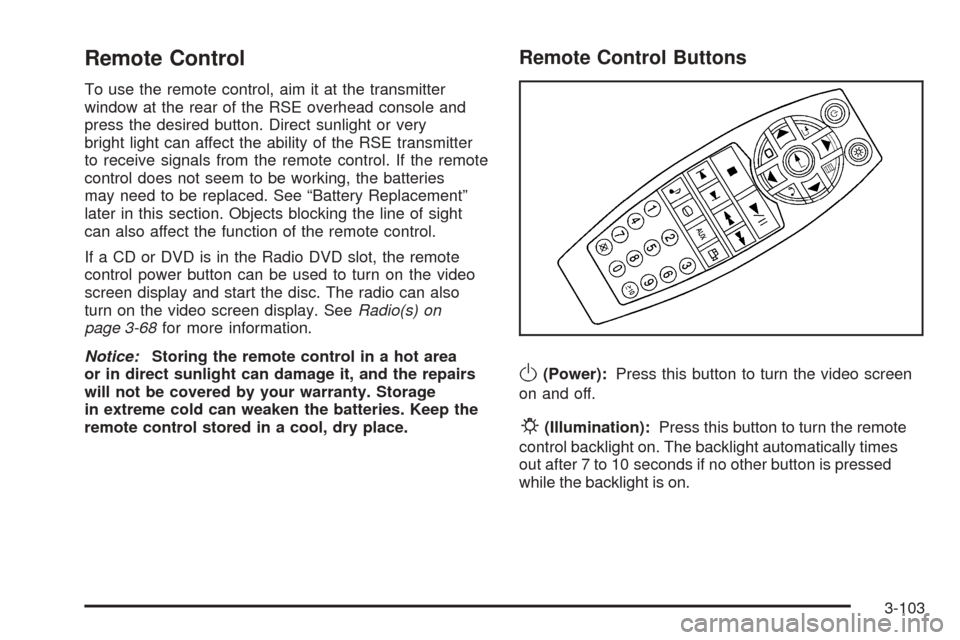
Remote Control
To use the remote control, aim it at the transmitter
window at the rear of the RSE overhead console and
press the desired button. Direct sunlight or very
bright light can affect the ability of the RSE transmitter
to receive signals from the remote control. If the remote
control does not seem to be working, the batteries
may need to be replaced. See “Battery Replacement”
later in this section. Objects blocking the line of sight
can also affect the function of the remote control.
If a CD or DVD is in the Radio DVD slot, the remote
control power button can be used to turn on the video
screen display and start the disc. The radio can also
turn on the video screen display. SeeRadio(s) on
page 3-68for more information.
Notice:Storing the remote control in a hot area
or in direct sunlight can damage it, and the repairs
will not be covered by your warranty. Storage
in extreme cold can weaken the batteries. Keep the
remote control stored in a cool, dry place.
Remote Control Buttons
O(Power):Press this button to turn the video screen
on and off.
P(Illumination):Press this button to turn the remote
control backlight on. The backlight automatically times
out after 7 to 10 seconds if no other button is pressed
while the backlight is on.
3-103
Page 234 of 436
Battery Replacement
To change the remote control batteries, do the following:
1. Slide the rear cover back on the remote control.
2. Replace the two batteries in the compartment.
Make sure that they are installed correctly,
using the diagram on the inside of the battery
compartment.
3. Replace the battery cover.
If the remote control is to be stored for a long period
of time, remove the batteries and keep them in a cool,
dry place.
Problem Recommended Action
No power. The ignition might not
be turned ON/RUN or in
ACC/ACCESSORY.
The picture does not
ll the screen. There are
black borders on the
top and bottom or on
both sides or it looks
stretched out.Check the display mode
settings in the setup
menu by pressing the
display menu button on
the remote control.
Problem Recommended Action
In auxiliary mode, the
picture moves or scrolls.Check the auxiliary
input connections at
both devices.
The remote control
does not work.Check to make sure
there is no obstruction
between the remote
control and the
transmitter window.
Check the batteries to
make sure they are not
dead or installed
incorrectly.
After stopping the
player, I push Play but
sometimes the DVD
starts where I left off
and sometimes at the
beginning.If the stop button was
pressed one time, the
DVD player resumes
playing where the DVD
was stopped. If the stop
button was pressed
two times the DVD player
begins to play from the
beginning of the DVD.
3-106
Page 236 of 436
Cleaning the RSE Overhead Console
When cleaning the RSE overhead console surface,
use only a clean cloth dampened with clean water.
Cleaning the Video Screen
When cleaning the video screen, use only a clean cloth
dampened with clean water. Use care when directly
touching or cleaning the screen, as damage can result.
Theft-Deterrent Feature
THEFTLOCK®is designed to discourage theft of your
vehicle’s radio. It works by using a secret code to
disable all radio functions when battery power is
removed and the radio is placed in a different vehicle.
This feature requires no user input to be activated.
The radio is automatically armed when it is put into
the vehicle for the rst time.
If THEFTLOCK is activated, the radio does not operate
if stolen. The radio displays LOCKED. If this occurs,
the radio needs to be returned to your dealer/retailer.
Audio Steering Wheel Controls
Vehicles with audio
steering wheel controls
may be different depending
on your vehicle’s options.
Some audio controls
can be adjusted at the
steering wheel. They
include the following:
xw(Next/Previous):Press the down or up arrow
to go to the next or to the previous radio station stored
as a favorite.
3-108