2008 CHEVROLET CORVETTE instrument cluster
[x] Cancel search: instrument clusterPage 59 of 432
If you ever pull the shoulder portion of the belt out all
the way, you will engage the child restraint locking
feature. This may unintentionally cause the passenger
sensing system to turn the airbag(s) off for some
adult size occupants. If this happens, just let the belt go
back all the way and start again.
{CAUTION:
If the airbag readiness light in the instrument
panel cluster ever comes on and stays on,
it means that something may be wrong with
the airbag system. If this ever happens, have
the vehicle serviced promptly, because an
adult-size person sitting in the right front
passenger’s seat may not have the protection
of the airbag(s). SeeAirbag Readiness Light
on page 3-37for more on this, including
important safety information.A thick layer of additional material, such as a blanket
or cushion, or aftermarket equipment such as seat
covers, seat heaters, and seat massagers can affect
how well the passenger sensing system operates.
We recommend that you not use seat covers or other
aftermarket equipment other than any that GM has
approved for your specic vehicle. SeeAdding
Equipment to Your Airbag-Equipped Vehicle on
page 1-56for more information about modications
that can affect how the system operates.
{CAUTION:
Stowing of articles under the passenger seat
or between the passenger seat cushion and
seatback may interfere with the proper
operation of the passenger sensing system.
1-55
Page 137 of 432
Instrument Panel Overview...............................3-4
Hazard Warning Flashers................................3-6
Other Warning Devices...................................3-7
Horn .............................................................3-7
Tilt Wheel.....................................................3-7
Turn Signal/Multifunction Lever.........................3-8
Turn and Lane-Change Signals (Auto Signal).....3-9
Headlamp High/Low-Beam Changer..................3-9
Flash-to-Pass...............................................3-10
Windshield Wipers........................................3-10
Windshield Washer.......................................3-11
Cruise Control..............................................3-11
Exterior Lamps.............................................3-15
Wiper Activated Headlamps............................3-16
Headlamps on Reminder................................3-16
Daytime Running Lamps (DRL).......................3-16
Fog Lamps ..................................................3-17
Twilight Sentinel
®..........................................3-18
Exterior Lighting Battery Saver........................3-19
Instrument Panel Brightness...........................3-19
Courtesy Lamps...........................................3-19
Entry/Exit Lighting.........................................3-19
Reading Lamps............................................3-20Battery Run-Down Protection..........................3-20
Head-Up Display (HUD).................................3-20
Accessory Power Outlet(s).............................3-24
Ashtray(s) and Cigarette Lighter......................3-25
Climate Controls............................................3-26
Dual Automatic Climate Control System...........3-26
Outlet Adjustment.........................................3-32
Passenger Compartment Air Filter...................3-32
Warning Lights, Gages, and Indicators............3-34
Instrument Panel Cluster................................3-35
Speedometer and Odometer...........................3-36
Tachometer.................................................3-36
Safety Belt Reminders...................................3-36
Airbag Readiness Light..................................3-37
Passenger Airbag Status Indicator...................3-38
Voltmeter Gage............................................3-40
One-to-Four Shift Light
(Manual Transmission)...............................3-40
Brake System Warning Light..........................3-41
Antilock Brake System (ABS) Warning Light........3-42
Traction Control System (TCS) Warning Light......3-42
Active Handling System Light.........................3-43
Engine Coolant Temperature Gage..................3-44
Section 3 Instrument Panel
3-1
Page 141 of 432
The main components of your instrument panel are the following:
A. Air Outlet. SeeOutlet Adjustment on page 3-32.
B. Head-Up Display Controls (If Equipped).
SeeHead-Up Display (HUD) on page 3-20.
C. Turn Signal/Multifunction Lever. SeeTurn
Signal/Multifunction Lever on page 3-8. Cruise
Control. SeeCruise Control on page 3-11. Fog
Lamps. SeeFog Lamps on page 3-17. Headlamp
Controls. SeeExterior Lamps on page 3-15.
D. Manual Shift Paddles (If Equipped). SeeAutomatic
Transmission Operation on page 2-26.
E. Driver Information Center (DIC). SeeDriver
Information Center (DIC) on page 3-51.
F. Instrument Panel Cluster. SeeInstrument Panel
Cluster on page 3-35.
G. Audio Steering Wheel Controls (If Equipped).
SeeAudio Steering Wheel Controls on page 3-103.
H. Windshield Wiper/Washer Lever. SeeWindshield
Wipers on page 3-10andWindshield Washer
on page 3-11.
I. Driver Information Center (DIC) Controls.
SeeDIC Operation and Displays on page 3-52.J. Center Air Outlets. SeeOutlet Adjustment on
page 3-32.
K. Hazard Warning Flasher Button. SeeHazard
Warning Flashers on page 3-6.
L. Audio System. SeeAudio System(s) on page 3-84.
M. Climate Controls. SeeDual Automatic Climate
Control System on page 3-26.
N. Fuel Door Release Button. SeeFilling the Tank
on page 5-8. Hatch/Trunk Release Button.
See “Hatch/Trunk Lid Release” underHatch on
page 2-13.
O. Instrument Panel Brightness Control. SeeInstrument
Panel Brightness on page 3-19.
P. Power Folding Top Switch (If Equipped).
SeeConvertible Top (Manual) on page 2-62or
Convertible Top (Power) on page 2-68.
Q. Tilt Wheel Lever. SeeTilt Wheel on page 3-7.
R. Telescopic Wheel Button (If Equipped). SeeTilt
Wheel on page 3-7.
S. Ignition Switch. SeeIgnition Positions on page 2-22.
3-5
Page 145 of 432
Turn and Lane-Change Signals
(Auto Signal)
The turn signal has two upward (for right) and two
downward (for left) positions. These positions allow you
to signal a turn or a lane change.
To signal a turn, move the multifunction lever all the
way up or down. When the turn is nished, the lever will
return automatically.
An arrow on the instrument
panel cluster will ash in
the direction of the
turn or lane change.
To signal a lane change, just raise or lower the lever
until the arrow starts to ash. Release the lever and the
turn signal will automatically ash three times. If more
ashes are desired, continue to hold the lever.
If you signal a turn or a lane change and the arrows ash
faster than normal, a signal bulb may be burned out.If a bulb is burned out, replace it to help avoid an
accident. If the arrows do not go on at all when you
signal a turn, check the fuses and check for burned-out
bulbs. SeeFuses and Circuit Breakers on page 5-100.
Turn Signal on Chime
A chime will remind you if you leave the turn signal on
for more than three-quarters of a mile (1.2 km) of
driving.
If you need to leave the turn signal on for more than
three-quarters of a mile (1.2 km), turn off the signal and
then turn it back on.
Headlamp High/Low-Beam Changer
To change the headlamps from low beam to high,
push the turn signal lever all the way forward. To change
from high to low beam, pull the lever rearward.
While the high beams are
on, this light on the
instrument panel cluster
will also be lit.
3-9
Page 153 of 432
When it is dark enough outside, the front turn signal
lamps turn off and the normal low-beam headlamps
turn on.
When it is bright enough outside, the regular lamps
go off, and the front turn signal lamps will take over.
If the vehicle is started in a dark garage, the automatic
headlamp system will come on immediately. Once
the vehicle leaves the garage, it takes approximately
one minute for the automatic headlamp system to
change to DRL if it is light outside. During that delay,
the instrument panel cluster may not be as bright
as usual. Make sure the instrument panel brightness
knob is in the full bright position. SeeInstrument Panel
Brightness on page 3-19for more information.
If it is dark enough outside and the exterior lamp control
is off, a HEADLAMPS SUGGESTED message will
display on the Driver’s Information Center (DIC).
SeeDIC Warnings and Messages on page 3-57.
Turning the exterior lamp control to off a second time,
or turning on the headlamps will remove the
HEADLAMPS SUGGESTED message in the DIC.
If the parking lamps or the fog lamps were turned on
instead, the HEADLAMPS SUGGESTED message
will continue to be displayed.
The regular headlamp system should be turned on
when needed.To turn off the DRL, turn the exterior lamp control to
the off position or shift into PARK (P). The DRL
will stay off until the control is toggled again or the
vehicle is shifted out of PARK (P).
This procedure applies only to vehicles rst sold in the
United States.
Fog Lamps
Use fog lamps for better vision in foggy or misty
conditions.
The fog lamps control is located on the multifunction
lever next to the exterior lamp control.
-(Fog Lamps):Turning the band to this position will
turn the fog lamps on.
When you turn the fog lamps on, the fog lamp light will
appear on the instrument panel cluster to indicate
that the fog lamps and the parking lamps are on.
If you turn the high-beam headlamps on, the fog lamps
will turn off. They will turn on again when you switch
to low-beam headlamps.
The ignition must be on for the fog lamps to operate.
Some localities have laws that require the headlamps to
be on along with the fog lamps.
3-17
Page 154 of 432

Twilight Sentinel®
Twilight Sentinel®can turn your lamps on and off for you.
A light sensor on top of the instrument panel makes the
Twilight Sentinel
®work, so be sure it is not covered.
With Twilight Sentinel
®, you will see the following
happen:
When it is dark enough outside, the front turn signal
lamps (DRL) will go off, and the headlamps and
parking lamps will come on. The other lamps
that come on with headlamps will also come on.
When it is bright enough outside, the headlamps
will go off, and the front turn signal lamps (DRL)
will come on, as long as the exterior lamp switch is
in the AUTO position.
If you start your vehicle in a dark garage, the automatic
headlamp system will come on immediately. Once you
leave the garage, it will take about one minute for the
automatic headlamp system to change to DRL if it is light
outside. During that delay, your instrument panel cluster
may not be as bright as usual. Make sure your instrument
panel brightness control is in full bright position.
SeeInstrument Panel Brightness on page 3-19.You can idle the vehicle with the lamps off, even when
it is dark outside.
After starting the vehicle, turn the exterior lamp control
band on the multifunction lever to off and then
release it. The lamps will remain off until you turn the
control band to off again.
Twilight Sentinel
®also provides exterior illumination as
you leave the vehicle. If Twilight Sentinel®has turned
on the lamps when you turn off the ignition, your lamps
will remain on until:
The exterior lamp switch is moved from off to the
parking lamp position, or
A delay time that you select has elapsed.
See “Personal Options” underDIC Vehicle
Personalization on page 3-75to select the delay time
that you want. You can also select no delay time.
If you turn off the ignition with the exterior lamp switch
in the parking lamp or headlamp position, the Twilight
Sentinel
®delay will not occur. The lamps will turn off as
soon as the switch is turned off.
As with any vehicle, you should turn on the regular
headlamp system when you need it.
3-18
Page 156 of 432
Reading Lamps
The inside rearview mirror includes two reading lamps.
The lamps will go on when a door is opened. When
the doors are closed, each lamp can be turned on
individually by pressing the switch for that lamp.
An ambient light is located in the passenger sun visor
clip. This light stays on while driving to keep the
cabin from being too dark.
Battery Run-Down Protection
This vehicle has a feature to help prevent the battery
from being drained in case any of the following
lamps are left on; the underhood lamp, if your vehicle
has this feature, vanity mirror lamps, cargo lamps,
reading lamps, console or glove box lamps. If any of
these lamps are left on, they will automatically time-out
after about 10 minutes. To reset it, all of the above
lamps must be turned off or the ignition key on.
Head-Up Display (HUD)
{CAUTION:
If the HUD image is too bright, or too high in
your eld of view, it may take you more time to
see things you need to see when it is dark
outside. Be sure to keep the HUD image dim
and placed low in your eld of view.
If your vehicle has the Head-Up Display (HUD), you can
see some of the driver information that appears on
the instrument panel cluster.
The information may be displayed in English or metric
units and appears as an image focused out toward
the front of the vehicle. The HUD consists of the
following information:
Speedometer
Turn Signal Indicators
High-Beam Indicator Symbol
Tachometer
3-20
Page 158 of 432
When the desired HUD display has been selected,
release the MODE button.
Within each mode, the display, can be further
customized by pressing the PAGE button. Pressing this
button in each mode will turn off and on the following:
Street Mode — No tachometer, circular tachometer,
and linear tachometer.
Track Modes 1 and 2 — No minor gage, coolant
temperature, transmission oil temperature, engine
oil temperature, and engine oil pressure.
While in Track Mode 1 or 2, the maximum G value
achieved during the current ignition cycle can be
displayed by pressing and holding the PAGE button.
The maximum G display will be shown until the
PAGE button is released. The maximum G value
display will be identical to the normal G value
display, except the maximum G gage digits (X.XX G)
and corresponding G gage bar will overwrite the
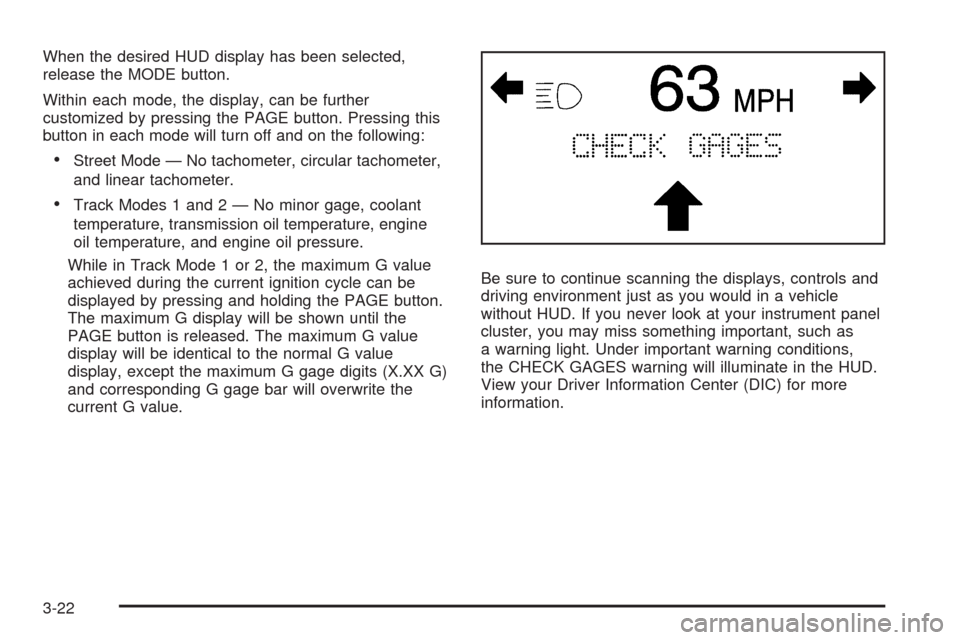
current G value.Be sure to continue scanning the displays, controls and
driving environment just as you would in a vehicle
without HUD. If you never look at your instrument panel
cluster, you may miss something important, such as
a warning light. Under important warning conditions,
the CHECK GAGES warning will illuminate in the HUD.
View your Driver Information Center (DIC) for more
information.
3-22