2008 CHEVROLET CORVETTE brake light
[x] Cancel search: brake lightPage 208 of 432
TRACTION SYSTEM ACTIVE
This message displays when the Traction Control
System (TCS) is limiting wheel spin. Slippery road
conditions may exist if this message is displayed, so
adjust your driving accordingly. The message stays on
for a few seconds after the TCS stops limiting wheel
spin. SeeTraction Control System (TCS) on page 4-6
for more information.
TRACTION SYSTEM AND ACTIVE
HANDLING – OFF
This message displays, the instrument panel cluster
light turns on, and a chime sounds when the Traction
Control System (TCS) and Active Handling System
are turned off by pressing the Active Handling System
button on the console for ve seconds. The Antilock
Brake System (ABS) remains on with the TCS and
Active Handling System off. Adjust your driving
accordingly. SeeTraction Control System (TCS) on
page 4-6andActive Handling System on page 4-7
for more information.
To acknowledge this message, press the RESET
button.
TRACTION SYSTEM AND ACTIVE
HANDLING – ON
If the Traction Control System (TCS) and Active
Handling System are off, this message displays briey,
the instrument panel cluster light turns off, and a
chime sounds when the TCS and Active Handling
System are turned on by briey pressing the Active
Handling System button on the console. SeeTraction
Control System (TCS) on page 4-6andActive Handling
System on page 4-7for more information.
TRACTION SYSTEM – OFF
This message displays and stays on, a single, quick
tone sounds, and the traction control system (TCS)
warning light on the instrument panel cluster turns on
when the TCS is turned off by pressing the Active
Handling System button on the console. SeeTraction
Control System (TCS) Warning Light on page 3-42.
SeeTraction Control System (TCS) on page 4-6
for more information.
To acknowledge the message, press the RESET button.
3-72
Page 246 of 432
Braking
SeeBrake System Warning Light on page 3-41.
Braking action involves perception time and reaction
time. First, you have to decide to push on the brake
pedal. That is perception time. Then you have to bring
up your foot and do it. That is reaction time.
Average reaction time is about three-fourths of a
second. But that is only an average. It might be less
with one driver and as long as two or three seconds or
more with another. Age, physical condition, alertness,
coordination, and eyesight all play a part. So do alcohol,
drugs, and frustration. But even in three-fourths of a
second, a vehicle moving at 60 mph (100 km/h) travels
66 feet (20 m). That could be a lot of distance in an
emergency, so keeping enough space between
your vehicle and others is important.
And, of course, actual stopping distances vary greatly
with the surface of the road, whether it is pavement or
gravel; the condition of the road, whether it is wet, dry, or
icy; tire tread; the condition of the brakes; the weight of
the vehicle; and the amount of brake force applied.Avoid needless heavy braking. Some people drive
in spurts — heavy acceleration followed by heavy
braking — rather than keeping pace with traffic. This is a
mistake. The brakes might not have time to cool between
hard stops. The brakes will wear out much faster if you do
a lot of heavy braking. If you keep pace with the traffic
and allow realistic following distances, you will eliminate a
lot of unnecessary braking. That means better braking
and longer brake life.
If your vehicle’s engine ever stops while you are driving,
brake normally but do not pump the brakes. If you do,
the pedal could get harder to push down. If the
engine stops, you will still have some power brake
assist. But you will use it when you brake. Once the
power assist is used up, it can take longer to stop and
the brake pedal will be harder to push.
Under certain weather or operating conditions,
occasional brake squeak, squeal, or other noise might
be heard with your vehicle’s performance braking
system. This brake system is designed for superior fade
resistance and consistent operation using high
performance brake pads. Brake noise is normal and
does not affect system performance.
Adding non-dealer/non-retailer accessories can affect
your vehicle’s performance. SeeAccessories and
Modifications on page 5-3.
4-4
Page 247 of 432
Antilock Brake System (ABS)
Your vehicle has the Antilock Brake System (ABS), an
advanced electronic braking system that will help
prevent a braking skid.
When you start the engine and begin to drive away,
ABS will check itself. You might hear a momentary
motor or clicking noise while this test is going on, and
you might even notice that the brake pedal moves
a little. This is normal.
If there is a problem with
ABS, this warning light will
stay on. SeeAntilock Brake
System (ABS) Warning
Light on page 3-42.
Let us say the road is wet and you are driving safely.
Suddenly, an animal jumps out in front of you. You slam
on the brakes and continue braking. Here is what
happens with ABS:
A computer senses that wheels are slowing down. If
one of the wheels is about to stop rolling, the computer
will separately work the brakes at each wheel.ABS can change the brake pressure faster than any
driver could. The computer is programmed to make the
most of available tire and road conditions. This can
help you steer around the obstacle while braking hard.
As you brake, the computer keeps receiving updates
on wheel speed and controls braking pressure
accordingly.
Remember: ABS does not change the time you need to
get your foot up to the brake pedal or always decrease
stopping distance. If you get too close to the vehicle in
front of you, you will not have time to apply the brakes if
that vehicle suddenly slows or stops. Always leave
enough room up ahead to stop, even though you
have ABS.
Using ABS
Do not pump the brakes. Just hold the brake pedal
down rmly and let antilock work for you. You might hear
a motor or clicking noise and feel the brake pedal
move a little during a stop, but this is normal.
Braking in Emergencies
With ABS, you can steer and brake at the same time.
In many emergencies, steering can help you more than
even the very best braking.
4-5
Page 248 of 432
Traction Control System (TCS)
Your vehicle has a traction control system called TCS
that limits wheel spin. This is especially useful in slippery
road conditions. The system operates only if it senses
that the rear wheels are spinning too much or are
beginning to lose traction. When this happens, the
system works the rear brakes and reduces engine power
(by closing the throttle and managing engine spark) to
limit wheel spin.
The TRACTION SYSTEM ACTIVE message displays on
the Driver Information Center (DIC) when the TCS
system is limiting wheel spin. SeeDIC Warnings and
Messages on page 3-57. You may feel or hear the
system working, but this is normal.
If your vehicle is in cruise control when the TCS system
begins to limit wheel spin, the cruise control will
automatically disengage. When road conditions allow you
to safely use it again, you may re-engage the cruise
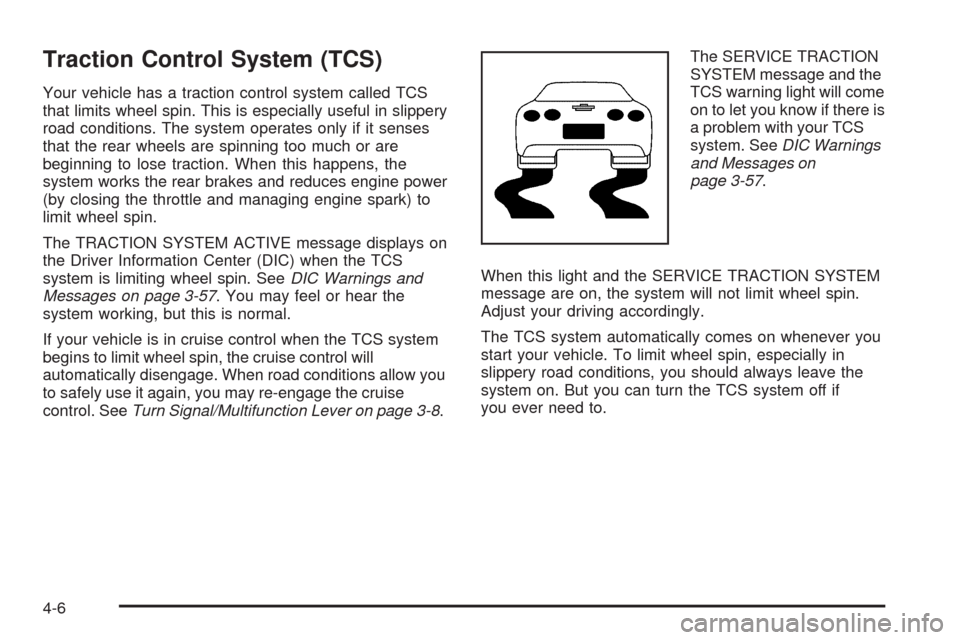
control. SeeTurn Signal/Multifunction Lever on page 3-8.The SERVICE TRACTION
SYSTEM message and the
TCS warning light will come
on to let you know if there is
a problem with your TCS
system. SeeDIC Warnings
and Messages on
page 3-57.
When this light and the SERVICE TRACTION SYSTEM
message are on, the system will not limit wheel spin.
Adjust your driving accordingly.
The TCS system automatically comes on whenever you
start your vehicle. To limit wheel spin, especially in
slippery road conditions, you should always leave the
system on. But you can turn the TCS system off if
you ever need to.
4-6
Page 249 of 432
To turn the system off,
press the button located
on the console.
You can turn the system on or off at any time by
pressing the ACTIVE HANDLING button. The DIC will
display the appropriate message when you push
the button.
Notice:When traction control is turned off, or
Competitive Driving Mode is active, it is possible to
lose traction. If you attempt to shift with the rear
wheels spinning with a loss of traction, it is possible
to cause damage to the transmission. Do not attempt
to shift when the rear wheels do not have traction.
Damage caused by misuse of the vehicle is not
covered. See your warranty book for additional
information.
Adding non-dealer/non-retailer accessories can affect
your vehicle’s performance. SeeAccessories and
Modifications on page 5-3for more information.Active Handling System
The Active Handling System is a computer controlled
system that helps the driver maintain directional control
of the vehicle in difficult driving conditions. This is
accomplished by selectively applying any one of the
vehicle’s brakes.
When you rst start your vehicle during cold winter
weather and begin to drive away, the message ACTIVE
HANDLING WARMING UP may be displayed in the
DIC. This is normal. You can acknowledge this message
by pressing the RESET button. The Active Handling
System performance is affected until the message,
ACTIVE HANDLING READY, is displayed in the DIC.
The ACTIVE HANDLING CALIBRATING message may
be displayed in the DIC and the instrument panel
cluster light will be on after exceeding 18 mph (30 km/h)
for 10 seconds. The Active Handling System is off
until the ACTIVE HANDLING READY message
is displayed. This could take up to 15 minutes.
The ACTIVE HANDLING message will come on when
the system is operating. SeeDIC Warnings and
Messages on page 3-57for more information. You may
also feel or hear the system working. This is normal.
4-7
Page 251 of 432
Competitive Driving Mode
The driver can select this optional handling mode by
pressing the ACTIVE HANDLING button on the
console two times within a ve second time period.
COMPETITIVE DRIVING MODE will be displayed in the
DIC. Competitive Driving Mode allows the driver to have
full control of the rear wheels while the Active Handling
System helps maintain directional control of the vehicle
by selective brake application. This involves less
intervention than with both the Active Handling System
and Traction Control Systems on. The instrument cluster
light will not be on. The Traction Control System will not
be operating. Adjust your driving accordingly.
When you press the ACTIVE HANDLING button again,
or press the Acc. button, the Active Handling and Traction
Control Systems will be on. The TRACTION SYSTEM
AND ACTIVE HANDLING-ON message will be displayed
temporarily in the DIC and a chime will be heard.Notice:When traction control is turned off, or
Competitive Driving Mode is active, it is possible to
lose traction. If you attempt to shift with the rear
wheels spinning with a loss of traction, it is possible
to cause damage to the transmission. Do not
attempt to shift when the rear wheels do not have
traction. Damage caused by misuse of the vehicle is
not covered. See your warranty book for additional
information.
Limited-Slip Rear Axle
Your limited-slip rear axle can give you additional
traction on snow, mud, ice, sand or gravel. It works like
a standard axle most of the time, but when one of
the rear wheels has no traction and the other does, this
feature will allow the wheel with traction to move the
vehicle.
4-9
Page 255 of 432
Off-Road Recovery
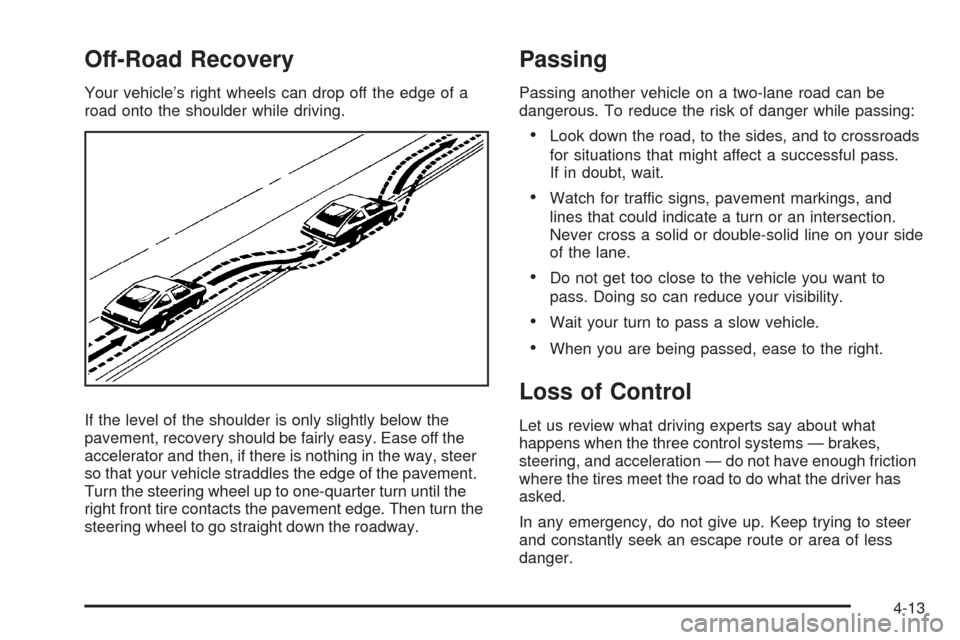
Your vehicle’s right wheels can drop off the edge of a
road onto the shoulder while driving.
If the level of the shoulder is only slightly below the
pavement, recovery should be fairly easy. Ease off the
accelerator and then, if there is nothing in the way, steer
so that your vehicle straddles the edge of the pavement.
Turn the steering wheel up to one-quarter turn until the
right front tire contacts the pavement edge. Then turn the
steering wheel to go straight down the roadway.
Passing
Passing another vehicle on a two-lane road can be
dangerous. To reduce the risk of danger while passing:
Look down the road, to the sides, and to crossroads
for situations that might affect a successful pass.
If in doubt, wait.
Watch for traffic signs, pavement markings, and
lines that could indicate a turn or an intersection.
Never cross a solid or double-solid line on your side
of the lane.
Do not get too close to the vehicle you want to
pass. Doing so can reduce your visibility.
Wait your turn to pass a slow vehicle.
When you are being passed, ease to the right.
Loss of Control
Let us review what driving experts say about what
happens when the three control systems — brakes,
steering, and acceleration — do not have enough friction
where the tires meet the road to do what the driver has
asked.
In any emergency, do not give up. Keep trying to steer
and constantly seek an escape route or area of less
danger.
4-13
Page 259 of 432
{CAUTION:
Wet brakes can cause crashes. They might not
work as well in a quick stop and could cause
pulling to one side. You could lose control of
the vehicle.
After driving through a large puddle of water
or a car/vehicle wash, lightly apply the brake
pedal until the brakes work normally.
Flowing or rushing water creates strong
forces. Driving through owing water could
cause your vehicle to be carried away. If this
happens, you and other vehicle occupants
could drown. Do not ignore police warnings
and be very cautious about trying to drive
through owing water.
Hydroplaning
Hydroplaning is dangerous. Water can build up under
your vehicle’s tires so they actually ride on the
water. This can happen if the road is wet enough and
you are going fast enough. When your vehicle is
hydroplaning, it has little or no contact with the road.
There is no hard and fast rule about hydroplaning. The
best advice is to slow down when the road is wet.
Other Rainy Weather Tips
Besides slowing down, other wet weather driving tips
include:
Allow extra following distance.
Pass with caution.
Keep windshield wiping equipment in good shape.
Keep the windshield washer uid reservoir lled.
Have good tires with proper tread depth. SeeTires
on page 5-58.
4-17