2008 CHEVROLET CORVETTE maintenance
[x] Cancel search: maintenancePage 193 of 432
Remember, you must reset the engine oil life system
yourself after each oil change. It will not reset itself.
To reset the system, seeEngine Oil Life System
on page 5-23. Be careful not to reset the engine oil life
system accidentally at any time other than when the
oil has just been changed. It cannot be reset accurately
until the next oil change.
SeeScheduled Maintenance on page 6-4andEngine
Oil on page 5-17for more information.
OPTION Button
The OPTION button allows you to access the
PERSONAL OPTIONS menu and customize the
personalization settings on your vehicle. SeeDIC
Vehicle Personalization on page 3-75for more
information.
RESET Button
The RESET button, used along with other buttons, will
reset system functions and turn off or acknowledge
messages on the DIC.
DIC Warnings and Messages
Messages are displayed on the DIC to notify the driver
that the status of the vehicle has changed and that
some action may be needed by the driver to correct the
condition. Multiple messages may appear one after
another. You can scroll through the messages that
may have been sent at the same time. The DIC is
continuously updated with the vehicle performance
status.
Some messages may not require immediate action,
but you can press the RESET button to acknowledge
that you received the messages and to clear them from
the display.
Some messages cannot be cleared from the DIC
display because they are more urgent. These messages
require action before they can be cleared. You should
take any messages that appear on the display seriously
and remember that clearing the messages will only
make the messages disappear, not correct the problem.
The following are the possible messages that can be
displayed and some information about them.
3-57
Page 196 of 432
If the driver remains unbuckled when the ignition is on
and the vehicle is in motion, the reminder will be
repeated. If the driver’s safety belt is already buckled,
this message and chime will not come on.
This message is an additional reminder to the safety
belt reminder light in the instrument panel cluster.
SeeSafety Belt Reminders on page 3-36for more
information.
CHANGE ENGINE OIL
This message displays when the life of the engine oil
has expired. SeeScheduled Maintenance on page 6-4.
After an oil change, the engine oil life system must
be reset. See “Engine Oil Life” underDIC Operation
and Displays on page 3-52. Also, seeEngine Oil on
page 5-17andEngine Oil Life System on page 5-23for
more information.
CHECK BRAKE FLUID
This message displays, a chime sounds, and the brake
system warning light on the instrument panel cluster
turns on if the ignition is on to inform the driver that the
brake uid level is low. SeeBrake System Warning
Light on page 3-41. Have the brake system serviced by
your dealer/retailer as soon as possible. SeeBrakes
on page 5-42.
CHECK COOLANT LEVEL
This message displays when the engine coolant level
is low. Have the cooling system serviced by your
dealer/retailer as soon as possible. SeeEngine Coolant
on page 5-28.
CHECK GAS CAP
This message displays if the fuel cap has not been fully
tightened. Check the fuel cap to make sure that it is
on properly. Once tightened, it takes at least one
overnight park to reset or clear this message. If both the
CHECK GAS CAP message and the malfunction
indicator lamp in the instrument panel cluster are on,
you may need to see your dealer/retailer for service.
SeeMalfunction Indicator Lamp on page 3-45for more
information.
CHECK OIL LEVEL
On some vehicles, this message displays and two
chimes sound if the oil level in the vehicle is low.
Once the vehicle senses a change in the engine oil
level, the light remains off.
If this message appears after starting the engine,
the engine oil level may be too low. You may need to
add oil. SeeEngine Overheating on page 5-31.
3-60
Page 241 of 432
XM™ Satellite Radio Service
XM™ Satellite Radio Service gives digital radio
reception from coast-to-coast in the 48 contiguous
United States, and in Canada. Just as with FM,
tall buildings or hills can interfere with satellite radio
signals, causing the sound to fade in and out.
In addition, traveling or standing under heavy foliage,
bridges, garages, or tunnels may cause the loss of
XM™ signal for a period of time. The radio may display
NO SIGNAL to indicate interference.
Cellular Phone Usage
Cellular phone usage may cause interference with your
vehicle’s radio. This interference may occur when
making or receiving phone calls, charging the phone’s
battery, or simply having the phone on. This interference
causes an increased level of static while listening to
the radio. If static is received while listening to the radio,
unplug the cellular phone and turn it off.
Diversity Antenna System
The AM-FM antenna is a hidden self tuning system.
It optimizes the AM and FM signals relative to the
vehicle’s position and radio station source.
No maintenance or adjustments are needed.
XM™ Satellite Radio Antenna
System
If your vehicle has the XM™ Satellite Radio Service,
it will have an XM™ Satellite Radio antenna.
This type of antenna is located on the roof or on the
trunk lid of your vehicle. Keep this antenna clear of
snow and ice build up for clear radio reception.
3-105
Page 257 of 432
Racing or Other Competitive Driving
See your warranty book before using your vehicle for
racing or other competitive driving.
Notice:If you use your vehicle for racing or other
competitive driving, the engine may use more
oil than it would with normal use. Low oil levels can
damage the engine. For information on how to
add oil, seeEngine Oil on page 5-17.
Z06 Only: Be sure to check the oil level often during
racing or other competitive driving and keep the
level at or near the upper mark that shows the
proper operating range on the engine oil dipstick.
Except Z06: Be sure to check the oil level often
during racing or other competitive driving and keep
the level at or near 1 quart (1 L) above the upper
mark that shows the proper operating range on the
engine oil dipstick. After the competitive driving,
remove excess oil so that the level on the dipstick is
not above the upper mark that shows the proper
operating range.Vehicles with the Z51 performance package have
greaseable outer ends on both of the rear toe-links.
Under normal use, lubrication should be performed as
described in the maintenance schedule. SeeScheduled
Maintenance on page 6-4andRecommended Fluids
and Lubricants on page 6-12. If you use the vehicle for
racing, lubrication should be performed at the end of
each racing day. See your dealer/retailer for lubrication
and make sure any needed repairs are made at
once. Proper procedures for performing these services
can be found in the service manual. SeeService
Publications Ordering Information on page 7-17.
4-15
Page 274 of 432
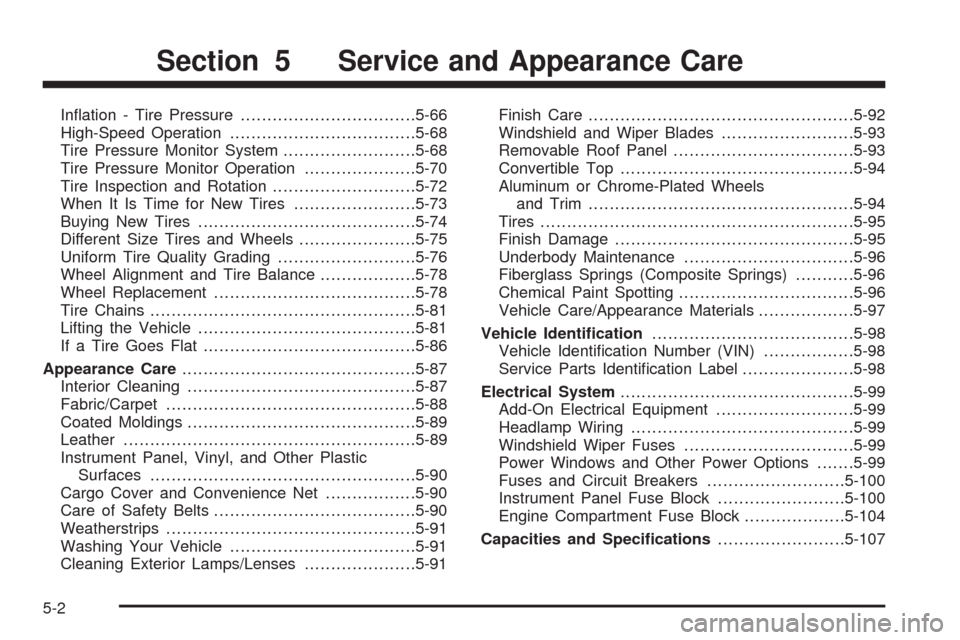
Ination - Tire Pressure.................................5-66
High-Speed Operation...................................5-68
Tire Pressure Monitor System.........................5-68
Tire Pressure Monitor Operation.....................5-70
Tire Inspection and Rotation...........................5-72
When It Is Time for New Tires.......................5-73
Buying New Tires.........................................5-74
Different Size Tires and Wheels......................5-75
Uniform Tire Quality Grading..........................5-76
Wheel Alignment and Tire Balance..................5-78
Wheel Replacement......................................5-78
Tire Chains..................................................5-81
Lifting the Vehicle.........................................5-81
If a Tire Goes Flat........................................5-86
Appearance Care............................................5-87
Interior Cleaning...........................................5-87
Fabric/Carpet...............................................5-88
Coated Moldings...........................................5-89
Leather.......................................................5-89
Instrument Panel, Vinyl, and Other Plastic
Surfaces..................................................5-90
Cargo Cover and Convenience Net.................5-90
Care of Safety Belts......................................5-90
Weatherstrips...............................................5-91
Washing Your Vehicle...................................5-91
Cleaning Exterior Lamps/Lenses.....................5-91Finish Care..................................................5-92
Windshield and Wiper Blades.........................5-93
Removable Roof Panel..................................5-93
Convertible Top............................................5-94
Aluminum or Chrome-Plated Wheels
and Trim..................................................5-94
Tires...........................................................5-95
Finish Damage.............................................5-95
Underbody Maintenance................................5-96
Fiberglass Springs (Composite Springs)...........5-96
Chemical Paint Spotting.................................5-96
Vehicle Care/Appearance Materials..................5-97
Vehicle Identication......................................5-98
Vehicle Identication Number (VIN).................5-98
Service Parts Identication Label.....................5-98
Electrical System............................................5-99
Add-On Electrical Equipment..........................5-99
Headlamp Wiring..........................................5-99
Windshield Wiper Fuses................................5-99
Power Windows and Other Power Options.......5-99
Fuses and Circuit Breakers..........................5-100
Instrument Panel Fuse Block........................5-100
Engine Compartment Fuse Block...................5-104
Capacities and Specications........................5-107
Section 5 Service and Appearance Care
5-2
Page 276 of 432
California Proposition 65 Warning
Most motor vehicles, including this one, contain and/or
emit chemicals known to the State of California to
cause cancer and birth defects or other reproductive
harm. Engine exhaust, many parts and systems
(including some inside the vehicle), many uids, and
some component wear by-products contain and/or
emit these chemicals.
California Perchlorate Materials
Requirements
Certain types of automotive applications, such as airbag
initiators, seat belt pretensioners, and lithium batteries
contained in remote keyless entry transmitters, may
contain perchlorate materials. Special handling may
be necessary. For additional information, see
www.dtsc.ca.gov/hazardouswaste/perchlorate.
Doing Your Own Service Work
{CAUTION:
You can be injured and your vehicle could be
damaged if you try to do service work on a
vehicle without knowing enough about it.
Be sure you have sufficient knowledge,
experience, the proper replacement parts,
and tools before you attempt any vehicle
maintenance task.
Be sure to use the proper nuts, bolts, and
other fasteners. English and metric
fasteners can be easily confused. If you
use the wrong fasteners, parts can later
break or fall off. You could be hurt.
If you want to do some of your own service work, you
should use the proper service manual. It tells you much
more about how to service your vehicle than this
manual can. To order the proper service manual, see
Service Publications Ordering Information on page 7-17.
5-4
Page 277 of 432
Your vehicle has an airbag system. Before attempting
to do your own service work, seeServicing Your
Airbag-Equipped Vehicle on page 1-56.
You should keep a record with all parts receipts and list
the mileage and the date of any service work you
perform. SeeMaintenance Record on page 6-16.
Adding Equipment to the Outside of
the Vehicle
Things you might add to the outside of your vehicle can
affect the airow around it. This can cause wind noise
and can affect fuel economy and windshield washer
performance. Check with your dealer/retailer before
adding equipment to the outside of your vehicle.
Fuel
Use of the recommended fuel is an important part of
the proper maintenance of your vehicle. To help
keep the engine clean and maintain optimum vehicle
performance, we recommend the use of gasoline
advertised as TOP TIER Detergent Gasoline.The 8th digit of the Vehicle Identication Number (VIN)
shows the code letter or number that identies your
vehicle’s engine. The VIN is at the top left of the
instrument panel. SeeVehicle Identification Number
(VIN) on page 5-98.
Gasoline Octane
If your vehicle has the 6.2L V8 engine (VIN Code W),
use premium unleaded gasoline with a posted
octane rating of 91 or higher. You can also use regular
unleaded gasoline rated at 87 octane or higher, but
your vehicle’s acceleration could be slightly reduced,
and you might notice a slight audible knocking
noise, commonly referred to as spark knock. If the
octane is less than 87, you might notice a heavy
knocking noise when you drive. If this occurs, use a
gasoline rated at 87 octane or higher as soon as
possible. Otherwise, you could damage the engine.
If you are using gasoline rated at 87 octane or higher
and you hear heavy knocking, the engine needs service.
5-5
Page 293 of 432
Changing Engine Oil and Filter
(Z06 Only)
Z06 models have a racetrack-ready dry sump engine
lubrication system. This high-performance system
operates differently than a standard engine lubrication
system and requires a special procedure when changing
the engine oil and lter. Follow this procedure closely
when changing the engine oil and lter.
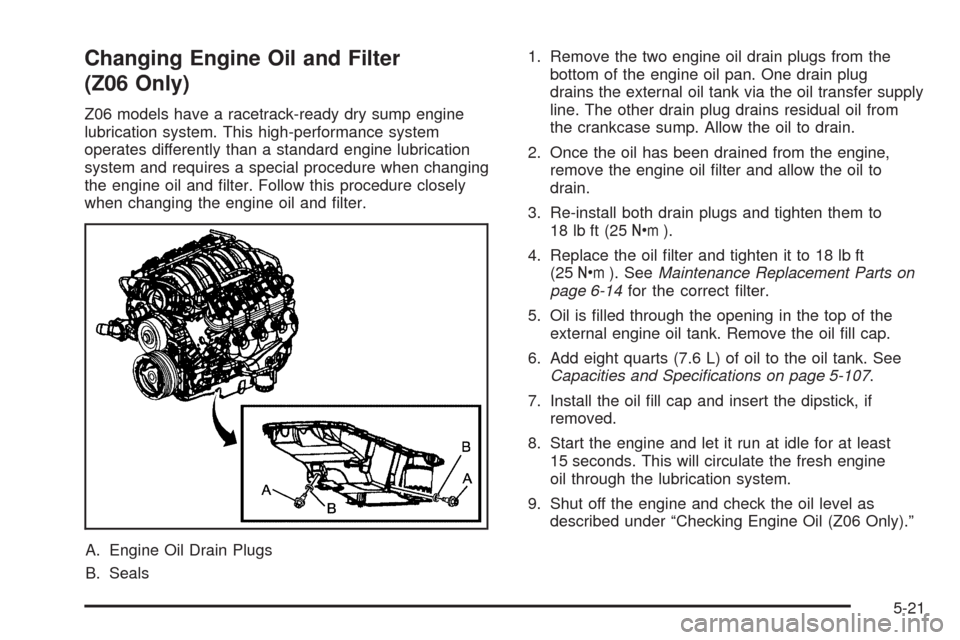
A. Engine Oil Drain Plugs
B. Seals1. Remove the two engine oil drain plugs from the
bottom of the engine oil pan. One drain plug
drains the external oil tank via the oil transfer supply
line. The other drain plug drains residual oil from
the crankcase sump. Allow the oil to drain.
2. Once the oil has been drained from the engine,
remove the engine oil lter and allow the oil to
drain.
3. Re-install both drain plugs and tighten them to
18 lb ft (25Y).
4. Replace the oil lter and tighten it to 18 lb ft
(25Y). SeeMaintenance Replacement Parts on
page 6-14for the correct lter.
5. Oil is lled through the opening in the top of the
external engine oil tank. Remove the oil ll cap.
6. Add eight quarts (7.6 L) of oil to the oil tank. See
Capacities and Specifications on page 5-107.
7. Install the oil ll cap and insert the dipstick, if
removed.
8. Start the engine and let it run at idle for at least
15 seconds. This will circulate the fresh engine
oil through the lubrication system.
9. Shut off the engine and check the oil level as
described under “Checking Engine Oil (Z06 Only).”
5-21