2008 CADILLAC STS navigation
[x] Cancel search: navigationPage 234 of 500

Trip Information Display Menu Items
The following display menu items can be displayed
by pressing the trip Information button.
Odometer
Press the trip information button until the odometer
appears on the DIC display. The odometer shows the
total distance the vehicle has been driven in either
miles (mi) or kilometers (km).
Trip Odometer
Press the trip information button until trip odometer A or B
appears on the DIC display. The trip odometer shows
the current distance traveled since the last reset for each
trip odometer in either miles (mi) or kilometers (km).
Both odometers can be used at the same time.
For base level vehicles, each trip odometer can be
reset to zero separately by pressing and holding
the bottom of the trip information button while the
desired trip odometer is displayed. For uplevel vehicles,
reset each trip odometer by pressing the reset
button or by pressing and holding the trip information
button while the desired trip odometer is displayed.
DIC Warnings and Messages
Messages are displayed on the DIC to notify the driver
that the status of the vehicle has changed and that
some action may be needed by the driver to correct
the condition. Multiple messages may appear one after
another.
The text messages are the same for both the base
audio and Navigation systems unless otherwise
indicated.
Some messages may not require immediate action,
but you can press the reset button to acknowledge that
you received the messages and to clear them from
the display.
Some messages cannot be cleared from the DIC
display because they are more urgent. These messages
require action before they can be cleared. Take any
messages that appear on the display seriously
and remember that clearing the messages will only
make the messages disappear, not correct the problem.
The following are the possible messages that can be
displayed and some information about them.
3-80
Page 238 of 500

CLEAN RADAR
This message displays when the Adaptive Cruise
Control system is disabled because the radar is blocked
and cannot detect vehicles in your path. It may also
activate during heavy rain or due to road spray.
To clean the system, see “Cleaning the System”
underAdaptive Cruise Control on page 3-20.
CLEAN SIDE BLIND ZONE ALERT
SYSTEM
If your vehicle has the Side Blind Zone Alert (SBZA)
system, this message displays when the SBZA system
is disabled because the sensor is blocked and cannot
detect vehicles in your blind zone. The sensor may
be blocked by mud, dirt, snow, ice, or slush. This
message may also display during heavy rain or due
to road spray. Your vehicle does not need service.
For cleaning instructions, seeWashing Your Vehicle
on page 5-110. See the Index in the Navigation
manual for more information.
COMPETITIVE DRIVING (STS-V Only)
This message displays when the competitive driving
mode is turned on with the TC (traction control) button.
The TC (traction control) light comes on when the
competitive driving mode is on. The Traction Control
System (TCS) will not operate while in competitive
driving mode. Adjust your driving accordingly. See
Competitive Driving Mode (STS-V) on page 4-7for
more information.
DRIVER DOOR AJAR
This symbol appears
with this message.
This message displays when the driver door is not closed
completely. Make sure that the door is closed completely.
3-84
Page 241 of 500

HOOD AJAR
This symbol appears
with this message.
This message displays when the hood is not closed
completely. Make sure that the hood is closed
completely. SeeHood Release on page 5-10.
ICE POSSIBLE
This message displays when the outside temperature
is cold enough to create icy road conditions. Adjust your
driving accordingly.
KEY FOB BATTERY LOW
This message displays when the battery in the keyless
access transmitter is low. Replace the battery in the
transmitter. See “Battery Replacement” underKeyless
Access System Operation on page 2-6.
LANE DEPARTURE SYSTEM
UNAVAILABLE
If your vehicle has the Lane Departure Warning (LDW)
system, this message may display if the LDW system
does not activate due to a temporary condition. See the
Index in the Navigation manual for more information.
LEFT REAR DOOR AJAR
This symbol appears
with this message.
This message displays when the driver side rear door
is not closed completely. Make sure that the door
is closed completely.
3-87
Page 245 of 500

SERVICE LANE DEPARTURE SYSTEM
If your vehicle has the Lane Departure Warning
(LDW) system, this message may display to
indicate that the LDW system is not working properly.
If this message remains on after continued driving,
the system needs service. See your dealer/retailer.
See the Index in the Navigation manual for more
information.
SERVICE RADAR CRUISE
This message displays when the Adaptive Cruise
Control system is disabled and needs service.
See your dealer/retailer.
SERVICE SIDE BLIND ZONE ALERT
SYSTEM
If your vehicle has the Side Blind Zone Alert (SBZA)
system and this message displays, both SBZA
displays will remain on indicating there is a problem
with the SBZA system. If these displays remain on
after continued driving, the system needs service.
See your dealer/retailer. See the Index in the
Navigation manual for more information.
SERVICE STABILITY SYS (System)
Your vehicle has a vehicle stability enhancement system
called StabiliTrak®. All-Wheel Drive (AWD) vehicle
with the Active Steering with Enhanced StabiliTrak®
option have a stability enhancement system called
Enhanced StabiliTrak®.
This message displays if there has been a problem
detected with the stability system.
If this message comes on while driving, pull off the road
as soon as possible and stop carefully. Try resetting
the system by turning the ignition off then back on. If this
message still stays on or comes back on again while
driving, your vehicle needs service. Have the stability
system inspected by your dealer/retailer as soon
as possible. SeeStabiliTrak
®System on page 4-8or
Enhanced StabiliTrak®on page 4-9for more information.
For vehicles with the Active Steering with Enhanced
StabiliTrak
®option, in some cases when the SERVICE
STABILITY SYS message is displayed, a larger
degree of steering wheel input at low vehicle speeds
and a smaller degree of steering wheel input at higher
vehicle speeds may be required.
3-91
Page 247 of 500

SERVICE TIRE MONITOR
This message displays if a part on the Tire Pressure
Monitor System (TPMS) is not working properly. The tire
pressure light also ashes and then remains on during
the same ignition cycle. SeeTire Pressure Light on
page 3-67. Several conditions may cause this message
to appear. SeeTire Pressure Monitor Operation on
page 5-70for more information. If the warning comes on
and stays on, there may be a problem with the TPMS.
See your dealer/retailer.
SERVICE THEFT SYSTEM
This message displays when there is a problem with
the hood open and closed switches. The switches may
need to be replaced. When this message is displayed,
the theft-deterrent system will still be protecting the
interior of the vehicle, however, the hood area will not
be protected at this time. Also, the remote start function
will not work when this message appears. See your
dealer/retailer for service.
SERVICE TRANSMISSION
This message displays when there is a problem with
the transmission. Have your vehicle serviced by
your dealer/retailer.
SERVICE VEHICLE SOON
This message displays when a non-emissions related
malfunction occurs. Have your vehicle serviced by your
dealer/retailer as soon as possible.
SIDE BLIND ZONE ALERT
SYSTEM OFF
If your vehicle has the Side Blind Zone Alert (SBZA)
system, this message displays when the SBZA system
has been turned off. See the Index in the Navigation
manual andDIC Operation and Displays on page 3-74
for more information.
SPEED LIMITED TO XXX
This message displays when the vehicle speed is
limited to XXX, mph in English mode and km/h in
Metric mode, because the vehicle detects a problem
in the steering, stability control, or suspension system.
Have your vehicle serviced by your dealer/retailer.
3-93
Page 248 of 500

STABILITY COMPETITIVE MODE
If your All-Wheel Drive (AWD) vehicle has the
Active Steering with Enhanced StabiliTrak®option,
this message displays when the Competitive Mode
for stability control has been turned on using the
TC (traction control) button. SeeEnhanced StabiliTrak
®
on page 4-9. When the Enhanced StabiliTrak®
Competitive Mode has been activated, traction control
operates in competitive mode and cannot be turned
off. Also, the Active Steering and the Magnetic
Ride Control systems operate in the Performance
Mode. For more information, see “Active Steering
and Magnetic Ride Control” in the Index in the
Navigation manual.
STABILITY SECURE MODE
If your All-Wheel Drive (AWD) vehicle has the
Active Steering with Enhanced StabiliTrak®option,
this message displays when the stability control system
is in the secure mode. Stability Secure Mode is set
automatically when certain system faults or vehicle
conditions are detected. When the Stability Secure
Mode is activated, the stability control system will
not respond to driver requests to change the stability
mode until the next ignition cycle or until the vehicle
condition or fault is returned to normal. SeeEnhanced
StabiliTrak
®on page 4-9.
STABILITY SYS (System) ACTIVE
This message displays any time the StabiliTrak®system
or Enhanced StabiliTrak®system is actively assisting
with directional control of the vehicle. Slippery road
conditions may exist when this message is displayed,
so adjust your driving accordingly. This message
may stay on for a few seconds after StabiliTrak
®
stops assisting with directional control of the vehicle.
SeeStabiliTrak®System on page 4-8orEnhanced
StabiliTrak®on page 4-9for more information.
STABILITY SYS (System) NOT READY
This message displays if the StabiliTrak®system is
not ready. Two conditions may cause this message
to display:
The vehicle needs to be driven in a straight line
until the sensors are centered. Once the sensors
are centered, the StabiliTrak
®system is ready and
the STABILITY SYS READY message displays.
The system needs to warm up. This may occur
when rst starting your vehicle and driving away
during cold winter weather. This is normal. To
acknowledge this message, press the reset button.
The StabiliTrak
®performance is affected until the
STABILITY SYS READY message is displayed in the
DIC. SeeStabiliTrak
®System on page 4-8for more
information.
3-94
Page 271 of 500
Navigation/Radio System
Your vehicle may have a navigation radio system.
The navigation system has built-in features intended
to minimize driver distraction. Technology alone,
no matter how advanced, can never replace your own
judgment. See the Navigation System manual for
some tips to help you reduce distractions while driving.
Radio Personalization
Accessing the Radio’s Main Menu
(Base Audio System)
There are two different procedures for accessing the
radio’s main menu depending upon whether or not
your vehicle has the Navigation system.
To access the main menu of the radio, do one of
the following:
Using the Base audio system, press the
CNFG button located on the radio or press
the
w(tune) knob located on the right side
of the radio. Then turn the
wknob clockwise
or counterclockwise to scroll through the
menu items.
If your vehicle has the Navigation system, see
the Navigation System manual supplied with
your vehicle for more information on accessing
the main menu and for descriptions of the menu
items for the Navigation system.
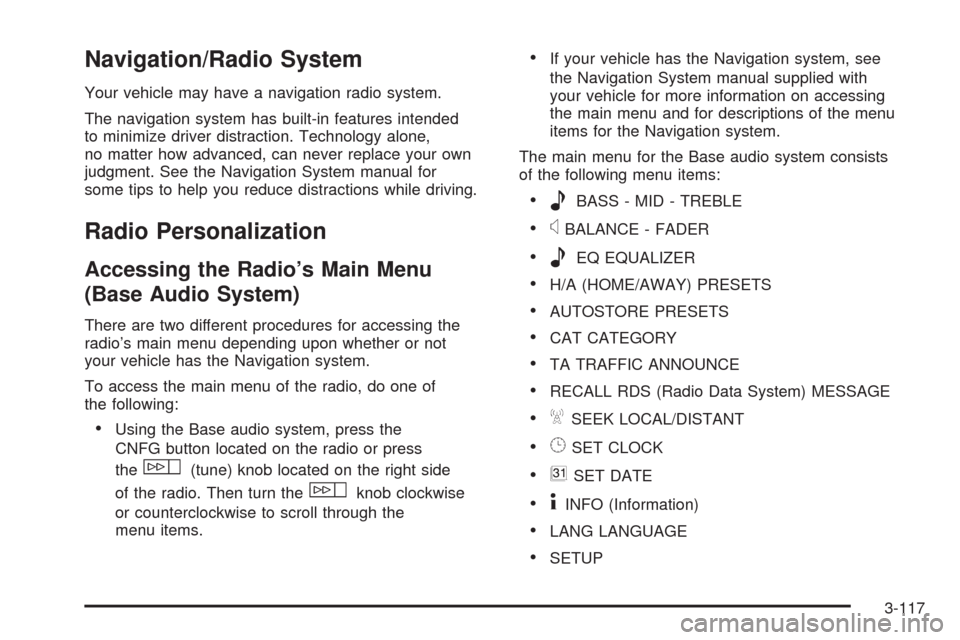
The main menu for the Base audio system consists
of the following menu items:
eBASS - MID - TREBLE
xBALANCE - FADER
eEQ EQUALIZER
H/A (HOME/AWAY) PRESETS
AUTOSTORE PRESETS
CAT CATEGORY
TA TRAFFIC ANNOUNCE
RECALL RDS (Radio Data System) MESSAGE
ASEEK LOCAL/DISTANT
8SET CLOCK
BSET DATE
4INFO (Information)
LANG LANGUAGE
SETUP
3-117
Page 272 of 500

Radio Main Menu Item Descriptions
(Base Audio System)
The following descriptions are for the Base audio
system. For information pertaining to the Navigation
audio system, see “Audio System” in the Index of
the Navigation System manual supplied with your
vehicle.
eBASS - MID (Midrange) - TREBLE:This menu
item lets you adjust the levels for the bass, midrange
and treble features of the audio system. See “Setting
the Tone (Bass/Treble)” underRadio(s) (MP3) on
page 3-100for more information.
xBALANCE - FADER:This menu item lets you
adjust the levels for the balance and fader features
of the audio system. See “Adjusting the Speakers
(Balance/Fade)” underRadio(s) (MP3) on page 3-100
for more information.
eEQ (Equalizer):This menu item lets you choose
among ve preset equalizations for the audio system.
See “Audio Equalizer” underRadio(s) (MP3) on
page 3-100for more information.H/A (Home/Away) PRESETS:This menu item lets you
switch back and forth between your home and away
preset radio stations. See “Presets Home/Away” under
Radio(s) (MP3) on page 3-100for more information.
AUTOSTORE PRESETS:This menu item lets
you automatically store radio stations with the strongest
signals as presets. See “Autostore Presets” under
Radio(s) (MP3) on page 3-100for more information.
CAT (Category):This menu item lets you select radio
stations based on preset categories. See “Activating
Program Type (PTY) Stations” underRadio(s) (MP3)
on page 3-100for more information.
TA (Traffic Announcement):This menu item lets
you turn the TA feature on and off. See “TA (Traffic
Announcement)” underRadio(s) (MP3) on page 3-100
for more information.
RECALL RDS MESSAGE:This menu item lets you
view an RDS radio station message broadcast by
a radio station. See “MSG (Message)” underRadio(s)
(MP3) on page 3-100for more information.
3-118