2008 BMW X6 remote control
[x] Cancel search: remote controlPage 218 of 288

Telephoning
216 You can select the displayed service phone
number if your mobile phone is logged on in the
vehicle:
iDrive, for operating principle refer to page16.
1.Press the button.
This opens the start menu.
2.Move the controller forward to select
"Communication".
3.Select "BMW Contact" and press the con-
troller.
4.Select "BMW Contact Numbers" and press
the controller.
5.Select one of the following menu items and
press the controller:
>"Roadside Assistance"
>"Customer Relations"
>"Service Request"
6.Select "Call" and press the controller.
Contact is established.
Transferring phone number via tone
dialing method
The tone dialing method is required for access
to network services or for controlling devices,
e.g. remote checking of an answering machine.
This function is available when a connection
has been established.
1.Establish connection.
2.With a single drive:
Press the controller.
Select "Keypad" and press the controller.
With two drives:
Move the controller backwards until the
bottom field is selected.
3.Select the desired character
and press the
controller.
Each character is sent immediately and
confirmed by a tone depending on the
mobile phone model.
Page 220 of 288

Telephoning
218
Example: dialing phone numbers
To start the dialog:
Press the button on the steering wheel.
Adjusting volume of instructions
You can adjust the volume for the instructions
from the system:
Turn the knob during instructions.
This volume for the instructions is maintained,
even if the other audio sources are set to mini-
mum volume.
The setting is stored for the remote control cur-
rently in use.
Calling
Dialing phone numbers
The connection to the desired subscriber is
established.
Correcting phone number
After the last spoken sequence of digits has
been repeated by the system, you can delete
this sequence of digits.
The command {Correct number} can be
repeated as often as you like.
Deleting phone number
All digits entered up to this point are deleted.
Voice phone book
Operating by voice command requires a per-
sonal voice phone book.
>With separate drives for audio CDs and nav-
igation DVDs, the entries are automatically
applied from your mobile phone's memory.
>With a single drive, the entries must be
entered by voice and are independent of
your mobile phone's memory. In this case, it
is not possible to use voice command either
to call phone numbers stored in the mobile
phone or to store new numbers. Up to 50
entries can be input. An entry always con-
sists of a name and phone number.
CommandThe voice control answers
{Dial number}{{Please say the number}}
e.g. {123 456 7890}Depending on equipment:
{{123 456 7890. Continue?}} or
{{123 456 7890. And next?}}
{Dial}{{Dialing number}}
1.{Dial number}.
2.Say the phone number.
For telephone calls abroad, say {Plus}
and then the country code.
3.{Dial}.
{Correct number}.
The digits are deleted.
{Delete}.
Page 223 of 288

221
Entertainment
Reference
At a glance
Controls
Driving tips Communications
Navigation
Mobility
BMW Assist
BMW Assist provides you with various services.
For example, the position data of your vehicle
can be transferred to the BMW Assist
Response Center if an emergency request
* has
been initiated.
Many BMW Assist services depend on the indi-
vidually agreed contract.
After your contract has expired, the BMW
Assist system will be deactivated by the BMW
Assist Response Center without you having to
visit a BMW Sports Activity Vehicle Center.
After the BMW Assist system has been deacti-
vated, no BMW Assist service will be available.
The BMW Assist system can be reactivated by
a BMW Sports Activity Vehicle Center after
signing a new contract.
Requirements
If the following requirements are met, you can
use BMW Assist:
>The installed BMW Assist system is logged
in on a wireless communications network.
This network must be capable of transmit-
ting the services.
>To transmit position data, the vehicle must
be able to determine the current position.
>To activate and update BMW Assist, a GPS
signal must be available.
>You have subscribed to BMW Assist with
your BMW Sports Activity Vehicle Center or
with the BMW Assist Response Center.
Enabling must have been completed.
>BMW Assist is activated, refer to page226.
Offered services
The following services are available via
BMW Assist:
>Emergency requests, refer to page252:
When you press the SOS button, a connec-
tion is established to the BMW Assist
Response Center. The BMW Assist
Response Center contacts you and takes
further steps to help you.
>Automatic collision notification:
Under certain conditions, a connection is
established to the BMW Assist Response
Center after a serious accident. If possible,
the BMW Assist Response Center contacts
you and takes further steps to help you.
>Enhanced roadside assistance:
You can call BMW Roadside Assistance
*
should you require help in the event of a
breakdown. If possible, the vehicle and
position data are transmitted in the process.
>BMW Customer Relations:
For information on all aspects of your vehi-
cle, you can be connected to BMW Cus-
tomer Relations.
>TeleService:
The data on the service status of your vehi-
cle or on required inspections are transmit-
ted to your BMW Sports Activity Vehicle
Center either automatically prior to the due
date or when you request a BMW service
appointment.
>Remote door unlock:
Inform the BMW Assist Response Center,
e.g. if your remote control is not available
and you want to have the vehicle unlocked.
>Stolen vehicle recovery:
After your vehicle has been reported to the
police as stolen, the BMW Assist Response
Center can locate its position.
In addition, you can be provided with other ser-
vices, e.g. the concierge service or information
on route planning, traffic conditions, and the
*
Page 245 of 288
Mobility
243Reference
At a glance
Controls
Driving tips
Communications
Navigation
Entertainment
Maintenance
BMW maintenance system
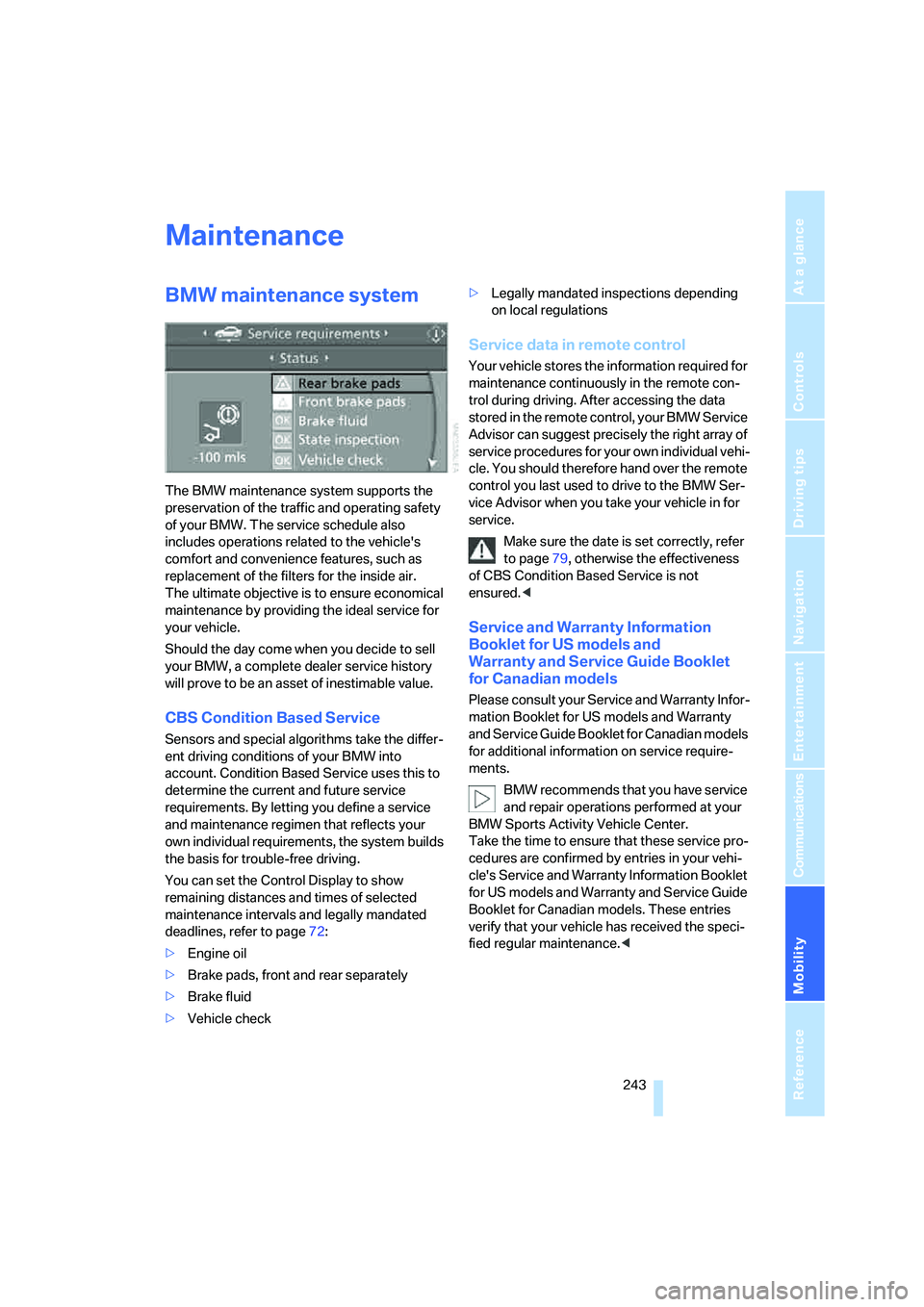
The BMW maintenance system supports the
preservation of the traffic and operating safety
of your BMW. The service schedule also
includes operations related to the vehicle's
comfort and convenience features, such as
replacement of the filters for the inside air.
The ultimate objective is to ensure economical
maintenance by providing the ideal service for
your vehicle.
Should the day come when you decide to sell
your BMW, a complete dealer service history
will prove to be an asset of inestimable value.
CBS Condition Based Service
Sensors and special algorithms take the differ-
ent driving conditions of your BMW into
account. Condition Based Service uses this to
determine the current and future service
requirements. By letting you define a service
and maintenance regimen that reflects your
own individual requirements, the system builds
the basis for trouble-free driving.
You can set the Control Display to show
remaining distances and times of selected
maintenance intervals and legally mandated
deadlines, refer to page72:
>Engine oil
>Brake pads, front and rear separately
>Brake fluid
>Vehicle check>Legally mandated inspections depending
on local regulations
Service data in remote control
Your vehicle stores the information required for
maintenance continuously in the remote con-
trol during driving. After accessing the data
stored in the remote control, your BMW Service
Advisor can suggest precisely the right array of
service procedures for your own individual vehi-
cle. You should therefore hand over the remote
control you last used to drive to the BMW Ser-
vice Advisor when you take your vehicle in for
service.
Make sure the date is set correctly, refer
to page79, otherwise the effectiveness
of CBS Condition Based Service is not
ensured.<
Service and Warranty Information
Booklet for US models and
Warranty and Service Guide Booklet
for Canadian models
Please consult your Service and Warranty Infor-
mation Booklet for US models and Warranty
and Service Guide Booklet for Canadian models
for additional information on service require-
ments.
BMW recommends that you have service
and repair operations performed at your
BMW Sports Activity Vehicle Center.
Take the time to ensure that these service pro-
cedures are confirmed by entries in your vehi-
cle's Service and Warranty Information Booklet
for US models and Warranty and Service Guide
Booklet for Canadian models. These entries
verify that your vehicle has received the speci-
fied regular maintenance.<
Page 269 of 288

Reference 267
At a glance
Controls
Driving tips
Communications
Navigation
Entertainment
Mobility
Assistance systems, refer to
Driving stability control
systems85
Assistance window20
"Assist. window off"21
AUC Automatic recirculated-
air control106
"Audio"163,167
– for DVD system in rear202
Audio160
– controls160
– switching on/off160
– tone control161
– volume161
Audio CD for DVD system in
rear196
Audio device, external116
Automatic
– air distribution104,109
– air volume104,109
– headlamp control99
– liftgate operation34
– service notification223
– steering wheel adjustment,
refer to Easy entry/exit51
– storing stations165
Automatic car washes128
– also refer to Caring for your
vehicle brochure
Automatic climate control104
– automatic air
distribution104,109
– in rear108
– switching off107,109
– ventilation in rear108
Automatic closing of doors,
refer to Automatic soft
closing33
Automatic curb monitor50
Automatic Hold58
– activating59
– deactivating59
– parking59Automatic lighting
– refer to Automatic headlamp
control99
– refer to Daytime running
lamps100
– refer to Interior lamps102
– refer to Pathway lighting100
"Automatic programs"105
Automatic recirculated-air
control AUC106
Automatic soft closing
33
Automatic station search165
Automatic transmission with
Steptronic61
– deactivating selector lever
interlock61
– kick-down62
– manually releasing
transmission lock63
– tow-starting255
– with comfort access37
"Automatic ventilation"110
AUTO program for automatic
climate control104,109
"Auto Request"223
"Autostore" on the radio166
"AUX"161,186,188
– AUX-In connection186
– for DVD system in rear201
– USB audio interface187
"AUX / Rear"192
AUX-In connection116,186
Average fuel consumption70
– setting units79
Average speed, refer to
Computer70
"Avoid ferries" for
navigation147
"Avoid highways" for
navigation146
Avoiding highways for
navigation146
Avoiding unintentional
alarms36
"Avoid tollroads" for
navigation147
Axle loads, refer to
Weights260
"A - Z"214
B
Backrest contour, refer to
Lumbar support44
Backrests, refer to Seats43
Backrest width adjustment44
Backup lamps, replacing
bulbs246
Balance, refer to Tone
control162
"Balance" for DVD system in
rear195
Band-aids, refer to First-aid
kit253
Bass, refer to Tone
control161
Battery
– charging250
– jump starting253
– power failure251
– refer to Vehicle battery250
Battery disposal
– remote control with comfort
access38
– vehicle battery251
Battery replacement
– remote control for DVD
system in rear192
– remote control with comfort
access38
Being towed255
Belts, refer to Safety belts47
Beverage holder, refer to Cup
holders117
Blower, refer to Air
volume105,109
"BMW Assist"222,223,224
BMW Assist
– activating226
– concierge service224
– contacting BMW Customer
Relations224
– offered services221
– roadside assistance222
– TeleService223
"BMW Contact"216
"BMW Contact
Numbers"216
BMW homepage4
Page 270 of 288

Everything from A to Z
268 BMW maintenance
system243
"BMW Service settings"227
BMW website4
Bottle holder, refer to Cup
holders117
Brake assistant86
Brake force display94
Brake lamps
– brake force display94
– replacing bulbs246
Brake rotors128
Brakes
– ABS Antilock Brake
System85
– brake assistant86
– brake force display94
– breaking-in126
– CBC Cornering Brake
Control85
– electronic brake-force
distribution85
– parking brake57
– refer to Braking safely127
– warning lamp13
Brake system126
– brake pads126
– breaking-in126
– disk brakes128
Braking safely127
Breakdown, Flat Tire
Monitor89
Breakdown services, refer to
Roadside Assistance253
Breaking-in brake pads126
Breaking-in differential126
Break-in period126
"Brightness"79
– DVD changer182
– DVD system in rear194
Brightness
– of Control Display79
– of the rear view camera85
– on Head-Up Display97
"Brightness / Position"98
Button for starting engine56
Buttons on steering wheel11
Bypassing traffic
congestion155
C
Calibrating driver's seat47
California Proposition 65
Warning6
"Call"214,225
Call
– accepting212
– displaying accepted215
– ending213
– in absence215
– starting213
Calling
– from phone book214
– from Top 8 list215
– redialing215
– refer to telephone operating
instructions
Camera, refer to Rear view
camera83
"Camera picture and PDC"85
"Camera view: full screen"85
"Camera view: main
window"85
Can holder, refer to Cup
holders117
Capacities261
Capacity of cargo bay260
Car battery, refer to Vehicle
battery250
Car care, refer to Caring for
your vehicle brochure
Car-care products, refer to
Caring for your vehicle
brochure
"Car Data"70
Care244
– refer to Caring for your
vehicle brochure
Cargo
– refer to Loading128
– securing130
– securing with ski bag122
Cargo area, refer to Cargo
bay119Cargo bay
– capacity260
– emergency operation, refer
to Opening manually33
– expanding120
– opening/closing, refer to
Liftgate33
– opening from inside33
– opening from outside33
– opening with remote
control30
Caring for artificial leather,
refer to Caring for your
vehicle brochure
Caring for leather, refer to
Caring for your vehicle
brochure
Caring for light-alloy wheels,
refer to Caring for your
vehicle brochure
Caring for the carpet, refer to
Caring for your vehicle
brochure
Caring for the vehicle finish,
refer to Caring for your
vehicle brochure
Car key, refer to Keys/remote
control28
Car phone206
– installation location, refer to
Center armrest, front116
– refer to Mobile phone206
– refer to separate operating
instructions
Car radio, refer to Radio164
Car wash128
– also refer to Caring for your
vehicle brochure
– before driving in57
– with comfort access38
Catalytic converter, refer to
Hot exhaust system127
"Categories" on satellite
radio171
CBC Cornering Brake
Control85
CBS Condition Based
Service243
Page 271 of 288

Reference 269
At a glance
Controls
Driving tips
Communications
Navigation
Entertainment
Mobility
"CD"161,173
– for DVD system in rear192
CD, refer to Playing audio
tracks, DVD system in
rear196
CD/DVD player, DVD system
in rear191
CD changer173
– compressed audio files173
– controls160
– fast forward/reverse176
– random sequence176
– repeating a track175
– sampling tracks175
– selecting a CD173
– selecting a track174
– switching on/off160
– tone control161
– volume161
CD player173
– compressed audio files173
– controls160
– fast forward/reverse176
– random sequence176
– repeating a track175
– sampling tracks175
– selecting a track174
– switching on/off160
– tone control161
– volume161
Cell phone, refer to Mobile
phone
Center armrest
– front116
– rear119
Center brake lamp248
Center console14
"Central locking"30
Central locking system29
– comfort access36
– from inside vehicle32
Changes, technical
– refer to For your own
safety5
– refer to Parts and
accessories6
Changing language on
Control Display80Changing tires237
Changing units of measure on
Control Display79
Changing wheels248
Check Control75
"Check Control
messages"76
Checking the air pressure,
refer to Tire inflation
pressure232
Children, transporting53
Child restraint fixing system
LATCH54
Child restraint systems53
Child-safety locks55
Child seats53
Chime, refer to Check
Control75
Chrome parts, care, refer to
Caring for your vehicle
brochure
Cigarette lighter, refer to
Lighter118
Cleaning, refer to Caring for
your vehicle brochure
"Climate"48
Clock68
– 12h/24h mode79
– setting time78
Closing
– from inside32
– using remote control29
Closing fuel filler cap230
Clothes hooks116
Cockpit10
Cold start, refer to Starting
engine57
"Color" for DVD system in
rear194
Comfort access36
– observe in car wash38
– replacing battery38
Comfort area, refer to Around
the center console14
Comfort start, refer to Starting
engine57
"Communica-
tion"212,222,223,224Compact Disc
– refer to CD changer173
– refer to CD player173
Compact wheel, wheel
change248
Compartment for remote
control, refer to Ignition
lock56
Compartments, refer to
Storage compartments116
Compass, digital114
Computer70
– displays in instrument
panel70
– displays on Control
Display70
– trip computer71
"Concierge"224
Concierge service224
Condition Based Service
CBS243
"Confirmation"31
Connecting car vacuum
cleaner, refer to Connecting
electrical devices118
Connecting headphones191
Consumption, refer to
Average fuel
consumption70
Consumption statistics, refer
to Average fuel
consumption70
"Continue guidance to
destination?"149
"Contrast"
– DVD changer182
– DVD system in rear194
Control Center, refer to
iDrive16
Control Display, refer to
iDrive16
– setting brightness79
Controller, refer to iDrive16
Controls
– DVD changer179
– DVD system in rear190
– refer to Cockpit10
Page 272 of 288

Everything from A to Z
270 Convenience operation
– glass sunroof30,32
– glass sunroof with comfort
access37
– windows30,32
– windows with comfort
access37
– with comfort access37
Coolant242
– checking level242
– temperature69
Cooling, maximum106
Cornering Brake Control
CBC85
Courtesy lamps, refer to
Interior lamps102
Cradle for telephone or mobile
phone116
Cruise control66
Cruising range70
Cup holders117
Curb weight, refer to
Weights260
"Current position"155
Current position
– displaying155
– entering144
– storing144
"Customer
Relations"216,224
Cylinders, refer to Engine
data258
D
Dashboard, refer to
Cockpit10
Data258
– capacities261
– dimensions259
– engine258
– technical data258
– weights260
"Date"79
Date68
– display format79
– retrieving68
– setting79"Date format"79
"Daytime running lamps"100
Daytime running lamps100
"Deactivated"45
Decommissioning the vehicle,
refer to Caring for your
vehicle brochure
Defrosting windows105
Defrosting windows and
removing condensation105
Defrost position, refer to
Defrosting windows105
"Delete address book" for
navigation145
"Delete all numbers" on the
mobile phone215
"Delete data" for
navigation145
"Delete" for mobile
phone215
Destination address
– deleting145
– entering137,139
Destination for navigation
– destination list143
– entering136
– selecting from address
book144
– selecting using
information142
– selecting using voice139
– storing144
Destination guidance148
– canceling voice
instructions52
– changing specified
route146
– displaying route149
– distance and arrival148
– ending/continuing148
– starting148
– voice instructions151
– volume of voice
instructions152
Destination list for navigation
system
143Destinations recently driven
to143
"Details"
– DVD system in the rear198
– in audio mode188
"Dial" for mobile phone213
"Dial number"213
"Diamond button"52
Digital clock68
Digital compass114
Digital radio, refer to High
Definition Radio167
Digital Versatile Disc, refer to
– DVD changer179
– Player for navigation
DVD160
Dimensions259
Directional indicators, refer to
Turn signals64
Direction announcements,
refer to Voice
instructions151
Direction instructions, refer to
Voice instructions151
Directory for navigation, refer
to Address book144
Direct selection buttons21
Displacement, refer to Engine
data258
"Display"79
Display, refer to iDrive16
Displaying images198
Display lighting, refer to
Instrument lighting102
"Display off"21
Displays, refer to Instrument
panel12
"Display settings"79,97
Displays on the windshield,
refer to Head-Up Display97
Disposal
– battery of remote control
with comfort access38
– remote control battery192
– vehicle battery251
Distance, refer to
Computer70