Short commands of voice command system
262
Short commands of voice command
system
With short commands you can carry out certain
functions directly, regardless of which menu item is selected. Here are the important short
commands for the voice command system.
Assistance window
Communication
*
FunctionCommand
To open assistance window20{Assistance window}
To select display in assistance window20{Assistance window map facing north},
{Assistance window map direction of travel},
{Assistance window arrow display},
{Assistance window perspective},
{Assistance window current position},
{Assistance window trip computer} or
{Assistance window onboard info}
To change scale in assistance window150{Assistance window scale ... feet} or
{Assistance window scale ... miles}
FunctionCommand
To open phone207{Phone}
To dial phone number213{Dial number}
To display phone book214{A to Z}
To dial from phone book214{Call ...} or
{Dial name}
To display "Top 8"215{Top 8}
To redial214{Redial}
To display "Received calls"215{Received calls}
To display "Missed calls"215{Missed calls}
To display "Bluetooth"210{Bluetooth}
To open BMW Assist222{BMW Assist}
To open "BMW Service"222{BMW Service}
To open "BMW Contact"215{BMW Contact}
To open "BMW Contact Numbers"215{BMW Contact numbers}
To open "Roadside Assistance"222{Roadside Assistance}
Reference 265
At a glance
Controls
Driving tips
Communications
Navigation
Entertainment
Mobility
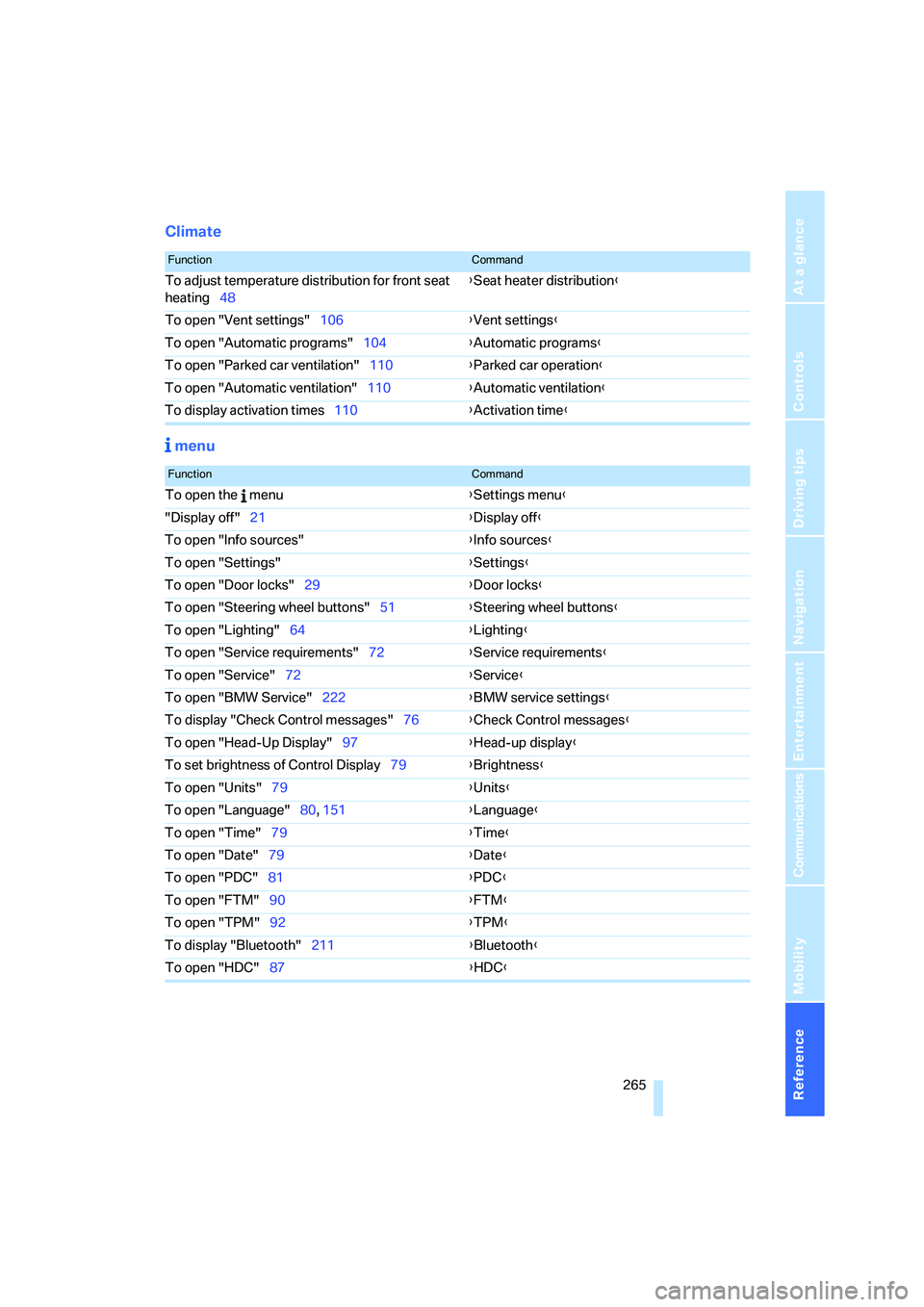
Climate
menu
FunctionCommand
To adjust temperature distribution for front seat
heating48{Seat heater distribution}
To open "Vent settings"106{Vent settings}
To open "Automatic programs"104{Automatic programs}
To open "Parked car ventilation"110{Parked car operation}
To open "Automatic ventilation"110{Automatic ventilation}
To display activation times110{Activation time}
FunctionCommand
To open the menu{Settings menu}
"Display off"21{Display off}
To open "Info sources"{Info sources}
To open "Settings"{Settings}
To open "Door locks"29{Door locks}
To open "Steering wheel buttons"51{Steering wheel buttons}
To open "Lighting"64{Lighting}
To open "Service requirements"72{Service requirements}
To open "Service"72{Service}
To open "BMW Service"222{BMW service settings}
To display "Check Control messages"76{Check Control messages}
To open "Head-Up Display"97{Head-up display}
To set brightness of Control Display79{Brightness}
To open "Units"79{Units}
To open "Language"80, 151{Language}
To open "Time"79{Time}
To open "Date"79{Date}
To open "PDC"81{PDC}
To open "FTM"90{FTM}
To open "TPM"92{TPM}
To display "Bluetooth"211
{Bluetooth}
To open "HDC"87{HDC}