2008 BMW X6 navigation
[x] Cancel search: navigationPage 257 of 288
Mobility
255Reference
At a glance
Controls
Driving tips
Communications
Navigation
Entertainment
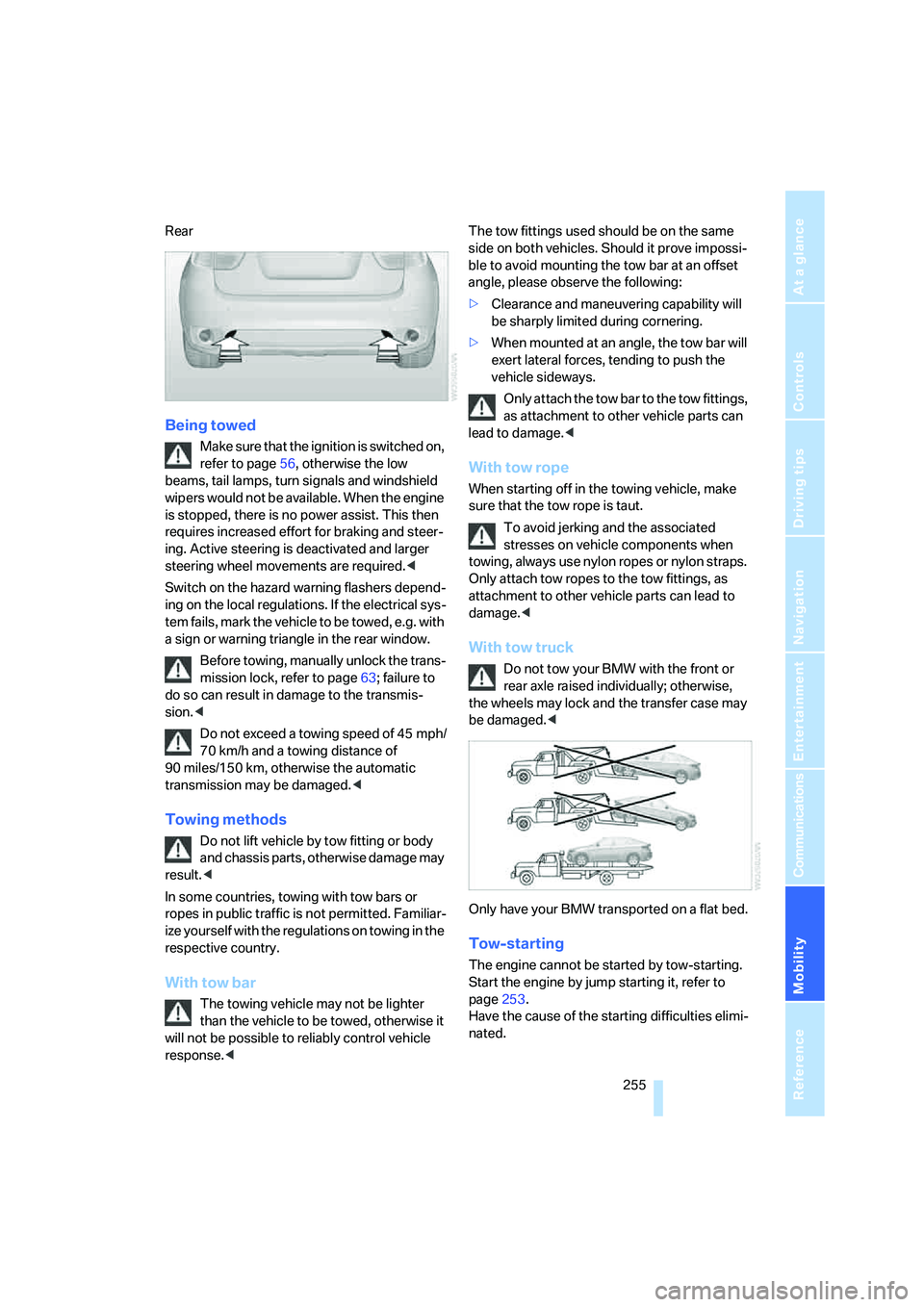
Rear
Being towed
Make sure that the ignition is switched on,
refer to page56, otherwise the low
beams, tail lamps, turn signals and windshield
wipers would not be available. When the engine
is stopped, there is no power assist. This then
requires increased effort for braking and steer-
ing. Active steering is deactivated and larger
steering wheel movements are required.<
Switch on the hazard warning flashers depend-
ing on the local regulations. If the electrical sys-
tem fails, mark the vehicle to be towed, e.g. with
a sign or warning triangle in the rear window.
Before towing, manually unlock the trans-
mission lock, refer to page63; failure to
do so can result in damage to the transmis-
sion.<
Do not exceed a towing speed of 45 mph/
70 km/h and a towing distance of
90 miles/150 km, otherwise the automatic
transmission may be damaged.<
Towing methods
Do not lift vehicle by tow fitting or body
and chassis parts, otherwise damage may
result.<
In some countries, towing with tow bars or
ropes in public traffic is not permitted. Familiar-
ize yourself with the regulations on towing in the
respective country.
With tow bar
The towing vehicle may not be lighter
than the vehicle to be towed, otherwise it
will not be possible to reliably control vehicle
response.
ble to avoid mounting the tow bar at an offset
angle, please observe the following:
>Clearance and maneuvering capability will
be sharply limited during cornering.
>When mounted at an angle, the tow bar will
exert lateral forces, tending to push the
vehicle sideways.
Only attach the tow bar to the tow fittings,
as attachment to other vehicle parts can
lead to damage.<
With tow rope
When starting off in the towing vehicle, make
sure that the tow rope is taut.
To avoid jerking and the associated
stresses on vehicle components when
towing, always use nylon ropes or nylon straps.
Only attach tow ropes to the tow fittings, as
attachment to other vehicle parts can lead to
damage.<
With tow truck
Do not tow your BMW with the front or
rear axle raised individually; otherwise,
the wheels may lock and the transfer case may
be damaged.<
Only have your BMW transported on a flat bed.
Tow-starting
The engine cannot be started by tow-starting.
Start the engine by jump starting it, refer to
page253.
Have the cause of the starting difficulties elimi-
nated.
Page 261 of 288

Reference 259
At a glance
Controls
Driving tips
Communications
Navigation
Entertainment
Mobility
Dimensions
All dimensions given in inches/mm.
Smallest turning circle diam.: 42.0 ft/12.8 m
With mixed tires
* the vehicle width may exceed the specified dimension.
Page 263 of 288

Reference 261
At a glance
Controls
Driving tips
Communications
Navigation
Entertainment
Mobility
Capacities
Notes
Fuel tank US gal/liters approx. 22.5/85 Fuel grade: page231
of that reserve US gal/liters approx. 2.1/8
Windshield washer
with headlamp washer system US quarts/liters approx. 6.9/6.5 For more details: page65
Page 265 of 288

Reference 263
At a glance
Controls
Driving tips
Communications
Navigation
Entertainment
Mobility
Navigation
Onboard info
FunctionCommand
To open navigation system136{Navigation}
To open "Enter address"137{Enter address}
To open "New destination"137{New destination}
To display "Input map"141{Input map}
To display destination list143{Destination list}
To display address book144{Address book}
To display route criteria146{Route preference}
To start destination guidance148{Start guidance}
To end destination guidance148{Stop guidance}
To display arrow display149{Arrow display}
To display map display150{Map}, {Map facing north},
{Map direction of travel} or
{Perspective}
To change scale150{Scale ... miles} or
{Scale ... feet}
To display roads or towns/cities along route150{Route list}
To switch on voice instructions151{Navigation info on}
To switch off voice instructions151{Navigation info off}
To repeat voice instructions151{Repeat navigation info}
To open route146, 150
{Route menu}
To open "New route"152{New route}
To display current position155{Current position}
FunctionCommand
To open "Car Data"70{Car data}
To display computer70{Onboard info}
To display trip computer71{Trip computer}
To open stopwatch77{Stopwatch}
To open speed limit77{Limit}
To activate speed limit77{Limit on}
To deactivate speed limit77{Limit off}
Page 267 of 288
Reference 265
At a glance
Controls
Driving tips
Communications
Navigation
Entertainment
Mobility
Climate
menu
FunctionCommand
To adjust temperature distribution for front seat
heating48{Seat heater distribution}
To open "Vent settings"106{Vent settings}
To open "Automatic programs"104{Automatic programs}
To open "Parked car ventilation"110{Parked car operation}
To open "Automatic ventilation"110{Automatic ventilation}
To display activation times110{Activation time}
FunctionCommand
To open the menu{Settings menu}
"Display off"21{Display off}
To open "Info sources"{Info sources}
To open "Settings"{Settings}
To open "Door locks"29{Door locks}
To open "Steering wheel buttons"51{Steering wheel buttons}
To open "Lighting"64{Lighting}
To open "Service requirements"72{Service requirements}
To open "Service"72{Service}
To open "BMW Service"222{BMW service settings}
To display "Check Control messages"76{Check Control messages}
To open "Head-Up Display"97{Head-up display}
To set brightness of Control Display79{Brightness}
To open "Units"79{Units}
To open "Language"80, 151{Language}
To open "Time"79{Time}
To open "Date"79{Date}
To open "PDC"81{PDC}
To open "FTM"90{FTM}
To open "TPM"92{TPM}
To display "Bluetooth"211
{Bluetooth}
To open "HDC"87{HDC}
Page 268 of 288

Everything from A to Z
266
Everything from A to Z
Index
"..." Identifies Control Display
texts used to select
individual functions, and
indicates where to find them
in the text.
A
ABS Antilock Brake
System85
Accessories6
Acoustic signal, refer to Check
Control75
Activated-charcoal filter108
"Activation time" for parked
car ventilation110
Active seat49
Active seat ventilation48
Active steering94
– warning lamp94
Adaptive brake lamps, refer to
Brake force display94
Adaptive Drive88
Adaptive fastening
system120
Adaptive Head Light101
"Add digits" for mobile
phone214
"Address book" for
navigation144
Address for navigation
– deleting145
– entering137,144
– selecting144
– storing144
– storing current position144
"Add to destination list"139
Adjusting confirmation signals
for locking and unlocking31
Adjusting temperature with
expanded-scope automatic
climate control105Adjusting the tone during
audio operation, refer to
Tone control161
Adjusting thigh
support43,44
"After door opened"45
"After unlocking"45
Airbags95
– sitting safely42
– warning lamp96
Air distribution
– automatic104,109
– manual105
Airing, refer to Ventilation107
Air recirculation106
– AUC Automatic
recirculated-air control106
– recirculated-air mode106
"Air recirculation on / off"52
Air vents103
– refer to Ventilation107
Air vents of automatic climate
control
103
Air volume105,109
AKI, refer to Fuel
specifications231
Alarm system35
– avoiding unintentional
alarms36
– interior motion sensor36
– switching off alarm35
– switching off tilt alarm
sensor and interior motion
sensor36
– tilt alarm sensor36
"All channels" on satellite
radio171
"All doors"30
All-season tires, refer to
Winter tires238
"All stations", displaying on
radio164All-wheel drive, refer to
xDrive87
Alterations, technical, refer to
For your own safety5
"AM", reception
range161,164
"Angle of view"
– DVD changer183
– DVD system in rear195
Antenna for mobile phone206
Antifreeze
– coolant242
– washer fluid65
Antilock Brake System
ABS85
Anti-theft system
– refer to Alarm system35
– refer to Central locking
system29
Approved axle loads, refer to
Weights260
Approved engine oils241
Approved gross vehicle
weight, refer to Weights260
Armrest, refer to Center
armrest, front116
Around the center console14
Around the steering wheel10
Arrival time
– refer to Computer70
– refer to Starting destination
guidance148
"Arrow display" for
navigation149
Arrow view for navigation
system149
Ashtray
– front117
– rear117
Assist, refer to separate
operating instructions
Page 269 of 288

Reference 267
At a glance
Controls
Driving tips
Communications
Navigation
Entertainment
Mobility
Assistance systems, refer to
Driving stability control
systems85
Assistance window20
"Assist. window off"21
AUC Automatic recirculated-
air control106
"Audio"163,167
– for DVD system in rear202
Audio160
– controls160
– switching on/off160
– tone control161
– volume161
Audio CD for DVD system in
rear196
Audio device, external116
Automatic
– air distribution104,109
– air volume104,109
– headlamp control99
– liftgate operation34
– service notification223
– steering wheel adjustment,
refer to Easy entry/exit51
– storing stations165
Automatic car washes128
– also refer to Caring for your
vehicle brochure
Automatic climate control104
– automatic air
distribution104,109
– in rear108
– switching off107,109
– ventilation in rear108
Automatic closing of doors,
refer to Automatic soft
closing33
Automatic curb monitor50
Automatic Hold58
– activating59
– deactivating59
– parking59Automatic lighting
– refer to Automatic headlamp
control99
– refer to Daytime running
lamps100
– refer to Interior lamps102
– refer to Pathway lighting100
"Automatic programs"105
Automatic recirculated-air
control AUC106
Automatic soft closing
33
Automatic station search165
Automatic transmission with
Steptronic61
– deactivating selector lever
interlock61
– kick-down62
– manually releasing
transmission lock63
– tow-starting255
– with comfort access37
"Automatic ventilation"110
AUTO program for automatic
climate control104,109
"Auto Request"223
"Autostore" on the radio166
"AUX"161,186,188
– AUX-In connection186
– for DVD system in rear201
– USB audio interface187
"AUX / Rear"192
AUX-In connection116,186
Average fuel consumption70
– setting units79
Average speed, refer to
Computer70
"Avoid ferries" for
navigation147
"Avoid highways" for
navigation146
Avoiding highways for
navigation146
Avoiding unintentional
alarms36
"Avoid tollroads" for
navigation147
Axle loads, refer to
Weights260
"A - Z"214
B
Backrest contour, refer to
Lumbar support44
Backrests, refer to Seats43
Backrest width adjustment44
Backup lamps, replacing
bulbs246
Balance, refer to Tone
control162
"Balance" for DVD system in
rear195
Band-aids, refer to First-aid
kit253
Bass, refer to Tone
control161
Battery
– charging250
– jump starting253
– power failure251
– refer to Vehicle battery250
Battery disposal
– remote control with comfort
access38
– vehicle battery251
Battery replacement
– remote control for DVD
system in rear192
– remote control with comfort
access38
Being towed255
Belts, refer to Safety belts47
Beverage holder, refer to Cup
holders117
Blower, refer to Air
volume105,109
"BMW Assist"222,223,224
BMW Assist
– activating226
– concierge service224
– contacting BMW Customer
Relations224
– offered services221
– roadside assistance222
– TeleService223
"BMW Contact"216
"BMW Contact
Numbers"216
BMW homepage4
Page 271 of 288

Reference 269
At a glance
Controls
Driving tips
Communications
Navigation
Entertainment
Mobility
"CD"161,173
– for DVD system in rear192
CD, refer to Playing audio
tracks, DVD system in
rear196
CD/DVD player, DVD system
in rear191
CD changer173
– compressed audio files173
– controls160
– fast forward/reverse176
– random sequence176
– repeating a track175
– sampling tracks175
– selecting a CD173
– selecting a track174
– switching on/off160
– tone control161
– volume161
CD player173
– compressed audio files173
– controls160
– fast forward/reverse176
– random sequence176
– repeating a track175
– sampling tracks175
– selecting a track174
– switching on/off160
– tone control161
– volume161
Cell phone, refer to Mobile
phone
Center armrest
– front116
– rear119
Center brake lamp248
Center console14
"Central locking"30
Central locking system29
– comfort access36
– from inside vehicle32
Changes, technical
– refer to For your own
safety5
– refer to Parts and
accessories6
Changing language on
Control Display80Changing tires237
Changing units of measure on
Control Display79
Changing wheels248
Check Control75
"Check Control
messages"76
Checking the air pressure,
refer to Tire inflation
pressure232
Children, transporting53
Child restraint fixing system
LATCH54
Child restraint systems53
Child-safety locks55
Child seats53
Chime, refer to Check
Control75
Chrome parts, care, refer to
Caring for your vehicle
brochure
Cigarette lighter, refer to
Lighter118
Cleaning, refer to Caring for
your vehicle brochure
"Climate"48
Clock68
– 12h/24h mode79
– setting time78
Closing
– from inside32
– using remote control29
Closing fuel filler cap230
Clothes hooks116
Cockpit10
Cold start, refer to Starting
engine57
"Color" for DVD system in
rear194
Comfort access36
– observe in car wash38
– replacing battery38
Comfort area, refer to Around
the center console14
Comfort start, refer to Starting
engine57
"Communica-
tion"212,222,223,224Compact Disc
– refer to CD changer173
– refer to CD player173
Compact wheel, wheel
change248
Compartment for remote
control, refer to Ignition
lock56
Compartments, refer to
Storage compartments116
Compass, digital114
Computer70
– displays in instrument
panel70
– displays on Control
Display70
– trip computer71
"Concierge"224
Concierge service224
Condition Based Service
CBS243
"Confirmation"31
Connecting car vacuum
cleaner, refer to Connecting
electrical devices118
Connecting headphones191
Consumption, refer to
Average fuel
consumption70
Consumption statistics, refer
to Average fuel
consumption70
"Continue guidance to
destination?"149
"Contrast"
– DVD changer182
– DVD system in rear194
Control Center, refer to
iDrive16
Control Display, refer to
iDrive16
– setting brightness79
Controller, refer to iDrive16
Controls
– DVD changer179
– DVD system in rear190
– refer to Cockpit10