2008 BMW 650I CONVERTIBLE dynamic
[x] Cancel search: dynamicPage 147 of 264
Navigation
Driving tips
145Reference
At a glance
Controls
Communications
Entertainment
Mobility
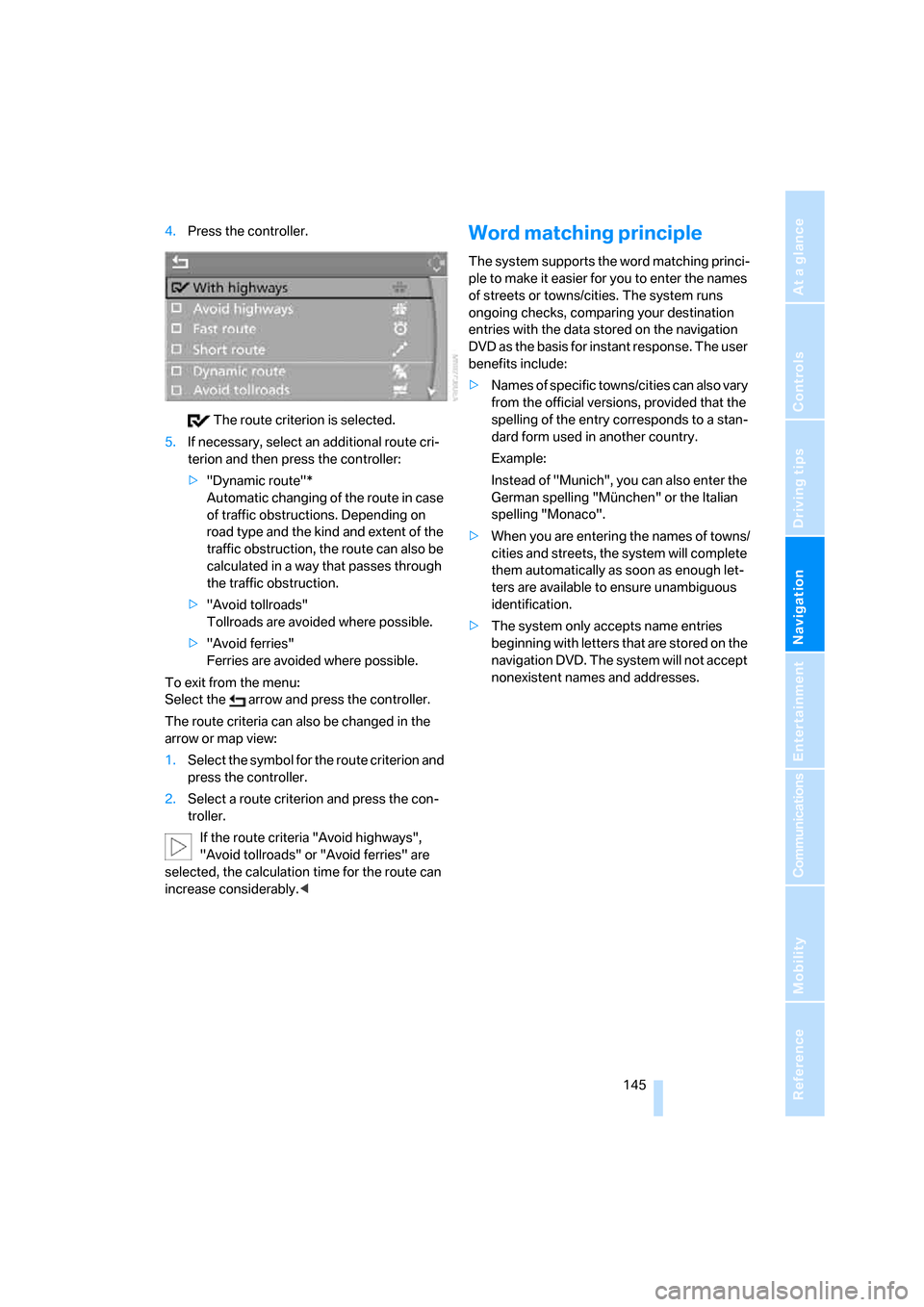
4.Press the controller.
The route criterion is selected.
5.If necessary, select an additional route cri-
terion and then press the controller:
>"Dynamic route"*
Automatic changing of the route in case
of traffic obstructions. Depending on
road type and the kind and extent of the
traffic obstruction, the route can also be
calculated in a way that passes through
the traffic obstruction.
>"Avoid tollroads"
Tollroads are avoided where possible.
>"Avoid ferries"
Ferries are avoided where possible.
To exit from the menu:
Select the arrow and press the controller.
The route criteria can also be changed in the
arrow or map view:
1.Select the symbol for the route criterion and
press the controller.
2.Select a route criterion and press the con-
troller.
If the route criteria "Avoid highways",
"Avoid tollroads" or "Avoid ferries" are
selected, the calculation time for the route can
increase considerably.
ple to make it easier for you to enter the names
of streets or towns/cities. The system runs
ongoing checks, comparing your destination
entries with the data stored on the navigation
DVD as the basis for instant response. The user
benefits include:
>Names of specific towns/cities can also vary
from the official versions, provided that the
spelling of the entry corresponds to a stan-
dard form used in another country.
Example:
Instead of "Munich", you can also enter the
German spelling "München" or the Italian
spelling "Monaco".
>When you are entering the names of towns/
cities and streets, the system will complete
them automatically as soon as enough let-
ters are available to ensure unambiguous
identification.
>The system only accepts name entries
beginning with letters that are stored on the
navigation DVD. The system will not accept
nonexistent names and addresses.
Page 155 of 264
Navigation
Driving tips
153Reference
At a glance
Controls
Communications
Entertainment
Mobility
Traffic information during destination
guidance
System response will vary depending on
whether or not "Dynamic route" is selected.
Displaying traffic obstructions
If a traffic obstruction is reported to the naviga-
tion system and "Dynamic route" is not
selected, you will be provided with certain infor-
mation from a distance of approx. 25 miles/
40 km, e.g. the length of the traffic congestion.
The last possible junction will be displayed
shortly before this.This information is also displayed if you have
called up a different application on the Control
Display.
Dynamic route planning
When "Dynamic route" is selected, the route
will be changed automatically in the event of a
traffic obstruction. The system does not point
out traffic obstructions along the original route.
Depending on road type and the kind and extent
of the traffic obstruction, the calculated route
may lead through the traffic obstruction.
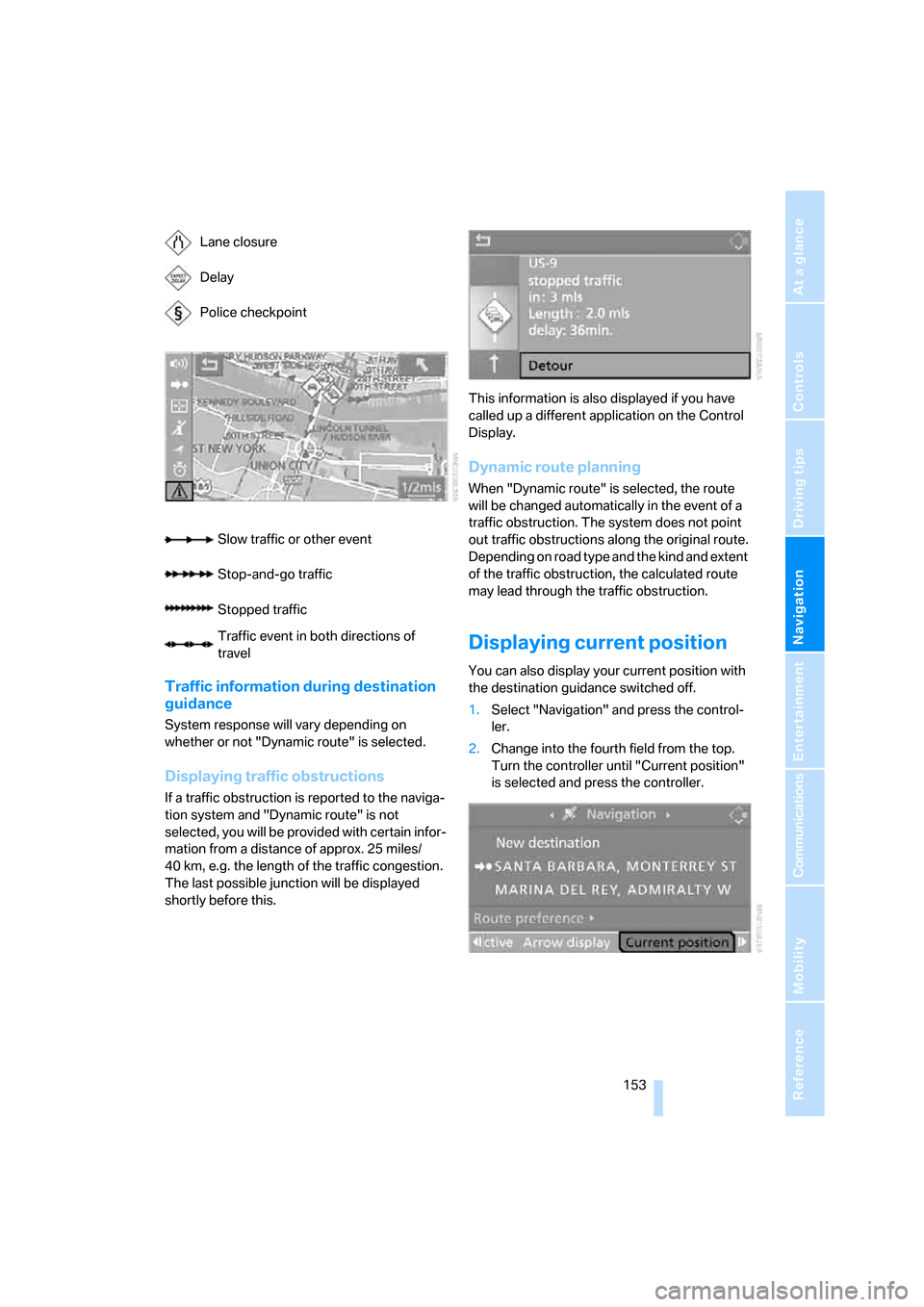
Displaying current position
You can also display your current position with
the destination guidance switched off.
1.Select "Navigation" and press the control-
ler.
2.Change into the fourth field from the top.
Turn the controller until "Current position"
is selected and press the controller. Lane closure
Delay
Police checkpoint
Slow traffic or other event
Stop-and-go traffic
Stopped traffic
Traffic event in both directions of
travel
Page 248 of 264

Everything from A to Z
246 Convertible top
– care, refer to Caring for your
vehicle brochure
– closing manually43
– convenient operation32
– emergency closing43
– opening and closing43
Coolant219
– checking level220
– temperature74
Cooling, maximum111
Cooling function, automatic
climate control111
Cooling system, refer to
Coolant219
Copyright2
Cornering Brake Control
CBC86
Country of destination for
navigation135
Courtesy lamps, refer to
Interior lamps106
Cradle for telephone or mobile
phone117
Cruise control65
– active cruise control66
Cruising range75
Cup holders15,118
Curb weight, refer to
Weights237
"Current position"153
Current position
– displaying153
– entering142
– storing142
"Curve mode" with
BMW Night Vision100
"Customer
Relations"194,202
Cylinders, refer to Engine
data234
D
Dashboard, refer to
Cockpit10
Data, technical234
– capacities237
– dimensions235
– engine234
– measurements235
– weights237
"Date"83
Date74
– date format83
– setting83
"Date format"83
"Daytime running
lamps"103,106
Daytime running lamps103
– replacing bulbs224
DBC Dynamic Brake Control
– warning lamp88
"Deactivated"50
Decommissioning the vehicle,
refer to Caring for your
vehicle brochure
Defect, tires
– refer to Flat Tire Monitor89
– refer to Tire Pressure
Monitor90
Defrosting windows110
Defrosting windows and
removing condensation110
Defrosting windshield, refer to
Defrosting windows110
Defrost position, refer to
Defrosting windows110
"Delete address book" for
navigation system143
"Delete all numbers" for
mobile phone193
"Delete data" for navigation
system143
"Delete" for mobile
phone193
Destination address
– deleting143
– entering134,137Destination for navigation
– destination list141
– entering via voice137
– entry134
– home address144
– selecting from address
book142
– selecting using
information140
– storing142
Destination guidance146
– bypassing route
sections150
– canceling voice
instructions55
– changing specified
route144
– displaying route147
– distance and arrival146
– interrupting146
– starting146
– terminating/continuing146
– voice instructions149
– volume of voice
instructions150
Destination list for
navigation141
Destinations recently driven
to141
"Details" in audio
mode174,180
"Dial" for mobile phone191
"Dial number"191
"Diamond button"55
Digital clock74
Digital radio, refer to High
Definition Radio166
Dimensions
– Convertible236
– Coupe235
Directional indicators, refer to
Turn signals63
Direction instructions, refer to
Voice instructions149
Directory, refer to Phone
book192
Directory for navigation, refer
to Address book142
Page 249 of 264
Reference 247
At a glance
Controls
Driving tips
Communications
Navigation
Entertainment
Mobility
Direct selection buttons21
Displacement, refer to Engine
data234
"Display"84
Display, refer to iDrive
controls16
Display elements, refer to
Instrument cluster12
Displaying vehicle data205
Display lighting, refer to
Instrument lighting106
"Display off"21
Displays
– on Control Display, refer to
iDrive16
– refer to Instrument
cluster12
"Display settings"84,97
Displays on the windshield,
refer to Head-Up Display96
Disposal
– battery of remote control
with comfort access38
– coolant219
– vehicle battery225
Distance, refer to
Computer76
Distance control, refer to
Active cruise control66
"Distance to dest."76
Distance to destination, refer
to Computer76
Distance warning, refer to
PDC Park Distance
Control85
Door entry lighting, refer to
Interior lamps106
Door key, refer to Keys/
remote control28
Door lock32
"Door locks"30,78
Doors
– manual operation32
– remote control30,31
DOT Quality Grades212
Draft-free ventilation112
"Driver's door only"30Driving lamps, refer to Parking
lamps/low beams102
Driving route, refer to
Displaying route147
Driving stability control
systems86
Driving through water126
Driving tips, refer to General
driving notes124
Drying the air, refer to Cooling
function111
DSC Dynamic Stability
Control
87
– indicator lamp13,87
– malfunction88
DTC Dynamic Traction
Control87
– activating88
– indicator lamp13,88
DVD for navigation132
Dynamic Drive89
Dynamic Driving Control62
"Dynamic route" for
navigation145
Dynamic Stability Control
DSC87
Dynamic Traction Control
DTC87
E
Easy entry, refer to Entering
rear51
Easy entry/exit54
Eject button, refer to Buttons
on CD player158
Electrical malfunction
– convertible top43
– door lock32
– driver's door32
– fuel filler door208
– glass sunroof41
– luggage compartment lid34
– storage compartment, hotel
function33
Electric convertible top42Electric steering wheel
adjustment54
Electronic brake-force
distribution87
Electronic oil level check218
Emergency assistance, refer
to Roadside Assistance228
Emergency operation, refer to
Manual operation
– convertible top43
– door lock32
– driver's door32
– fuel filler door208
– glass sunroof41
– hotel function33
– luggage compartment lid34
– transmission lock, sport
automatic transmission62
Emergency release for
luggage compartment lid in
luggage compartment35
Emergency request227
Emergency services, refer to
Roadside Assistance228
"Enable services"205
"End call"192
Engine
– breaking-in124
– data234
– overheated, refer to Coolant
temperature74
– speed234
– starting59
– starting, comfort access36
– switching off59
– switching off when equipped
with Automatic
transmission, with comfort
access38
Engine compartment217
Engine coolant219
Page 250 of 264

Everything from A to Z
248 Engine oil
– adding219
– additives, refer to Approved
engine oils219
– approved oils219
– electronic oil level check218
– interval between changes,
refer to Service
requirements77
– oil change219
– oil grades, refer to Approved
engine oils219
– recommended oils219
– temperature75
– temperature gauge75
"Engine oil level"218
Engine output, refer to Engine
data234
Engine overheating, refer to
Coolant temperature74
Engine speed, refer to Engine
data234
Engine starting, refer to
Starting engine59
"Enter address"134,142
Entering address134,137
Entering intersection,
navigation136
Entering rear51
Entering town/city for
navigation135
Entering town/city of
destination name135
Entering zip code for
navigation135
"Entertainment"158
Entertainment sound output
on/off159
Entry map for destination139
Equalizer, refer to Tone
control161
"Equalizer", tone control161
"ESN"169
ESP Electronic Stability
Program, refer to DSC
Dynamic Stability
Control87
Event data recorders222Exhaust system, refer to Hot
exhaust system125
Exterior mirrors53
– adjusting53
– automatic dimming
feature54
– automatic heating53
– folding in and out53
– tilting down passenger-side
mirror54
External audio device117
Eye for tow-starting and
towing, refer to Tow
fitting229
Eyes for lashing, refer to
Securing cargo128
F
"Fader", refer to Tone
control160
Fader, refer to Tone
control160
Failure messages, refer to
Check Control79
False alarm
– refer to Avoiding
unintentional alarms36
– refer to Switching off
alarm35
Fastening safety belts, refer to
Safety belts52
Fastest route for
navigation144
Fast forward
– CD changer176
– CD player176
"Fast route" for
navigation144
"Favorites", calling up with
radio166
Filler neck for washer fluid65
Filter, refer to Microfilter/
activated-charcoal filter112
Fine wood, refer to Caring for
your vehicle brochure
First aid, refer to First-aid
kit228First-aid kit228
Flashing when locking and
unlocking, refer to Setting
confirmation signals31
Flashlight, refer to
Rechargeable flashlight117
Flat tire
– Flat Tire Monitor89
– run-flat tires90,92,214
– Tire Pressure Monitor90
– warning lamp90,92
Flat Tire Monitor89
– false alarms89
– initializing system89
– limits of system89
– snow chains215
– warning lamp90
Floor mats, refer to Caring for
your vehicle brochure
Floor mats/carpets, refer to
Caring for your vehicle
brochure
Fluid reservoir, refer to Filler
neck for washer fluid65
"FM", reception
range158,162
FM, waveband162
Fog lamps106
– indicator lamp13,106
Folding into raised position
convertible top
compartment floor,
Convertible35
Footbrake, refer to Braking
safely126
Footwell lighting, refer to
Interior lamps106
For specified oil grades, refer
to Approved engine oils219
For your own safety6
Freeway, refer to Route
criteria144
Front airbags94
Front passenger airbags,
deactivating94
"FTM"89
FTM, refer to Flat Tire
Monitor89
Page 258 of 264
Everything from A to Z
256 Service requirements77
– refer to CBS Condition
Based Service221
"Service Status"205
"Set"
– in audio mode158
– in trip computer77
"Set date"83
"Set service date"78
"Set time"83
Setting button, refer to
Controls, controller16
"Settings"205
– for BMW Assist203
– for unlocking30
Settings
– BMW Night Vision100
– changing on Control
Display82
– clock, 12h/24h mode83
– configuring, refer to
Personal Profile29
– date83
– language84
– units of measure84
Settings menu, refer to
imenu17
Setting time, refer to
Preselecting activation
time113
Shifting, Sport automatic
transmission61
Short commands of voice
command system238
"Short route" for
navigation144
Short route in navigation, refer
to Selecting route144
"Show current position"139
"Show destination
position"139
Side airbags94
Side turn signals, replacing
bulbs224
Signal horn, refer to Horn10
Signaling a turn, triple turn
signal activation64
Sill panel lighting, refer to
Interior lamps106Sitting safely47
– with airbags47
– with head restraints47
– with safety belts47
Ski bag119
Sliding/tilt roof, refer to Glass
sunroof, electric with raise
function40
Slope assistant, refer to
Starting assistant88
Snap-in adapter
– mounting/removing197
– using184
Snow chains215
Socket, refer to Connecting
electrical devices119
Socket for Onboard
Diagnostics interface222
Socket for remote control,
refer to Ignition lock58
Soft closure aid, refer to
Automatic soft closing34
Song search with CD, refer to
Sampling tracks, scan174
SOS, refer to Initiating an
emergency request227
Spare
– adapter for spare key28
– fuses226
– key28
Special oils, refer to Approved
engine oils219
Speed-dependent
volume160
Speed limit warning, refer to
Speed limit81
Speedometer12
"Speed volume", refer to Tone
control160
Speed with winter tires215
Sport automatic
transmission60
– Dynamic Driving Control62
– kick-down61
– releasing transmission
lock62
– towing230,231
– with comfort access38Sport program in the Sport
automatic transmission61
Stability control, refer to
Driving stability control
systems86
"Star button"55
Start/Stop button58
– starting the engine59
– switching off the engine59
"Start" for stopwatch82
"Start guidance"137,146
Starting assistant88
Starting difficulties, refer to
Jump starting228
Starting engine59
Starting off on slopes, refer to
Starting assistant88
Start menu, iDrive17
"Start route guidance"139
"Start service"201
"Start Service" for
BMW Assist202
"State / Province" for
destination entry
135
"State inspection"78
Station, refer to Radio162
"Status"78
Status information on Control
Display20
Status of this Owner's Manual
at time of printing5
Steering wheel
– adjustment54
– automatic adjustment, refer
to Easy entry/exit54
– automatic adjustment, refer
to Steering wheel
memory49
– buttons on steering
wheel11
– heating54
– lock, refer to Ignition lock58
– memory49
– programmable buttons55
"Steering wheel buttons"55
Steering with variable ratio,
refer to Active steering93
Steptronic, refer to Sport
automatic transmission60
Page 260 of 264

Everything from A to Z
258 Torque, refer to Engine
data234
Touch tone dialing, refer to
Tone dialing method194
Tow bar230
Tow fitting229
Towing229
– methods230
– tow fittings229
– with manual
transmission230
– with Sport automatic
transmission230
"Town / City" for destination
entry135
Tow rope231
Tow-starting229
"TPM"91
TPM Tire Pressure
Monitor90
– resetting system91
– system limits91
– warning lamp92
Tracks
– finding174
– random sequence175
– sampling on CD174
– selecting with CD173
Track width, refer to
Dimensions235
Traction-assist feature, refer
to DSC Dynamic Stability
Control87
Traction control, refer to DSC
Dynamic Stability
Control87
Traffic congestion
– displaying traffic
information150
– refer to Bypassing route
sections150
Traffic information for
navigation150
– depiction in route map152
– displaying151
– during destination
guidance153
– symbols152"Traffic Info settings"151
Transmission
– manual transmission60
– sport automatic
transmission60
– starting assistant88
– towing230
– transmission lock, manually
locking and unlocking, sport
automatic transmission62
Transporting children
safely56
Transport securing device,
refer to Securing cargo128
Tread depth, refer to Minimum
tread depth
213
Treble, refer to Tone
control159
"Treble", tone control159
"Trip computer"77
Trip computer76
Trip-distance counter
– refer to Trip computer76
– refer to Trip meter74
"Triple turn signal"64
Trip meter, also refer to Trip
computer76
Trip odometer74
Trunk, refer to Luggage
compartment35
Trunk lid, refer to Luggage
compartment lid34
Turning circle, refer to
Dimensions235
Turn signals63
U
Undercarriage protection,
refer to Caring for your
vehicle brochure
Uniform Tire Quality Grading/
UTQR212
"Units"84
Units
– average fuel
consumption84
– temperature84Universal garage-door
opener, refer to Integrated
universal remote
control115
Universal remote control, refer
to Integrated universal
remote control115
"Unlock button"30
Unlocking
– from inside33
– from outside30
– without key, refer to Comfort
access36
"Update services"203
USB/audio interface179
"USB" in audio mode180
"Use current location as
address"142,144
Used batteries
– refer to Disposal225
– refer to Replacing battery38
Using turn signals63
V
Vehicle
– battery225
– breaking-in124
– care, refer to Caring for your
vehicle brochure
– cargo loading127
– measurements, refer to
Dimensions235
– parking59
– washing, refer to Caring for
your vehicle brochure
– weights237
"Vehicle / Tires" for
unlocking30
Vehicle jack225
– jacking points225
Vehicle position, refer to
Displaying current
position153
Ventilation112
– draft-free112
– for cooling112
– parked car ventilation112